
Moonitor
Cotações de cripto em tempo real
Mac
Versão 4.0.0
macOS 12.0 ou posterior
585.7 MB
1 idiomas
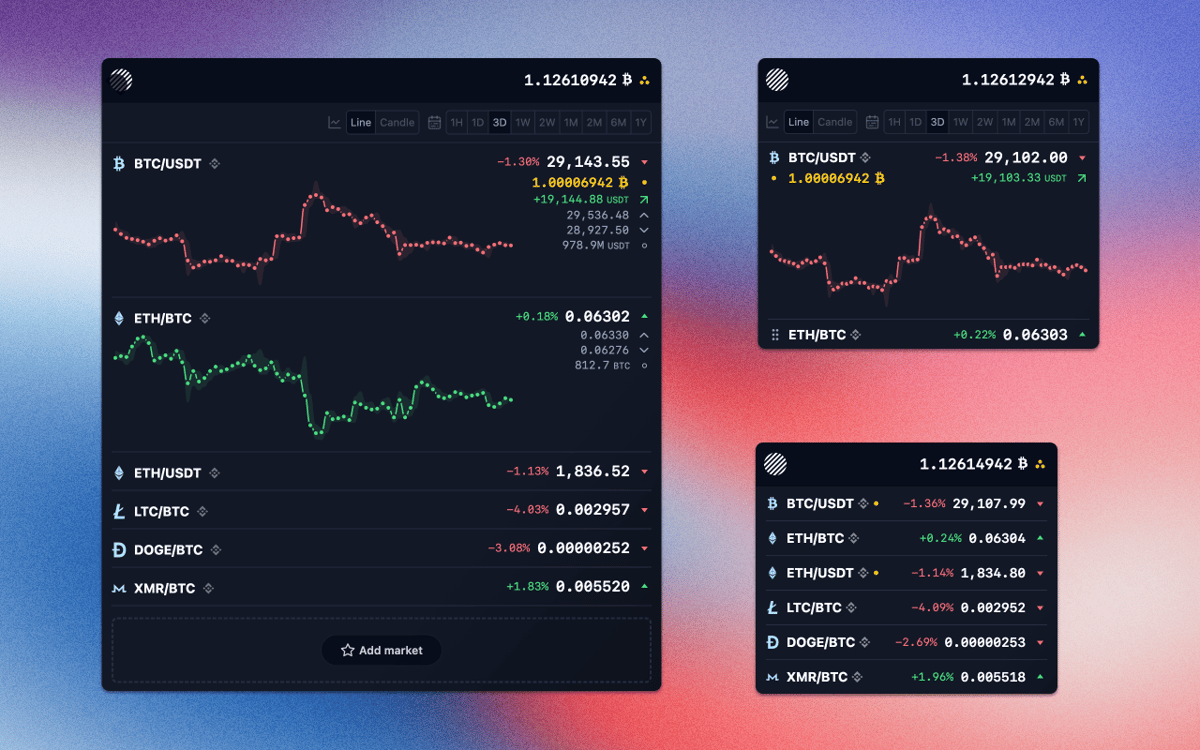
A eficiência na compra e venda de criptomoedas, sem falar em lucrar com isso, pode ser complicada mesmo se você não precisa pensar em como acompanhar seus investimentos. Mas com o Moonitor, a preocupação com o acompanhamento é eliminada, já que você não precisa visitar vários sites para verificar a cotação de investimentos em criptomoedas. Ele oferece detalhes de centenas de mercados de criptomoedas diretamente no Mac. Com dados confiáveis de duas das principais casas de câmbio, o Moonitor é o único app de acompanhamento de criptomoedas que você precisa.
Fique em dia com criptomoedas automaticamente
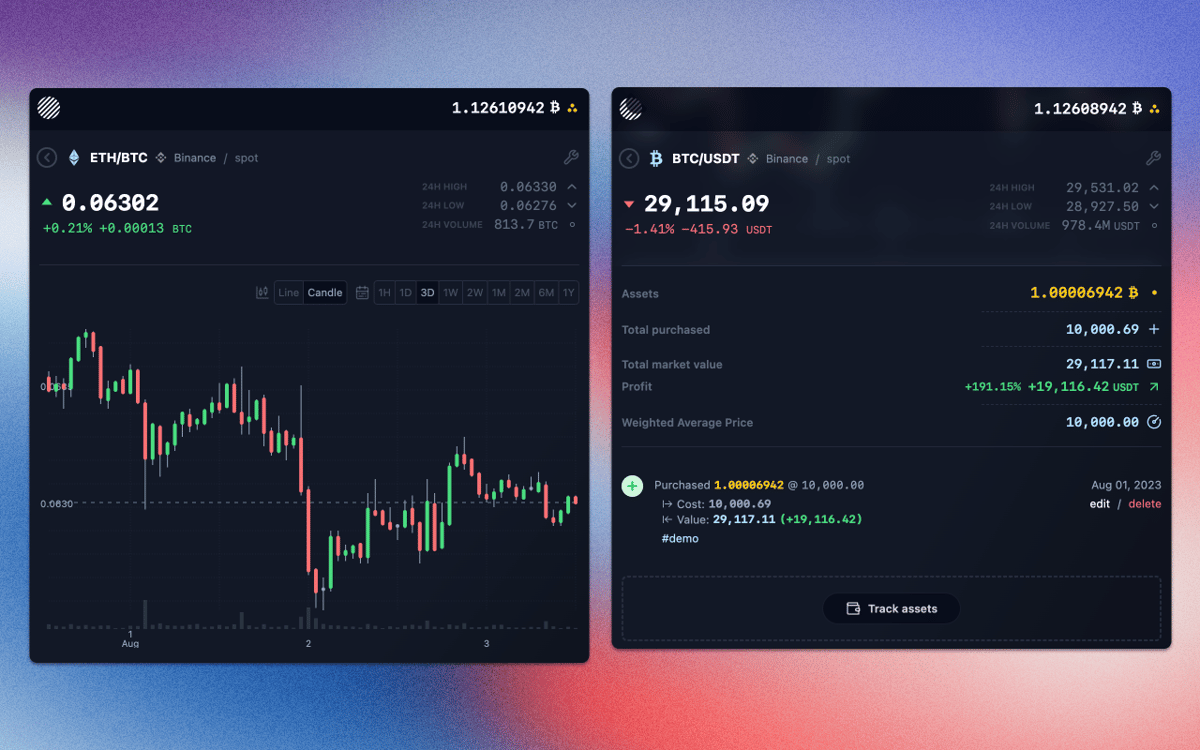
Acompanhe seu portfólio atual
Obtenha dados da Binance, Coinbase, etc.
Integre e controle todas as suas carteiras
Recursos do Moonitor
Obtenha dados de cotações automaticamente
Como o Moonitor é atualizado automaticamente e em tempo real, você não precisa atualizar páginas web manualmente, como o faria on‑line, para acompanhar criptomoedas. Atualmente, ele usa os mercados Binance e Bittrex, embora outros devam ser adicionados no futuro, e baseia‑se apenas em fontes de dados 100% confiáveis das APIs oficiais.
Siga apenas o que for relevante
Com um recurso semelhante ao Twitter ou Instagram para seguir criptomoedas, você pode escolher apenas aquelas que você precisa — incluindo Bitcoin, Litecoin, Dogecoin, Monero, ZCash, Ethereum e muitas outras. Isso faz com que o Moonitor seja verdadeiramente seu e você não precise passar por dados irrelevantes para encontrar o que precisa.
Controle lucros e perdas facilmente
Com dados em tempo real que indicam a alta ou a baixa do valor de mercado de uma criptomoeda, além de marcadores históricos e gráficos “candlestick” que monitoram o desempenho atual, o Monitor ajuda você a decidir a melhor hora de comprar ou vender. E como esses dados vêm diretamente das casas de câmbio, eles estão sempre atualizados.
Mantenha a privacidade com APIs somente leitura
O Moonitor permite que você use chaves de API da Binance e Bittrex para importar e sincronizar seu portfólio automaticamente, sem salvar nenhum dado on‑line. O acesso do app é somente leitura e armazena todos os dados no computador, sem intermediários ocultos. Assim, você sempre tem privacidade.
Obtenha uma visão geral de todos os saldos
Dependendo do número de criptomoedas no seu portfólio (cada uma associada à uma respectiva cotação), pode ser que você já tenha usado uma calculadora só para saber o quanto elas valiam. Com o Moonitor, você obtém uma estimativa do saldo em mais de 100 moedas, incluindo $, £, € e ¥.
Personalize tudo
Tudo no Moonitor é altamente personalizável, visando fornecer a você o máximo de controle possível no acompanhamento do seu portfólio. O ícone da barra de menus, por exemplo, pode ser configurado para exibir o preço BTC do saldo total e “candlesticks” podem ser configurados para mostrar informações de 5 minutos, 1 hora, 4 horas, 1 dia ou 1 semana.
Classificações e avaliações
Moonitor
•
49 classificações
Lalo Le Bot
7 de nov. de 2025
Versão do app: 3.0.3
No anda, tengo Intel iMac 2017. A JavaScript error occurred in the main process Uncaught Exception: Error: dlopen(/Applications/Setapp/Moonitor.app/Contents/Resources/app/.webpack/main/native_modules/nodejs/dist/lib/binding/node_setapp_binding.node, 0x0001): tried: '/Applications/Setapp/Moonitor.app/Contents/Resources/app/.webpack/main/native_modules/nodejs/dist/lib/binding/node_setapp_binding.node' (mach-o file, but is an incompatible architecture (have 'arm64', need 'x86_64h' or 'x86_64'))
Resposta do Desenvolvedor
18 de set. de 2026
This is fixed now. Version 4 is fully compatible with Intel mac.
Dark Of Lord
2 de mai. de 2025
Versão do app: 3.0.3
hard to use, not working good
Resposta do Desenvolvedor
18 de set. de 2026
We did a big rework of the app. You should give it another try :)
Sid
16 de mar. de 2025
Versão do app: 3.0.3
Doesn’t work on Intel Macs. Gave a javascript error upon launching that says that it’s not compatible with certain architecture.
Resposta do Desenvolvedor
18 de set. de 2026
This is fixed now. Version 4 is fully compatible with Intel mac.
Obtenha centenas de apps com o Membership
Obtenha um membership do Setapp e use centenas de apps estelares numa única assinatura.
Experimente grátis por 7 dias. Depois, pague um valor único.
Instale o Setapp no Mac
Explore apps para Mac, iOS e web. Encontre formas fáceis de lidar com as tarefas do dia a dia.

Obtenha o app que chamou sua atenção
Aquele app especial está esperando você no Setapp. Instale‑o com um clique.

Moonitor
Escolha uma assinatura
Um ou mais apps com um membership do Setapp. Obtenha os apps que você quer.

Obtenha centenas de apps com o Membership
Obtenha um membership do Setapp e use centenas de apps estelares numa única assinatura.
Experimente grátis por 7 dias. Depois, pague um valor único.
1
Instale o Setapp no Mac
Explore apps para Mac, iOS e web. Encontre formas fáceis de lidar com as tarefas do dia a dia.
2
Obtenha o app que chamou sua atenção
Aquele app especial está esperando você no Setapp. Instale‑o com um clique.
Moonitor
3
Escolha uma assinatura
Um ou mais apps com um membership do Setapp. Obtenha os apps que você quer.
A casa dos melhores apps
Desde tarefas rotineiras e de planejamento a atividades criativas e de programação, encare suas tarefas com os apps do Setapp.

TypingMind
IU alternativa para conversar com IA
gere ou resuma textos
use uma biblioteca de ações
IA

Spark Mail
Gerencie e‑mails
IA

CleanMyMac
Limpe os detritos

Bartender
Personalize a barra de menus

CleanShot X
Capturas de tela versáteis

Luminar Neo
Edite suas fotos
IA

ClearVPN
Conecte‑se com mais segurança

Craft
Trabalhe com documentos
IA
Moonitor
Cotações de cripto em tempo real