For calculations you can actually read back: Soulver
For completing tasks and proactive assistance: Eney
These AI tools are available on Setapp. Try them free.
Best AI apps for iPhone at a glance
First, let me give you a quick overview of the apps I'm about to share. In the table below, you'll find the basics. If you're looking for more details, just scroll down for in-depth descriptions, including pros, cons, and user reviews.
Gives you 10,000 free AI credits for the first 14 days
Professionals who want an AI assistant across Mac and iPhone
Handling everyday tasks on Mac and across connected apps. Executing repetitive tasks on Mac and iPhone.
Elephas, Craft, Spark Mail, and more are inside Setapp. Cancel before Day 7 = $0 charged. Try Setapp 7 days.
Complete guide to 6 essential AI apps
Here's a deeper look at the AI apps that will speed up your work, organize your thoughts, and get more done on your iPhone and Mac.
Elephas for comprehensive text enhancement + personal knowledge management
If you spend a lot of time working or writing just on an iPhone, Elephas can organize your files into smart knowledge bases and act as your AI writing assistant across the entire device.
Elephas is best for
Writers, researchers, lawyers, business leaders, creators, and professionals who need a powerful writing assistant and a way to manage a large personal knowledge base.
Friction with files on iPhone: The app lets you create custom knowledge bases — called Super Brains — that you can chat with. Upload documents, PDFs, or even YouTube videos, then ask questions to discuss the content, analyze files, or pull up a specific fact without digging through everything manually. Source citation is included for every answer.
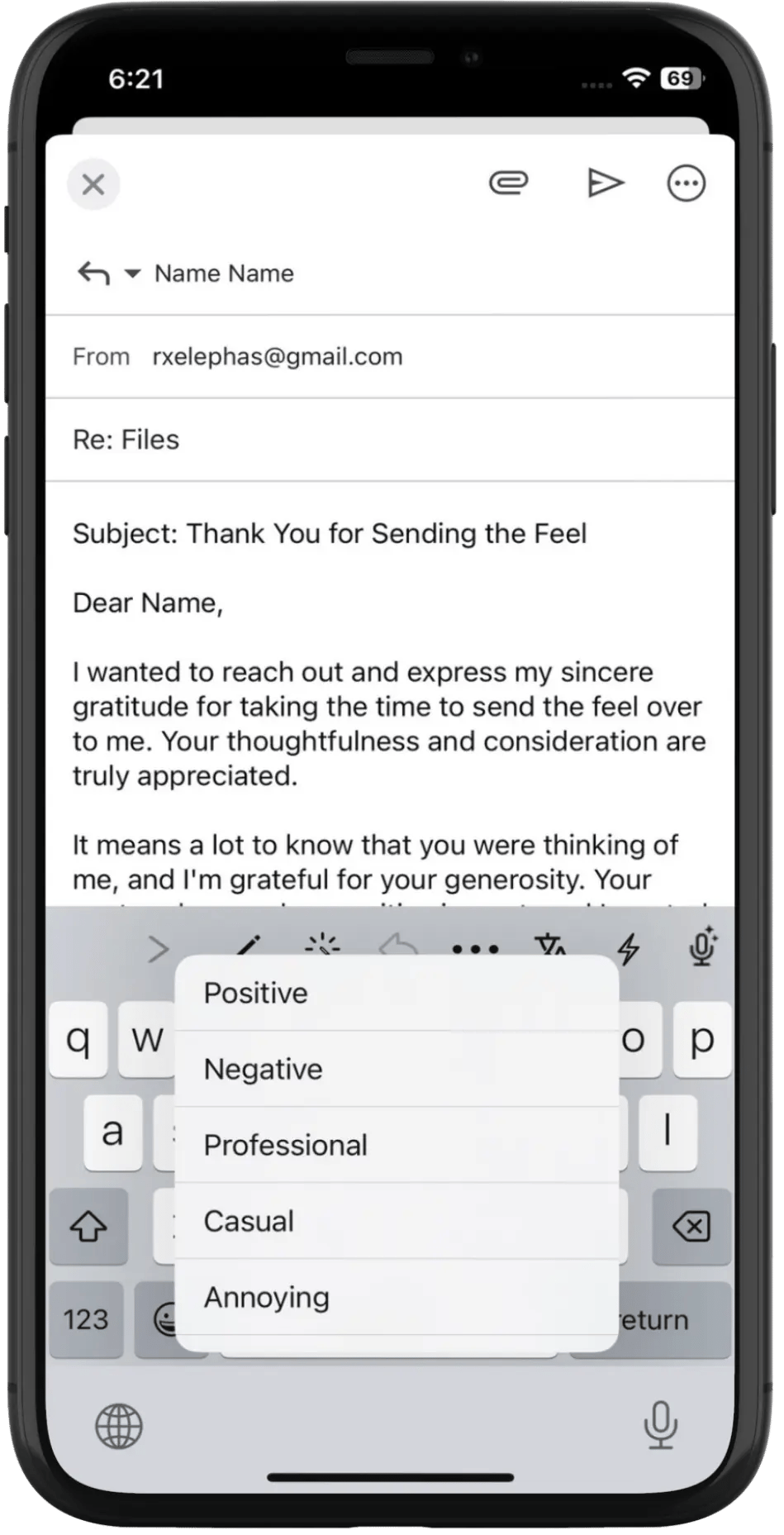
Context switching: The app adds a strip of quick actions just above your keyboard — compose, rewrite, translate, improve, and more. It works anywhere you can pull up a keyboard: Mail, Notes, Messages, you name it.
Repetitive tasks: The Snippets feature lets you create a prompt for tasks you repeat day after day — for example, "turn this idea into a plan," "find bugs in this code," or "apply a sarcastic tone to this message." Just select the text, pick the snippet from the Elephas menu, and the task is done right there.
Slow typing: Use your voice to describe a task — say something like "Write a polite message saying I'll have to skip the meeting due to work overload with client John" — and the AI will take it from there.
Elephas feature benefits
Supports 20+ file formats for its knowledge base, including PDFs, videos, Word documents, and web pages.
Works offline for many text-based tasks, though advanced features require an internet connection.
Lets you connect to multiple AI providers via API keys — OpenAI, Anthropic's Claude, Google Gemini, Grok, DeepSeek, Perplexity, and more.
Automatically anonymizes personally identifiable information (names, emails, phone numbers, and so on) before sending it to cloud AI providers.
Elephas strengths
Doesn't hallucinate when working with your knowledge base — all answers come directly from the sources you've uploaded.
Lets you create multiple personal tones and apply them immediately.
Supports local, on-device AI models for more privacy.
Seamlessly syncs between macOS and iOS.
Elephas limitations
Requires you to bring your own OpenAI (or other) API key for full functionality.
Using Elephas in your workflow
One of my favorite features in Elephas is something called Brain. It's essentially a custom knowledge base that lets you upload files related to a specific topic. For example, if you're an engineer, you can upload all your standards and regulations into a single Brain. Later, instead of scrolling through hundreds of pages, you can just ask: "What is the minimum width for a sidewalk next to a side road?" And you'll get an instant answer. On iPhone, this is great for pulling up facts or summaries from your knowledge base without needing to open your Mac.
Pricing info on Elephas
Elephas is available through Setapp, along with 270+ other apps. On the developer's site, pricing starts from $9.99/mo. In both cases, you'll likely need an API key from a provider like OpenAI to unlock the app's full potential.
WhoPays for tracking shared expenses without the awkward conversations
WhoPays is a group expense tracker for Mac and iPhone that helps you split costs, manage balances, and keep everyone's numbers in sync.
WhoPays is best for
Travelers, roommates, couples, friends, and anyone who regularly shares costs with other people.
Problems WhoPays solves
Who-pays drama: Create multiple groups for friends, colleagues, roommates, travel companions, and more. Add expenses directly inside each group with notes and attachments for context. Everything is saved, so you can settle up whenever it works for everyone.
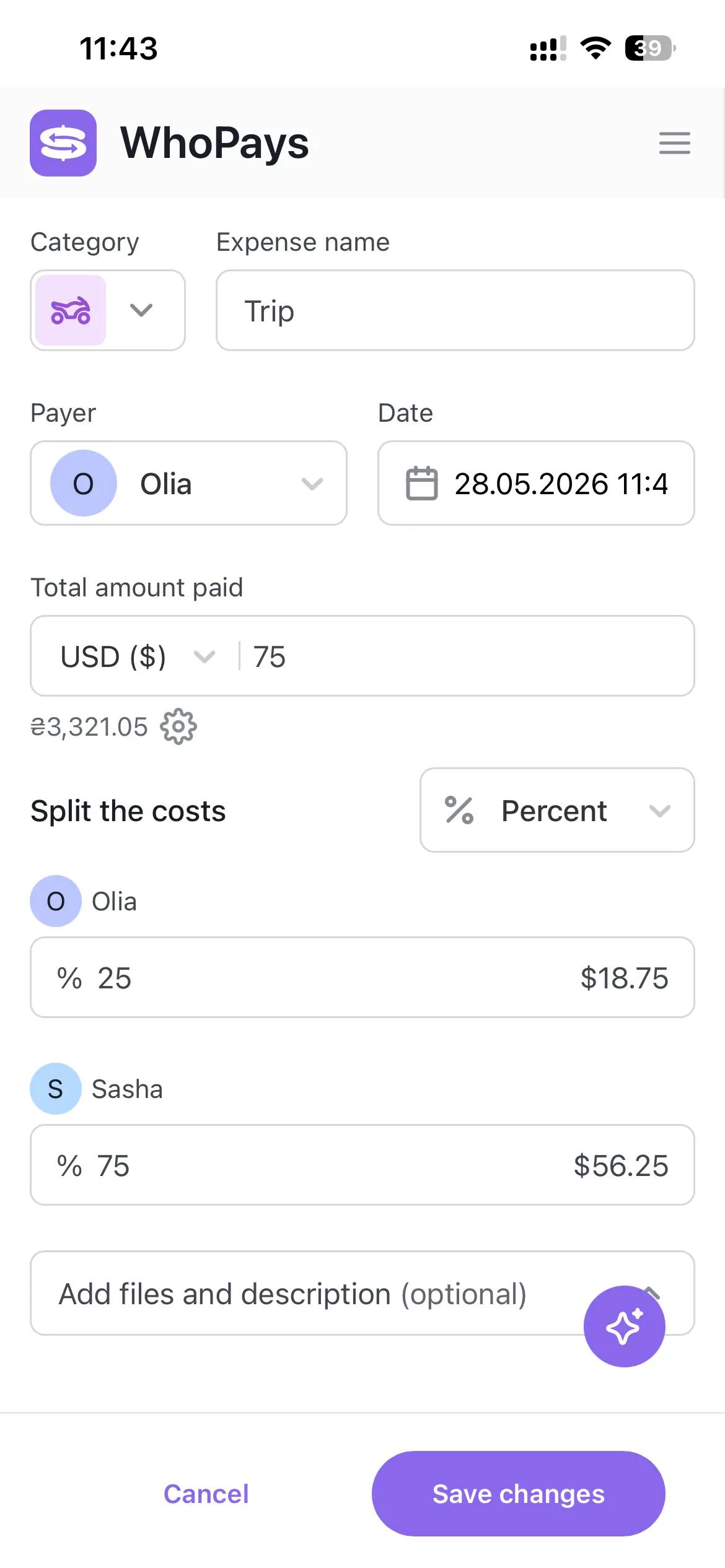
Splitting issues: The app offers multiple ways to split costs instantly: equal parts, percentages, shares, or fixed amounts.
Receipt chaos: Point your camera at a receipt, and the app's AI automatically extracts the line items, detects the currency, and saves the image with the expense.
Currency confusion: Add expenses or settlements in more than 150 currencies — the app converts everything to your default currency automatically.
Waiting for the whole group to install an app: You can add people to a group before they download WhoPays, and their expenses transfer over when they join. Friends can join a group via a link or QR code and review the balances without a subscription. If someone doesn't want to install the app, there is a web version of WhoPays, plus a screenshot of the balance also works just fine — it's clear either way.
WhoPays feature benefits
Lets you add expenses by voice — just record a note like "78 dollars, chicken, milk, veggies, drinks" and the AI automatically fills in the category, name, date, currency, payer, and amounts.
Shows real-time balances, totals by category, and per-member breakdowns in one view.
Keeps a full history of every change to the group, so nothing gets lost or disputed.
Exports data as CSV for future records or analysis.
Available on Mac, iOS, and web.
WhoPays strengths
AI receipt scanning that actually works — detects line items and currency from a photo.
Voice input for adding expenses on the go.
Full member management: resend invites, remove members, or leave groups.
WhoPays limitations
A very new app with a small review base.
Doesn't work as a personal expense tracker.
Using WhoPays in your workflow
The most useful thing about WhoPays isn't any single feature — it's how it removes the social friction from shared money. On a group trip, you can scan the restaurant receipt on the spot, split it across the group, and close out balances before the Uber home. For roommates, you can log monthly bills as they come in, check who's up or down at any point, and settle at the end of the month with a couple of taps. The voice input is a nice touch, too — "Paid €45 for groceries, split with Maria" takes about five seconds.
Pricing info on WhoPays
WhoPays is available through Setapp, alongside 270+ other apps under a single subscription.
Craft for speeding up your writing, planning, and task management
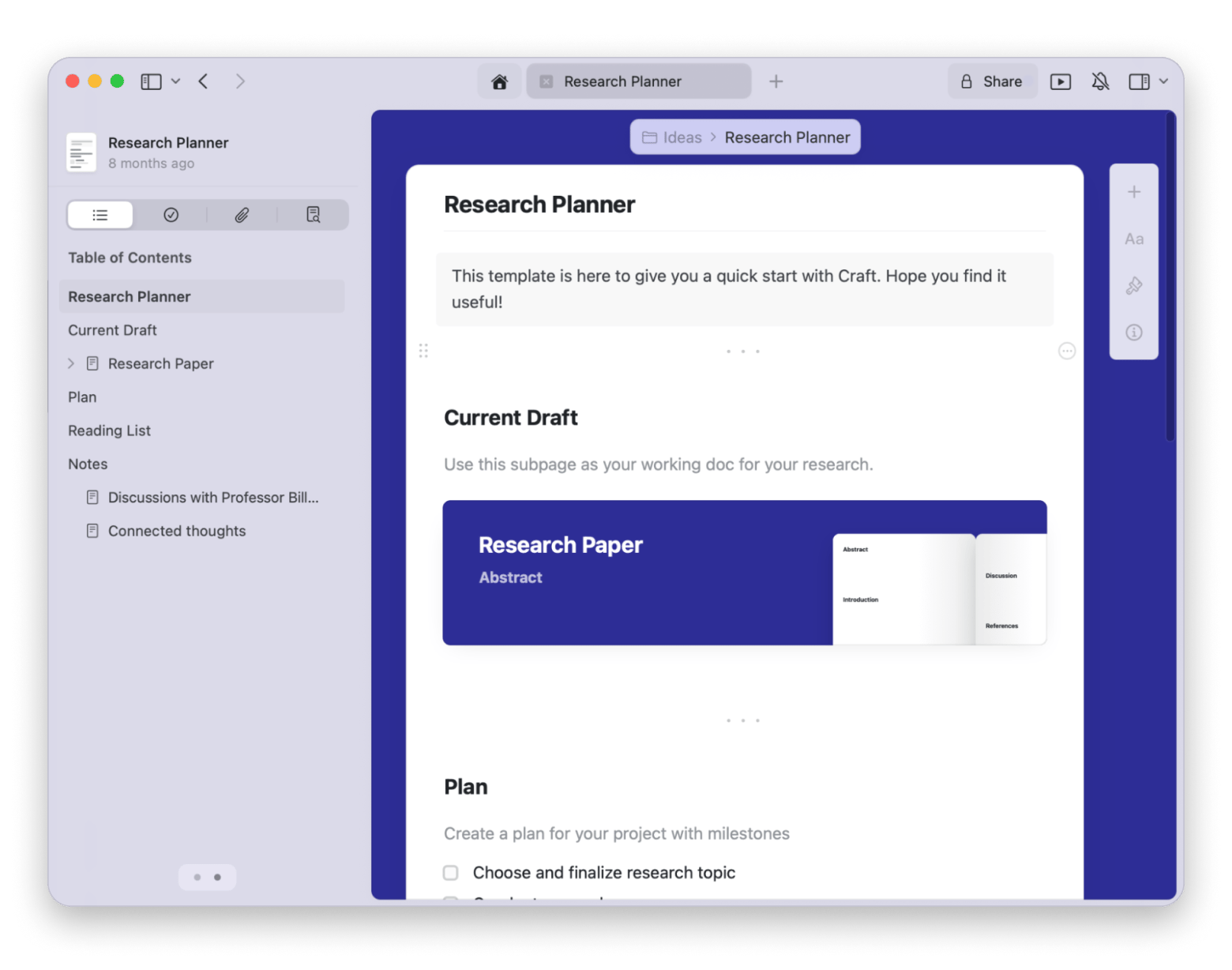
Craft, a Mac and iOS productivity app for notes, well-structured documents, tasks, calendars, and ideas. Powered by AI, Craft turns all these into a smooth, game-like process of improving your life.
Craft is best for
For students, writers, and teams who want a beautiful space to write, plan, organize, dream, analyze, and more.
Problems Craft solves
Disorganized notes: Helps you create multi-layered documents with nested pages, tables, and other elements.
Scattered apps: Many of us keep separate apps for to-do lists, habit trackers, meal planners, budget trackers, and more. Craft lets you use similar tools right inside the app — or build your own with AI.
Writer's block: The built-in AI assistant helps generate ideas, brainstorm, create outlines, summarize text, or translate content to get you unstuck.
Creator's block: With Craft's MCP and API integrations, you can connect your documents to AI services like Claude, ChatGPT, Lovable, Replit, and more. With them, you can build beautiful projects like personal blogs, tools, and websites, using only text prompts. Examples? A dream journal that continuously interprets your dreams. A reading log that sends quotes and excerpts from whatever you're reading to the relevant reading notes. These are the real projects, by the way.
Craft feature benefits
Combines notes, tasks, calendar, and reminders in one place for a unified workspace.
Works seamlessly across macOS, iOS, and the web, with an offline mode for editing on the go.
Craft strengths
Exceptional design makes it a pleasure to use.
Deeply integrated into the Apple ecosystem and supports Apple Pencil on iPad.
Craft limitations
While flexible, it may not be as powerful as dedicated project management tools for complex workflows.
Using Craft in your workflow
Think of Craft as a powerful organization tool that's even more capable thanks to AI. For example, an HR team can use a template to create an onboarding guide, add videos and files, and then use the AI Assistant to summarize key policies for a quick-reference section. As a student, you can organize your lecture notes into nested pages for each topic and use the AI to generate study questions from your notes.
Pricing info on Craft
Craft is available on Setapp along with 270+ other apps under a single subscription. On the developer's website, the price is $8/mo.
Spark Mail for easy emailing
Spark Mail added AI to the email client and made email management easy and quick.
Spark Mail is best for
Anyone who manages multiple email accounts wants to reduce the time they spend on their inbox.
Problems Spark Mail solves
Inbox overload: Its "Smart Inbox" automatically categorizes emails from people, notifications, and newsletters, and prioritizes important messages so you see them first.
Writing anxiety: The AI assistant helps draft emails, rephrase sentences for a different tone, proofread your messages, and fix grammar.
Long email threads: Can instantly create AI summaries of lengthy email chains.
App switching. Supports adding and managing unlimited email accounts from different providers, including Gmail, iCloud Mail, and others.
Spark Mail feature benefits
Lets you chat with your inbox. Ask something like "How much did I pay for the gym?" and it'll find the relevant receipt and share the details right in the chat.
Can search across all your connected accounts.
Executes your natural-language commands, such as "Move emails from Jane to Trash".
Integrates with meeting tools like Zoom and Google Meet to help transcribe and summarize calls and build follow-ups.
Spark Mail strengths
Offers automatic email categorization for better organization.
Gives you an AI writing assistant directly into the composition window — use it while you write, without switching context.
Supports scheduled sending (which is still rare for traditional email clients).
Learns your writing style from past emails and applies it to new ones.
Lets you connect apps like Evernote, Microsoft Teams, Notion, TickTick, Todoist, Trello, Zoom, and more.
Spark Mail limitations
AI-powered inbox search only covers the past year of emails.
Using Spark Mail in your workflow
The AI assistant built into Spark Mail is designed to make managing your emails smarter and faster. Just tell the AI what your email is about, and it will generate a well-written, personalized message. But it's not just about writing. You can also use AI to search across your email history or ask the built-in chat to take action on your inbox, like "Mark emails from Lucy as starred."
Pricing info on Spark Mail
Spark Mail is available on Setapp, along with 270+ other apps, under a single subscription. On the developer's website, a limited free plan is available; the premium plan (like the one on Setapp) starts at $8.25/mo (if billed annually).
Soulver for calculations you can actually read back
Soulver is a natural language notepad calculator for Mac and iPhone — somewhere between a calculator app and a spreadsheet, but easier to use than either.
Soulver is best for
Anyone who regularly needs to work through numbers — freelancers calculating rates, travelers converting currencies, students doing multi-step math. Anyone who feels that a traditional calculator is not enough and the spreadsheets are overkill.
Problems Soulver solves
Traditional calculators lose your work: Soulver does the math but feels like a note-taking app. Every line stays editable, you can keep separate notes for separate calculations, and organize them into folders.
Spreadsheets are overkill for quick thinking: When you just need to work something out — like "how much is 3 weeks of work at $35/hr minus 20% tax" — opening a spreadsheet is five steps too many. Soulver handles it in one line of plain text.
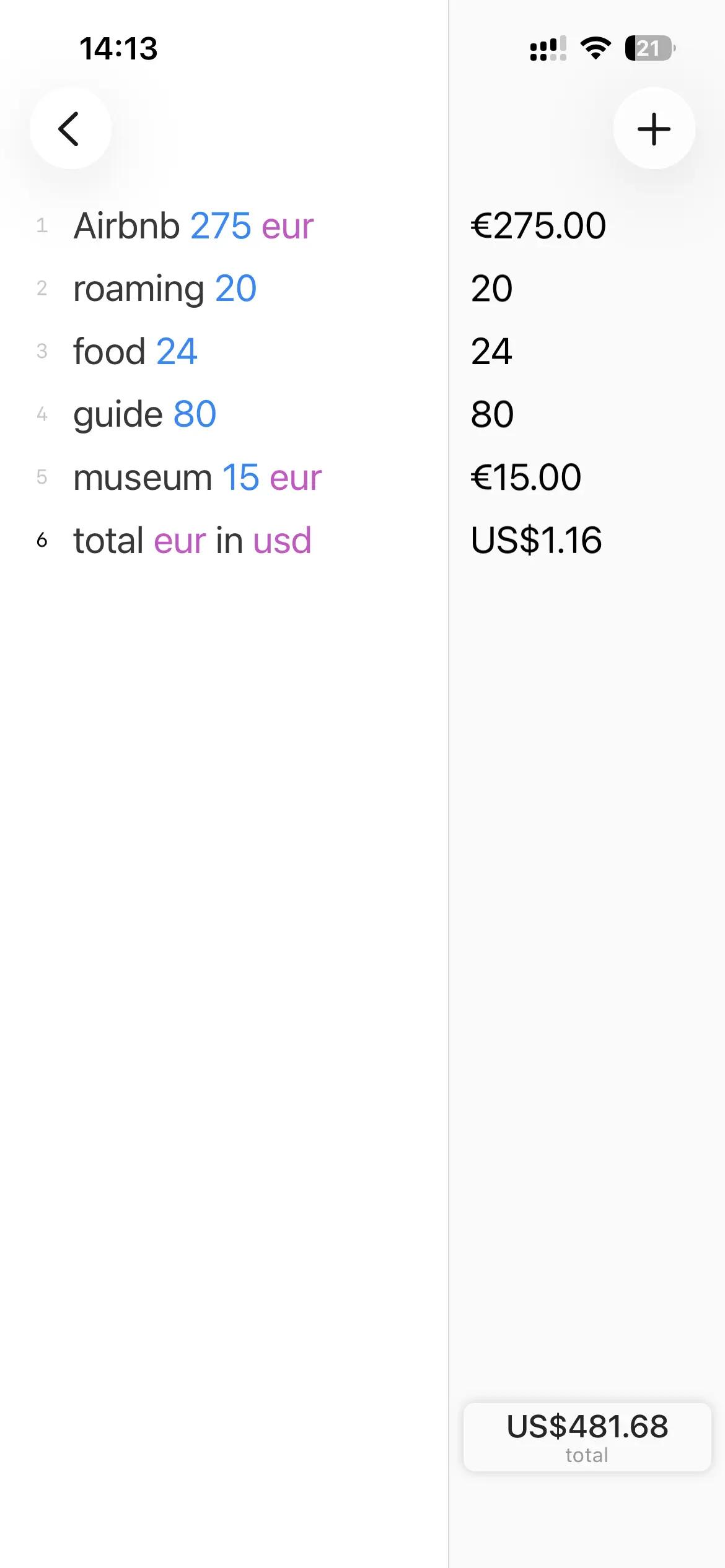
Currency and unit lookups break your flow: Soulver has 190 live currency rates (including crypto) and 200+ unit conversions built in. Type "500 EUR in USD" or "10 miles in km" and the answer appears inline.
Repetitive numbers slow you down: You can define variables with plain names — like "daily rate = $450" — and reference them throughout your sheet. Change the number once, and everything updates.
Soulver feature benefits
Supports natural-language calculations.
Handles dates and times: "how many days until June 30" or "3 weeks from today" just works.
Supports line references like a spreadsheet — double-click an answer to insert it into another line.
Can show live stock prices.
Supports Apple Pencil on iPad.
Soulver strengths
A running total at the bottom right automatically sums all your lines.
99% approval rating across 900+ Setapp reviews — one of the most consistently loved apps in the catalog.
Soulver limitations
Not a replacement for proper spreadsheet software when you need tables, charts, or shared collaboration.
The capabilities are deep, but the onboarding in the app is light. New users keep discovering features even after weeks of using the app.
Using Soulver in your workflow
If I had to categorize Soulver, I'd say that it is a scratchpad that does math. You open it when you need to think through something involving numbers.
Freelancer? Estimate your project costs. Write out your hours, rate, and expenses in plain text, and Soulver totals them.
Traveler? Convert currencies and split costs with friends.
Here are more ideas:
Calculate time zones: "what time is 3pm EST in Kyiv"
Estimate deadlines: "how many business days between now and July 25th"
Figure out whether a "buy in bulk" deal actually saves money: "€18.99 for 12 vs €8.99 for 6, price per unit = ?"
Budget for a trip: hotel + flights + daily budget × number of days.
Soulver is useful for any kind og quick-but-multi-step calculations that are too complex for a mental note but too simple for a spreadsheet
Pricing info on Soulver
Soulver is available through Setapp alongside 270+ other apps under a single subscription. On the developer's site, it's a one-time purchase: $39 for Mac, $20 for iPad, $14 for iPhone.
Eney: One proactive AI assistant across iPhone and Mac
Eney by MacPaw is a proactive AI assistant that handles tasks on your Mac and iPhone and spots what needs your attention. It connects to your apps and executes requests provided in plain English.
Eney is best for
People who want one AI assistant that can handle everyday tasks on their iPhones and Macs, with context and app connections shared across both devices.
Problems Eney solves
Acts, not just chats. Eney completes tasks. Say to it “Organize my Download folder” or “Convert this video to MP3”, and it will do it right away.
Scattered tasks: On both iPhone and Mac, you can use Eney to check your calendar, create reminders, look up contacts, translate text, and summarize documents, plus dozens of other skills.
App Switching: Eney connects to your work and personal management apps such as Gmail and Notion, letting you handle tasks from a single app.
Multiple app subscriptions: You don’t need one AI app for writing, one for email management, and another for managing your Mac. Eney does all that and more.
Eney feature benefits
Connects to 15+ services to act across tools. These include Gmail, Apple Mail, Google Calendar, Slack, Jira, and Notion.
Uses persistent memory to carry preferences and useful context across conversations, on both iPhone and Mac.
Only requires simple plain-language requests to carry out multi-step tasks.
After you activate specific skills, it monitors your device and alerts you when something needs your attention. For example, when an app is hogging your memory or CPU.
Eney strengths
Combines Mac and iPhone workflows in one assistant.
Handles everyday tasks across files, text, and connected apps.
Free to start with 10,000 AI credits during the first 14 days.
Eney limitations
Voice interaction currently relies on dictation rather than real-time voice conversation.
iPhone integrations are more limited than Mac integrations.
Tip: If you're looking for an AI photo editing tool for Mac, try Luminar Neo.
Using Eney in your workflow
Eney is designed to fit across an entire day’s workflow. I’ve set its Start my day skill to run automatically every weekday morning at 9 a.m. to check my connected apps and tell me what’s ahead. I then use Plan my day to create a realistic schedule, and I still adjust it throughout the day by telling Eney what I’d like to do. Eney also helps with other recurring tasks throughout the day, such as summarizing PDFs, creating meeting notes, and writing and sending emails. Day wrap-up then runs at 6 p.m. to briefly tell me what the day held and that I can put it down.
Pricing info on Eney
Free to start with 10,000 AI credits during the first 14 days. In-app purchases for extra credits available.
The best way to get AI software for your iPhone and Mac
Choosing the right AI tool can feel overwhelming, but focusing on tools that solve a specific problem in your workflow is the best way to start. All apps on this list are available through a single Setapp subscription.
This is a great way to make AI part of your routine, not just another tab you forget. You can try the entire suite of 270+ Mac and iOS apps with a free 7-day trial and see which ones fit your needs best.
AI tools for Mac, iPhone, and iPad
Generate and improve text, create summaries, and tackle your tasks faster.






 Best solution
 Best solution