Buildwatch
Marque o tempo compilando no Xcode

Mac
Versão 1.1.4
macOS 10.15 ou posterior
12.7 MB
1 idiomas
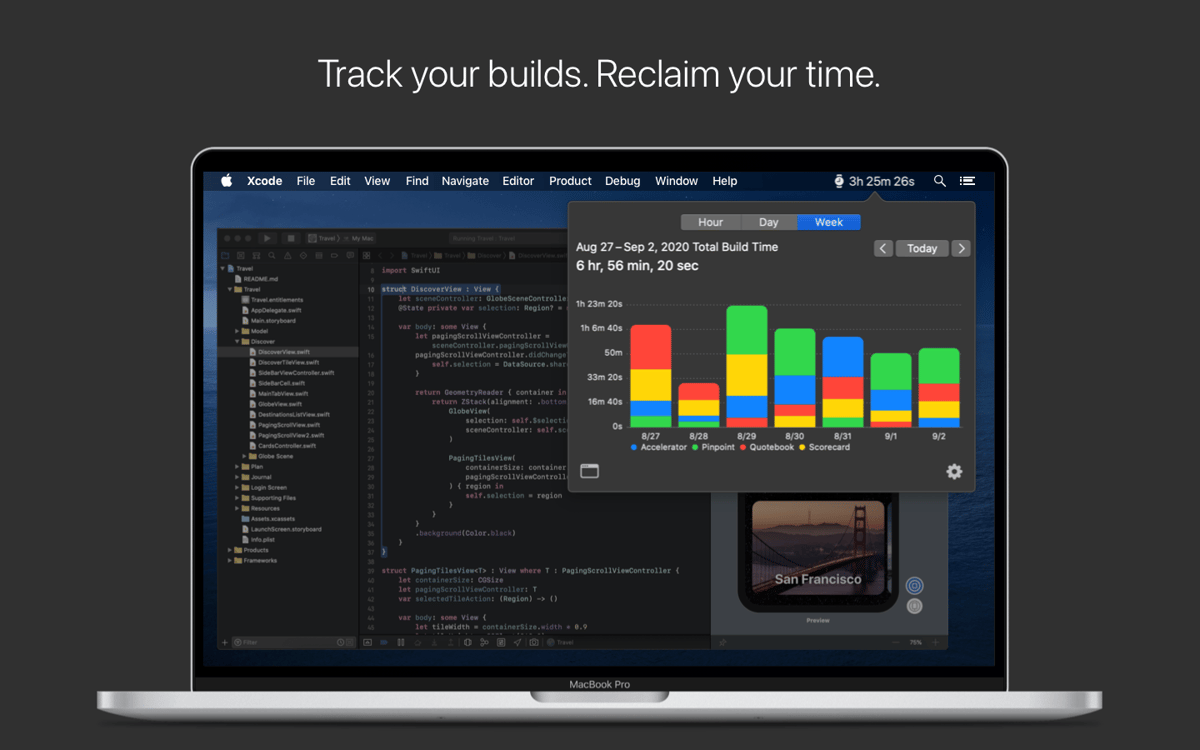
O Buildwatch é um app para a barra de menus que marca o tempo que você passa trabalhando em compilações no Xcode. Para ter uma marcação detalhada do tempo no Xcode, basta clicar no ícone do Buildwatch na barra de menus e visualizar os gráficos que mostram quanto tempo você trabalhou em cada projeto.
Marque o tempo que você gasta em certos projetos
Saiba quanto tempo leva para compilar um app
Identifique travamentos no fluxo de trabalho
Tenha estimativas precisas para projetos futuros
Recursos do Buildwatch
Total e média do tempo de compilação
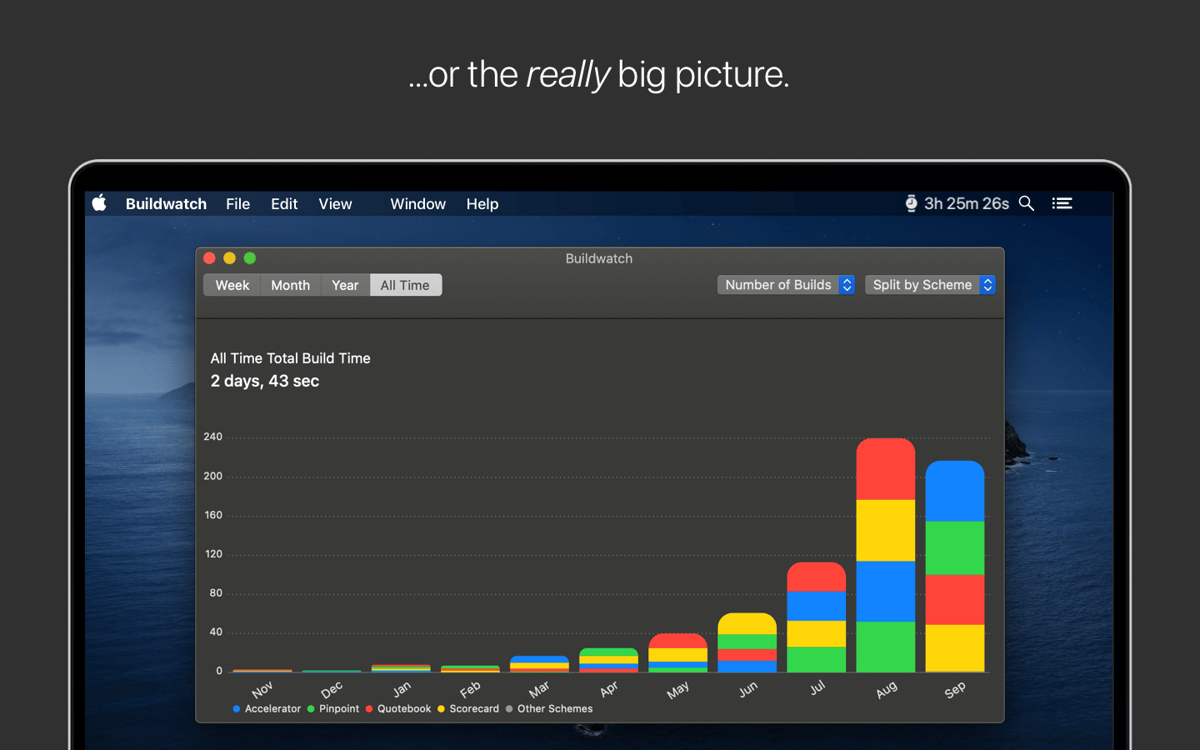
Use o Buildwatch para visualizar a média e o total do tempo que você passa criando compilações no Xcode. Use o app para registrar o tempo compilando um app ao longo de um dia, semana, mês, ano ou total. Você também pode visualizar o número de compilações dos apps em que você tem trabalhado.
Tempo de compilação na barra de menus
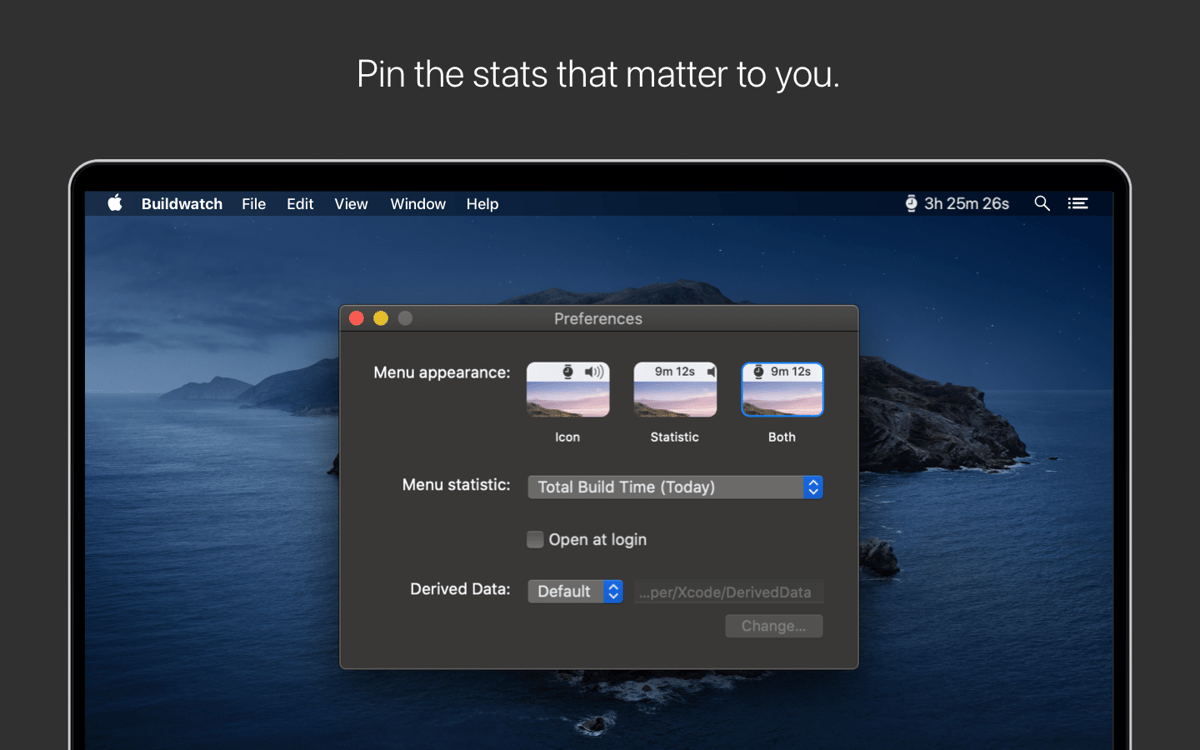
Para os momentos em que você precisa controlar o ritmo e saber exatamente quanto tempo você gastou compilando, é útil ter a estatística correspondente diretamente na barra de menus. Acesse as preferências do Buildwatch e fixe as estatísticas que deseja ver rapidamente na barra de menus.
Gráficos interativos
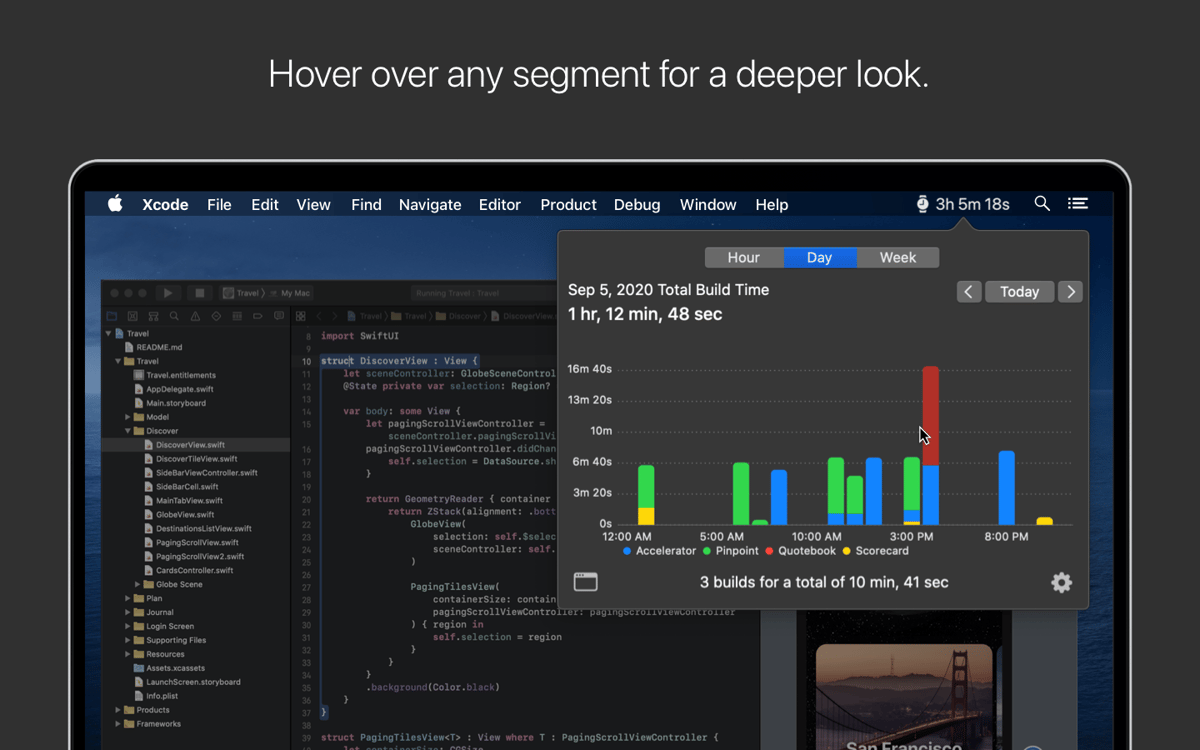
Todo o tempo registrado é mostrado em um formato gráfico. Clique nos ajustes disponíveis para ver o tempo que você passou compilando apps e pare o mouse sobre os diversos elementos do gráfico para obter informações detalhadas.
Estatísticas detalhadas
O Buildwatch permite que você registre estatísticas detalhadas dos seus projetos. Obtenha informações valiosas de distribuição de tempo, identifique pontos de travamento e otimize o seu fluxo de trabalho no Xcode com as estatísticas úteis do Buildwatch em projetos recentes, além de ter uma visualização combinada de todas as estatísticas.
Classificações e avaliações
Buildwatch
•
79 classificações
Luis Alberto Montes Gordillo
31 de mai. de 2024
Versão do app: 1.1.4
Lo he probado poco pero si me va diciendo si se me da los tiempos de building de xcode
Keithon Stribling
13 de jul. de 2023
Versão do app: 1.1.3
Been great! Very eye opening!
Fahad
26 de jun. de 2023
Versão do app: 1.1.3
No way to contact developer from the website so I'm leaving feedback here. We use a "Relative" derived data folder by the name ".DerivedData" (notice the dot, so it's hidden). If you use this, Buildwatch keeps saying "Select the folder where DerivedData is found" and no matter what you do, it won't find it.
Obtenha centenas de apps com o Membership
Obtenha um membership do Setapp e use centenas de apps estelares numa única assinatura.
Experimente grátis por 7 dias. Depois, pague um valor único.
Instale o Setapp no Mac
Explore apps para Mac, iOS e web. Encontre formas fáceis de lidar com as tarefas do dia a dia.

Obtenha o app que chamou sua atenção
Aquele app especial está esperando você no Setapp. Instale‑o com um clique.

Buildwatch
Escolha uma assinatura
Um ou mais apps com um membership do Setapp. Obtenha os apps que você quer.

Obtenha centenas de apps com o Membership
Obtenha um membership do Setapp e use centenas de apps estelares numa única assinatura.
Experimente grátis por 7 dias. Depois, pague um valor único.
1
Instale o Setapp no Mac
Explore apps para Mac, iOS e web. Encontre formas fáceis de lidar com as tarefas do dia a dia.
2
Obtenha o app que chamou sua atenção
Aquele app especial está esperando você no Setapp. Instale‑o com um clique.
Buildwatch
3
Escolha uma assinatura
Um ou mais apps com um membership do Setapp. Obtenha os apps que você quer.
A casa dos melhores apps
Desde tarefas rotineiras e de planejamento a atividades criativas e de programação, encare suas tarefas com os apps do Setapp.

TypingMind
IU alternativa para conversar com IA
gere ou resuma textos
use uma biblioteca de ações
IA

Spark Mail
Gerencie e‑mails
IA

CleanMyMac
Limpe os detritos

Bartender
Personalize a barra de menus

CleanShot X
Capturas de tela versáteis

Luminar Neo
Edite suas fotos
IA

ClearVPN
Conecte‑se com mais segurança

Craft
Trabalhe com documentos
IA
Buildwatch
Marque o tempo compilando no Xcode