
Core Shell
Um terminal SSH completo



Mac
Versão 5.1.1
macOS 15.0 ou posterior
75.4 MB
2 idiomas
Alterne entre diversos hosts profissionalmente com o Core Shell. Este terminal completo para Mac permite que você personalize conexões, acesse recursos avançados — desde “proxy jump” a “agent forwarding” — e organize hosts por etiqueta para ter conveniência. E para deixar tudo mais bonito, você pode definir um esquema de cores personalizadas no cliente SSH.
Alterne instantaneamente entre vários hosts
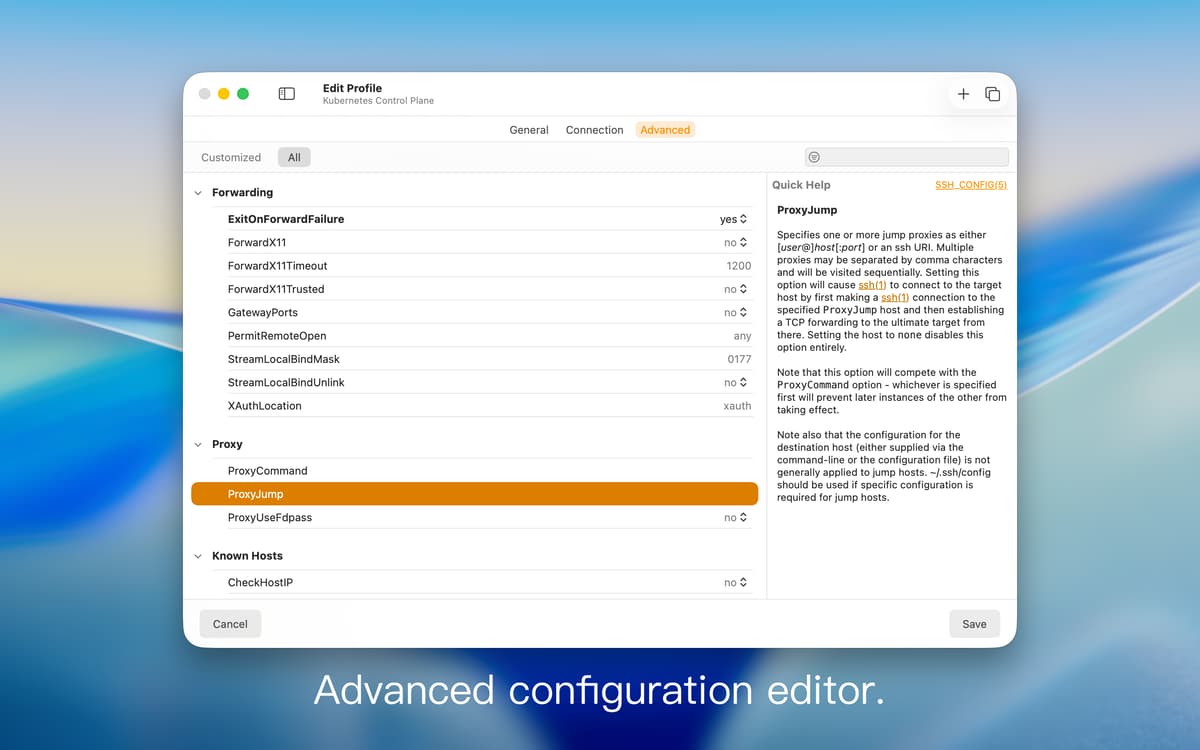
Gerencie e edite ajustes por host
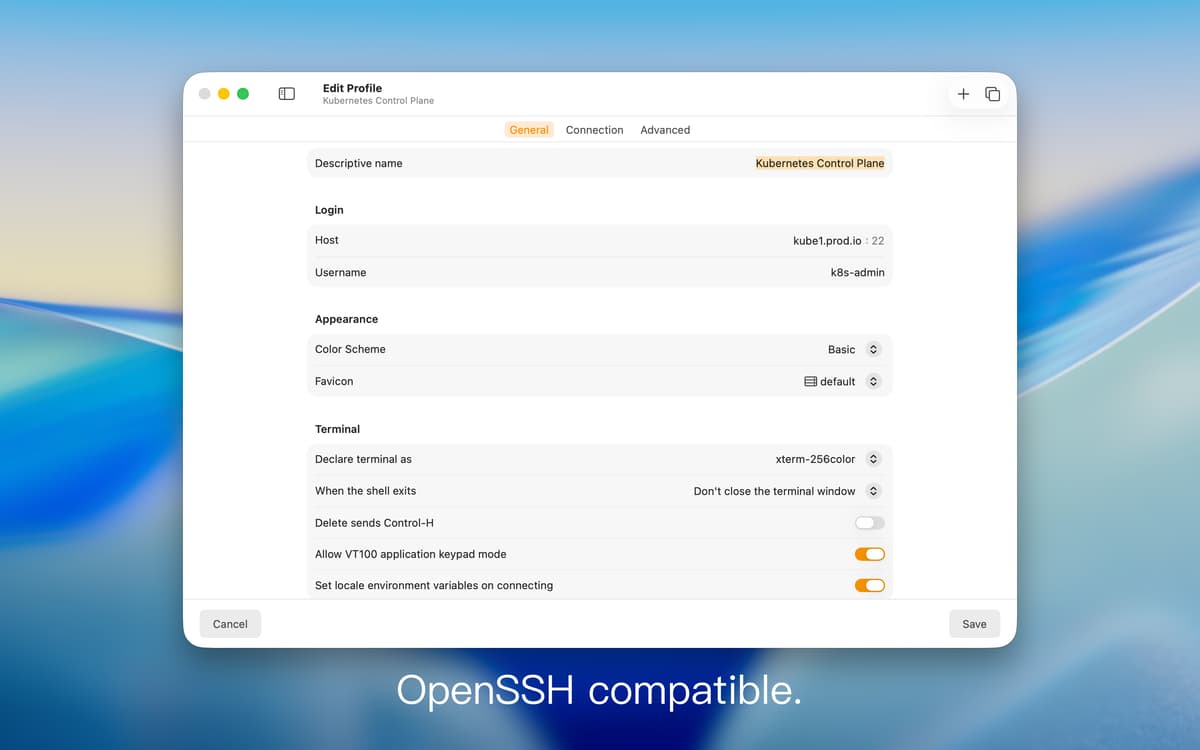
Desfrute de compatibilidade OpenSSH nativa
Simplifique o fluxo SSH com etiquetas e cores
Recursos do Core Shell
Simplifique conexões remotas
O Core Shell passou no *vttest* (teste de funcionalidade essencial do app Terminal), sendo totalmente compatível com o cliente SSH nativo da Apple. Mas com o Core Shell, você também tem muitas opções de personalização, início de sessão com um clique e reconexão automática. Uma versão aprimorada quando comparado a qualquer terminal SSH.
Beneficie-se de OpenSSH
O Core Shell é compatível com OpenSSH, o que faz com que você tenha acesso a diversas opções profissionais, como “post command”, “proxy jump” e “agent forwarding”, dentre outras. Usuários avançados também pode aplicar seus arquivos “ssh_config” pessoais para disponibilizar recursos no Core Shell.
Edição avançada por host
Além do poder para gerenciar opções avançadas, você também pode alterar os ajustes dessas opções em cada host diferente. E, se você precisar tirar alguma dúvida sobre configurações, basta acessar todas as informações sobre diretrizes SSH na ajuda contextual.
Integração com o app Acesso às Chaves
Para se conectar, você precisa de senhas e mais senhas. Para simplificar o acesso, o Core Shell faz com que você não precise se lembrar de todas elas. O app integra‑se com segurança ao app Acesso às Chaves do macOS para memorizar as informações de início de sessão. Embora prático, você pode, a qualquer momento, optar por não usar esse recurso.
Otimização de cores
Seu terminal SSH merece ter a melhor aparência possível. Com o Core Shell, você pode escolher entre oito esquemas de cores diferentes, como “Dracula”, “ Ocean” ou “Solarized”. O app alinha os temas ao texto automaticamente para otimizar o equilíbrio entre as cores.
Organize hosts por etiqueta
Use etiquetas para localizar qualquer host imediatamente. O Core Shell permite que você atribua etiquetas personalizadas ao registrar novos hosts e os organize, bastando arrastar e soltar. Um recurso essencial para quem precisa lidar com muitos hosts.
Classificações e avaliações
Core Shell
•
577 classificações
Developer
9 de set. de 2026
Versão do app: 5.0
Don’t upgrade—this new version is absolutely terrible! It will lose the path to your SSH-bound private key, and there’s no meaningful warning at all! This version will waste a ton of your time!
Eric Jones
20 de mai. de 2026
Versão do app: 4.0
One of the few SetApp tools I use everyday
Steven H
29 de abr. de 2026
Versão do app: 4.0
Good app, but it’s been buggy lately. When I go to add a new profile and save it, something like 30-40 unnamed terminals are created then I gotta clean them up. Not using any special characters or doing anything different than I’ve done in the past. Other than this, it’s a pretty clean looking app that works much better than the default Terminal app. It has good options and has treated me well.
Obtenha centenas de apps com o Membership
Obtenha um membership do Setapp e use centenas de apps estelares numa única assinatura.
Experimente grátis por 7 dias. Depois, pague um valor único.
Instale o Setapp no Mac
Explore apps para Mac, iOS e web. Encontre formas fáceis de lidar com as tarefas do dia a dia.

Obtenha o app que chamou sua atenção
Aquele app especial está esperando você no Setapp. Instale‑o com um clique.

Core Shell
Escolha uma assinatura
Um ou mais apps com um membership do Setapp. Obtenha os apps que você quer.

Obtenha centenas de apps com o Membership
Obtenha um membership do Setapp e use centenas de apps estelares numa única assinatura.
Experimente grátis por 7 dias. Depois, pague um valor único.
1
Instale o Setapp no Mac
Explore apps para Mac, iOS e web. Encontre formas fáceis de lidar com as tarefas do dia a dia.
2
Obtenha o app que chamou sua atenção
Aquele app especial está esperando você no Setapp. Instale‑o com um clique.
Core Shell
3
Escolha uma assinatura
Um ou mais apps com um membership do Setapp. Obtenha os apps que você quer.
A casa dos melhores apps
Desde tarefas rotineiras e de planejamento a atividades criativas e de programação, encare suas tarefas com os apps do Setapp.

TypingMind
IU alternativa para conversar com IA
gere ou resuma textos
use uma biblioteca de ações
IA

Spark Mail
Gerencie e‑mails
IA

CleanMyMac
Limpe os detritos

Bartender
Personalize a barra de menus

CleanShot X
Capturas de tela versáteis

Luminar Neo
Edite suas fotos
IA

ClearVPN
Conecte‑se com mais segurança

Craft
Trabalhe com documentos
IA
Core Shell
Um terminal SSH completo