
PixelSnap
Meça qualquer coisa na tela




Mac
Versão 2.6.4
macOS 10.14.4 ou posterior
19.5 MB
7 idiomas
O PixelSnap é uma ferramenta de medição insubstituível para designers, desenvolvedores da web e qualquer pessoa que use um Mac para trabalhos de design. Ele mede precisamente os pixels, distâncias e objetos na tela enquanto você arrasta o cursor por uma página web. Com sua integração nativa ao CleanShot, o PixelSnap faz até capturas de tela dos elementos medidos com perfeição.
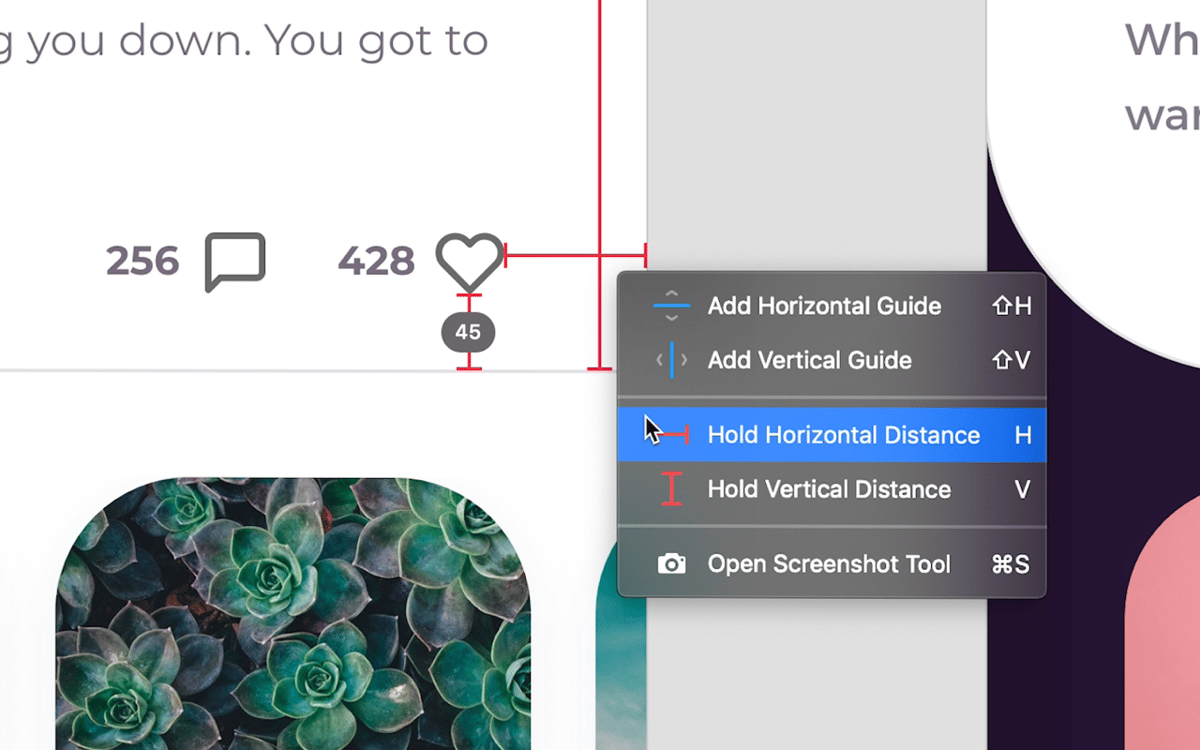
Meça a distância entre os elementos
Meça vários objetos rapidamente
Verifique o alinhamento entre elementos
Compartilhe as medidas em uma captura de tela
Recursos do PixelSnap
Veja além das distâncias
Seja ao trabalhar em um novo layout ou apenas ao explorar tendências de design, o PixelSnap ajuda você a ter as distâncias certas entre os elementos em uma página web. Selecione “Find Dimensions” no menu do app, clique no elemento do layout e arraste o cursor. O PixelSnap mostra as distâncias de imediato.
Capture objetos na tela
O PixelSnap pode medir até os elementos mais minúsculos na tela. Capture uma área (da mesma forma que você captura a tela) para que o app forneça as dimensões precisas do objeto. Você pode até capturar os tamanhos de vários elementos na mesma tela.
Verifique o alinhamento rapidamente
É verdade que um layout caótico pode ser uma decisão de design. Mas em outros casos, você precisa que os elementos da página estejam alinhados horizontal e verticalmente. O PixelSnap permite que você adicione e mantenha guias de alinhamento automático na tela para atingir a perfeição.
Salve capturas de tela
O PixelSnap integra‑se nativamente ao CleanShot, um utilitário de captura de tela para Mac. Assim, sempre que estiver medindo algo na tela, você pode pressionar S para capturar a tela, editá‑la em uma sobreposição de acesso rápido e salvá‑la. A captura de tela é salva no local de exportação selecionado.
Personalize sua jornada
Diretamente da barra de menus, você pode ajustar o nível de tolerância: de zero ao nível mais alto. Isso ajuda a capturar elementos mais sutis, como sombras e gradientes. Você também pode personalizar totalmente a maneira como o PixelSnap trabalha para você, desde cores de sobreposição e temas a atalhos.
Alinhe com outros softwares de design
O PixelSnap se integra às ferramentas mais populares de design profissional. Se você já tem uma rotina de design, ele se encaixa perfeitamente. O PixelSnap funciona com o Adobe XD e o Sketch, além de ser compatível com Retina, o que garante uma experiência de ponta.
Classificações e avaliações
PixelSnap
•
1496 classificações
Cecília Furlan
6 de set. de 2026
Versão do app: 2.6.4
Cool
Jeff Selser
5 de jun. de 2026
Versão do app: 2.6.3
It did what was nearly impossible to do in Illustrator to measure the space between things easily.
Pierre Cameron
24 de mai. de 2026
Versão do app: 2.6.3
Perfect
Obtenha centenas de apps com o Membership
Obtenha um membership do Setapp e use centenas de apps estelares numa única assinatura.
Experimente grátis por 7 dias. Depois, pague um valor único.
Instale o Setapp no Mac
Explore apps para Mac, iOS e web. Encontre formas fáceis de lidar com as tarefas do dia a dia.

Obtenha o app que chamou sua atenção
Aquele app especial está esperando você no Setapp. Instale‑o com um clique.

PixelSnap
Escolha uma assinatura
Um ou mais apps com um membership do Setapp. Obtenha os apps que você quer.

Obtenha centenas de apps com o Membership
Obtenha um membership do Setapp e use centenas de apps estelares numa única assinatura.
Experimente grátis por 7 dias. Depois, pague um valor único.
1
Instale o Setapp no Mac
Explore apps para Mac, iOS e web. Encontre formas fáceis de lidar com as tarefas do dia a dia.
2
Obtenha o app que chamou sua atenção
Aquele app especial está esperando você no Setapp. Instale‑o com um clique.
PixelSnap
3
Escolha uma assinatura
Um ou mais apps com um membership do Setapp. Obtenha os apps que você quer.
A casa dos melhores apps
Desde tarefas rotineiras e de planejamento a atividades criativas e de programação, encare suas tarefas com os apps do Setapp.

TypingMind
IU alternativa para conversar com IA
gere ou resuma textos
use uma biblioteca de ações
IA

Spark Mail
Gerencie e‑mails
IA

CleanMyMac
Limpe os detritos

Bartender
Personalize a barra de menus

CleanShot X
Capturas de tela versáteis

Luminar Neo
Edite suas fotos
IA

ClearVPN
Conecte‑se com mais segurança

Craft
Trabalhe com documentos
IA
PixelSnap
Meça qualquer coisa na tela