
Tab Finder
Todas as abas de navegação juntas


Mac
Versão 2.1.19
macOS 14.6 ou posterior
16.7 MB
1 idiomas
Ter 294.484 abas abertas é uma constante para você? Para nós também. Encontrar aquela aba aberta há uma hora ou guardada desde a semana passada parece ser praticamente impossível nessa bagunça, mas o Tab Finder está aqui para ajudar. Não importa quantas janelas e abas estejam abertas no navegador, ele compila uma lista prática das abas para que você navegue facilmente.
Navegue pelas abas do navegador mais rápido
Encontre a aba da semana passada que ficou aberta
Reúna as abas de todos os navegadores em uma lista
Reduza a troca entre navegadores
Recursos do Tab Finder
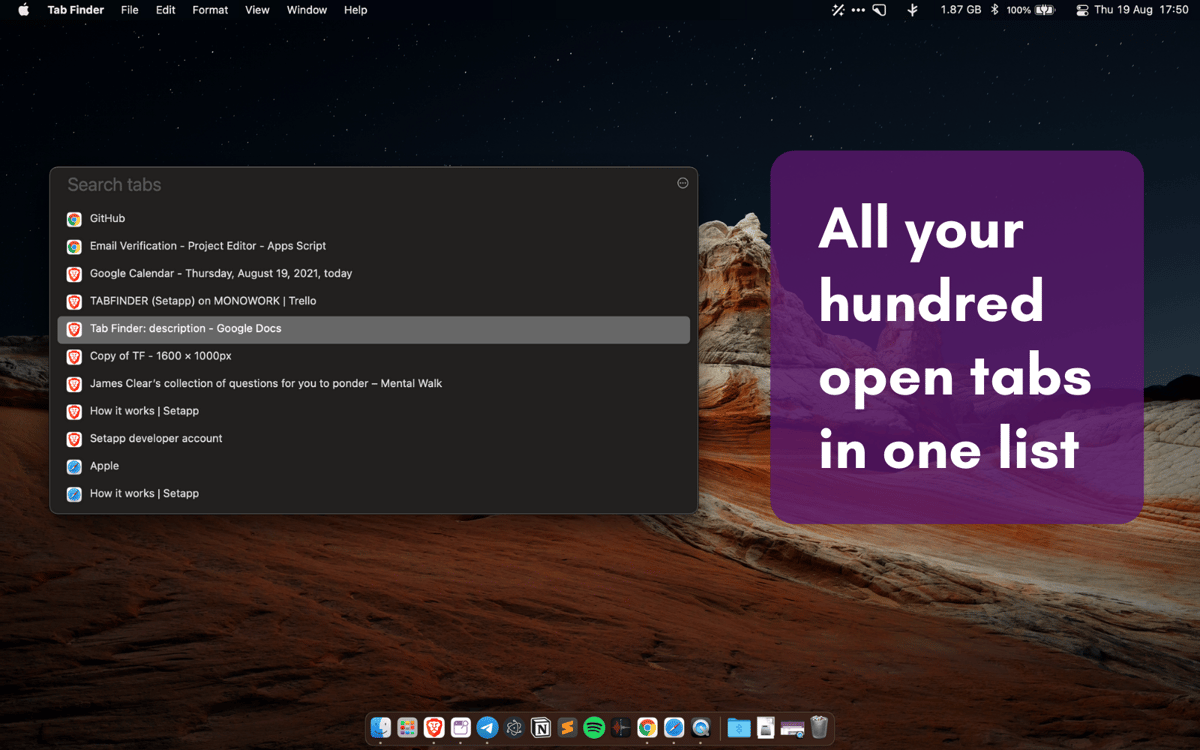
Todas as abas em uma só lista
O Tab Finder é um app para pessoas ocupadas, sem tempo a perder. Buscar aquele artigo específico que você abriu outro dia enquanto pesquisava sobre aquele assunto pode ser desafiador e demorado. Veja todas as abas abertas em várias janelas do navegador em uma única lista e encontre exatamente o que você precisa em instantes!
Compatibilidade com diversos navegadores
Quando dizemos que todas as abas aparecem em uma única lista no Tab Finder, não estamos exagerando. O app funciona com o Safari, Chrome, Brave e Opera, e agrega todas as abas abertas em cada um dos navegadores em uma única lista. Não importa o que estiver aberto… sem sombra de dúvidas, você poderá encontrar tudo.
Busca com atalho
Embora o Tab Finder possa ser acessado facilmente na barra de menus, você pode configurá-lo para que ele apareça também no Dock e até ativá-lo com uma combinação de teclas para ter acesso rápido e fluido.
Modo escuro
O Tab Finder se adequa a qualquer layout na mesa com as opções flexíveis de tema claro e escuro. Opte por definir o tema automaticamente ou selecione manualmente o modo claro ou escuro no app, de acordo com o que você prefira.
Classificações e avaliações
Tab Finder
•
167 classificações
Gustavo
31 de ago. de 2026
Versão do app: 2.1.19
As of today, it is not working on Arc browser Version 1.162.0 (86046).
Emory Petrack
19 de ago. de 2026
Versão do app: 2.1.19
Great idea, but does not work consistently. Also agree with previous request to add Dia browser (as Dia is replacing Arc browser).
Mariano de Iriondo
25 de jul. de 2026
Versão do app: 2.1.16
I'd like support for Dia Browser. If Arc supports it, then Dia—which is the official replacement—should be supported as well.
Resposta do Desenvolvedor
27 de jul. de 2026
Good point. Thanks.
Obtenha centenas de apps com o Membership
Obtenha um membership do Setapp e use centenas de apps estelares numa única assinatura.
Experimente grátis por 7 dias. Depois, pague um valor único.
Instale o Setapp no Mac
Explore apps para Mac, iOS e web. Encontre formas fáceis de lidar com as tarefas do dia a dia.

Obtenha o app que chamou sua atenção
Aquele app especial está esperando você no Setapp. Instale‑o com um clique.

Tab Finder
Escolha uma assinatura
Um ou mais apps com um membership do Setapp. Obtenha os apps que você quer.

Obtenha centenas de apps com o Membership
Obtenha um membership do Setapp e use centenas de apps estelares numa única assinatura.
Experimente grátis por 7 dias. Depois, pague um valor único.
1
Instale o Setapp no Mac
Explore apps para Mac, iOS e web. Encontre formas fáceis de lidar com as tarefas do dia a dia.
2
Obtenha o app que chamou sua atenção
Aquele app especial está esperando você no Setapp. Instale‑o com um clique.
Tab Finder
3
Escolha uma assinatura
Um ou mais apps com um membership do Setapp. Obtenha os apps que você quer.
A casa dos melhores apps
Desde tarefas rotineiras e de planejamento a atividades criativas e de programação, encare suas tarefas com os apps do Setapp.

TypingMind
IU alternativa para conversar com IA
gere ou resuma textos
use uma biblioteca de ações
IA

Spark Mail
Gerencie e‑mails
IA

CleanMyMac
Limpe os detritos

Bartender
Personalize a barra de menus

CleanShot X
Capturas de tela versáteis

Luminar Neo
Edite suas fotos
IA

ClearVPN
Conecte‑se com mais segurança

Craft
Trabalhe com documentos
IA
Tab Finder
Todas as abas de navegação juntas