
Tripsy
Planeje suas viagens



Mac, iOS
Versão 3.10.5
macOS 15.0 ou posterior
48.8 MB
33 idiomas
Estruture a sua próxima viagem com o Tripsy. Adicione detalhes da viagem, armazene documentos, compartilhe o itinerário com amigos ou familiares e receba alertas sobre os próximos voos. Insira tudo o que você planeja fazer para organizar facilmente a viagem: desde detalhes dos voos a reservas de excursões, cafés, restaurantes ou locais para fazer trilhas.
Planeje suas viagens com precisão máxima
Compartilhe o seu itinerário
Armazene documentos
Receba alertas de voos
Recursos do Tripsy
Organização fácil
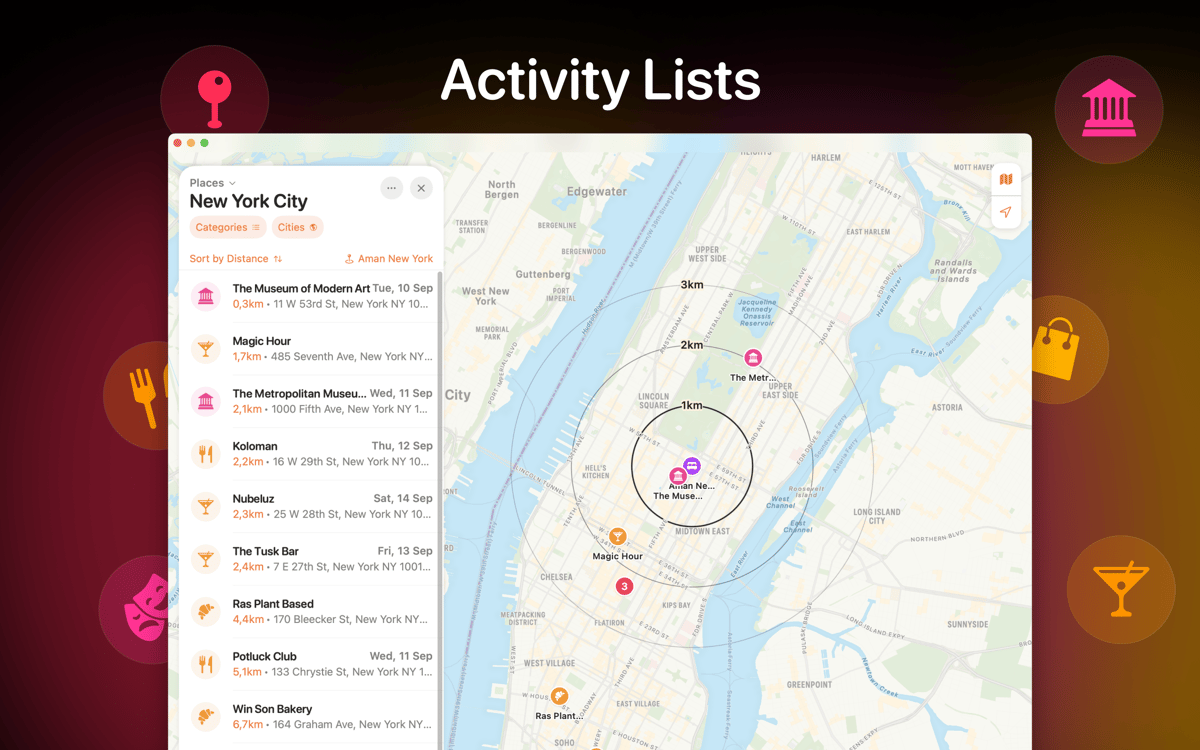
O Tripsy está ao seu dispor desde o primeiro até o último passo da sua viagem. Insira todos os detalhes da viagem e organize-os facilmente em categorias. Marque seus locais de compras, jantares, entretenimento e excursões em suas respectivas categorias.
Opções de personalização
Use uma cor de fundo personalizada para que cada viagem tenha um visual diferente. Você também pode usar uma foto como imagem de fundo: adicione uma foto antes da viagem e atualize-a com a sua própria foto quando você estiver lá!
Armazenamento de arquivos
Para transformar o Tripsy no seu diário de viagem, adicione fotos, vídeos e notas da viagem ao app. Crie memórias fantásticas para apreciá-las futuramente e compartilhe os detalhes da sua experiência com amigos.
Compartilhamento
Com o Tripsy, você nunca está só! Compartilhe a viagem inteira com amigos e familiares para que eles saibam onde você está e o que você anda fazendo. Caso eles estejam com você, é fácil planejar e colaborar em itinerários, planos e locais que cada pessoa queira visitar.
Widget em dispositivos móveis
No iOS, adicione o widget do Tripsy à Visualização Hoje ou à Tela de Início. Veja rapidamente todas as viagens planejadas. Para usar o widget, selecione o Tripsy na lista de widgets sugeridos no telefone e escolha a aparência que melhor se adequa às suas necessidades.
Classificações e avaliações
Tripsy
•
447 classificações
Zeshan
12 de jun. de 2026
Versão do app: 3.8.11
When I downloaded it, I expected it to be just another app I’d use for a while and delete afterwards. But that wasn’t the case. I actually used it to plan my entire trip to Japan and it just somehow works flawlessly. Everything is built purposefully! The email forward feature works like magic. And their latest MCP integration is simply brilliant with my Claude desktop. I can surely say it’s one of my favourite apps currently and I’ve been using it for a few months to plan the entire itinerary of my trip to Japan! Simply amazing!
Dale
2 de mai. de 2026
Versão do app: 3.8.6
Could be great if it had a better location database. There are way too many places you have to enter manually, and for things which don't have an address, there's no way to give it an accurate location.
SteelSpirit32
29 de abr. de 2026
Versão do app: 3.8.6
Really, really, nice trip planner. Very visually apealling UI. Wish there was a Andriod app.
Obtenha centenas de apps com o Membership
Obtenha um membership do Setapp e use centenas de apps estelares numa única assinatura.
Experimente grátis por 7 dias. Depois, pague um valor único.
Instale o Setapp no Mac
Explore apps para Mac, iOS e web. Encontre formas fáceis de lidar com as tarefas do dia a dia.

Obtenha o app que chamou sua atenção
Aquele app especial está esperando você no Setapp. Instale‑o com um clique.

Tripsy
Escolha uma assinatura
Um ou mais apps com um membership do Setapp. Obtenha os apps que você quer.

Obtenha centenas de apps com o Membership
Obtenha um membership do Setapp e use centenas de apps estelares numa única assinatura.
Experimente grátis por 7 dias. Depois, pague um valor único.
1
Instale o Setapp no Mac
Explore apps para Mac, iOS e web. Encontre formas fáceis de lidar com as tarefas do dia a dia.
2
Obtenha o app que chamou sua atenção
Aquele app especial está esperando você no Setapp. Instale‑o com um clique.
Tripsy
3
Escolha uma assinatura
Um ou mais apps com um membership do Setapp. Obtenha os apps que você quer.
A casa dos melhores apps
Desde tarefas rotineiras e de planejamento a atividades criativas e de programação, encare suas tarefas com os apps do Setapp.

TypingMind
IU alternativa para conversar com IA
gere ou resuma textos
use uma biblioteca de ações
IA

Spark Mail
Gerencie e‑mails
IA

CleanMyMac
Limpe os detritos

Bartender
Personalize a barra de menus

CleanShot X
Capturas de tela versáteis

Luminar Neo
Edite suas fotos
IA

ClearVPN
Conecte‑se com mais segurança

Craft
Trabalhe com documentos
IA
Tripsy
Planeje suas viagens