
Wifilicious
Conheça sua rede Wi-Fi

Mac
Versão 2.0.1
macOS 15.0 ou posterior
21.7 MB
12 idiomas
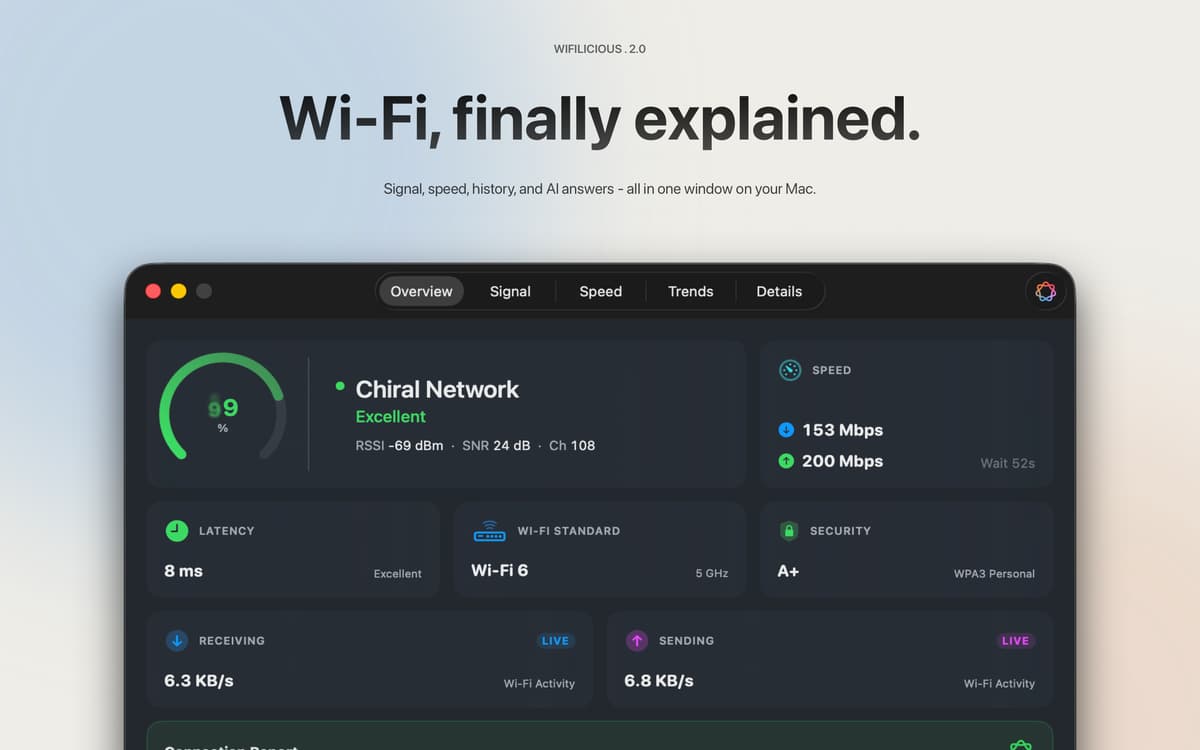
Wifilicious é um analisador de Wi-Fi para Mac. Ele mostra tudo sobre sua conexão atual — intensidade do sinal, latência, taxa de transferência, segurança e tempo de DNS — atualizado a cada dois segundos. Faça um teste de velocidade, navegue pelo histórico das últimas duas semanas ou simplesmente pergunte à Apple Intelligence o que está acontecendo. Tudo é processado no seu Mac. Nada sai dali.
Diagnostique Wi-Fi lento ou instável rapidamente
Teste a velocidade real do seu Wi-Fi
Acompanhe tendências do sinal por horas e dias
Pergunte à IA por que sua conexão está estranha
Recursos do Wifilicious
O panorama completo, num relance
Qualidade do sinal, padrão de segurança, taxa de transferência ao vivo, latência e tempo do DNS — tudo em um painel único, atualizado a cada dois segundos. Os dados que seu Mac vem coletando silenciosamente, finalmente em um lugar onde você pode visualizá-los.
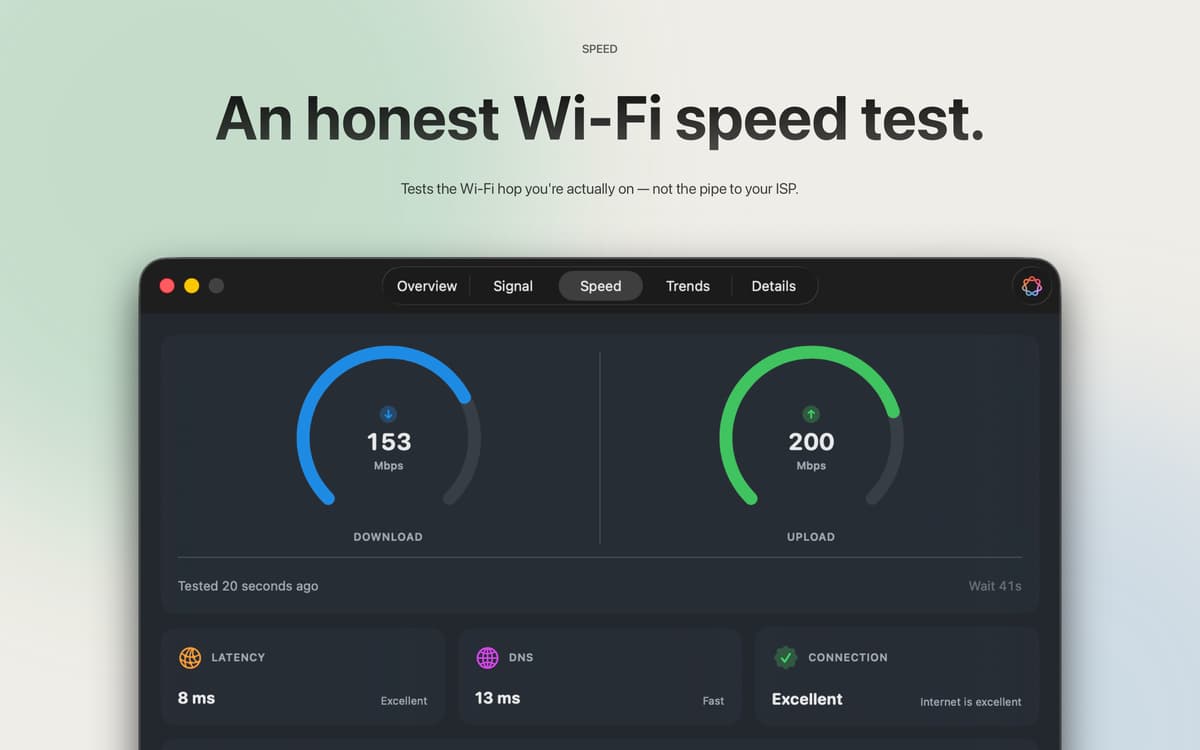
Testes de velocidade que realmente testam seu Wi-Fi
A maioria dos testes de velocidade mede o pipe do seu provedor de internet. Esta ferramenta mede a latência do Wi-Fi entre o seu Mac e o roteador — que é normalmente onde está o problema. Três amostras, resultado da mediana, sem necessidade de conta. Usa cerca de 9 MB de download e 5 MB de upload por teste, então você pode testar sempre que algo não parecer certo sem pensar duas vezes.
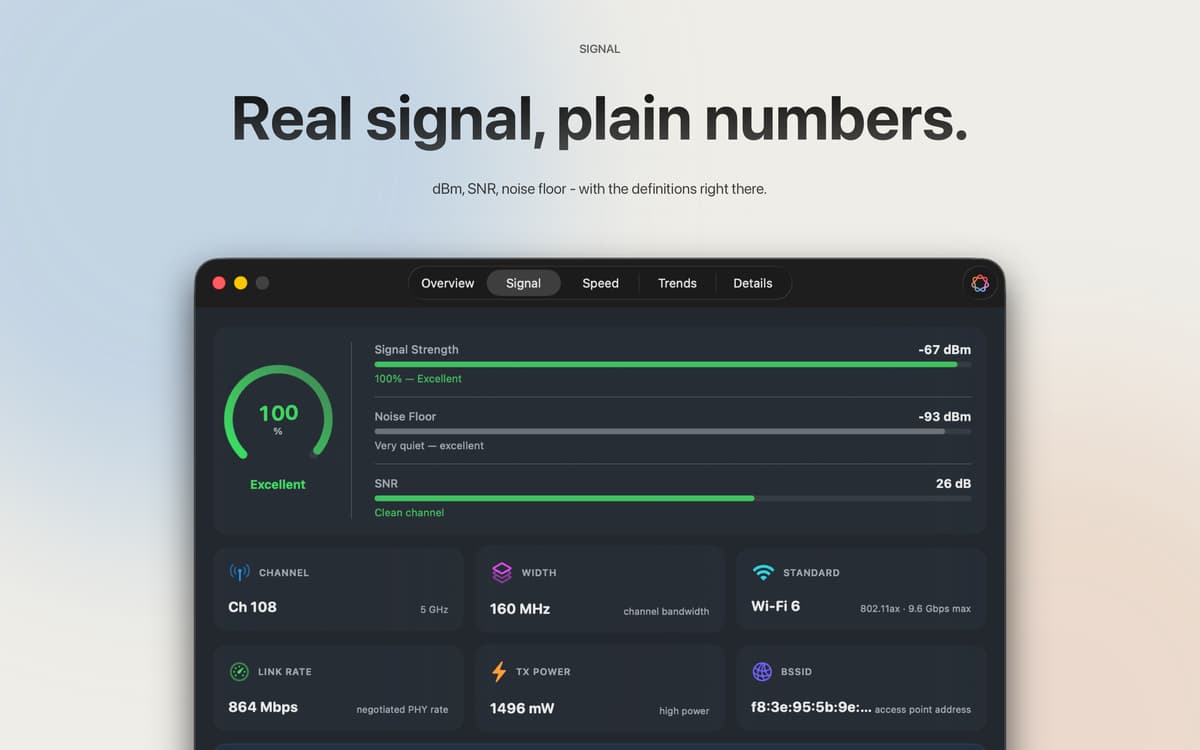
Os números brutos, explicados
RSSI em dBm, relação sinal-ruído, potência de transmissão, largura do canal, modo PHY — tudo isso, bem ali. Todos os campos podem ser copiados e colados. Cada métrica vem com uma explicação em linguagem clara, então você não precisa de um diploma em redes para saber o que está vendo.
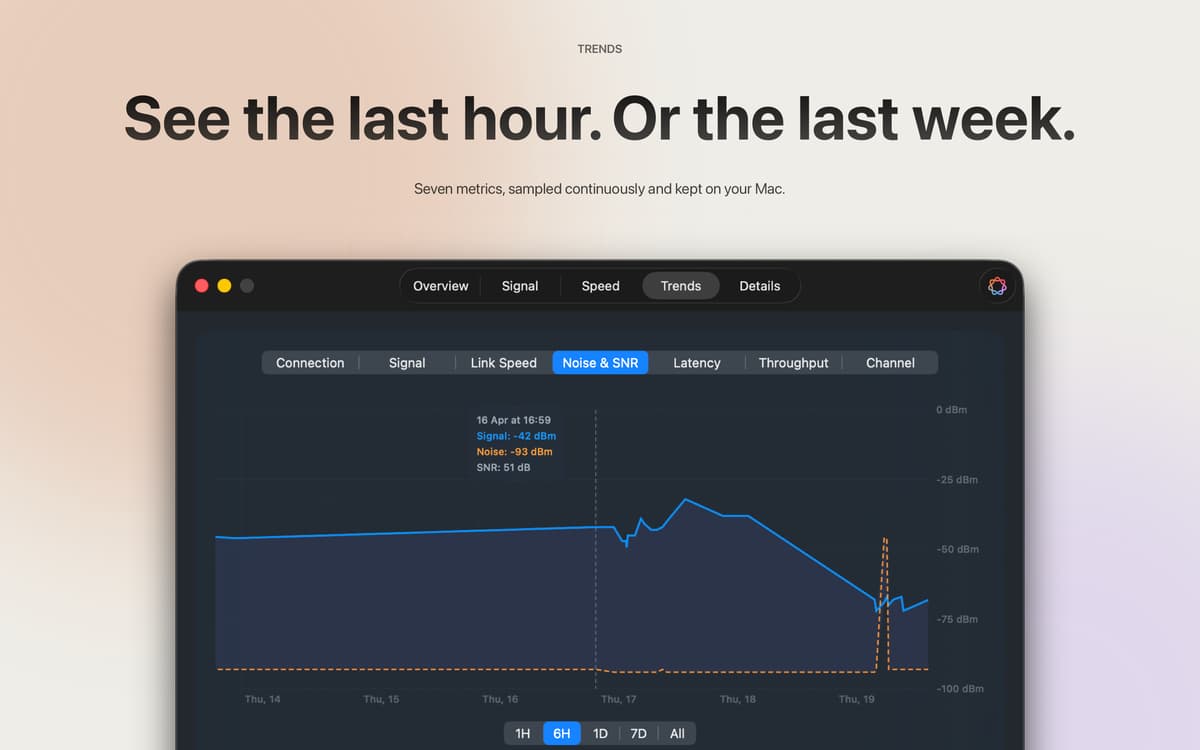
Duas semanas de história
Intensidade do sinal, velocidade de conexão, ruído, SNR, latência, taxa de transferência e canal — amostrados a cada cinco minutos e mantidos por 14 dias. Volte uma hora, um dia ou as duas semanas completas para ver exatamente quando as coisas saíram dos trilhos. Todas as amostras ficam no seu Mac.
Apple Intelligence, fundamentada em seus dados reais
No macOS 26 e versões posteriores, o Apple Intelligence lê os dados da sua conexão em tempo real e responde como um amigo que realmente entende de redes. Pergunte "Isso é bom para uma chamada de vídeo?" e receba uma resposta real baseada no seu sinal e velocidade — não conselhos genéricos da internet. No seu dispositivo, no seu idioma, nunca enviado.
Barra de menu, painel ou ambos
Uma verificação rápida do sinal na barra de menus resolve a questão "está tudo funcionando bem agora?". O painel completo cuida de todo o resto. Seis estilos de ícone, cores de sinal personalizadas — você decide o que aparece e como.
Obtenha centenas de apps com o Membership
Obtenha um membership do Setapp e use centenas de apps estelares numa única assinatura.
Experimente grátis por 7 dias. Depois, pague um valor único.
Instale o Setapp no Mac
Explore apps para Mac, iOS e web. Encontre formas fáceis de lidar com as tarefas do dia a dia.

Obtenha o app que chamou sua atenção
Aquele app especial está esperando você no Setapp. Instale‑o com um clique.

Wifilicious
Escolha uma assinatura
Um ou mais apps com um membership do Setapp. Obtenha os apps que você quer.

Obtenha centenas de apps com o Membership
Obtenha um membership do Setapp e use centenas de apps estelares numa única assinatura.
Experimente grátis por 7 dias. Depois, pague um valor único.
1
Instale o Setapp no Mac
Explore apps para Mac, iOS e web. Encontre formas fáceis de lidar com as tarefas do dia a dia.
2
Obtenha o app que chamou sua atenção
Aquele app especial está esperando você no Setapp. Instale‑o com um clique.
Wifilicious
3
Escolha uma assinatura
Um ou mais apps com um membership do Setapp. Obtenha os apps que você quer.
A casa dos melhores apps
Desde tarefas rotineiras e de planejamento a atividades criativas e de programação, encare suas tarefas com os apps do Setapp.

TypingMind
IU alternativa para conversar com IA
gere ou resuma textos
use uma biblioteca de ações
IA

Spark Mail
Gerencie e‑mails
IA

CleanMyMac
Limpe os detritos

Bartender
Personalize a barra de menus

CleanShot X
Capturas de tela versáteis

Luminar Neo
Edite suas fotos
IA

ClearVPN
Conecte‑se com mais segurança

Craft
Trabalhe com documentos
IA
Wifilicious
Conheça sua rede Wi-Fi