
ScreenSnap Pro
Captura, marca y comparte rápido
Mac
Versión 3.5.2
macOS 12.0 o posterior
753.8 MB
1 idiomas
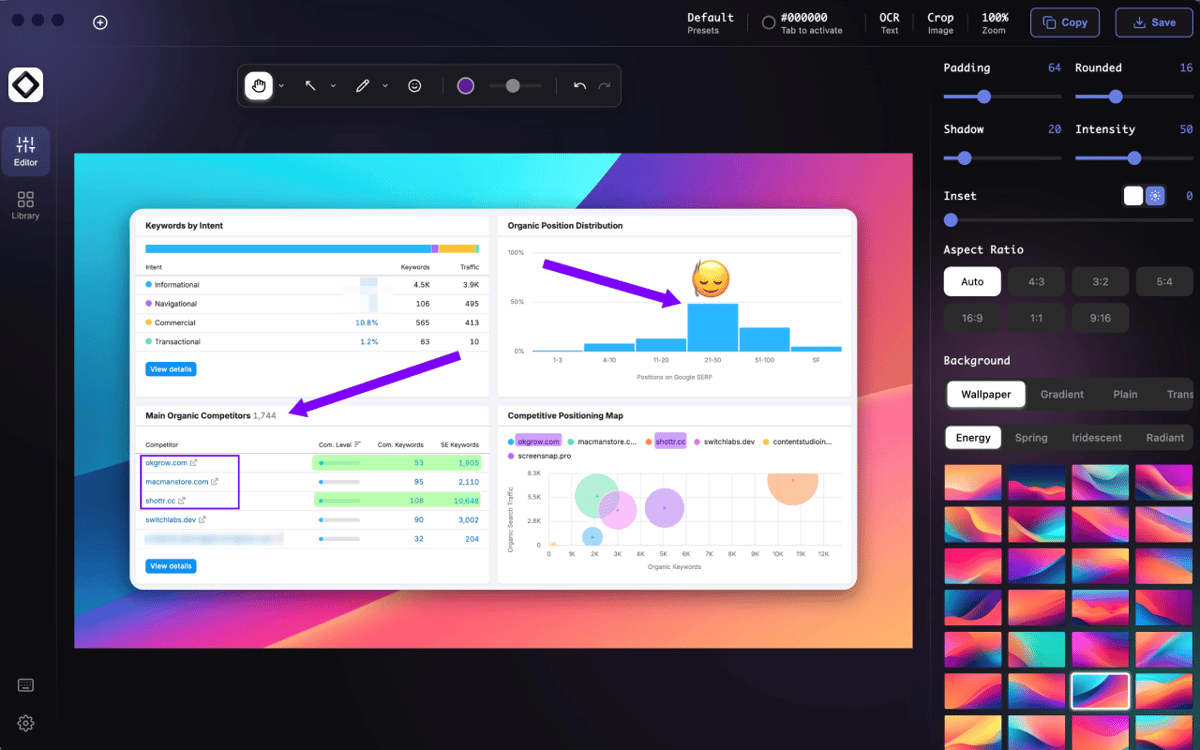
ScreenSnap Pro: aplicación de capturas de pantalla para Mac. Captura un área, una ventana o toda la pantalla sin complicarte con menús o combinaciones de teclas. Marca las capturas de pantalla con flechas, desenfoque, resaltados y notas justo después de capturarlas, porque abrir tres aplicaciones adicionales no es el flujo de trabajo ideal de nadie. ¿Necesitas movimiento también? Graba tu pantalla, crea GIF rápidos o extrae texto de capturas de pantalla con el OCR integrado. Desde informes de errores hasta tutoriales y esos momentos de "espera, ¿dónde guardé eso?", ScreenSnap Pro mantiene el intercambio visual simple y ordenado.
Captura pantallas en segundos
Grabar demos rápidas de pantalla
Anota sin apps adicionales
Extraer texto de imágenes
Características de ScreenSnap Pro
Captura exactamente lo que necesitas
Toma capturas a pantalla completa, en ventana, de área o con retardo usando atajos intuitivos. Captura rápida, menos búsquedas.
Anota al instante
Añade flechas, formas, texto, resaltados, efectos de desenfoque y mucho más en el editor integrado. No se permite exportar. Sin saltar entre apps.
Graba la pantalla y crea GIF
Muestra pasos, explica problemas o crea tutoriales rápidos sin configurar todo un estudio de producción.
Capturar texto con OCR
Copia texto directamente desde capturas de pantalla e imágenes. Útil para recibos, presentaciones, PDF o cualquier cosa que olvidaste seleccionar.
Comparte capturas de pantalla más rápido
Sube capturas a la nube, mantén los archivos organizados y comparte enlaces sin convertir tu escritorio en un cementerio de capturas de pantalla.
Personaliza tu flujo de trabajo
Personaliza atajos, ubicaciones de guardado, vista previa, configuración de salida y temporizadores para que la aplicación funcione como tú trabajas.
Suscríbete y accede a cientos de apps
Suscríbete a Setapp y usa cientos de apps fantásticas con una sola suscripción.
Pruébalo 7 días gratis y luego paga una única cuota.
Instala Setapp en tu Mac
Apps de Mac, iOS y web para encontrar soluciones a tus desafíos cotidianos.

Consigue la app que buscabas
Esa app increíble y reluciente te espera en Setapp. Instálala con un clic.

ScreenSnap Pro
Elige la suscripción
Una app o más con Setapp Membership. Consigue las apps a tu manera.

Suscríbete y accede a cientos de apps
Suscríbete a Setapp y usa cientos de apps fantásticas con una sola suscripción.
Pruébalo 7 días gratis y luego paga una única cuota.
1
Instala Setapp en tu Mac
Apps de Mac, iOS y web para encontrar soluciones a tus desafíos cotidianos.
2
Consigue la app que buscabas
Esa app increíble y reluciente te espera en Setapp. Instálala con un clic.
ScreenSnap Pro
3
Elige la suscripción
Una app o más con Setapp Membership. Consigue las apps a tu manera.
Las mejores apps bajo un mismo paraguas
Tanto para las tareas rutinarias como para los proyectos creativos, programación o planificación, todo es más fácil con las apps de Setapp.

TypingMind
Chat de IA con una interfaz alternativa
genera o resume texto
usa la biblioteca de prompts
IA

Spark Mail
Gestiona tus correos
IA

CleanMyMac
Elimina los archivos de más

Bartender
Personaliza la barra de menús

CleanShot X
Personaliza tus capturas de pantalla

Luminar Neo
Edita tus fotos
IA

ClearVPN
Conéctate con más seguridad

Craft
Trabaja con documentos
IA
ScreenSnap Pro
Captura, marca y comparte rápido