Clamshell
Lavora con il coperchio chiuso



Mac
Versione 1.4.23
macOS 14.0 o successivo
9.6 MB
4 lingue
Clamshell: gestore della sospensione a coperchio chiuso per Mac. Chiudi il coperchio e il tuo Mac continua a lavorare: i download si completano, le build vengono eseguite, gli agenti IA fanno il loro lavoro. Nessun display esterno, nessuna periferica collegata: basta un clic dalla barra dei menu per attivare la funzione. Riapri il coperchio e ti ritrovi esattamente dove avevi interrotto.
Esegui agenti IA tutta la notte a coperchio chiuso
Esegui build lunghe senza supervisione
Trasferisci file grandi a schermo chiuso
Attiva o disattiva con un clic sulla barra
Funzionalità di Clamshell
Un clic per attivare, zero complicazioni
Per attivare Clamshell basta un clic sull'icona nella barra dei menu. Preferisci non usare il mouse? Esiste anche una scorciatoia da tastiera. Sui MacBook compatibili, se tieni premuto Opzione mentre chiudi il coperchio, attivi Clamshell proprio durante la chiusura, completa di una piccola animazione che rende il tutto stranamente appagante.
Resta attivo anche con i cambi di alimentazione
Collegare o scollegare il caricabatterie di solito reimposta la sospensione a coperchio chiuso senza che tu te ne accorga. Clamshell monitora ogni evento di alimentazione e si riattiva istantaneamente, così un'attività notturna non si interrompe silenziosamente solo perché un cavo si è spostato alle 2 del mattino.
Rete di sicurezza per batteria scarica
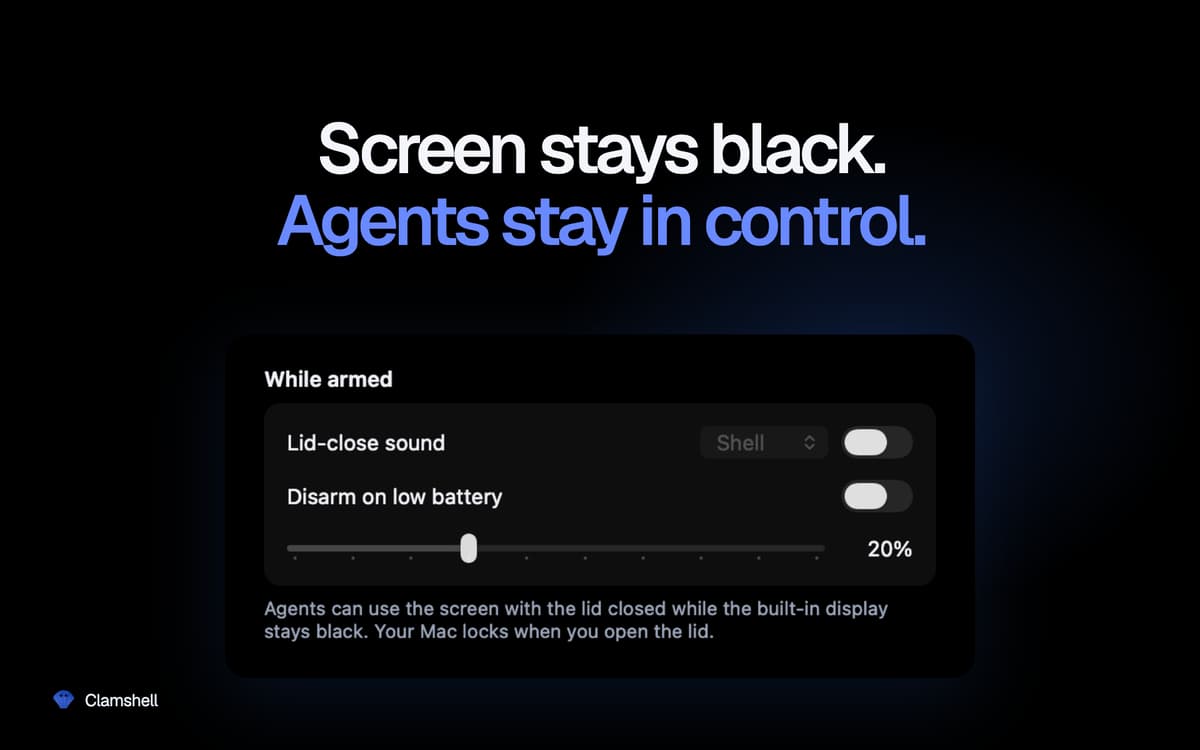
Imposta una soglia di batteria e Clamshell si disattiverà automaticamente al suo raggiungimento, lasciando che il Mac vada in sospensione invece di scaricare completamente la batteria. Mantieni il controllo senza doverti ricordare di verificare.
Momentaneo per impostazione predefinita, permanente se lo desideri
Apri il coperchio e il Mac torna a funzionare normalmente: niente impostazioni dimenticate che scaricano la batteria nella borsa. Preferisci tenere Clamshell sempre attivo? Basta un semplice interruttore nelle impostazioni. Se l'app si chiude inaspettatamente, il normale comportamento di sospensione viene ripristinato automaticamente. Nessuno stato bloccato.
Niente nascosto in background
Nessuna icona nel Dock, nessuna finestra, nessuna password di amministratore, nessun demone di supporto, nessuna estensione del kernel. Un'unica icona nella barra dei menu che ti mostra a colpo d'occhio se il tuo Mac continuerà a funzionare anche chiudendo il coperchio.
Valutazioni e recensioni
Clamshell
•
21 valutazioni
Yoram Kornatzky
29 set 2026
Versione app: 1.4.19
Great. But one shortcoming is that it cannot operate when using external displays.
Miha
2 set 2026
Versione app: 1.4.17
I was skeptical when I first saw this, but so far it has worked incredibly well for me. A MacBook Air can run on battery for a looong time in this mode (just take care if you chuck it in a backpack or similar — it can get HOT!).
Vincent Keunen
20 ago 2026
Versione app: 1.4.14
Simple and very useful. Well designed. Developer responds fast to suggestions.
Centinaia di app con la Membership
Diventa membro di Setapp e utilizza centinaia di app straordinarie con un unico abbonamento.
Prova gratis per 7 giorni, poi paga una tariffa unica.
Installa Setapp sul Mac
Scopri le app per Mac, iOS e il web. Trova modi semplici per risolvere le attività quotidiane.

Ottieni l'app che stavi cercando
Quell'app tanto desiderata ti aspetta in Setapp. Installala con un clic.

Clamshell
Scegli un abbonamento
Una o più app con un abbonamento Setapp. Acquista le app come preferisci.

Centinaia di app con la Membership
Diventa membro di Setapp e utilizza centinaia di app straordinarie con un unico abbonamento.
Prova gratis per 7 giorni, poi paga una tariffa unica.
1
Installa Setapp sul Mac
Scopri le app per Mac, iOS e il web. Trova modi semplici per risolvere le attività quotidiane.
2
Ottieni l'app che stavi cercando
Quell'app tanto desiderata ti aspetta in Setapp. Installala con un clic.
Clamshell
3
Scegli un abbonamento
Una o più app con un abbonamento Setapp. Acquista le app come preferisci.
Sede delle migliori app
Dalla pianificazione e dai lavori di routine alle attività creative e di scrittura di codice, con le app di Setapp potrai affrontare di tutto.

TypingMind
Chat IA con un'interfaccia utente diversa
genera o riassumi un testo
usa la libreria di prompt
IA

Spark Mail
Gestisci le email
IA

CleanMyMac
Elimina i file spazzatura

Bartender
Personalizza la barra dei menu

CleanShot X
Cattura screenshot versatili

Luminar Neo
Modifica le tue foto
IA

ClearVPN
Connessione più sicura

Craft
Lavora con i documenti
IA
Clamshell
Lavora con il coperchio chiuso