
Sidekick
Chiedi. Il tuo Mac lo fa



Mac
Versione 1.5.46
macOS 15.0 o successivo
9.6 MB
1 lingue
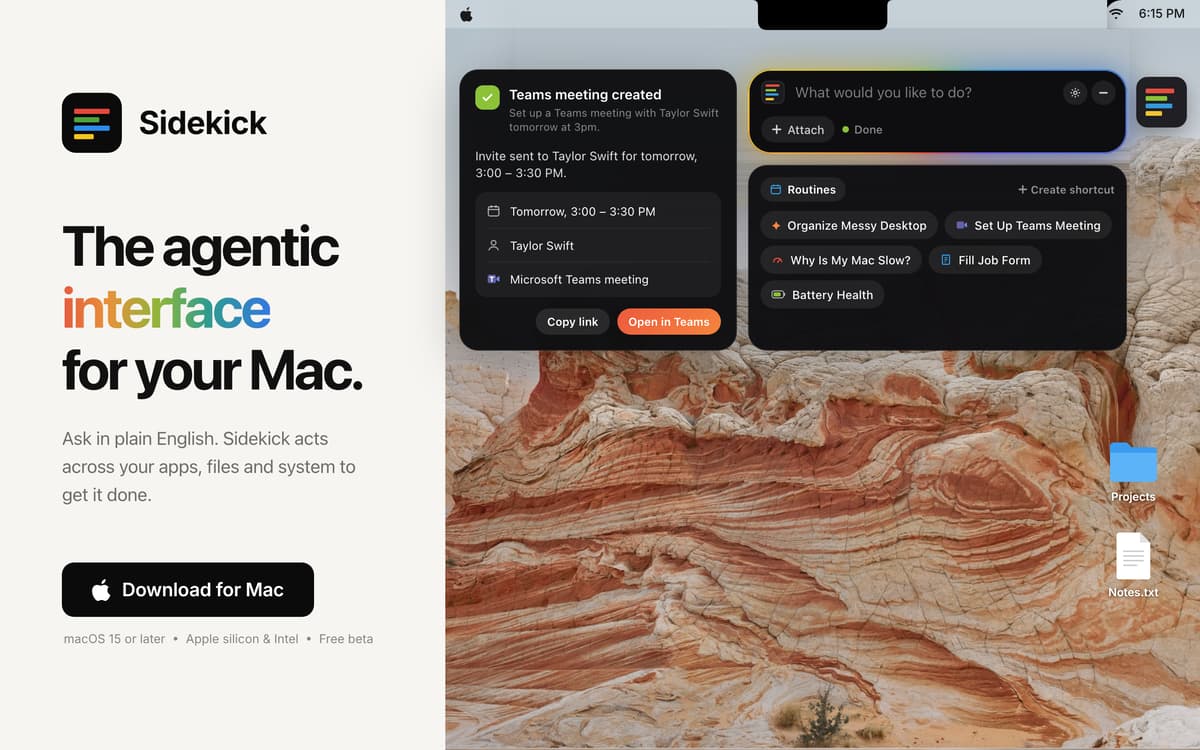
Sidekick è un agente IA per il tuo Mac. Chiedi in italiano semplice e il lavoro è fatto. Compila moduli, riordina la scrivania e organizza riunioni senza muovere un dito.
Compila i moduli web in Safari
Ordina 200 file sulla scrivania
Organizza riunioni su Teams in due clic
Chiudi le schede social in un colpo
Funzionalità di Sidekick
Compilazione avanzata dei moduli in Safari
Sidekick legge l'intero modulo, inserisce i tuoi dati e ti segnala ciò di cui ha bisogno.
Riordina la scrivania
Dì "ordina la mia scrivania" e in pochi secondi i tuoi file saranno organizzati in cartelle.
Organizza riunioni su Teams
Dì la data e l'ora, e l'invito è pronto in due clic.
Trova qualsiasi file
Descrivilo a grandi linee e Sidekick lo trova e lo apre. Basta una parola del nome.
Resti tu al comando
Sidekick agisce solo quando glielo chiedi, chiede conferma prima di eliminare qualsiasi elemento e ti permette di annullare le modifiche.
Valutazioni e recensioni
Sidekick
•
15 valutazioni
Simon Thompson
5 nov 2026
Versione app: 1.5.42
Like the app but there is NO way to change the Ai provider, sort this and you have a winner amigo!
Risposta dello sviluppatore
5 nov 2026
I appreciate the appreciation Simon! That's a good point about the AI. I've added a drop down which now lets you pick the model. It'll be available in the next update, around tomorrow. Currently it's only AI models by Claude as Sidekick works best with it. Will be adding other providers once we get them to give the best possible results for users.
RoMaN
4 nov 2026
Versione app: 1.5.41
Honestly, looks like an app with so much potential, easy to use and with a great design. Unfortunately, it spent my entire monthly quota of AI Credits in 4-5 things I asked it for while testing and trying it out. It wasn’t anything overly long or complicated. Check battery health, ran once the “Clean Mac” shortcut and so on. And it seems to be almost useless without the AI Credits, there’s no option to use my own models, so, sadly, after only a couple of hours I’m uninstalling it…
Risposta dello sviluppatore
4 nov 2026
Thank you for giving Sidekick a proper try. We're sorry about this. Until now, every task ran on Setapp's most capable AI model, even the quick ones. The latest update adds an AI Mode menu, right next to where you type. Choose Balanced and Sidekick uses a lighter model for simple jobs like battery health, saving the stronger one for harder tasks. Choose Fast and it always uses the light model with a super low credit usage. Do come back and try out our latest "Control your Mac via Telegram" feature. Message Sidekick from your phone, wherever you are, and it does the job on your Mac. Connecting takes about ten seconds. I'd love for you to give it another go. Tell me how it works for you. You can always email me at [email protected].
Tortoise
4 nov 2026
Versione app: 1.5.41
I downloaded the app because it looked good but the privacy policy is too opaque. For an AI app to say content may be sent to AI third parties but not give any further information is reckless.
Risposta dello sviluppatore
4 nov 2026
Thanks for raising this. The privacy section on our home page is only a short summary. The full policy is here: https://sidekick-os.online/privacy.html It names exactly who handles your data. Requests go through Setapp AI (run by MacPaw) to Anthropic's Claude models. Anthropic doesn't train on them and deletes them within 30 days. It also lists what each kind of task sends, what never leaves your Mac, and what we keep and for how long. Your requests aren't stored on our servers, and Sidekick never reads password fields. Any questions, email me at [email protected].
Centinaia di app con la Membership
Diventa membro di Setapp e utilizza centinaia di app straordinarie con un unico abbonamento.
Prova gratis per 7 giorni, poi paga una tariffa unica.
Installa Setapp sul Mac
Scopri le app per Mac, iOS e il web. Trova modi semplici per risolvere le attività quotidiane.

Ottieni l'app che stavi cercando
Quell'app tanto desiderata ti aspetta in Setapp. Installala con un clic.

Sidekick
Scegli un abbonamento
Una o più app con un abbonamento Setapp. Acquista le app come preferisci.

Centinaia di app con la Membership
Diventa membro di Setapp e utilizza centinaia di app straordinarie con un unico abbonamento.
Prova gratis per 7 giorni, poi paga una tariffa unica.
1
Installa Setapp sul Mac
Scopri le app per Mac, iOS e il web. Trova modi semplici per risolvere le attività quotidiane.
2
Ottieni l'app che stavi cercando
Quell'app tanto desiderata ti aspetta in Setapp. Installala con un clic.
Sidekick
3
Scegli un abbonamento
Una o più app con un abbonamento Setapp. Acquista le app come preferisci.
Sede delle migliori app
Dalla pianificazione e dai lavori di routine alle attività creative e di scrittura di codice, con le app di Setapp potrai affrontare di tutto.

TypingMind
Chat IA con un'interfaccia utente diversa
genera o riassumi un testo
usa la libreria di prompt
IA

Spark Mail
Gestisci le email
IA

CleanMyMac
Elimina i file spazzatura

Bartender
Personalizza la barra dei menu

CleanShot X
Cattura screenshot versatili

Luminar Neo
Modifica le tue foto
IA

ClearVPN
Connessione più sicura

Craft
Lavora con i documenti
IA
Sidekick
Chiedi. Il tuo Mac lo fa