
Proxyman
Proxy de depuração HTTP para Mac
Mac, iOS
Versão 26.1.0
macOS 14.0 ou posterior
140.6 MB
5 idiomas
Conheça um incrível depurador de proxy que pode agir como middleMan, o Proxyman! Categorize apps e domínios, visualize solicitações HTTP/HTTPS e identifique erros no Mac, simulador do iOS ou dispositivos remotos. Ajuste tudo perfeitamente com um conjunto de ferramentas de depuração fácil de usar.
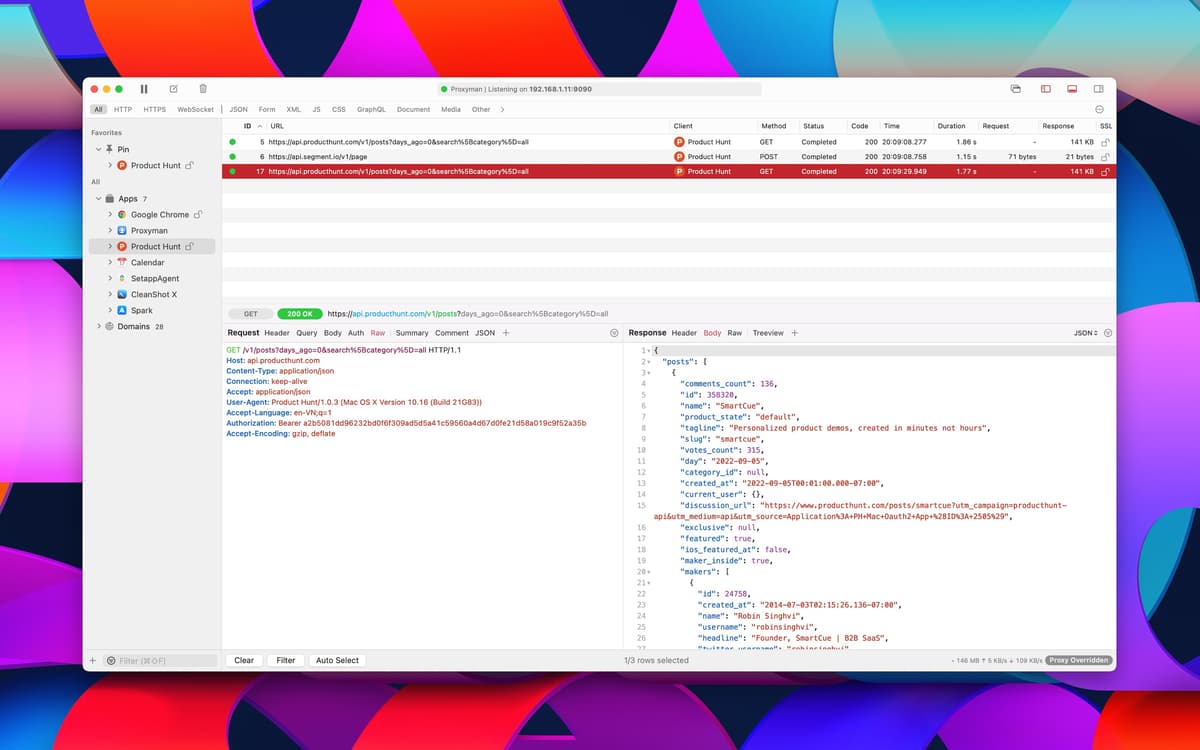
Depure o tráfego da web
Tráfego HTTP/HTTPS em texto simples
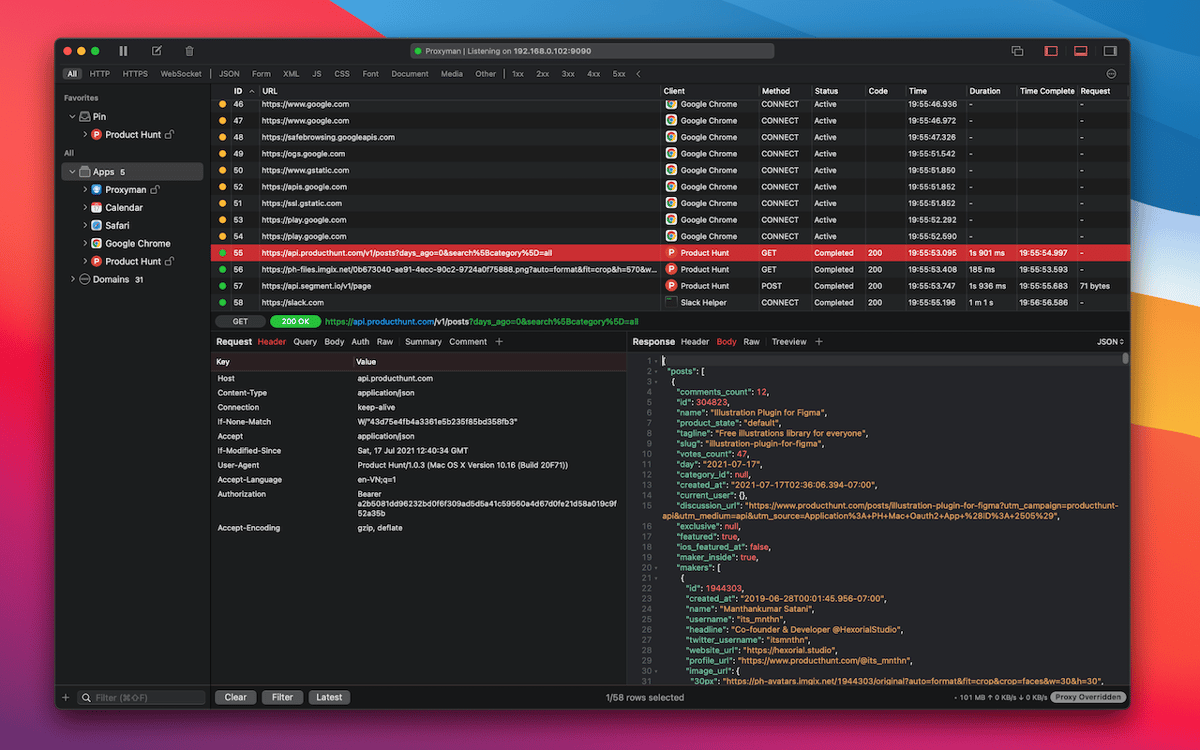
Fixe domínios
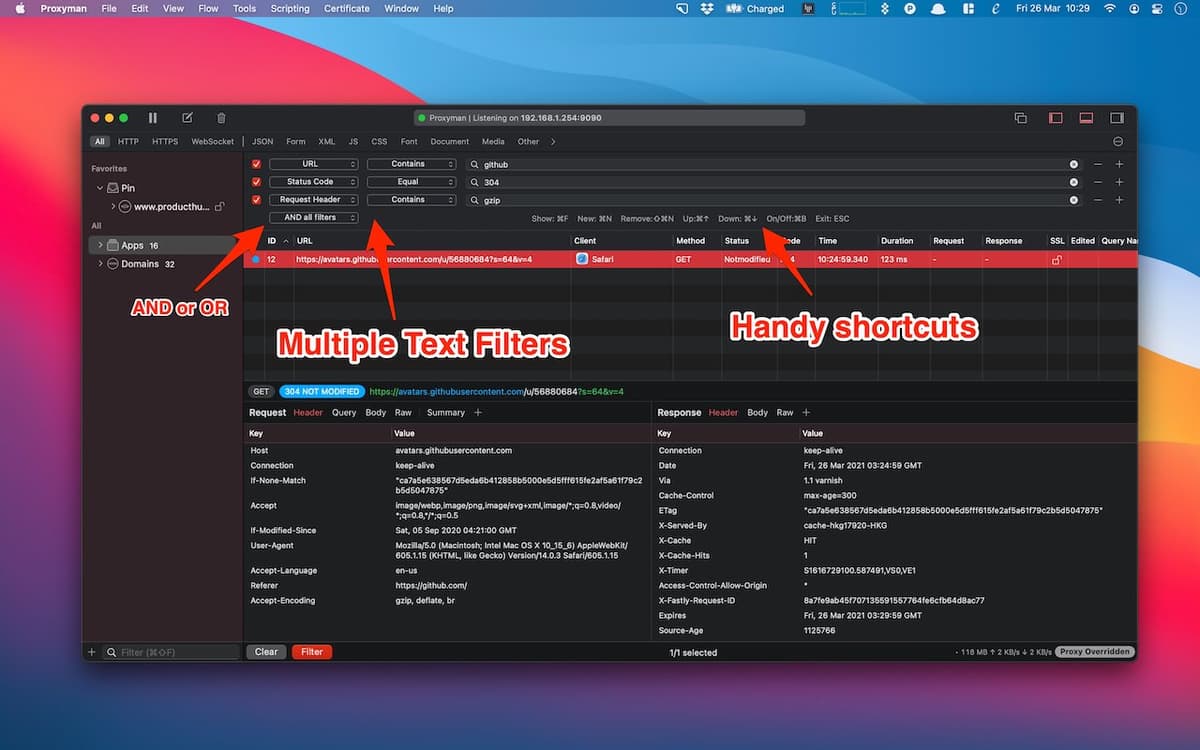
Use filtros para focar num certo tráfego
Recursos do Proxyman
Interface intuitiva
O Proxyman foi projetado para macOS e foca em oferecer uma experiência de uso ininterrupta. Navegue por três painéis em um ambiente sem distrações. Organize apps e domínios no primeiro, visualize fluxos no segundo, e gerencie o conteúdo de solicitações e respostas no terceiro.
Desempenho consistente
Embora sempre pronto para trabalhar ininterruptamente em qualquer tarefa, o Proxyman não exige muito do Mac. Programado em Swift e C++, ele mantém um alto desempenho em depurações e garante um ambiente estável. Assim, você não se preocupa com a bateria nem com a conexão de rede — elas se mantêm em forma.
Uma lista de fontes organizada
Coloque ordem na maneira como você gerencia e busca fontes. Com base no comportamento do Finder, o Proxyman permite que você encontre apps e domínios com o mesmo atalho ao qual você já está acostumado: Controle + Maiúsculas + F. Você pode arrastar e soltar para organizar fontes, além de fixar aquelas que você deseja ter em foco.
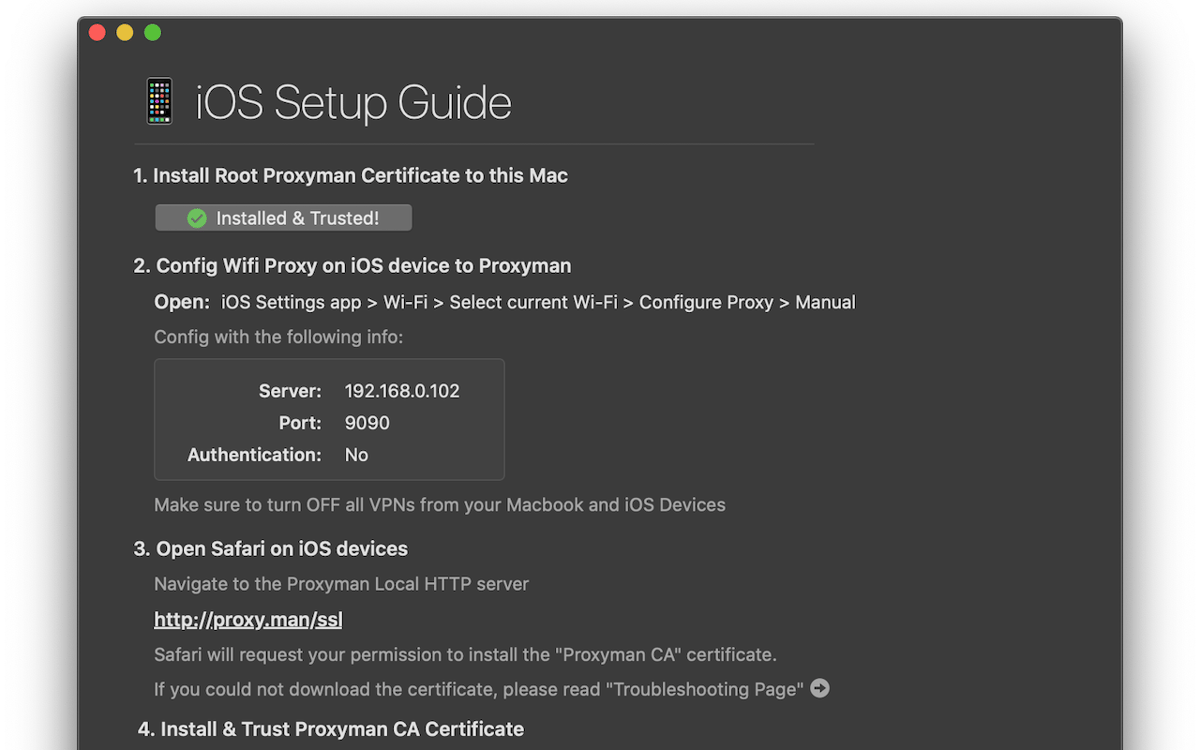
Proxy automático via SSL
Ative facilmente o proxy via SLL em domínios. O Proxyman gera certificados automaticamente, permitindo que você instale e confie no certificado do app ou o adicione manualmente. Ao agir como middleMan, o Proxyman registra o tráfego HTTP/HTTPS entre um Servidor Web SSL e o seu app.
Visualize solicitações HTTP/HTTPS
Com o certificado do Proxyman instalado, tudo fica pronto para que você tenha uma experiência de depuração tranquila. Visualize solicitações HTTP/HTTPS em JSON, navegue entre respostas de Header, Query, Cookies e JSON, além de buscar no conteúdo com as ferramentas integradas ou o seu editor favorito.
Ferramentas profissionais de depuração
O Proxyman oferece uma coleção de ferramentas úteis para refinar o processo de depuração. Repita solicitações com “params” atuais, edite e teste novos “params” ou exporte sessões do Proxyman para compartilhá‑las. E você também pode trabalhar em várias abas.
Classificações e avaliações
Proxyman
•
1076 classificações
Fabricio Vergara
27 de ago. de 2026
Versão do app: 6.15.0
Good but unable to pair with proxyman ios
Deric Andrews
20 de ago. de 2026
Versão do app: 6.15.0
A crucial go-to tool for debugging, extracting cURLs, creating local responses, redirecting traffic to my localHost while testing on physical devices, and so much more. Outstanding and reliable.
Andrii
31 de jul. de 2026
Versão do app: 6.14.0
Perfect
Obtenha centenas de apps com o Membership
Obtenha um membership do Setapp e use centenas de apps estelares numa única assinatura.
Experimente grátis por 7 dias. Depois, pague um valor único.
Instale o Setapp no Mac
Explore apps para Mac, iOS e web. Encontre formas fáceis de lidar com as tarefas do dia a dia.

Obtenha o app que chamou sua atenção
Aquele app especial está esperando você no Setapp. Instale‑o com um clique.

Proxyman
Escolha uma assinatura
Um ou mais apps com um membership do Setapp. Obtenha os apps que você quer.

Obtenha centenas de apps com o Membership
Obtenha um membership do Setapp e use centenas de apps estelares numa única assinatura.
Experimente grátis por 7 dias. Depois, pague um valor único.
1
Instale o Setapp no Mac
Explore apps para Mac, iOS e web. Encontre formas fáceis de lidar com as tarefas do dia a dia.
2
Obtenha o app que chamou sua atenção
Aquele app especial está esperando você no Setapp. Instale‑o com um clique.
Proxyman
3
Escolha uma assinatura
Um ou mais apps com um membership do Setapp. Obtenha os apps que você quer.
A casa dos melhores apps
Desde tarefas rotineiras e de planejamento a atividades criativas e de programação, encare suas tarefas com os apps do Setapp.

TypingMind
IU alternativa para conversar com IA
gere ou resuma textos
use uma biblioteca de ações
IA

Spark Mail
Gerencie e‑mails
IA

CleanMyMac
Limpe os detritos

Bartender
Personalize a barra de menus

CleanShot X
Capturas de tela versáteis

Luminar Neo
Edite suas fotos
IA

ClearVPN
Conecte‑se com mais segurança

Craft
Trabalhe com documentos
IA
Proxyman
Proxy de depuração HTTP para Mac