
Clamshell
Travailler avec le capot fermé



Mac
Version 1.4.23
macOS 14.0 ou version supérieure
9.6 MB
4 langues
Clamshell — gestionnaire de mise en veille à capot fermé pour Mac. Fermez le capot et votre Mac continue de fonctionner : les téléchargements se terminent, les compilations s'exécutent, les agents IA font leur travail. Pas d'écran externe, pas de périphériques branchés — juste un clic pour activer depuis la barre des menus. Rouvrez le capot et vous reprenez là où vous en étiez.
Faites tourner des agents IA toute la nuit
Compilations longues sans surveillance requise
Transférez des fichiers volumineux, écran fermé
Activez ou désactivez d'un clic dans la barre
Fonctionnalités de Clamshell
Un clic pour activer, zéro contrainte
L'activation de Clamshell se fait en un seul clic sur l'icône de la barre des menus. Vous préférez ne pas utiliser la souris ? Il existe également un raccourci clavier. Sur les MacBook compatibles, maintenir la touche Option enfoncée tout en fermant le capot active Clamshell au moment de la fermeture, accompagné d'une petite animation qui rend le tout étrangement satisfaisant.
Reste activé, même en cas de changement d'alimentation
Brancher ou débrancher votre chargeur réinitialise généralement le comportement de mise en veille à la fermeture du capot, sans que vous en soyez informé. Clamshell surveille chaque changement d'alimentation et se réactive instantanément, pour qu'une tâche lancée pendant la nuit ne s'interrompe pas discrètement parce qu'un câble a bougé à 2 heures du matin.
Filet de sécurité en cas de batterie faible
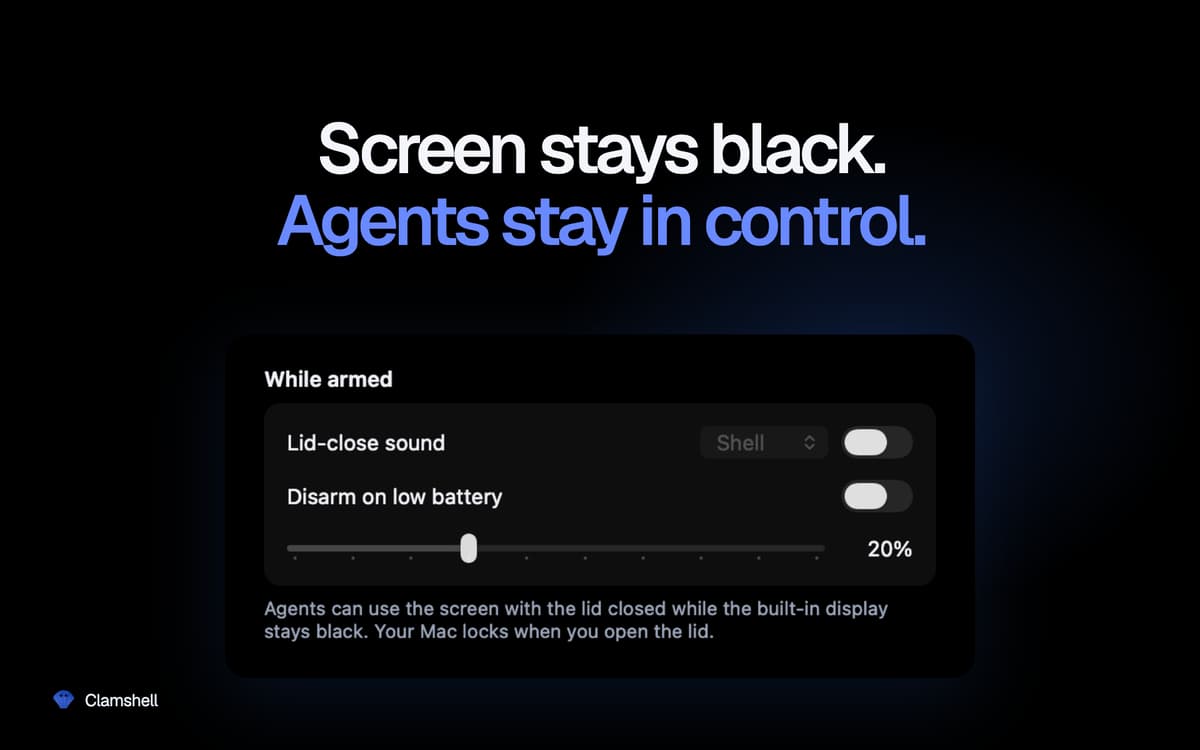
Définissez un seuil de batterie : Clamshell se désactivera automatiquement une fois ce seuil atteint, permettant à votre Mac de se mettre en veille plutôt que de vider complètement la batterie. Vous gardez le contrôle sans avoir à penser à vérifier.
Momentané par défaut, persistant si vous le souhaitez
Ouvrez le capot et votre Mac reprend son fonctionnement normal, sans réglage oublié qui viderait la batterie dans votre sac. Vous préférez garder Clamshell toujours activé ? Un simple réglage suffit. Si l'application se ferme de manière inattendue, le comportement normal de mise en veille est rétabli automatiquement. Aucun état bloqué.
Rien ne se cache en arrière-plan
Pas d'icône dans le Dock, pas de fenêtres, pas de mot de passe administrateur, pas de daemons auxiliaires, pas d'extensions de noyau. Une seule icône dans la barre des menus vous indique en un coup d'œil si votre Mac continuera de fonctionner une fois le capot fermé.
Avis et commentaires
Clamshell
•
21 classements
Yoram Kornatzky
29 sept. 2026
Version de l'application : 1.4.19
Great. But one shortcoming is that it cannot operate when using external displays.
Miha
2 sept. 2026
Version de l'application : 1.4.17
I was skeptical when I first saw this, but so far it has worked incredibly well for me. A MacBook Air can run on battery for a looong time in this mode (just take care if you chuck it in a backpack or similar — it can get HOT!).
Vincent Keunen
20 août 2026
Version de l'application : 1.4.14
Simple and very useful. Well designed. Developer responds fast to suggestions.
Profitez de centaines d'applications avec Membership
Devenez membre Setapp et utilisez des centaines d'applications incroyables grâce à un seul abonnement.
Forfait tout compris, après 7 jours d'essai gratuit
Installez Setapp sur votre Mac
Explorez des applications pour Mac, iOS et le Web. Découvrez comment accomplir facilement les tâches du quotidien.

Téléchargez l'application qui vous intéresse
Cette application vous attend dans Setapp. Installez-la d'un seul clic.

Clamshell
Choisissez votre abonnement
Une seule application ou bien plus avec un abonnement Setapp. Accédez aux applications comme vous le souhaitez.

Profitez de centaines d'applications avec Membership
Devenez membre Setapp et utilisez des centaines d'applications incroyables grâce à un seul abonnement.
Forfait tout compris, après 7 jours d'essai gratuit
1
Installez Setapp sur votre Mac
Explorez des applications pour Mac, iOS et le Web. Découvrez comment accomplir facilement les tâches du quotidien.
2
Téléchargez l'application qui vous intéresse
Cette application vous attend dans Setapp. Installez-la d'un seul clic.
Clamshell
3
Choisissez votre abonnement
Une seule application ou bien plus avec un abonnement Setapp. Accédez aux applications comme vous le souhaitez.
Des applications de qualité
Pour gérer des plannings, accomplir des tâches de routine, créer des contenus, coder et bien plus encore, optez pour Setapp.

TypingMind
IA conversationnelle avec interface alternative
générez ou résumez du texte
utilisez une bibliothèque de requêtes
IA

Spark Mail
Gérez vos e-mails
IA

CleanMyMac
Supprimez les fichiers inutiles

Bartender
Personnalisez la barre des menus

CleanShot X
Profitez de plus de possibilités pour les captures d'écran

Luminar Neo
Retouchez vos photos
IA

ClearVPN
Sécurisez votre connexion Internet

Craft
Travaillez sur vos documents
IA
Clamshell
Travailler avec le capot fermé