
Frame0
De l'idée au wireframe en un instant


Mac
Version 1.7.0
macOS 11.0 ou version supérieure
919.5 MB
1 langues
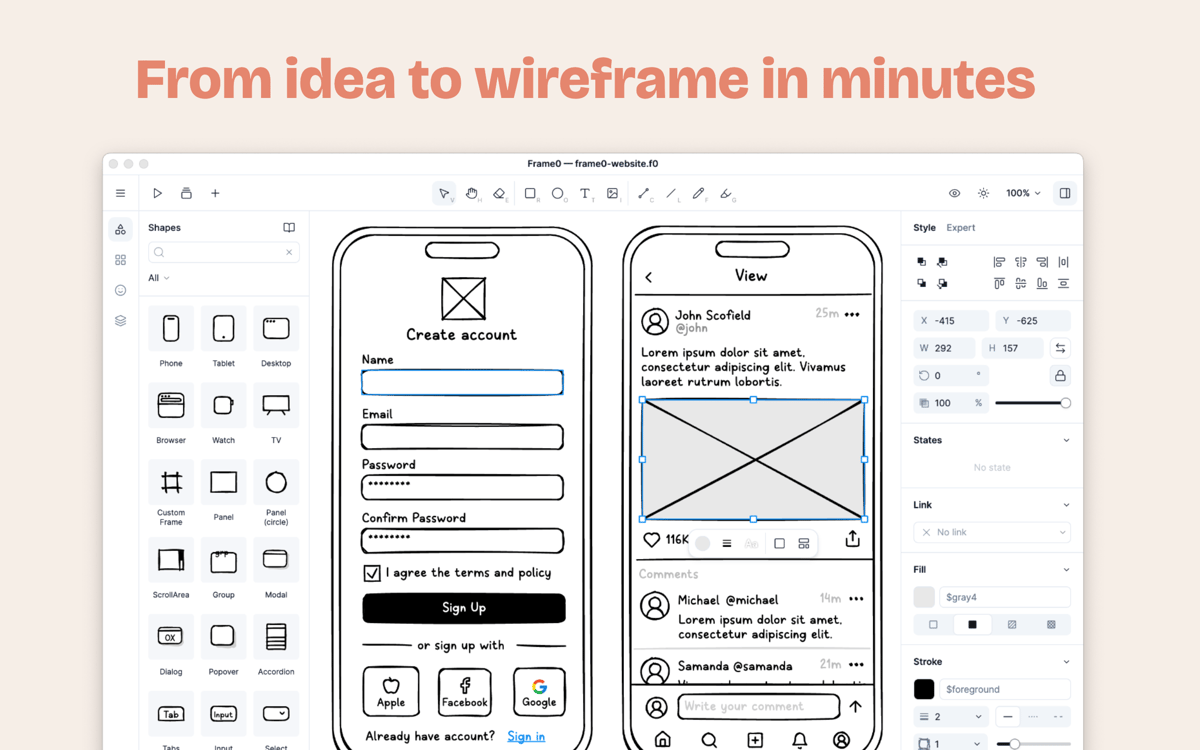
Frame0 est une application de wireframing élégante pour Mac qui vous aide à structurer vos idées numériques avant qu'elles ne s'envolent. Au lieu de vous perdre dans les détails de mise en forme au pixel près ou les mises en page strictes, concentrez-vous uniquement sur le concept. Son style organique et dessiné à la main permet à votre équipe de se concentrer sur la structure et les retours plutôt que sur les finitions de design. Des maquettes rapides d'applications aux diagrammes complets, il vous offre tout ce dont vous avez besoin pour communiquer votre vision clairement et facilement.
Esquissez des wireframes épurés basse fidélité
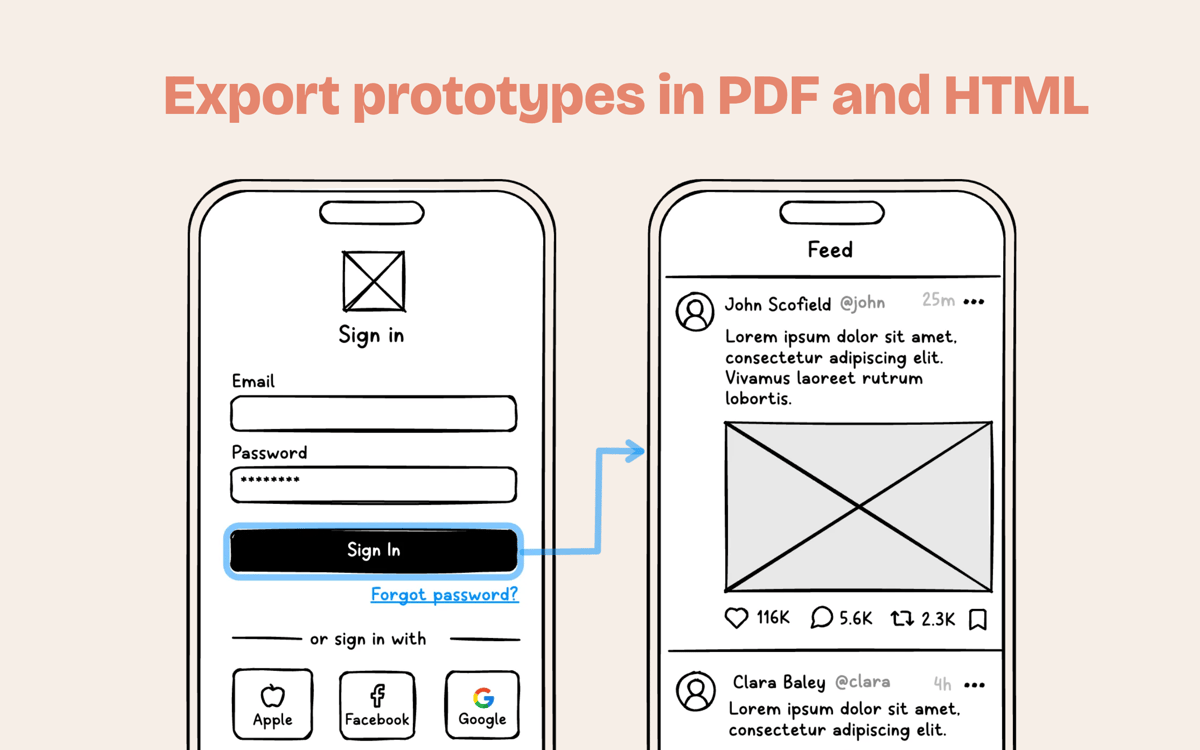
Créer des prototypes interactifs cliquables
Créez des mises en page avec l'IA intégrée
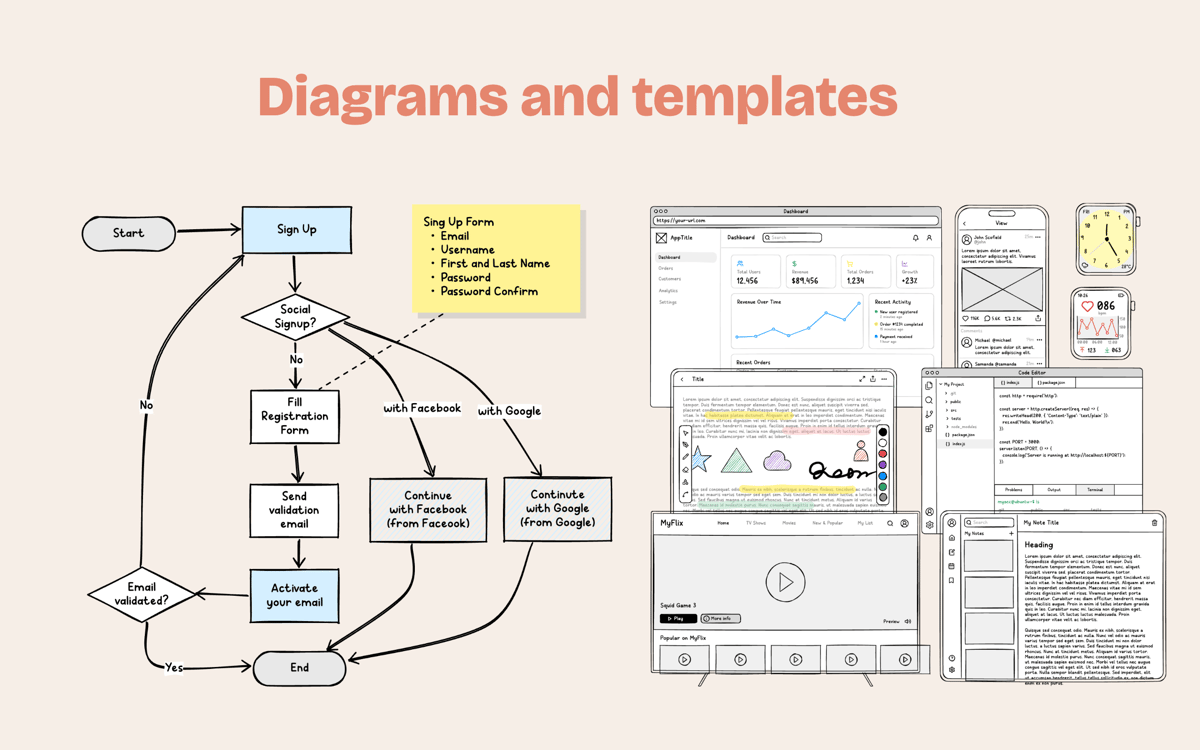
Créer des flux utilisateurs et diagrammes
Fonctionnalités de Frame0
Style dessiné à la main, sans stress
Oubliez la pression des mises en page parfaites. L'aspect esquissé et charmant indique à tous que vous explorez des concepts, ce qui encourage des retours plus constructifs et vous fait gagner du temps dès le départ.
Des milliers de composants et d'icônes
Accélérez vos projets grâce à une vaste bibliothèque d'éléments prêts à l'emploi pour vos applications web, mobiles et de bureau. Accédez également à plus de 1 500 icônes cohérentes au style esquisse.
Mise en miroir intelligente des cadres
Arrêtez de modifier le même en-tête sur vingt écrans différents. Créez un cadre principal, réutilisez-le partout et regardez vos mises à jour se synchroniser instantanément sur l'ensemble du projet.
Discutez avec un agent IA intégré
Besoin d'accélérer les choses ? Utilisez votre modèle d'IA préféré directement dans l'application pour créer des mises en page, explorer des structures ou même transformer vos idées brutes en wireframes fonctionnels.
Prototypes et présentations cliquables
Transformez des pages statiques en un parcours utilisateur dynamique. Reliez les formes pour créer des flux interactifs et présentez votre projet en diaporama captivant lors de votre prochaine grande réunion.
Prise en charge complète des diagrammes
Frame0 gère bien plus que de simples écrans. Restez organisé en créant des flux utilisateurs, des organigrammes et des diagrammes système clairs, le tout dans un seul et même fichier de projet.
Avis et commentaires
Frame0
•
24 classements
Sergio Alanis
3 juil. 2026
Version de l'application : 1.7.0
I really enjoy the app. Really ease to use, My suggestions. - Cloud account to save and sync files. - Abbility to connect own IA services like gemini or apple intelligence - Add more shortcuts speed is important on this apps. - A native desktop app.
Kolahn Garcia
20 juin 2026
Version de l'application : 1.7.0
Awesome when you link it up to Codex via MCP. Been spitting out web projects over the last few days
Alejandro Morataya
19 juin 2026
Version de l'application : 1.7.0
Great idea, but the implementation needs more refinement. The interactions don’t feel very smooth, especially the zoom behavior. It’s too easy to lose track of items because the zoom feels almost infinite, and scrolling/zooming with the tab does not update the visible zoom level correctly. Overall, the concept is strong, but the user experience needs more polish.
Profitez de centaines d'applications avec Membership
Devenez membre Setapp et utilisez des centaines d'applications incroyables grâce à un seul abonnement.
Forfait tout compris, après 7 jours d'essai gratuit
Installez Setapp sur votre Mac
Explorez des applications pour Mac, iOS et le Web. Découvrez comment accomplir facilement les tâches du quotidien.

Téléchargez l'application qui vous intéresse
Cette application vous attend dans Setapp. Installez-la d'un seul clic.

Frame0
Choisissez votre abonnement
Une seule application ou bien plus avec un abonnement Setapp. Accédez aux applications comme vous le souhaitez.

Profitez de centaines d'applications avec Membership
Devenez membre Setapp et utilisez des centaines d'applications incroyables grâce à un seul abonnement.
Forfait tout compris, après 7 jours d'essai gratuit
1
Installez Setapp sur votre Mac
Explorez des applications pour Mac, iOS et le Web. Découvrez comment accomplir facilement les tâches du quotidien.
2
Téléchargez l'application qui vous intéresse
Cette application vous attend dans Setapp. Installez-la d'un seul clic.
Frame0
3
Choisissez votre abonnement
Une seule application ou bien plus avec un abonnement Setapp. Accédez aux applications comme vous le souhaitez.
Des applications de qualité
Pour gérer des plannings, accomplir des tâches de routine, créer des contenus, coder et bien plus encore, optez pour Setapp.

TypingMind
IA conversationnelle avec interface alternative
générez ou résumez du texte
utilisez une bibliothèque de requêtes
IA

Spark Mail
Gérez vos e-mails
IA

CleanMyMac
Supprimez les fichiers inutiles

Bartender
Personnalisez la barre des menus

CleanShot X
Profitez de plus de possibilités pour les captures d'écran

Luminar Neo
Retouchez vos photos
IA

ClearVPN
Sécurisez votre connexion Internet

Craft
Travaillez sur vos documents
IA
Frame0
De l'idée au wireframe en un instant