
Kerlig
Écrivez mieux dans toutes les apps sur Mac


Mac
Version 2.8.4
macOS 12.0 ou version supérieure
573.5 MB
1 langues
Kerlig est un assistant d’écriture IA qui s’installe dans la barre de menus de votre Mac. Appuyez sur un raccourci et il est là — pas d’onglets de navigateur, pas de changement de contexte. Utilisez-le pour corriger vos messages, rédiger des réponses, résumer des documents ou lancer des actions personnalisées dans n’importe quelle application. Il fonctionne avec plus de 350 modèles d’OpenAI, Anthropic, Google et plus encore, en utilisant vos propres clés API.
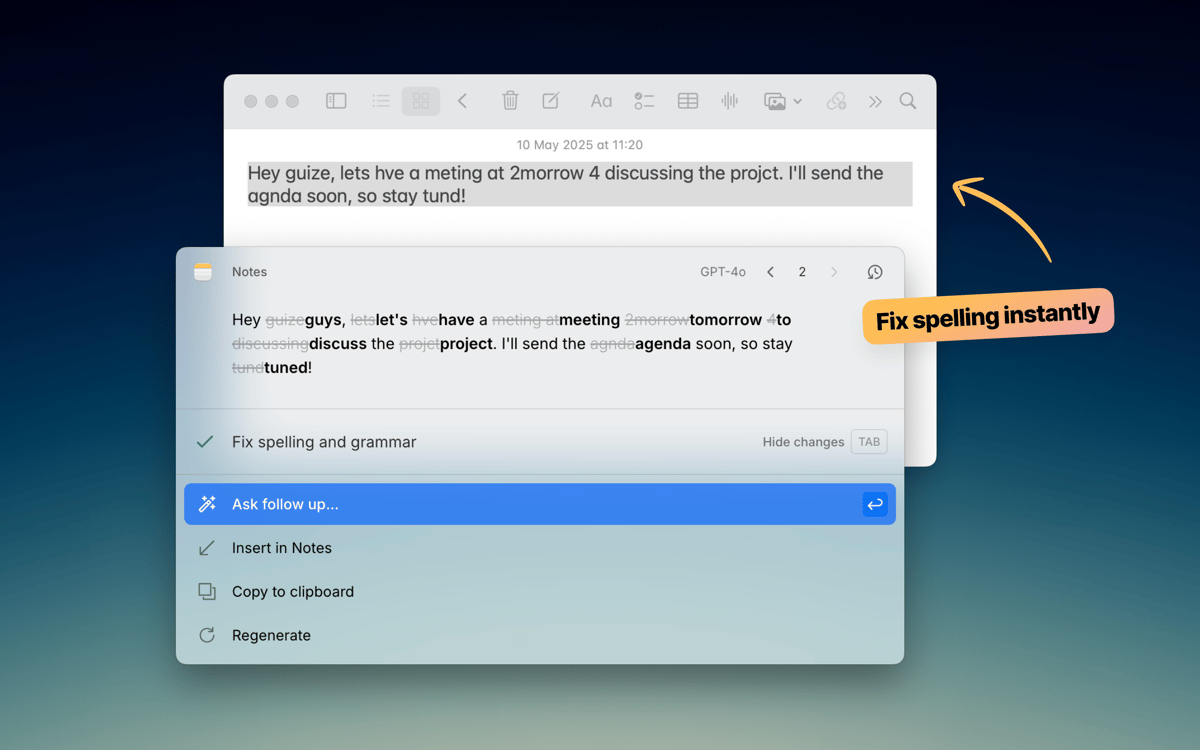
Corrigez vos textes avant d’appuyer sur Envoyer
Rédigez e-mails et réponses Slack plus vite
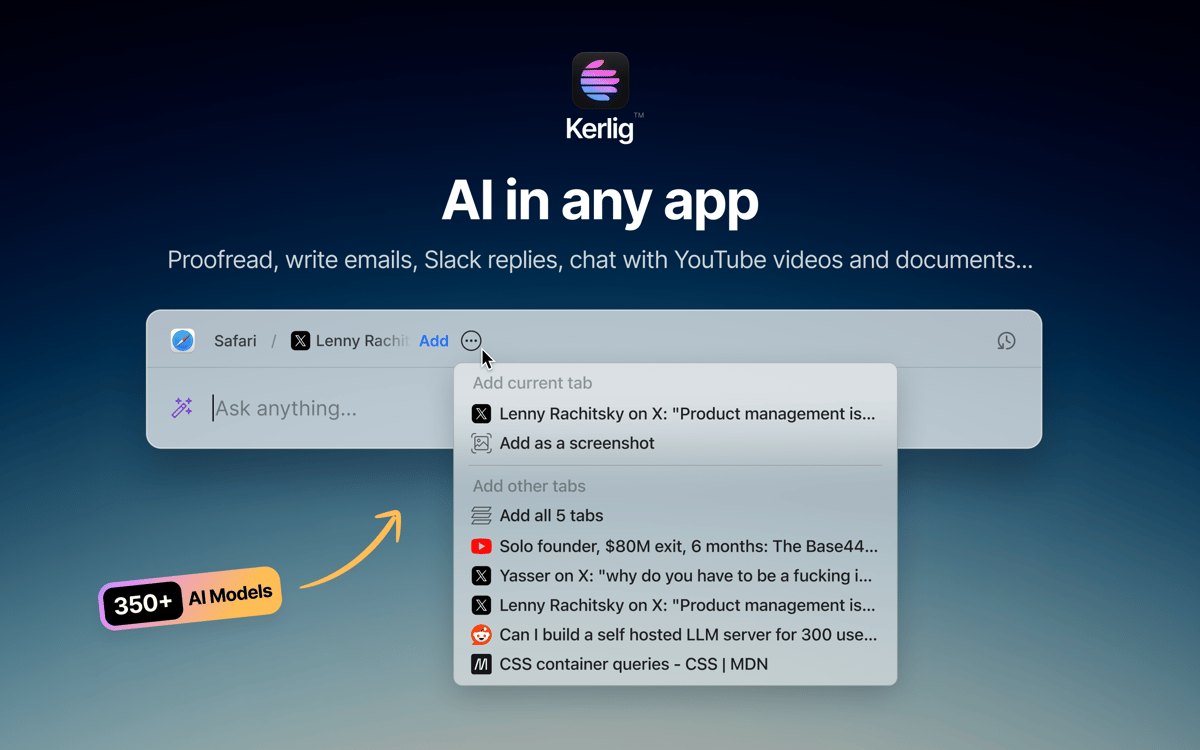
Discutez avec des documents et des pages web
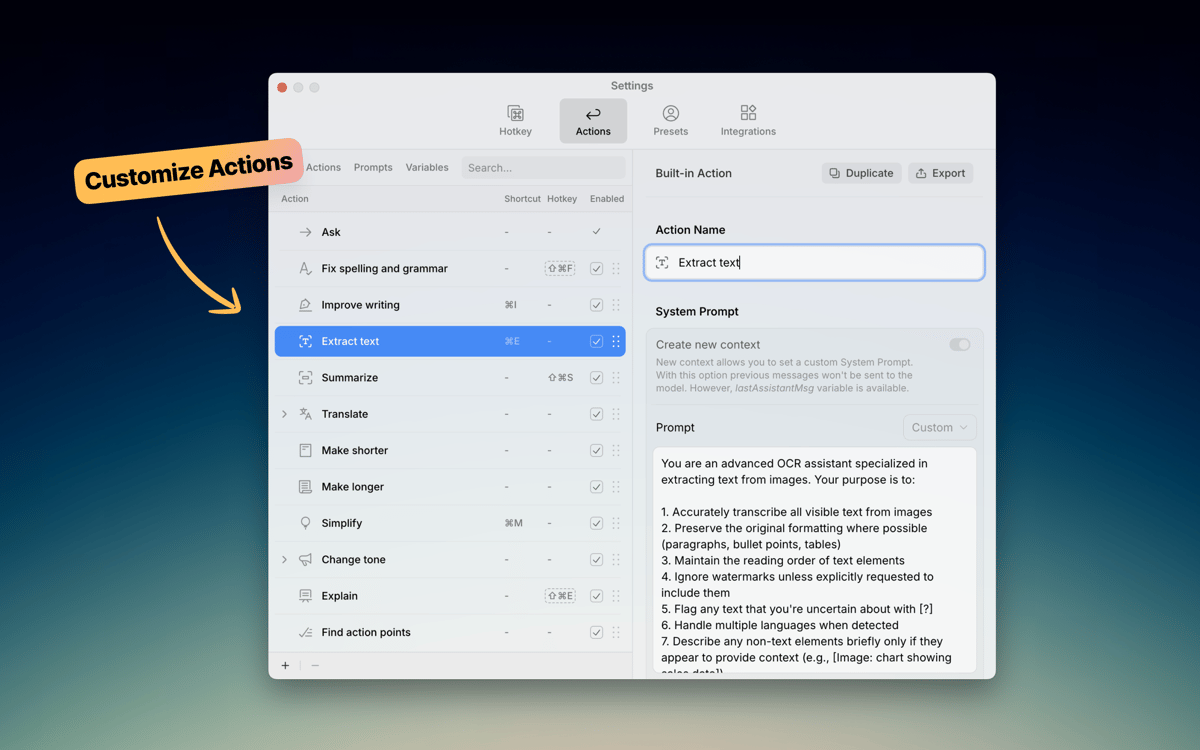
Actions IA personnalisées dans toute app
Fonctionnalités de Kerlig
Écrivez sans quitter votre application
Kerlig reste discret jusqu’à ce que vous en ayez besoin. Appuyez sur un raccourci clavier et il apparaît exactement là où vous travaillez — que ce soit dans Mail, Slack, Notion ou ailleurs. Corrigez la grammaire, améliorez un message ou rédigez une réponse sans ouvrir un seul onglet de navigateur. Il s’intègre parfaitement à votre façon de travailler sur Mac.
Choisissez votre modèle IA
Toutes les tâches n’ont pas besoin du même modèle. Kerlig se connecte à plus de 350 modèles venant d’OpenAI, Anthropic, Google, Groq, Perplexity, et plus encore. Passez de l’un à l’autre en un clic. Vous pouvez aussi exécuter des modèles locaux via Ollama, LM Studio ou Apple Foundation Models si vous préférez garder les données sur l’appareil.
Créez vos propres actions
Kerlig offre des actions intégrées pratiques comme la correction, la synthèse et la traduction. Mais la véritable puissance réside dans la création de vos propres actions. Créez des prompts personnalisés pour les tâches que vous effectuez souvent — rédaction de tickets Jira, conversion de code, génération de posts pour les réseaux sociaux — et déclenchez-les instantanément depuis le menu des raccourcis. Vos workflows, vos règles.
Discutez avec des documents
Déposez un PDF, une page web, un ebook ou une image et commencez à poser des questions. Kerlig vous permet d’analyser et de résumer des documents directement dans l’application, sans copier/coller des blocs de texte dans un navigateur. C’est un moyen rapide d’obtenir des informations des fichiers avec lesquels vous travaillez déjà.
Définissez votre ton
Chacun écrit différemment. Kerlig vous permet d’enregistrer des préréglages de ton — décontracté pour Slack, professionnel pour les e-mails clients, concis pour les tickets — afin que vos textes générés par l’IA vous ressemblent. Changez de ton en un clic et gardez votre style cohérent dans tous vos messages.
Gardez vos écrits privés
Kerlig ne stocke pas vos données et ne les utilise pas pour l’entraînement. Votre historique de chat reste chiffré sur votre Mac et vous gardez toujours le contrôle sur le fournisseur d’IA qui traite vos requêtes. Écrivez en toute liberté, en sachant que vos messages et documents ne sont ni collectés ni partagés en arrière-plan.
Avis et commentaires
Kerlig
•
25 classements
Matthias Honert
15 juil. 2026
Version de l'application : 2.6.0
Yeah, nice tool. Text review is now easier than before in during different apps
kyo kou
8 mai 2026
Version de l'application : 2.5.5
This app is really amazing! I particularly love its action feature, which makes everything so much easier. Before, I had to open a website to get certain AI responses, but now I can do it all with just a shortcut key.
Bowser
1 mai 2026
Version de l'application : 2.5.4
This app is fantastic. I LOVE it. It’s easy to use, does what it says, and is great for changing copy on the fly without using the Claude / ChatGPT platform. Highly Recommended.
Profitez de centaines d'applications avec Membership
Devenez membre Setapp et utilisez des centaines d'applications incroyables grâce à un seul abonnement.
Forfait tout compris, après 7 jours d'essai gratuit
Installez Setapp sur votre Mac
Explorez des applications pour Mac, iOS et le Web. Découvrez comment accomplir facilement les tâches du quotidien.

Téléchargez l'application qui vous intéresse
Cette application vous attend dans Setapp. Installez-la d'un seul clic.

Kerlig
Choisissez votre abonnement
Une seule application ou bien plus avec un abonnement Setapp. Accédez aux applications comme vous le souhaitez.

Profitez de centaines d'applications avec Membership
Devenez membre Setapp et utilisez des centaines d'applications incroyables grâce à un seul abonnement.
Forfait tout compris, après 7 jours d'essai gratuit
1
Installez Setapp sur votre Mac
Explorez des applications pour Mac, iOS et le Web. Découvrez comment accomplir facilement les tâches du quotidien.
2
Téléchargez l'application qui vous intéresse
Cette application vous attend dans Setapp. Installez-la d'un seul clic.
Kerlig
3
Choisissez votre abonnement
Une seule application ou bien plus avec un abonnement Setapp. Accédez aux applications comme vous le souhaitez.
Des applications de qualité
Pour gérer des plannings, accomplir des tâches de routine, créer des contenus, coder et bien plus encore, optez pour Setapp.

TypingMind
IA conversationnelle avec interface alternative
générez ou résumez du texte
utilisez une bibliothèque de requêtes
IA

Spark Mail
Gérez vos e-mails
IA

CleanMyMac
Supprimez les fichiers inutiles

Bartender
Personnalisez la barre des menus

CleanShot X
Profitez de plus de possibilités pour les captures d'écran

Luminar Neo
Retouchez vos photos
IA

ClearVPN
Sécurisez votre connexion Internet

Craft
Travaillez sur vos documents
IA
Kerlig
Écrivez mieux dans toutes les apps sur Mac