
ScreenSnap Pro
Capturez, annotez et partagez facilement
Mac
Version 3.5.2
macOS 12.0 ou version supérieure
753.8 MB
1 langues
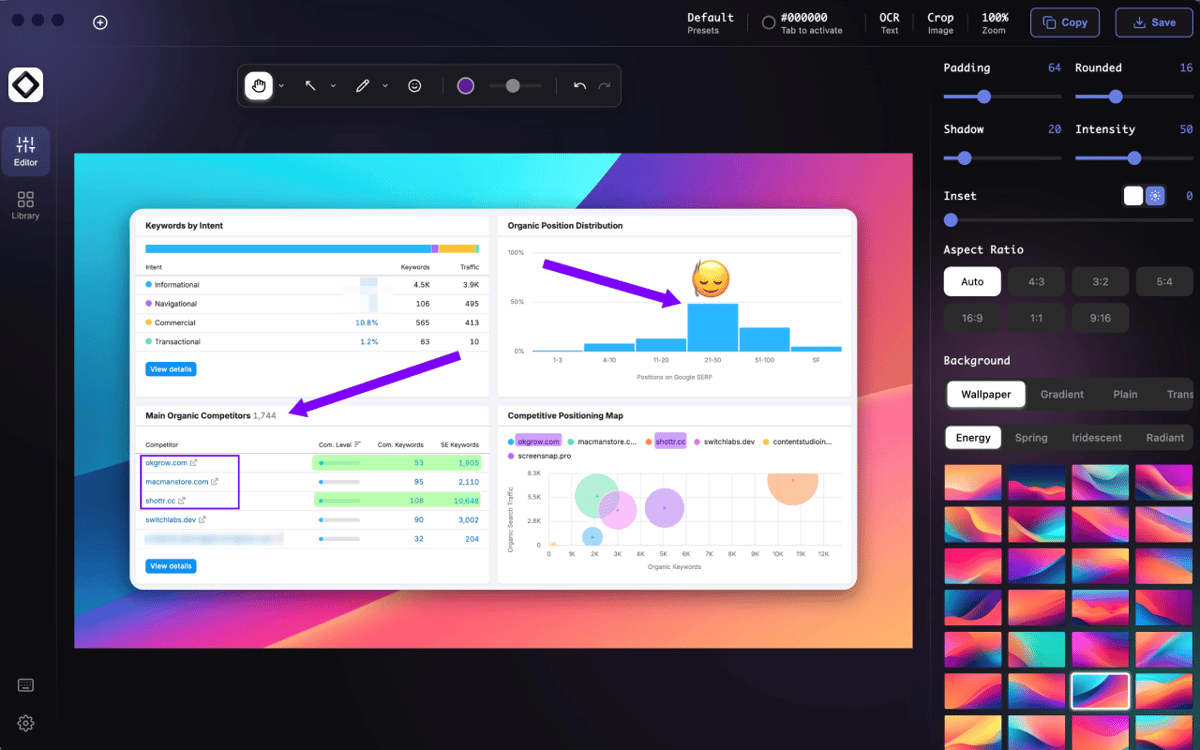
ScreenSnap Pro — app de capture d'écran pour Mac. Capturez une zone, une fenêtre ou l'écran entier sans naviguer dans des menus ou faire des acrobaties au clavier. Annotez les captures d'écran avec des flèches, du flou, des surlignages et des notes juste après la capture, car ouvrir trois applications supplémentaires n'est le flux de travail idéal pour personne. Vous avez aussi besoin de mouvement ? Enregistrez votre écran, créez des GIF rapides ou extrayez du texte de captures d'écran avec l'OCR intégré. Des rapports de bugs aux tutoriels en passant par les moments « Mais où ai-je enregistré ça ? », ScreenSnap Pro rend le partage visuel simple et organisé.
Capturez des captures d'écran rapidement
Enregistrez des démos d'écran rapides
Annoter sans apps supplémentaires
Extraire le texte des images
Fonctionnalités de ScreenSnap Pro
Capturez exactement ce dont vous avez besoin
Réalisez des captures d'écran en plein écran, en fenêtre, en zone ou différées grâce à des raccourcis intuitifs. Capture rapide, finies les recherches.
Annotez instantanément
Ajoutez des flèches, des formes, du texte, des surlignages, des effets de flou et plus encore dans l'éditeur intégré. Aucune exportation. Aucun changement d'application.
Enregistrez l'écran et créez des GIF
Montrez les étapes, expliquez les problèmes ou créez des tutoriels rapides sans installer tout un studio de production.
Saisir du texte par OCR
Copiez le texte directement à partir des captures d'écran et des images. Pratique pour les reçus, présentations, PDF ou tout élément oubliant d'être sélectionnable.
Partagez vos captures d'écran plus rapidement
Téléchargez vos captures d'écran sur le cloud, organisez vos fichiers et envoyez des liens sans transformer votre bureau en cimetière de captures d'écran.
Personnalisez votre workflow
Personnalisez les raccourcis, emplacements de sauvegarde, comportement d'aperçu, paramètres de sortie et minuteurs de délai pour que l'app fonctionne comme vous le faites déjà.
Profitez de centaines d'applications avec Membership
Devenez membre Setapp et utilisez des centaines d'applications incroyables grâce à un seul abonnement.
Forfait tout compris, après 7 jours d'essai gratuit
Installez Setapp sur votre Mac
Explorez des applications pour Mac, iOS et le Web. Découvrez comment accomplir facilement les tâches du quotidien.

Téléchargez l'application qui vous intéresse
Cette application vous attend dans Setapp. Installez-la d'un seul clic.

ScreenSnap Pro
Choisissez votre abonnement
Une seule application ou bien plus avec un abonnement Setapp. Accédez aux applications comme vous le souhaitez.

Profitez de centaines d'applications avec Membership
Devenez membre Setapp et utilisez des centaines d'applications incroyables grâce à un seul abonnement.
Forfait tout compris, après 7 jours d'essai gratuit
1
Installez Setapp sur votre Mac
Explorez des applications pour Mac, iOS et le Web. Découvrez comment accomplir facilement les tâches du quotidien.
2
Téléchargez l'application qui vous intéresse
Cette application vous attend dans Setapp. Installez-la d'un seul clic.
ScreenSnap Pro
3
Choisissez votre abonnement
Une seule application ou bien plus avec un abonnement Setapp. Accédez aux applications comme vous le souhaitez.
Des applications de qualité
Pour gérer des plannings, accomplir des tâches de routine, créer des contenus, coder et bien plus encore, optez pour Setapp.

TypingMind
IA conversationnelle avec interface alternative
générez ou résumez du texte
utilisez une bibliothèque de requêtes
IA

Spark Mail
Gérez vos e-mails
IA

CleanMyMac
Supprimez les fichiers inutiles

Bartender
Personnalisez la barre des menus

CleanShot X
Profitez de plus de possibilités pour les captures d'écran

Luminar Neo
Retouchez vos photos
IA

ClearVPN
Sécurisez votre connexion Internet

Craft
Travaillez sur vos documents
IA
ScreenSnap Pro
Capturez, annotez et partagez facilement