
Clamshell
Працюйте із закритою кришкою



Mac
Версія 1.4.23
macOS 14.0 чи новіша
9.6 MB
4 мов(и)
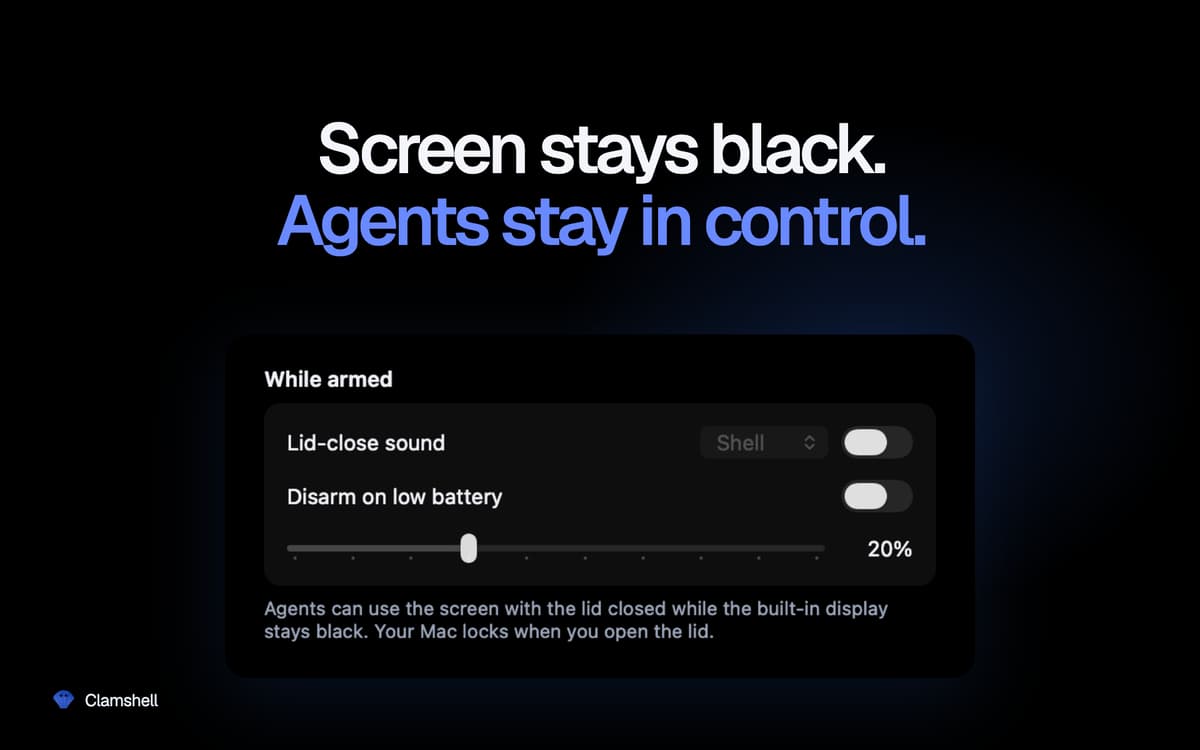
Clamshell — менеджер сну для Mac із закритою кришкою. Закрийте кришку — і Mac продовжить працювати: завантаження завершаться, збірки виконаються, а ШІ-агенти зроблять свою справу. Без зовнішнього дисплея, без підключених периферійних пристроїв — лише одне натискання в рядку меню. Відкрийте кришку — і ви знову там, де зупинилися.
Запускайте ШІ-агентів на ніч із закритою кришкою
Продовжуйте довгі збірки без нагляду
Передавайте великі файли із закритим екраном
Активуйте або деактивуйте одним кліком у меню
Можливості Clamshell
Одне натискання для активації — і жодних перешкод
Щоб активувати Clamshell, достатньо один раз натиснути на значок у рядку меню. Волієте не тягнутися до миші? Також є комбінація клавіш. На підтримуваних MacBook утримання клавіші Option під час закриття кришки активує Clamshell ще на шляху донизу — з невеликою анімацією закриття, яка робить увесь процес напрочуд приємним.
Залишається активним навіть при зміні джерела живлення
Підключення або відключення зарядного пристрою зазвичай непомітно скидає налаштування сну під час закриття кришки. Clamshell стежить за кожною зміною живлення та миттєво активується повторно, тож нічне завдання не припиниться непомітно через те, що кабель зсунувся о 2 ночі.
Захист від низького заряду батареї
Встановіть порогове значення заряду батареї, і Clamshell автоматично деактивується, щойно ви його досягнете, — дозволяючи Mac перейти в режим сну, а не розряджатися повністю. Ви контролюєте ситуацію без потреби пам'ятати про перевірку.
За замовчуванням тимчасовий, а постійний — за бажанням
Відкрийте кришку — і Mac повертається до звичної роботи, тож жодні забуті налаштування не розряджатимуть акумулятор у вашій сумці. Бажаєте, щоб Clamshell завжди залишався активним? Достатньо одного перемикача в налаштуваннях. Якщо застосунок несподівано завершує роботу, звичний режим сну відновлюється автоматично. Жодних зависань.
Нічого не приховано у фоновому режимі
Жодного значка в Dock, вікон, пароля адміністратора, допоміжних демонів чи розширень ядра. Лише один значок у рядку меню, який одразу показує, чи продовжить Mac працювати після закриття кришки.
Оцінки та відгуки
Clamshell
•
Оцінок: 21
Yoram Kornatzky
29 вер. 2026 р.
Версія: 1.4.19
Great. But one shortcoming is that it cannot operate when using external displays.
Miha
2 вер. 2026 р.
Версія: 1.4.17
I was skeptical when I first saw this, but so far it has worked incredibly well for me. A MacBook Air can run on battery for a looong time in this mode (just take care if you chuck it in a backpack or similar — it can get HOT!).
Vincent Keunen
20 серп. 2026 р.
Версія: 1.4.14
Simple and very useful. Well designed. Developer responds fast to suggestions.
Отримайте сотні програм з Membership
Підпишіться на Setapp і користуйтесь сотнями чудових програм.
Перші 7 днів безплатно, а далі – в єдиному простому плані.
Завантажити Setapp на Mac
Знайдіть в Setapp застосунок для macOS, iOS або web, що допоможе вирішити ваше завдання.

Установіть знайдену програму
Виконайте завдання за допомогою новенької програми зі Setapp.

Clamshell
Виберіть план підписки
Один застосунок або всі разом в підписці Setapp. Користуйтеся застосунками на своїх умовах.

Отримайте сотні програм з Membership
Підпишіться на Setapp і користуйтесь сотнями чудових програм.
Перші 7 днів безплатно, а далі – в єдиному простому плані.
1
Завантажити Setapp на Mac
Знайдіть в Setapp застосунок для macOS, iOS або web, що допоможе вирішити ваше завдання.
2
Установіть знайдену програму
Виконайте завдання за допомогою новенької програми зі Setapp.
Clamshell
3
Виберіть план підписки
Один застосунок або всі разом в підписці Setapp. Користуйтеся застосунками на своїх умовах.
Нагору
Від планування та рутинних завдань до програмування і творчості – працюйте ефективніше зі Setapp.

TypingMind
ШІ зі зручним інтерфейсом
генеруйте й обробляйте текст
користуйтеся бібліотекою
ШІ

Spark Mail
Упорядкуйте імейли
ШІ

CleanMyMac
Видаляйте тільки непотрібне

Bartender
Налаштуйте меню під себе

CleanShot X
Робіть будь-які скриншоти

Luminar Neo
Редагуйте фото
ШІ

ClearVPN
Безпечний звʼязок

Craft
Робота з документами
ШІ
Clamshell
Працюйте із закритою кришкою