
FinderCraft
Finder, but more in control
Mac
Версія 1.0.13
macOS 14.0 чи новіша
22.2 MB
1 мов(и)
FinderCraft — file manager for Mac. It adds a staging Shelf and a set of focused file tools right inside the Finder windows you already use, so moving, renaming, and organizing files feels calm instead of chaotic. Stage files from any Finder window, compare folders before copying anything, preview renames before they happen. FinderCraft is careful by default: it shows you what'll change, never silently overwrites, and keeps a log so you can undo. Everything runs locally — no account, no cloud, nothing leaves your Mac.
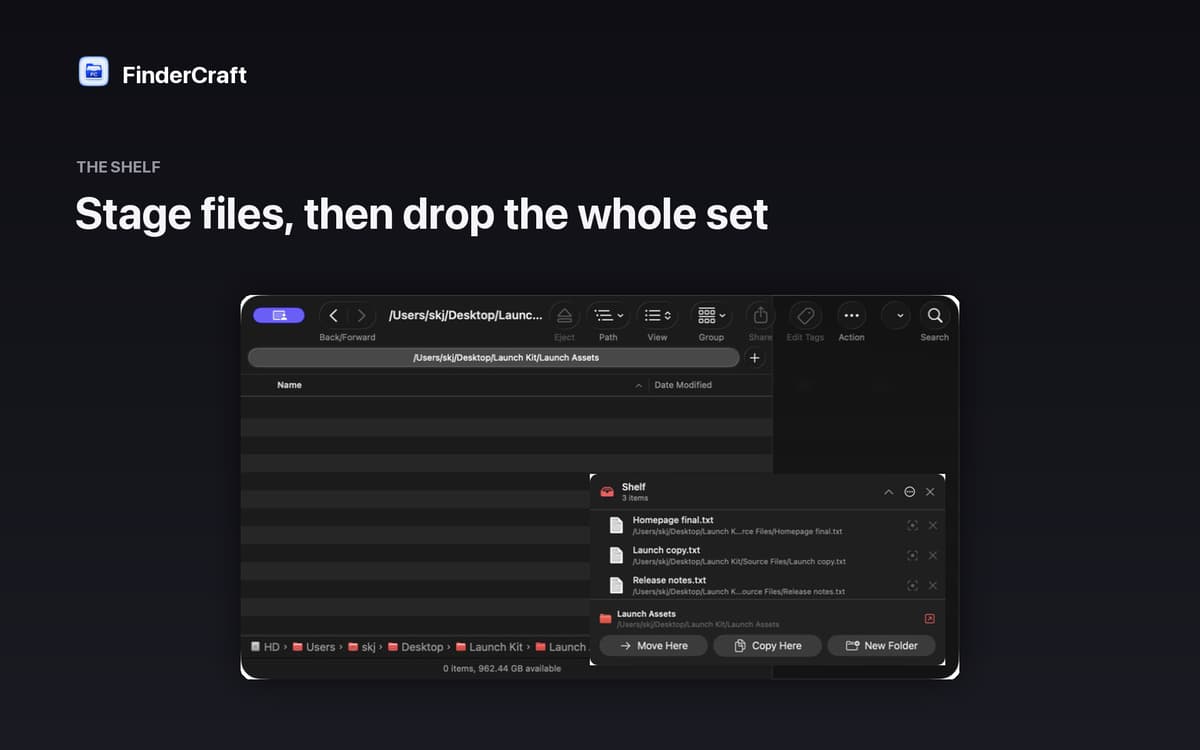
Stage files before you move them
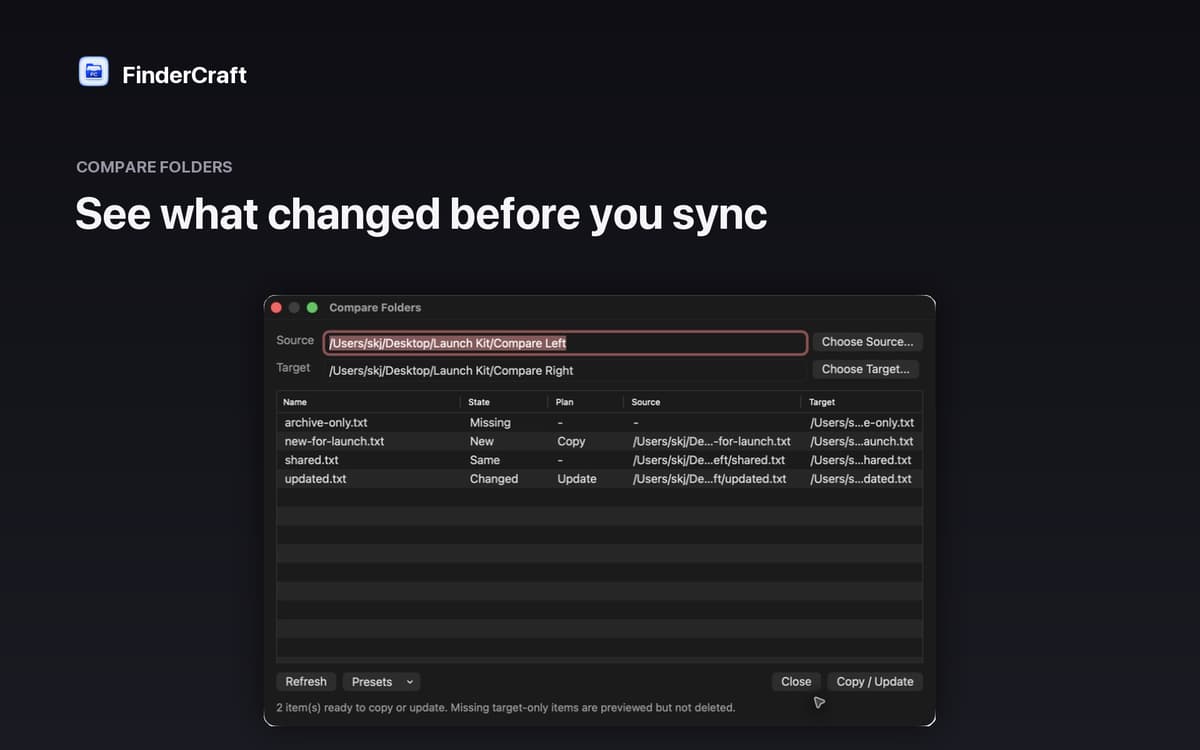
Compare two folders side by side
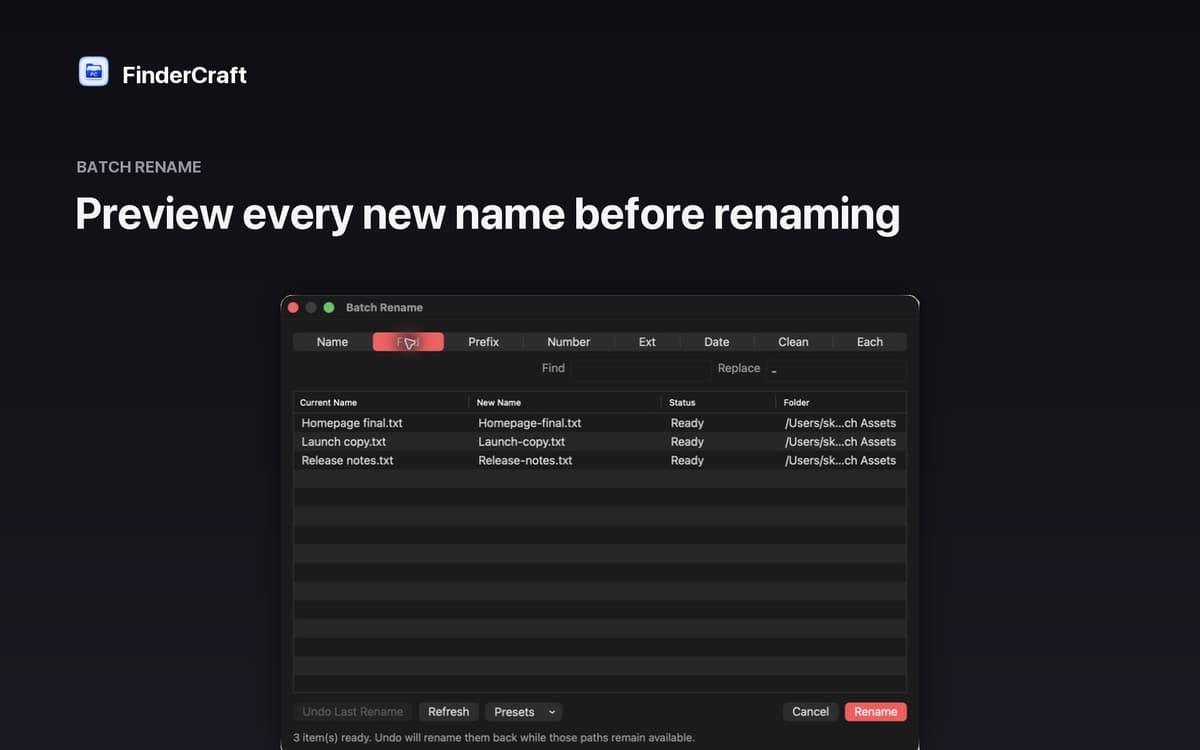
Batch rename with a live preview
Sort files into folders in one go
Можливості FinderCraft
The Shelf: your staging tray
Moving files between folders usually means juggling two windows at once. The Shelf gives you a neutral staging area instead. Drop files from any Finder window, then move the whole batch to its destination in one calm step. Less chaos, fewer mistakes.
Keyboard shuttle
Don't want to reach for the mouse every time? Stage your current Finder selection onto the Shelf with a single keystroke. It's a small thing that makes a big difference when you're working through a lot of files quickly.
Compare Folders
Not sure what's actually different between two folders? FinderCraft lines them up and tells you exactly what's missing, new, identical, or changed — before touching anything. You review the plan, then decide what to copy or update.
Batch Rename
Renaming files one by one is tedious. With Batch Rename, you see every new filename next to the original before committing. Adjust the pattern, check the preview, confirm — done. No surprises.
Tidy Up
Screenshots piling up on your Desktop? Tidy Up sorts files into clear folders by type — images, documents, audio, video, archives, code, and more. One action, instant order.
Safe by default
FinderCraft previews risky changes before they happen, never silently overwrites files, and records what it did so you can undo. Native AppKit, built for macOS 14 and later. Private by design: no account, no analytics, no trackers.
Отримайте сотні програм з Membership
Підпишіться на Setapp і користуйтесь сотнями чудових програм.
Перші 7 днів безплатно, а далі – в єдиному простому плані.
Завантажити Setapp на Mac
Знайдіть в Setapp застосунок для macOS, iOS або web, що допоможе вирішити ваше завдання.

Установіть знайдену програму
Виконайте завдання за допомогою новенької програми зі Setapp.

FinderCraft
Виберіть план підписки
Один застосунок або всі разом в підписці Setapp. Користуйтеся застосунками на своїх умовах.

Отримайте сотні програм з Membership
Підпишіться на Setapp і користуйтесь сотнями чудових програм.
Перші 7 днів безплатно, а далі – в єдиному простому плані.
1
Завантажити Setapp на Mac
Знайдіть в Setapp застосунок для macOS, iOS або web, що допоможе вирішити ваше завдання.
2
Установіть знайдену програму
Виконайте завдання за допомогою новенької програми зі Setapp.
FinderCraft
3
Виберіть план підписки
Один застосунок або всі разом в підписці Setapp. Користуйтеся застосунками на своїх умовах.
Нагору
Від планування та рутинних завдань до програмування і творчості – працюйте ефективніше зі Setapp.

TypingMind
ШІ зі зручним інтерфейсом
генеруйте й обробляйте текст
користуйтеся бібліотекою
ШІ

Spark Mail
Упорядкуйте імейли
ШІ

CleanMyMac
Видаляйте тільки непотрібне

Bartender
Налаштуйте меню під себе

CleanShot X
Робіть будь-які скриншоти

Luminar Neo
Редагуйте фото
ШІ

ClearVPN
Безпечний звʼязок

Craft
Робота з документами
ШІ
FinderCraft
Finder, but more in control