
Kerlig
Пишіть розумніше у будь-якому додатку Mac


Mac
Версія 2.8.4
macOS 12.0 чи новіша
573.5 MB
1 мов(и)
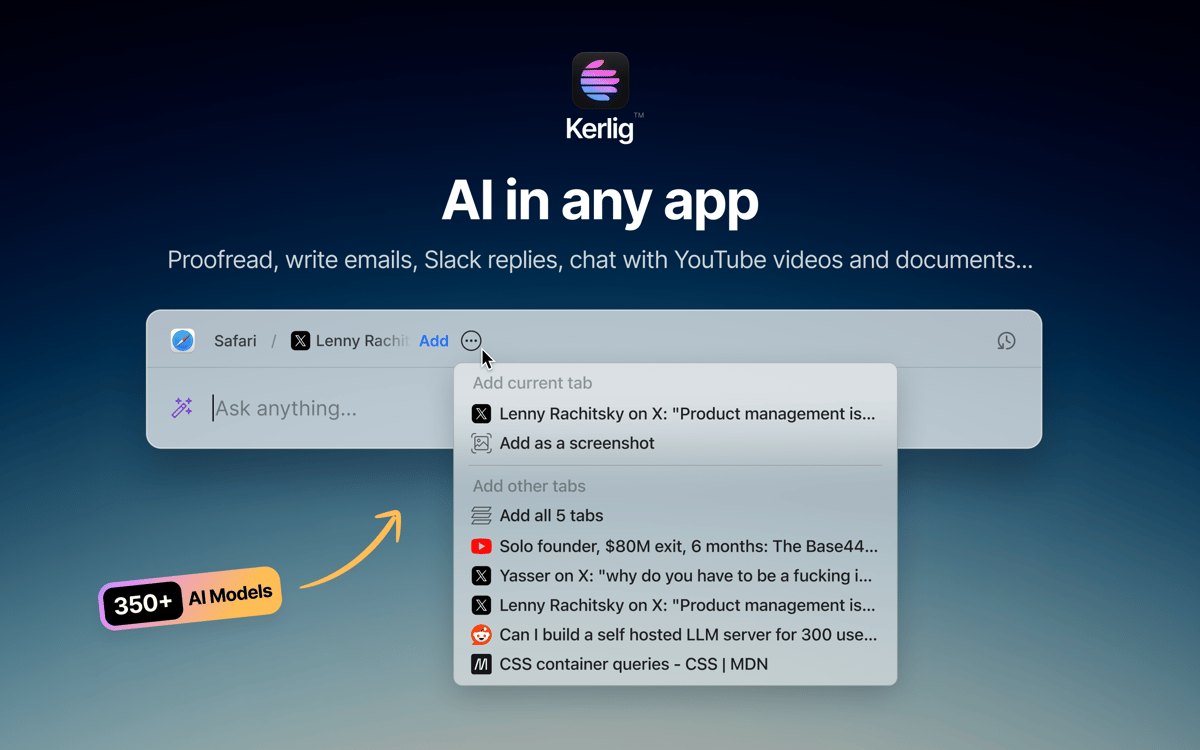
Kerlig — це AI-помічник для письма, що працює в менюбарі вашого Mac. Натисніть комбінацію клавіш — і він тут, без вкладок браузера та перемикань між вікнами. Використовуйте його для перевірки повідомлень, створення відповідей, узагальнення документів або запуску власних дій в будь-якому додатку. Працює з понад 350 моделями від OpenAI, Anthropic, Google та інших через ваші власні API-ключі.
Перевіряйте текст перед надсиланням
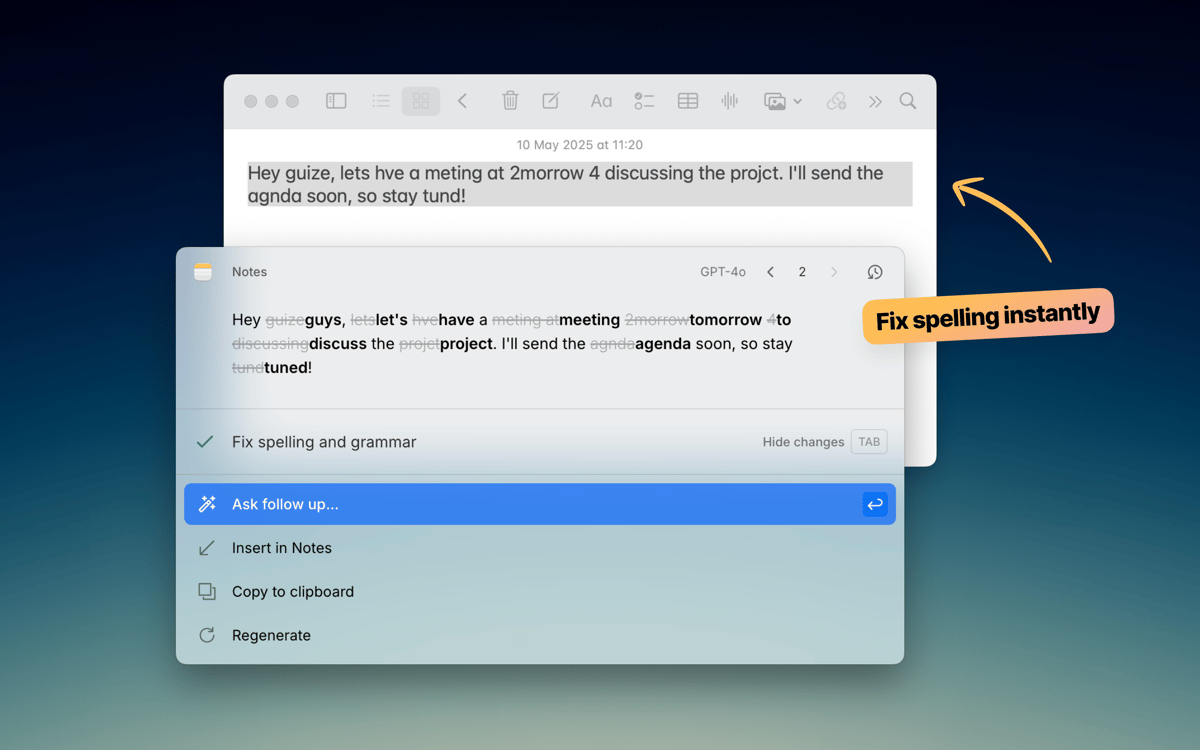
Швидкі чернетки листів і Slack-відповідей
Спілкуйтесь із документами та вебсторінками
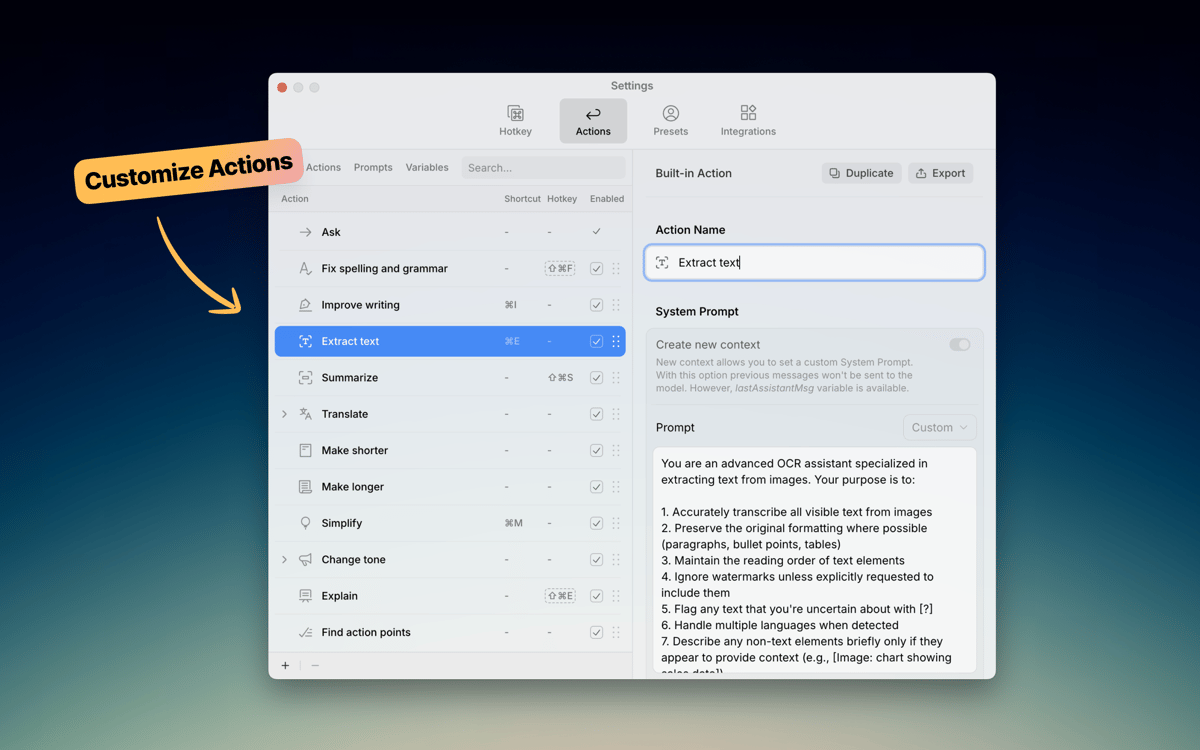
Запускайте власні AI-дії у будь-якому додатку
Можливості Kerlig
Пишіть, не виходячи з вашого додатку
Kerlig не заважає, поки вам він не знадобиться. Натисніть комбінацію клавіш — він з’явиться саме там, де ви працюєте — у Mail, Slack, Notion або будь-якому іншому додатку. Виправляйте граматику, покращуйте повідомлення чи створюйте відповідь без відкриття жодної вкладки браузера. Він ідеально інтегрується у ваш робочий процес на Mac.
Оберіть AI-модель
Не всі завдання потребують однакової моделі. Kerlig підключається до понад 350 моделей від OpenAI, Anthropic, Google, Groq, Perplexity та інших. Перемикайтесь між ними в один клік. Також ви можете запускати локальні моделі через Ollama, LM Studio чи Apple Foundation Models, якщо бажаєте зберігати дані на пристрої.
Створюйте власні дії
Kerlig постачається з корисними вбудованими діями, такими як перевірка тексту, узагальнення та переклад. Але справжня сила — у створенні власних дій. Створіть власні підказки для частих завдань — написання Jira-квитків, конвертації коду, створення постів для соцмереж — і запускайте їх миттєво через меню швидкого доступу. Ваші робочі процеси — ваші правила.
Спілкуйтеся з документами
Додавайте PDF, вебсторінку, електронну книгу чи зображення й одразу ставте питання. Kerlig дозволяє аналізувати та узагальнювати документи прямо у додатку без копіювання тексту до браузера. Це швидкий спосіб отримати ключову інформацію з файлів, з якими ви вже працюєте.
Встановіть власний тон мовлення
Кожен пише по-своєму. Зберігайте власні шаблони тону — неформальний для Slack, офіційний для листів клієнтам, лаконічний для задач — щоб AI-текст звучав саме як ви. Змінюйте тон одним кліком і зберігайте послідовність у всіх повідомленнях.
Зберігайте приватність вашого письма
Kerlig не зберігає та не використовує ваші дані для тренування моделей. Ваша історія чатів залишається зашифрованою на вашому Mac, і тільки ви вирішуєте, який AI-провайдер обробляє ваші запити. Пишіть вільно, знаючи, що ваші повідомлення та документи не збираються і не передаються стороннім.
Оцінки та відгуки
Kerlig
•
Оцінок: 25
Matthias Honert
15 лип. 2026 р.
Версія: 2.6.0
Yeah, nice tool. Text review is now easier than before in during different apps
kyo kou
8 трав. 2026 р.
Версія: 2.5.5
This app is really amazing! I particularly love its action feature, which makes everything so much easier. Before, I had to open a website to get certain AI responses, but now I can do it all with just a shortcut key.
Bowser
1 трав. 2026 р.
Версія: 2.5.4
This app is fantastic. I LOVE it. It’s easy to use, does what it says, and is great for changing copy on the fly without using the Claude / ChatGPT platform. Highly Recommended.
Отримайте сотні програм з Membership
Підпишіться на Setapp і користуйтесь сотнями чудових програм.
Перші 7 днів безплатно, а далі – в єдиному простому плані.
Завантажити Setapp на Mac
Знайдіть в Setapp застосунок для macOS, iOS або web, що допоможе вирішити ваше завдання.

Установіть знайдену програму
Виконайте завдання за допомогою новенької програми зі Setapp.

Kerlig
Виберіть план підписки
Один застосунок або всі разом в підписці Setapp. Користуйтеся застосунками на своїх умовах.

Отримайте сотні програм з Membership
Підпишіться на Setapp і користуйтесь сотнями чудових програм.
Перші 7 днів безплатно, а далі – в єдиному простому плані.
1
Завантажити Setapp на Mac
Знайдіть в Setapp застосунок для macOS, iOS або web, що допоможе вирішити ваше завдання.
2
Установіть знайдену програму
Виконайте завдання за допомогою новенької програми зі Setapp.
Kerlig
3
Виберіть план підписки
Один застосунок або всі разом в підписці Setapp. Користуйтеся застосунками на своїх умовах.
Нагору
Від планування та рутинних завдань до програмування і творчості – працюйте ефективніше зі Setapp.

TypingMind
ШІ зі зручним інтерфейсом
генеруйте й обробляйте текст
користуйтеся бібліотекою
ШІ

Spark Mail
Упорядкуйте імейли
ШІ

CleanMyMac
Видаляйте тільки непотрібне

Bartender
Налаштуйте меню під себе

CleanShot X
Робіть будь-які скриншоти

Luminar Neo
Редагуйте фото
ШІ

ClearVPN
Безпечний звʼязок

Craft
Робота з документами
ШІ
Kerlig
Пишіть розумніше у будь-якому додатку Mac