Meetings demand attention, but also perfect note-taking. That’s asking too much from one person. Eney sits in the meeting with you, transcribes the discussion, and delivers a clean summary in your preferred format. You don’t have to juggle both roles anymore.
Start the assistant with a single command
Open Eney and type a command like “take meeting notes” or “transcribe and summarize meeting”. Jump into your meeting. You’ll see a little confirmation in Eney — click it and it starts recording. From here, just focus on talking.
Note: The first time you run transcription, Eney may request access to the microphone, system audio, and speech recognition. Click Allow to proceed.
Record and receive structured notes
Once started, Eney captures everything you say. After the meeting ends, you’ll receive two files: a full transcript and a neatly structured meeting note with all key points clearly laid out. Everything is saved on your Mac for easy access.
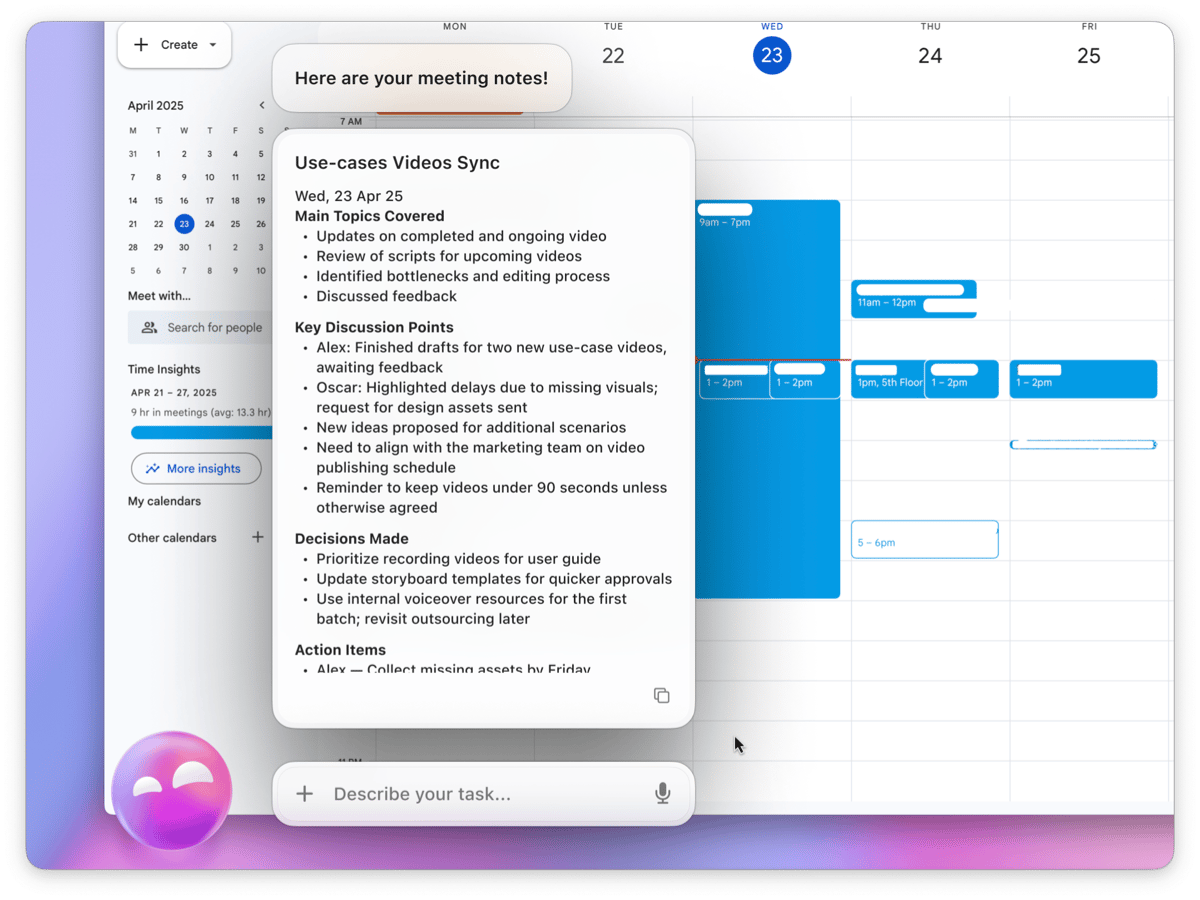
Ask questions and get instant answers
Need to check a detail quickly? You can ask something like, “Did we discuss holiday dates?” and Eney will provide the answer based on your meeting content.
Hope this how-to will help you solve tasks faster, and enjoy solving them, too! Check out more how-tos picked for you below.