Marketplace Membership
Sign in Try free
Setapp logo
Home Marketplace Membership How it works Solve with AI+ Pricing Blog About Setapp
Sign in

Solve macOS 13 issues

Troubleshooting kit for Ventura 

Beta or no beta, updating macOS is like stepping onto new land — there’s always a chance your foot goes down into a hole. With this pack of apps, you’ll feel prepared. 

Fix Ventura hiccups with these apps
Prevent the worst

With Get Backup Pro and an external drive connected to your Mac, you can back up your most precious data in a few minutes. No need to waste time and storage space on Time Machine backups. This simple step is your insurance in case the macOS update goes wrong.


Keep an eye on post-update performance 

iStat Menus will help you catch the apps that misbehave on Ventura, hogging your CPU and bandwidth. Check the real-time CPU, memory, and bandwidth stats right from the menu bar. 


Speed up Mac on Ventura

Found the apps that slow down your Mac? Time for CleanMyMac X to step in: 

  • Update outdated apps via Updater

  • Uninstall apps incompatible with Ventura via Uninstaller

  • Go to Maintenance and run available tasks to speed up your Mac.


Have an app quitter at hand 

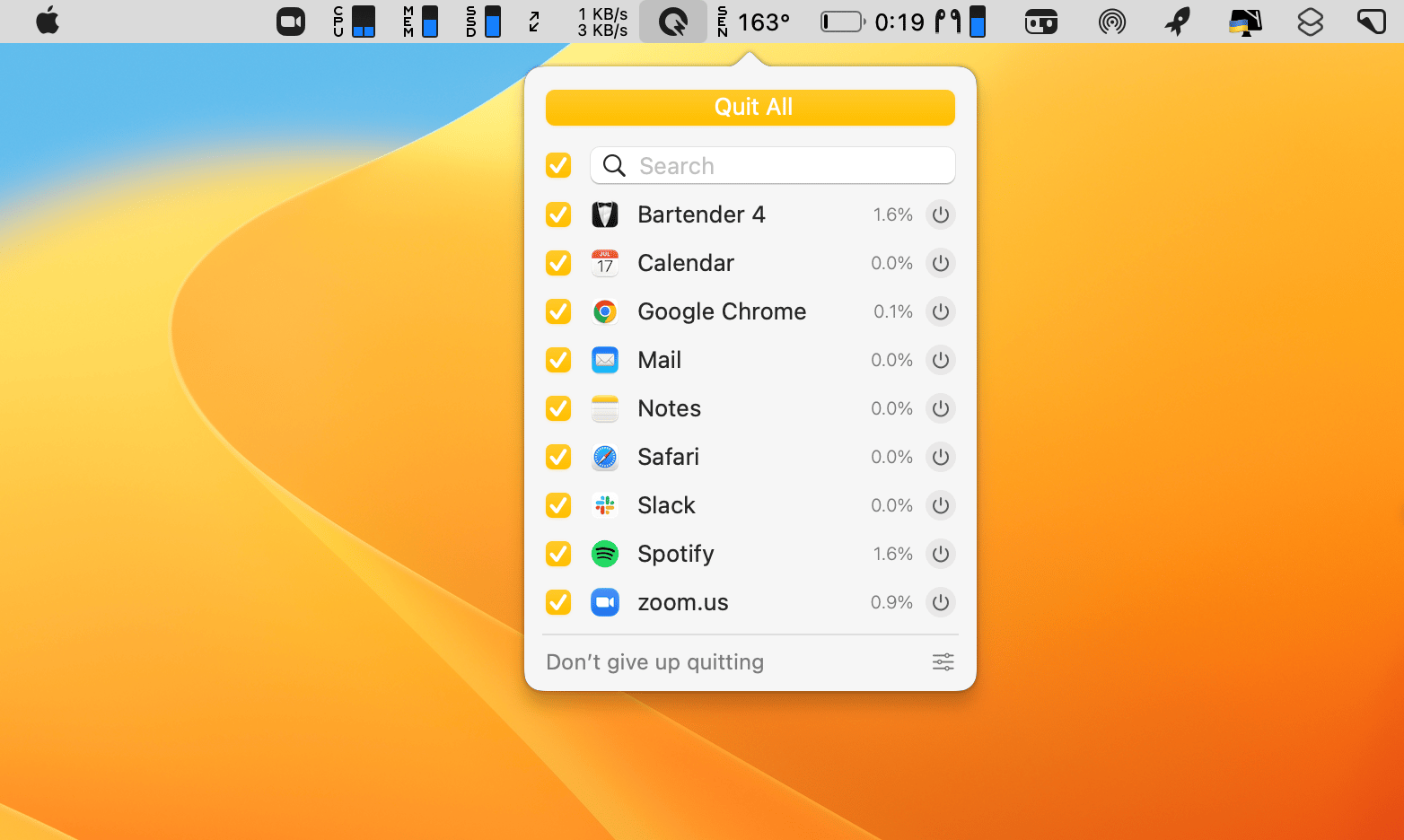
QuitAll will help you “unfreeze” your Mac by quitting all active processes, including the background ones. Freezing is a very common problem on new macOS and you don’t want it to hamper your performance. 
Extend your battery

Many early Ventura adopters report battery drain. Considering not every utility on your Mac is updated for the new macOS, enhanced energy use is normal. Install Endurance to extend your battery life up to 20% by taming non-essential processes. 

Get a better Bluetooth tool 

Some say their Bluetooth utility stops connecting devices after the update or takes painfully slow to connect. AirBuddy is a fabulous replacement — with a beautiful connection screen, similar to the one you use on iOS devices. 

Recover lost data

Finally, the emergency tool — Disk Drill. It’s the app you should install “just in case,” to ensure you don’t lose the files you haven’t backed up. Disk Drill can scan your disk for lost data and undig the files you thought you had lost for good. 


Wishing you a safe Ventura experience and a wonderful day! 

More reads for you

macOS 13 app updates
What's new and what's missing
macOS 13 wishlist
Get your long-awaited updates now
Setapp logo

Company

  • Home
  • All apps
  • How it works
  • Pricing
  • About Setapp
  • Download Setapp
  • Getting started with Setapp
  • Uninstall Setapp

Helpful

  • Support
  • Trust center
  • Join as a developer
  • Setapp reviews
  • Affiliate program
  • Blog

Inside the blog

  • Editorial process
  • How we evaluate apps
  • Human writing
  • Write for us

Best apps

  • VPN for Mac
  • YouTube downloader for Mac
  • Screen recorder for Mac
  • Recovery software for Mac
  • Password manager for Mac
  • Video editing software for Mac
  • Note–taking app for Mac
  • Terminal for Mac
  • Calendar app for Mac
  • Remote desktop for Mac
  • Cloud backup for Mac
  • Screenshot tool for Mac
  • Antivirus for Mac
  • Browser for Mac

Our best content

  • All macOS versions
  • All iOS versions
  • MacBook generations in order
  • iPhone releases in order
  • iPad generations in order
  • AirPods generations in order

How to's

  • View clipboard history on Mac
  • Change folder icon or color on Mac
  • Recover deleted iPhone photos
  • Access unrecognized external drive
  • Access your Mac remotely
  • Use recovery mode on Mac
  • View and kill processes on Mac
  • Stop Mac from sleeping
  • Check MacBook temperature
  • Fix frozen Mac
  • Reset iPhone
  • Reset iPad

Our tools

  • Apple serial number
  • iPhone serial number
  • Mac serial number
  • iPad serial number
  • AirPods serial number
  • Apple Watch serial number
  • Apple warranty number
  • Mac warranty checker
  • iPad warranty checker
  • HEIC to JPG
  • HEIC to PNG
  • HEIC to PDF
  • GPTs for Mac

Updates from our team, written with love

Love is coming your way, soon. This doesn’t look right, please try again. Try once more, our server fell asleep for a bit.
I agree to receive emails from Setapp as per this Privacy Notice.
Please select the checkbox to continue.
Need help? Terms of Use Privacy Notice
© 2026 MacPaw Way Ltd., 25 Serifou, Allure Center 11, Office No. 11-12, 2nd Floor, 3046 Zakaki, Limassol, Cyprus
Sweet, let’s get you started
or sign in with
Apple icon
Google icon
Create a strong password
Come up with a unique password for your Setapp account:
  • 8 characters minimum.
  • At least 1 uppercase letter.
  • At least 1 lowercase letter.
What should we call you?
Continue with new account:
Captcha is required