
Captain's Deck
Dateien mit voller Geschwindigkeit verschieben


Mac
Version 1.5.5
macOS 14.0 oder neuer
54.4 MB
1 Sprachen
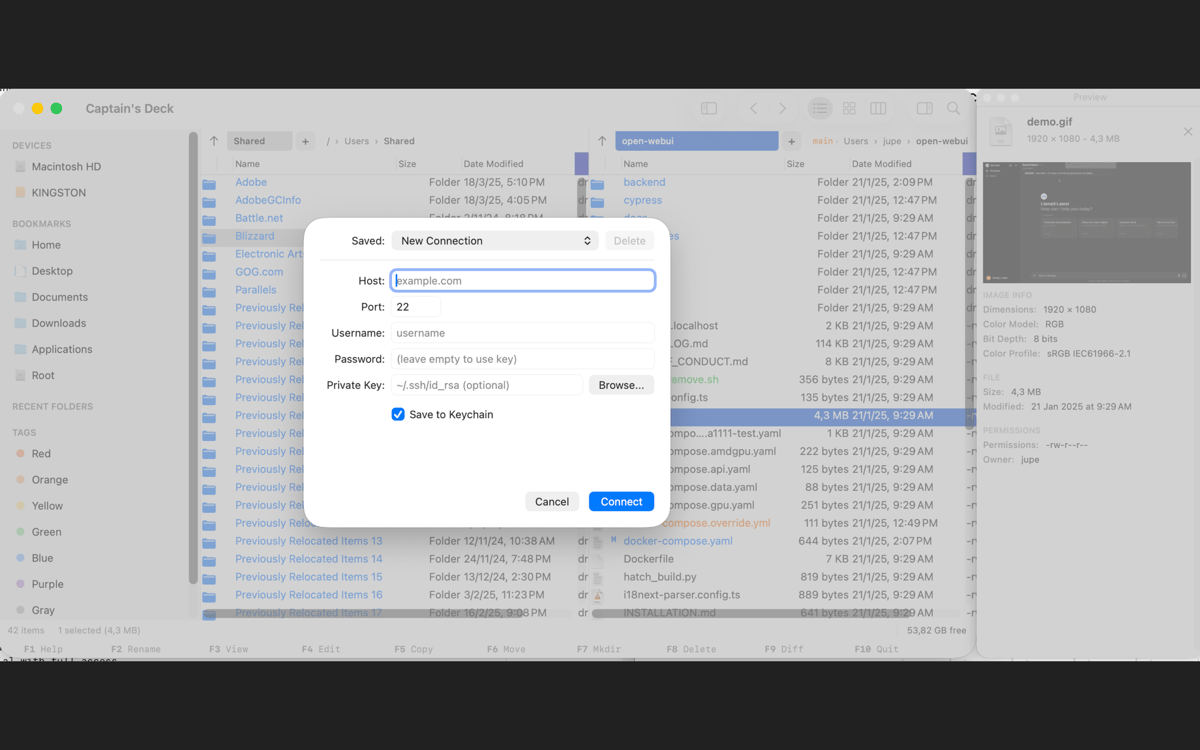
Captain's Deck ist ein leistungsstarker, zweispaltiger Dateimanager für macOS, der für Entwickler, Systemadministratoren und Power-User entwickelt wurde, die Dateien schneller als mit dem Finder verschieben möchten. Dank nebeneinander angeordneter Fenster, tastaturorientierter Bedienung und umfassender Unterstützung für Remote-Dateisysteme können Sie die Hände auf der Tastatur lassen.
Dateien ohne Finder verwalten
Schnell mit Remote-Servern arbeiten
Große Archive mühelos verwalten
Ordner per Tastatur navigieren
Captain's Deck-Funktionen
Dateien schneller verschieben mit zwei Bereichen
Dateien nebeneinander kopieren, verschieben, vergleichen und organisieren. Synchronisieren Sie die Navigation zwischen Bereichen und verwalten Sie umfangreiche Dateivorgänge von einem aufgeräumten Arbeitsbereich aus.
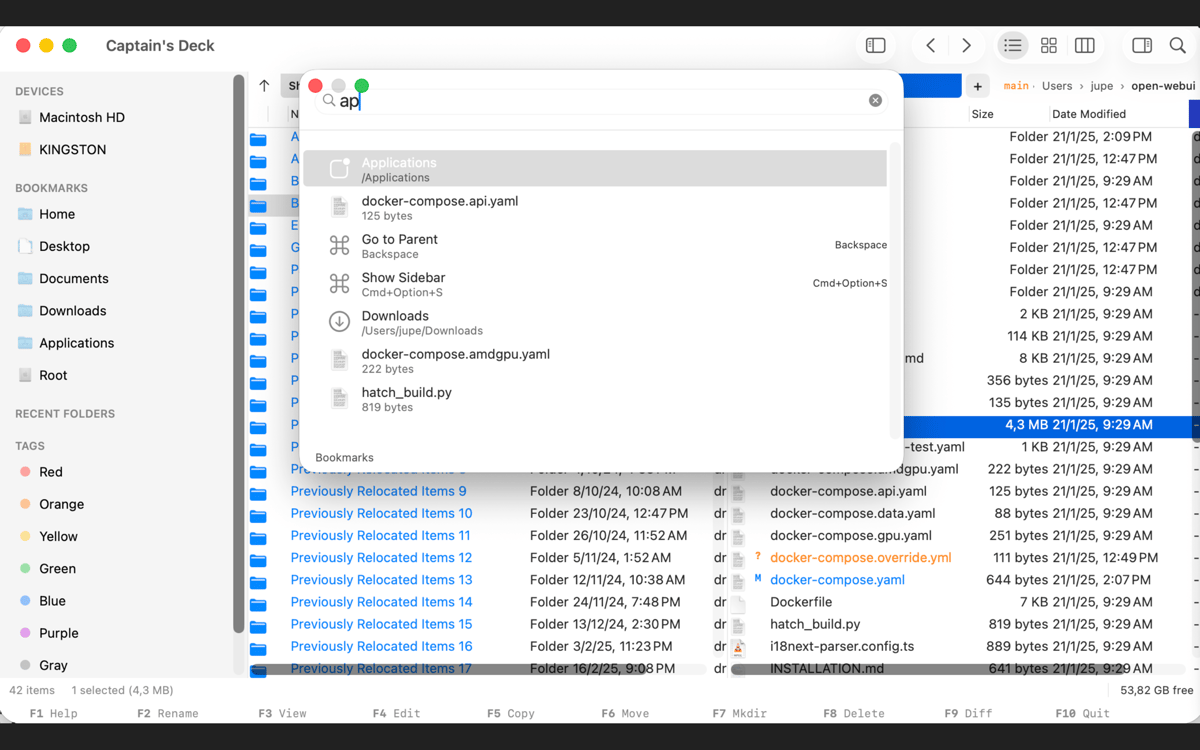
Bleiben Sie bei der Tastatur
Verwenden Sie Vim-Navigation, Tastenkombinationen, Tabs, Lesezeichen, Schnellöffnung und eine Befehlspalette, um ohne ständiges Greifen zur Maus zu arbeiten.
Remote-Server und Cloud-Speicher verwalten
Verbindung zu SFTP, FTP, SMB, WebDAV, Amazon S3, Dropbox, Google Drive, OneDrive und mehr herstellen. Remote-Ordner verhalten sich genau wie lokale Ordner.
Archive wie gewöhnliche Ordner durchsuchen
Öffnen Sie ZIP-, RAR-, APK-, JAR- und andere Archive direkt in der App. Extrahieren, komprimieren und überprüfen Sie Dateien, ohne zwischen Tools zu wechseln.
Git-Repositorys inline verwalten
Git-Status, Branches und Dateiänderungen direkt in Ihrem Dateibrowser anzeigen. Bereitstellen, rückgängig machen, vergleichen und committen, ohne die App zu verlassen.
Arbeitsbereich anpassen
Speichern Sie Fenster-Layouts, passen Sie Shortcuts an, ändern Sie Themes und fügen Sie externe Tools oder Plugins hinzu, um Captain's Deck an Ihren Workflow anzupassen.
Bewertungen und Rezensionen
Captain's Deck
•
1 Bewertungen
Fernando Lisboa
28. Juni 2026
App-Version: 1.4.8.2
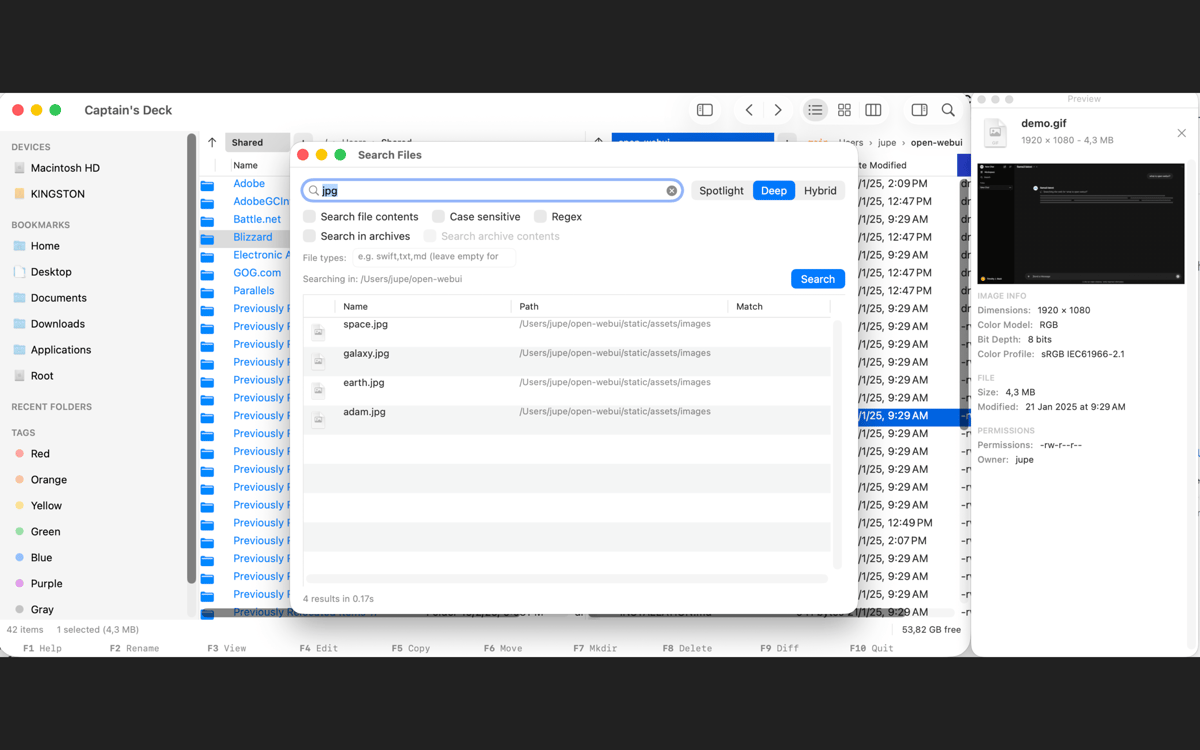
my first impression is not good, the find option not work in subfolders, i try to find all files .mov does not work, i want money back.
Antwort vom Entwickler
2. Juli 2026
Hello, there are 2 kinds of search function in Captain's Deck. One is the quick search which you used that looks in the current folder. The full search would have found your .mov files. However i will add an option to search subfolders in the quick search too in an update today. Captain's Deck has a lot of features, i suggest you take a look at the guide on https://www.captains-deck.com/guides.html to discover what the app can do for you. Thank you for trying it out and you can always reach out to us via the website.
Erhalten Sie Hunderte von Apps mit Membership
Werden Sie Setapp Member und nutzen Sie mit nur einem Abonnement hunderte genialer Apps.
Testen Sie 7 Tage kostenlos, im Anschluss nur eine einfach monatliche Gebühr.
Setapp auf dem Mac installieren
Erkunden Sie Apps für Mac, iOS und Web. Finden Sie einfache Möglichkeiten für die Bewältigung täglicher Aufgaben.

Die gesuchte App finden
In Setapp wartet eine wunderbare App auf Sie. Installieren Sie sie mit einem Klick.

Captain's Deck
Abonnement wählen
Eine App oder mehr mit der Setapp Membership. Holen Sie sich Apps, so wie Sie es möchten.

Erhalten Sie Hunderte von Apps mit Membership
Werden Sie Setapp Member und nutzen Sie mit nur einem Abonnement hunderte genialer Apps.
Testen Sie 7 Tage kostenlos, im Anschluss nur eine einfach monatliche Gebühr.
1
Setapp auf dem Mac installieren
Erkunden Sie Apps für Mac, iOS und Web. Finden Sie einfache Möglichkeiten für die Bewältigung täglicher Aufgaben.
2
Die gesuchte App finden
In Setapp wartet eine wunderbare App auf Sie. Installieren Sie sie mit einem Klick.
Captain's Deck
3
Abonnement wählen
Eine App oder mehr mit der Setapp Membership. Holen Sie sich Apps, so wie Sie es möchten.
Die besten Apps
Von Planung und Routineaufgaben bis hin zu kreativen Tätigkeiten und Programmieren – mit den Apps von Setapp sind Sie bestens für Aufgaben gerüstet.

TypingMind
KI-Chat mit alternativer UI
Text erzeugen oder zusammenfassen
Prompt-Bibliothek nutzen
KI

Spark Mail
E-Mails verwalten
KI

CleanMyMac
Datenmüll entfernen

Bartender
Menüleiste anpassen

CleanShot X
Vielseitige Bildschirmfotos aufnehmen

Luminar Neo
Fotos bearbeiten
KI

ClearVPN
Sichere Verbindung herstellen

Craft
Mit Dokumenten arbeiten
KI
Captain's Deck
Dateien mit voller Geschwindigkeit verschieben