
Spark Mail
Einfache E-Mailverwaltung
Mac, iOS
Version 3.30.12
macOS 12.0.0 oder neuer
868.3 MB
10 Sprachen
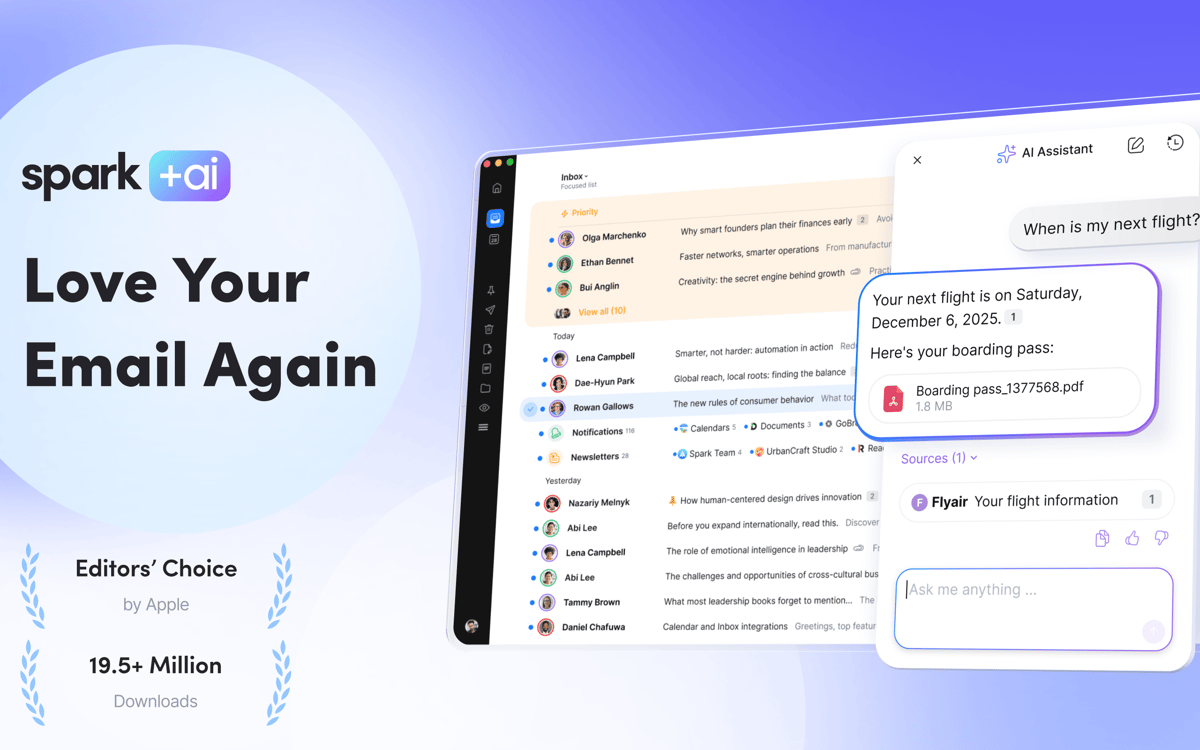
Spark Mail ist ein leistungsstarkes Tool, mit dem Sie Ihren Posteingang in den Griff bekommen, Zeit sparen und jederzeit den Überblick über Ihre E-Mails behalten. Mit seinen praktischen Funktionen wie Erinnerungen, vorrangigen Absendern, stummgeschalteten Threads, Links zu E-Mail-Threads und vielem mehr wird Ihre E-Mail-Verwaltung von einer lästigen Pflicht zu etwas, auf das Sie sich freuen können.
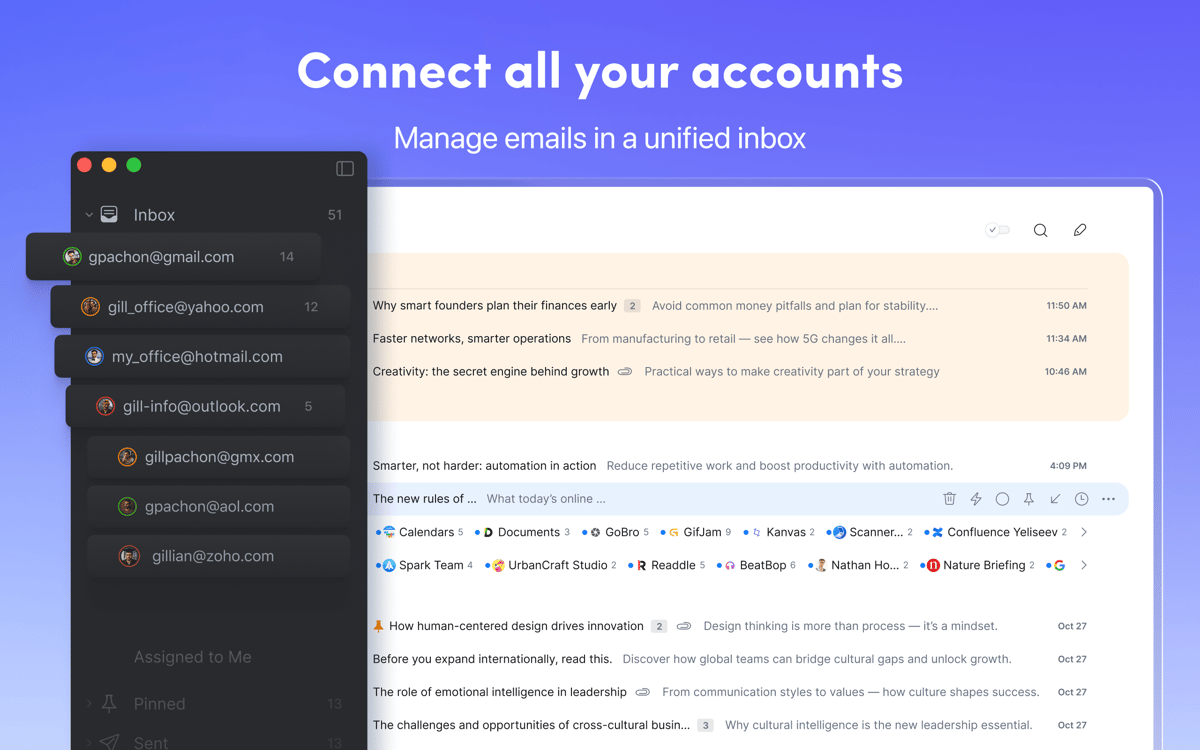
Für E-Mails aus mehreren Posteingängen
Markieren Sie E-Mails je nach Bearbeitung
Heften Sie wichtige E-Mails an
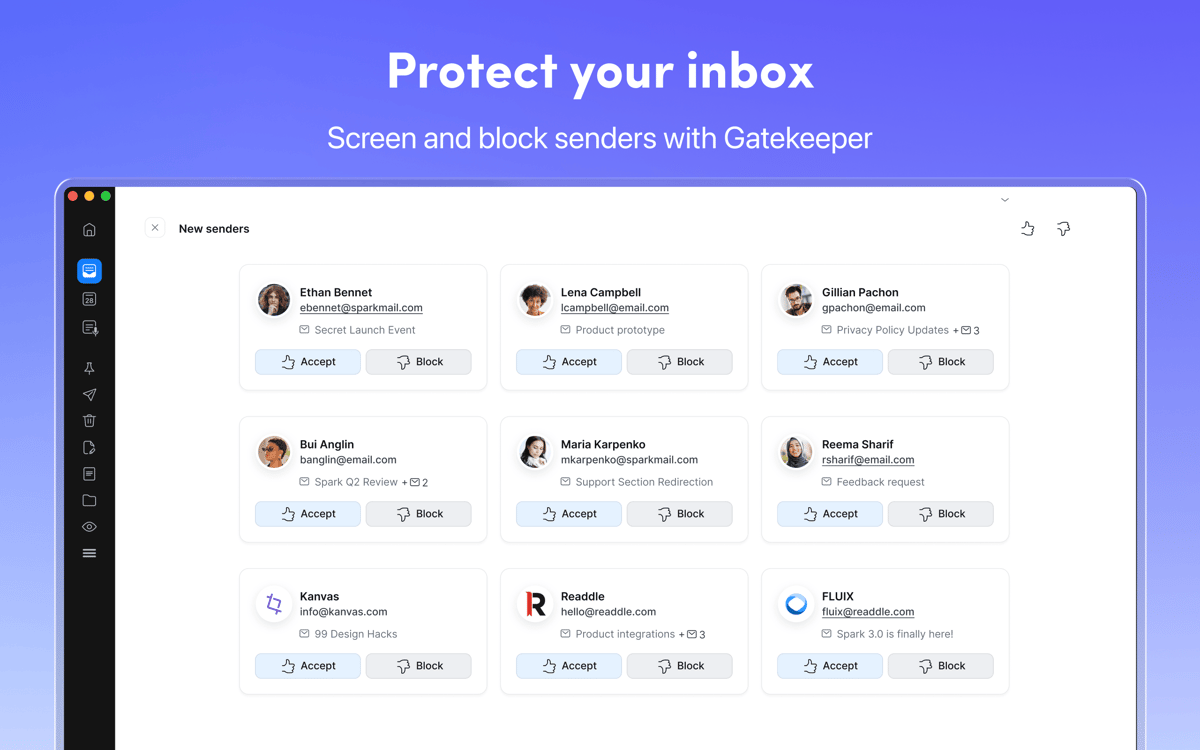
Absender blockieren, Threads stummschalten
Spark Mail-Funktionen
E-Mail-Verwaltung
Mit Spark Mail wird Ihre Arbeit mit E-Mails intuitiver und übersichtlicher. In der App können Sie E-Mails als erledigt markieren, auf Wiedervorlage setzen oder verschieben und später bearbeiten. Sie können wichtige E-Mails ganz oben anheften oder Nachrichten nach Absender gruppieren. Mit diesen und weiteren E-Mail-Verwaltungstools in Spark Mail bekommen Sie Ihre E-Mails endlich im Griff!
Zugriff auf mehrere Posteingänge
Verwenden Sie mehrere E-Mail-Konten? Mit Spark Mail können Sie diese von einem einzigen Posteingang aus verwalten. Empfangen und verwalten Sie E-Mails in Ihren Gmail-, AOL-, iCloud-, IMAP-, Hotmail-, Yahoo- und GMX-Konten.
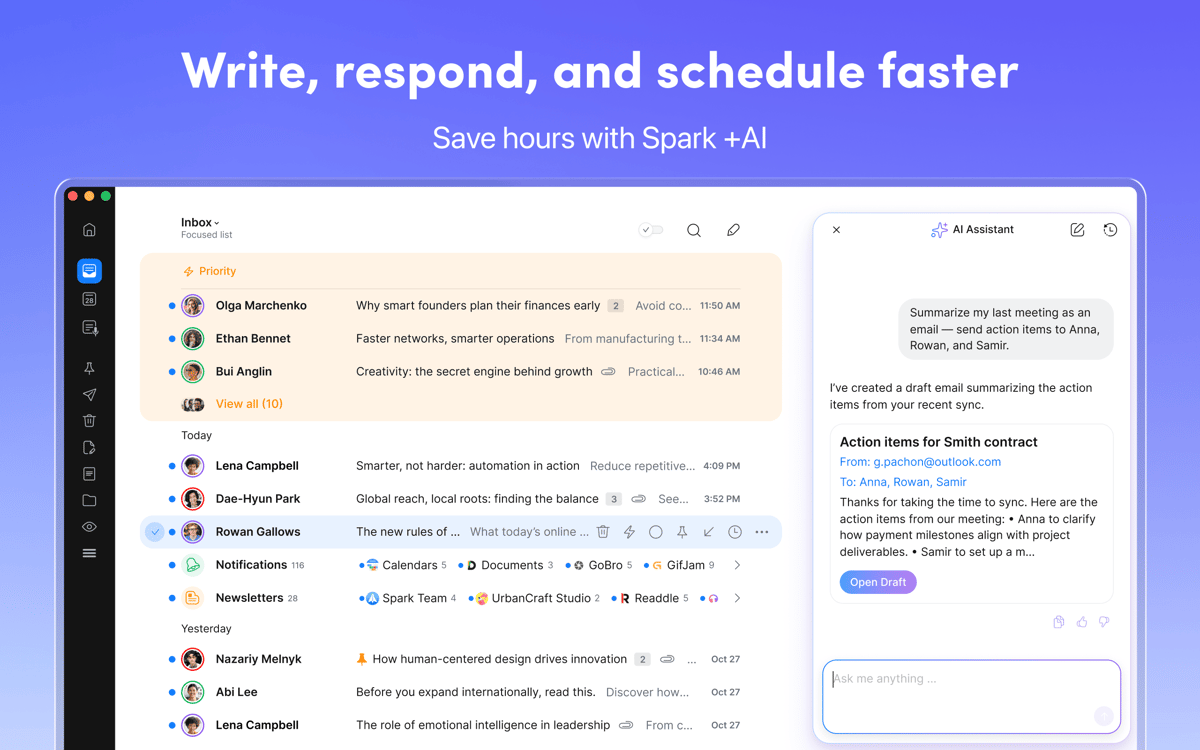
KI-gesteuerter E-Mail-Assistent
Erstellen Sie Entwürfe oder Zusammenfassungen, formulieren Sie Ihre Ideen um und erweitern oder kürzen Sie Ihren Text mit dem KI-Assistenten von Spark Mail. Nutzen Sie ihn, um Ihre E-Mail-Entwürfe Korrektur zu lesen, oder den Ton Ihres Textes freundlicher oder förmlicher zu gestalten.
Arbeiten ohne Ablenkungen
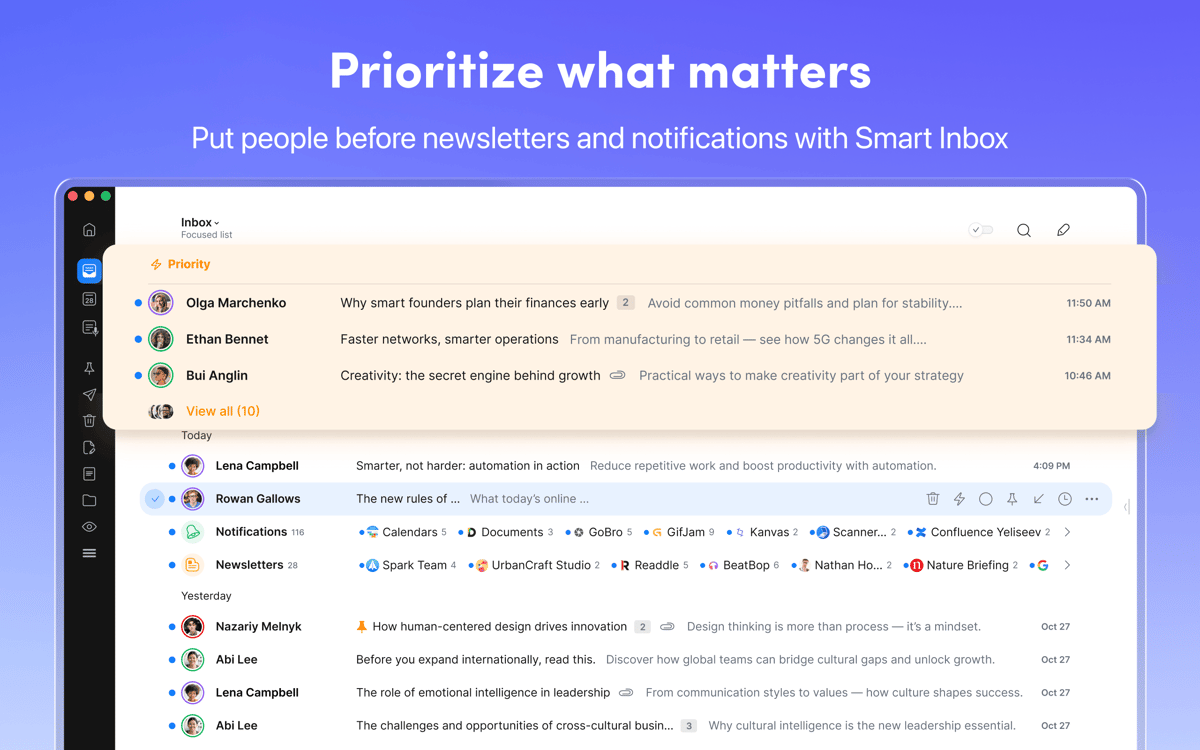
Der intelligente Posteingang trennt prioritäre E-Mails vom Rest, sodass Sie alle wirklich wichtigen E-Mails leichter finden können. Die App ermöglicht es Ihnen auch, unerwünschte Absender zu blockieren und ganze E-Mail-Threads stumm zu schalten.
Gemeinsam an E-Mails arbeiten
Verwenden Sie Spark Mail, um gemeinsam an E-Mails zu arbeiten – fügen Sie Teilnehmer hinzu, diskutieren Sie Nachrichten in einem privaten Chat, erstellen Sie sichere Links zu Threads oder einzelnen E-Mails und arbeiten Sie gemeinsam an schnelleren Antwortzeiten.
Bewertungen und Rezensionen
Spark Mail
•
3062 Bewertungen
Gavin Brooks
3. Okt. 2026
App-Version: 3.30.12
The app now requires additional payment outside of what I pay through setapp - for a feature that does not cost them any more (connecting my own llm to their app via a cli). Not a fan of gating features behind another payment.
Antwort vom Entwickler
6. Okt. 2026
Hi! Thank you for sharing your feedback. The Setapp version of Spark doesn't include the Spark Pro plan. If you'd like to use the Pro features, including the advanced CLI functionality, you'll need to upgrade to Spark Pro directly through our website. We apologize for the inconvenience and appreciate you taking the time to share your concerns. Mariana
Randy Wallin
2. Okt. 2026
App-Version: 3.30.12
Awesome app!
Antwort vom Entwickler
6. Okt. 2026
Hello Randy! We're thrilled to hear that you're enjoying the app. If you have any questions or feedback, don't hesitate to reach out to us at [email protected]. Mariana
Matthias
29. Sept. 2026
App-Version: 3.30.12
Repeatedly reports that I would not have an active SetApp subscription (but I have). It refuses to even start – so no way to just sign out and in again. Ridiculous that I cannot use my email and properly have to reinstall the entire app and accounts again.
Antwort vom Entwickler
6. Okt. 2026
Hi! We're sorry for the frustration. To help us get to the bottom of this, could you please send a quick note to [email protected]? We'd love to take a closer look at what's happening on your device. Mariana
Erhalten Sie Hunderte von Apps mit Membership
Werden Sie Setapp Member und nutzen Sie mit nur einem Abonnement hunderte genialer Apps.
Testen Sie 7 Tage kostenlos, im Anschluss nur eine einfach monatliche Gebühr.
Setapp auf dem Mac installieren
Erkunden Sie Apps für Mac, iOS und Web. Finden Sie einfache Möglichkeiten für die Bewältigung täglicher Aufgaben.

Die gesuchte App finden
In Setapp wartet eine wunderbare App auf Sie. Installieren Sie sie mit einem Klick.

Spark Mail
Abonnement wählen
Eine App oder mehr mit der Setapp Membership. Holen Sie sich Apps, so wie Sie es möchten.

Erhalten Sie Hunderte von Apps mit Membership
Werden Sie Setapp Member und nutzen Sie mit nur einem Abonnement hunderte genialer Apps.
Testen Sie 7 Tage kostenlos, im Anschluss nur eine einfach monatliche Gebühr.
1
Setapp auf dem Mac installieren
Erkunden Sie Apps für Mac, iOS und Web. Finden Sie einfache Möglichkeiten für die Bewältigung täglicher Aufgaben.
2
Die gesuchte App finden
In Setapp wartet eine wunderbare App auf Sie. Installieren Sie sie mit einem Klick.
Spark Mail
3
Abonnement wählen
Eine App oder mehr mit der Setapp Membership. Holen Sie sich Apps, so wie Sie es möchten.
Die besten Apps
Von Planung und Routineaufgaben bis hin zu kreativen Tätigkeiten und Programmieren – mit den Apps von Setapp sind Sie bestens für Aufgaben gerüstet.

TypingMind
KI-Chat mit alternativer UI
Text erzeugen oder zusammenfassen
Prompt-Bibliothek nutzen
KI

Spark Mail
E-Mails verwalten
KI

CleanMyMac
Datenmüll entfernen

Bartender
Menüleiste anpassen

CleanShot X
Vielseitige Bildschirmfotos aufnehmen

Luminar Neo
Fotos bearbeiten
KI

ClearVPN
Sichere Verbindung herstellen

Craft
Mit Dokumenten arbeiten
KI
Spark Mail
Einfache E-Mailverwaltung