
GapSucker
One cursor, zero dead ends
Mac
Version 1.0.1
macOS 11.5 oder neuer
10 MB
1 Sprachen
GapSucker — cursor manager for multi-monitor Mac setups. When your displays don't physically line up, your cursor gets stuck at the edges — GapSucker fixes that by automatically warping it across the gaps. Move from screen to screen as if the bezels aren't even there. It's lightweight, runs quietly in the background, and stays out of your way.
Move between screens without friction
Works with any multi-monitor layout
Skips gaps between misaligned displays
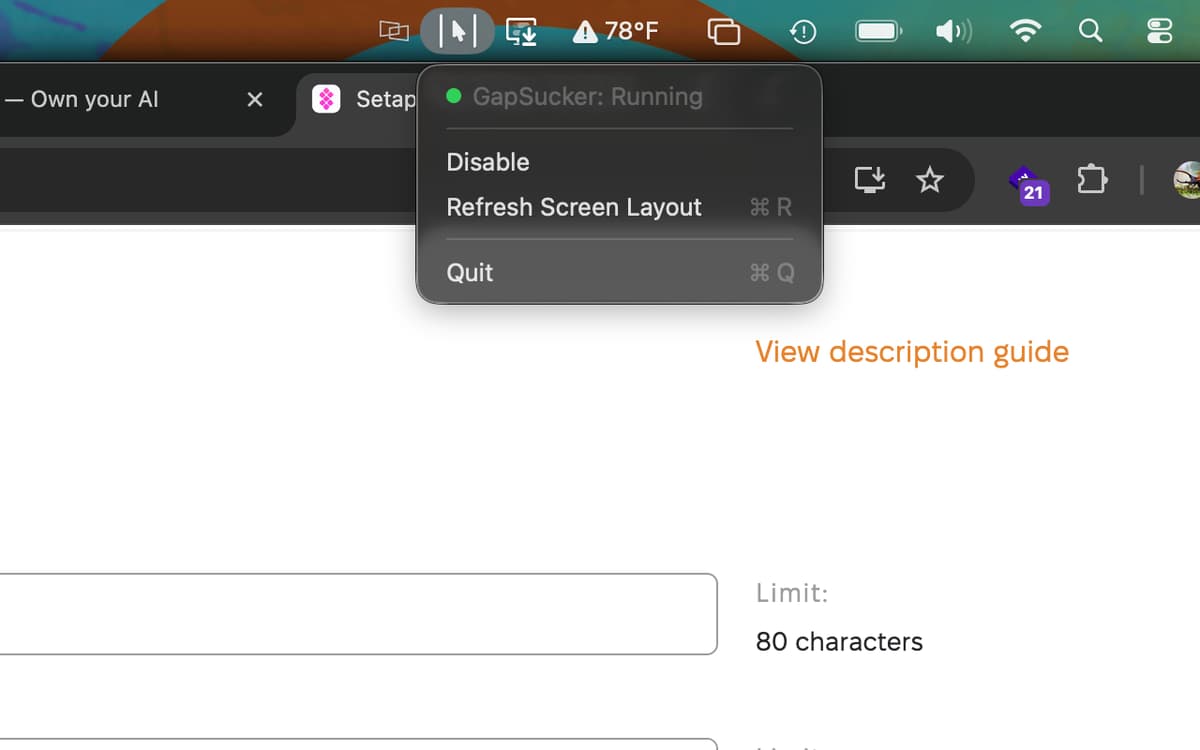
Control it all from your menu bar
GapSucker-Funktionen
Move freely between displays
Got a vertical monitor sitting next to a horizontal one, or two screens that don't quite line up edge to edge? GapSucker detects the gap and bridges it automatically. Your cursor glides through to the adjacent screen — no nudging, no hunting, no dead zones.
Smart adjacent-screen detection
GapSucker doesn't warp blindly. It only teleports your cursor when there's actually a screen on the other side, so you won't get unexpected jumps if you push your cursor toward an empty edge. It knows your layout.
Works with any arrangement
Portrait, landscape, side by side, stacked — GapSucker works with whatever multi-monitor setup you're running, no matter how unusual the configuration. Plug in a new display and it adapts without any manual tweaking.
Quick controls from the menu bar
Enable it, disable it, or refresh your screen layout whenever things change — all from a simple menu bar icon. No preferences window to dig through, no configuration headaches. It's just there when you need it.
Runs quietly in the background
GapSucker is exactly the kind of app you forget is installed — until you try a multi-monitor setup without it. It uses minimal resources and doesn't interrupt your workflow. Set it up once and let it do its thing.
Erhalten Sie Hunderte von Apps mit Membership
Werden Sie Setapp Member und nutzen Sie mit nur einem Abonnement hunderte genialer Apps.
Testen Sie 7 Tage kostenlos, im Anschluss nur eine einfach monatliche Gebühr.
Setapp auf dem Mac installieren
Erkunden Sie Apps für Mac, iOS und Web. Finden Sie einfache Möglichkeiten für die Bewältigung täglicher Aufgaben.

Die gesuchte App finden
In Setapp wartet eine wunderbare App auf Sie. Installieren Sie sie mit einem Klick.

GapSucker
Abonnement wählen
Eine App oder mehr mit der Setapp Membership. Holen Sie sich Apps, so wie Sie es möchten.

Erhalten Sie Hunderte von Apps mit Membership
Werden Sie Setapp Member und nutzen Sie mit nur einem Abonnement hunderte genialer Apps.
Testen Sie 7 Tage kostenlos, im Anschluss nur eine einfach monatliche Gebühr.
1
Setapp auf dem Mac installieren
Erkunden Sie Apps für Mac, iOS und Web. Finden Sie einfache Möglichkeiten für die Bewältigung täglicher Aufgaben.
2
Die gesuchte App finden
In Setapp wartet eine wunderbare App auf Sie. Installieren Sie sie mit einem Klick.
GapSucker
3
Abonnement wählen
Eine App oder mehr mit der Setapp Membership. Holen Sie sich Apps, so wie Sie es möchten.
Die besten Apps
Von Planung und Routineaufgaben bis hin zu kreativen Tätigkeiten und Programmieren – mit den Apps von Setapp sind Sie bestens für Aufgaben gerüstet.

TypingMind
KI-Chat mit alternativer UI
Text erzeugen oder zusammenfassen
Prompt-Bibliothek nutzen
KI

Spark Mail
E-Mails verwalten
KI

CleanMyMac
Datenmüll entfernen

Bartender
Menüleiste anpassen

CleanShot X
Vielseitige Bildschirmfotos aufnehmen

Luminar Neo
Fotos bearbeiten
KI

ClearVPN
Sichere Verbindung herstellen

Craft
Mit Dokumenten arbeiten
KI
GapSucker
One cursor, zero dead ends