
Kerlig
Schlauer schreiben in jeder Mac-App

Mac
Version 2.8.4
macOS 12.0 oder neuer
573.5 MB
1 Sprachen
Kerlig ist ein KI-Schreibassistent, der in der Menüleiste Ihres Macs lebt. Drücken Sie eine Tastenkombination und Kerlig ist da – keine Browser-Tabs, kein Kontextwechsel. Nutzen Sie Kerlig, um Nachrichten zu korrigieren, Antworten zu verfassen, Dokumente zusammenzufassen oder benutzerdefinierte Aktionen in jeder App auszuführen. Es funktioniert mit über 350 Modellen von OpenAI, Anthropic, Google und weiteren, unter Verwendung Ihrer eigenen API-Schlüssel.
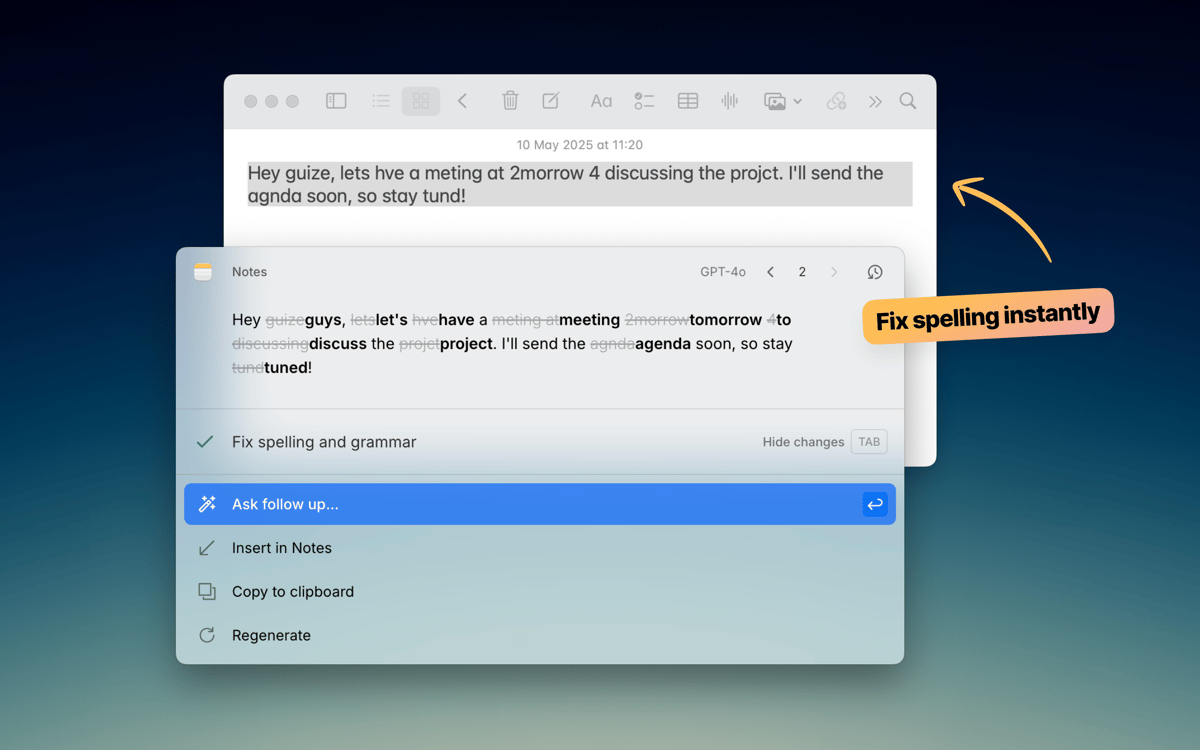
Texte vor dem Senden korrigieren
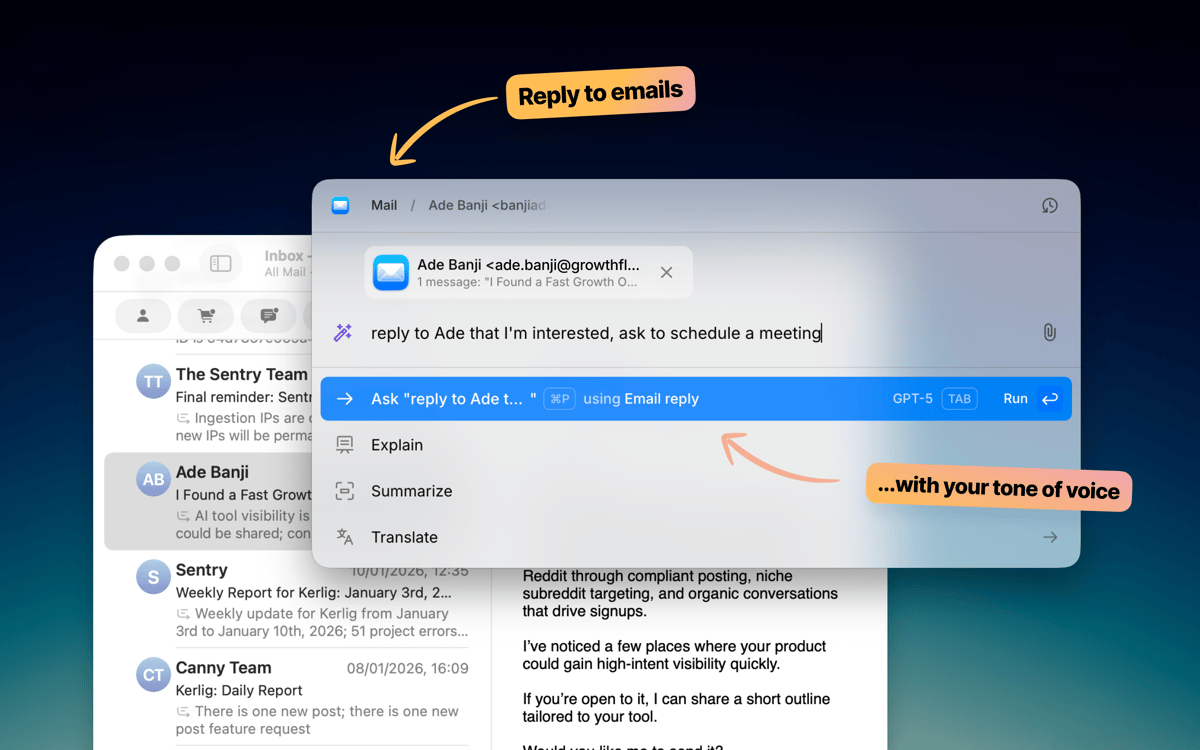
E-Mails und Slack-Antworten schneller schreiben
Chatten Sie mit Dokumenten und Webseiten
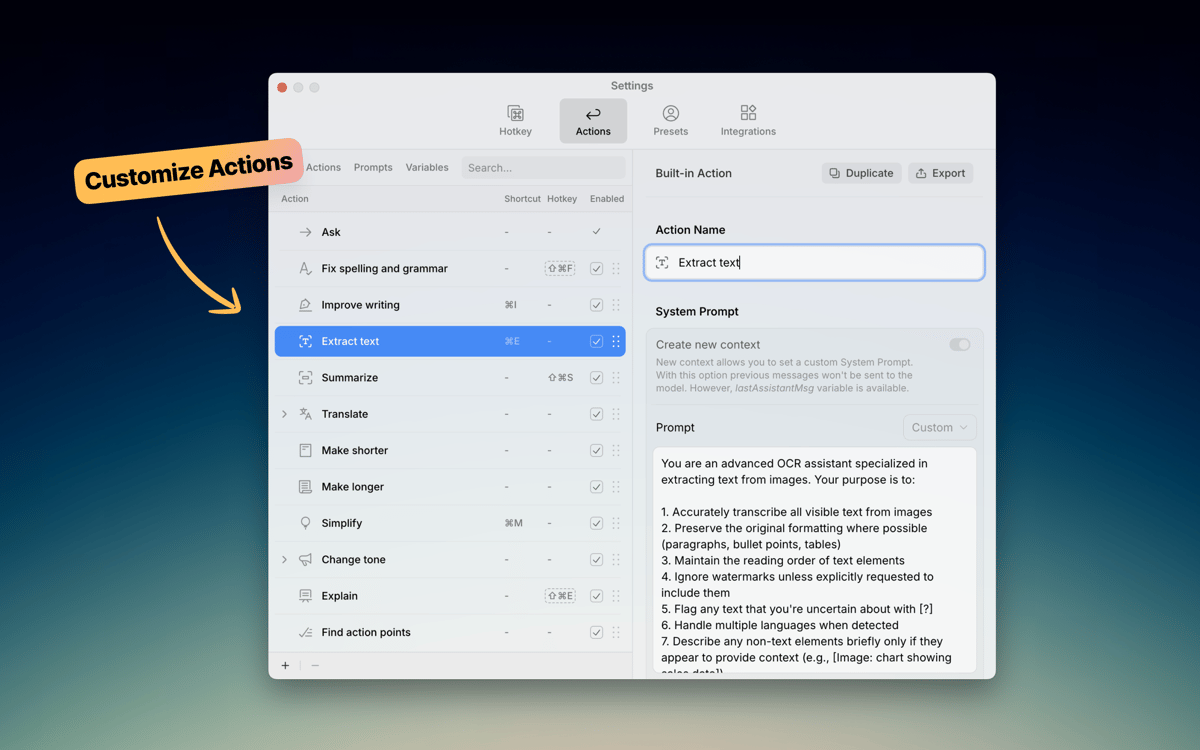
Benutzerdefinierte KI-Aktionen in jeder App
Kerlig-Funktionen
Schreiben, ohne Ihre App zu verlassen
Kerlig bleibt im Hintergrund, bis Sie es benötigen. Drücken Sie eine Tastenkombination, und das Fenster öffnet sich direkt dort, wo Sie arbeiten – egal ob Mail, Slack, Notion oder eine andere App. Korrigieren Sie Grammatik, verbessern Sie Nachrichten oder verfassen Sie Antworten, ohne einen einzigen Browser-Tab zu öffnen. Kerlig fügt sich nahtlos in Ihre gewohnte Arbeitsweise auf dem Mac ein.
Wählen Sie Ihr KI-Modell
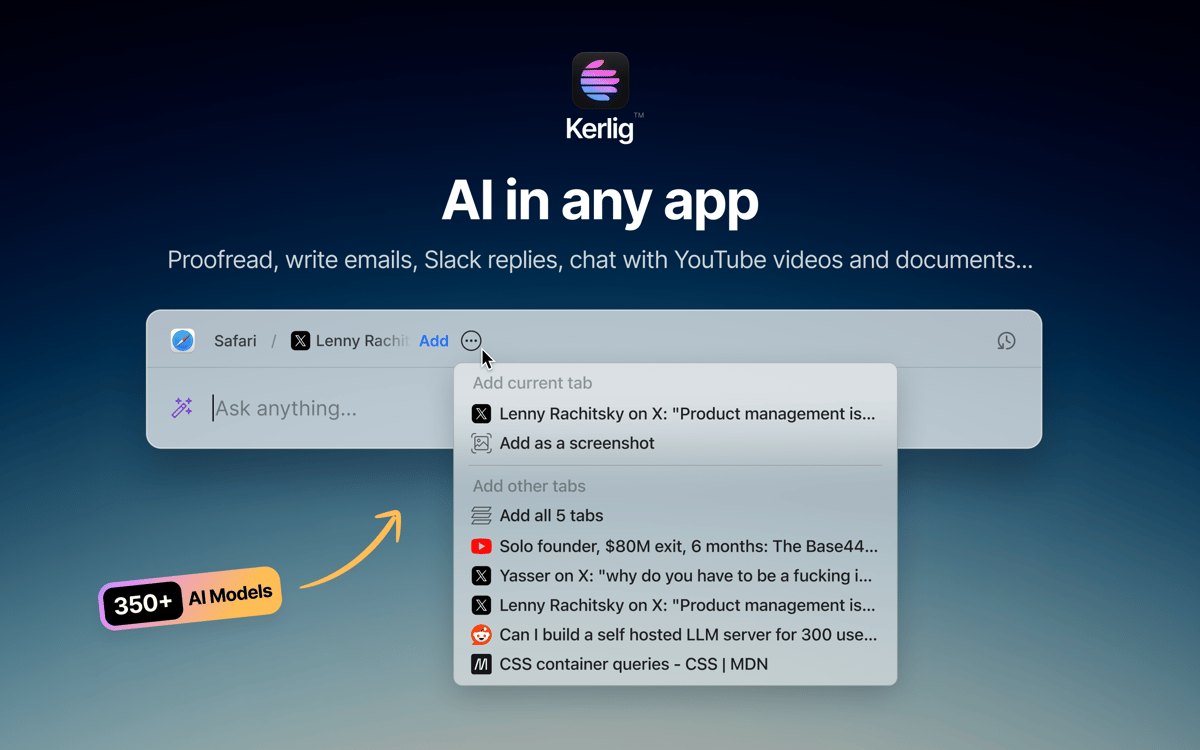
Nicht jede Aufgabe braucht das gleiche Modell. Kerlig verbindet sich mit über 350 Modellen von OpenAI, Anthropic, Google, Groq, Perplexity und weiteren. Wechseln Sie mit einem Klick zwischen den Modellen. Sie können auch lokale Modelle über Ollama, LM Studio oder Apple Foundation Models laufen lassen, wenn Sie alles auf Ihrem Gerät behalten möchten.
Erstellen Sie eigene Aktionen
Kerlig kommt mit praktischen integrierten Aktionen wie Korrekturlesen, Zusammenfassen und Übersetzen. Doch die wirkliche Stärke liegt darin, eigene Aktionen zu erstellen. Erstellen Sie benutzerdefinierte Prompts für regelmäßig wiederkehrende Aufgaben – wie das Schreiben von Jira-Tickets, die Umwandlung von Code oder das Erstellen von Social Posts – und lösen Sie diese sofort über das Shortcut-Menü aus. Ihre Workflows, Ihre Regeln.
Chatten Sie mit Dokumenten
Fügen Sie eine PDF, Webseite, ein E-Book oder Bild hinzu und beginnen Sie, Fragen zu stellen. Kerlig ermöglicht es Ihnen, Dokumente direkt in der App zu analysieren und zusammenzufassen, ohne Textstücke in einen Browser zu kopieren. So gewinnen Sie schnell Einblicke aus Dateien, mit denen Sie gerade arbeiten.
Legen Sie Ihren Schreibstil fest
Jeder schreibt anders. Mit Kerlig können Sie Ton-Voreinstellungen speichern – leger für Slack, professionell für Kunden-E-Mails, prägnant für Tickets – damit KI-generierte Texte wie Ihre klingen. Wechseln Sie mit einem Klick zwischen den Tönen und halten Sie Ihren Schreibstil in jeder Nachricht konsistent.
Schützen Sie Ihre Privatsphäre beim Schreiben
Kerlig speichert oder nutzt Ihre Daten nicht für Trainingszwecke. Ihr Chatverlauf bleibt verschlüsselt auf Ihrem Mac und Sie kontrollieren immer, welcher KI-Anbieter Ihre Anfragen bearbeitet. Schreiben Sie unbesorgt, denn Ihre Nachrichten und Dokumente werden nicht verdeckt gesammelt oder weitergegeben.
Bewertungen und Rezensionen
Kerlig
•
25 Bewertungen
Matthias Honert
15. Juli 2026
App-Version: 2.6.0
Yeah, nice tool. Text review is now easier than before in during different apps
kyo kou
8. Mai 2026
App-Version: 2.5.5
This app is really amazing! I particularly love its action feature, which makes everything so much easier. Before, I had to open a website to get certain AI responses, but now I can do it all with just a shortcut key.
Bowser
1. Mai 2026
App-Version: 2.5.4
This app is fantastic. I LOVE it. It’s easy to use, does what it says, and is great for changing copy on the fly without using the Claude / ChatGPT platform. Highly Recommended.
Erhalten Sie Hunderte von Apps mit Membership
Werden Sie Setapp Member und nutzen Sie mit nur einem Abonnement hunderte genialer Apps.
Testen Sie 7 Tage kostenlos, im Anschluss nur eine einfach monatliche Gebühr.
Setapp auf dem Mac installieren
Erkunden Sie Apps für Mac, iOS und Web. Finden Sie einfache Möglichkeiten für die Bewältigung täglicher Aufgaben.

Die gesuchte App finden
In Setapp wartet eine wunderbare App auf Sie. Installieren Sie sie mit einem Klick.

Kerlig
Abonnement wählen
Eine App oder mehr mit der Setapp Membership. Holen Sie sich Apps, so wie Sie es möchten.

Erhalten Sie Hunderte von Apps mit Membership
Werden Sie Setapp Member und nutzen Sie mit nur einem Abonnement hunderte genialer Apps.
Testen Sie 7 Tage kostenlos, im Anschluss nur eine einfach monatliche Gebühr.
1
Setapp auf dem Mac installieren
Erkunden Sie Apps für Mac, iOS und Web. Finden Sie einfache Möglichkeiten für die Bewältigung täglicher Aufgaben.
2
Die gesuchte App finden
In Setapp wartet eine wunderbare App auf Sie. Installieren Sie sie mit einem Klick.
Kerlig
3
Abonnement wählen
Eine App oder mehr mit der Setapp Membership. Holen Sie sich Apps, so wie Sie es möchten.
Die besten Apps
Von Planung und Routineaufgaben bis hin zu kreativen Tätigkeiten und Programmieren – mit den Apps von Setapp sind Sie bestens für Aufgaben gerüstet.

TypingMind
KI-Chat mit alternativer UI
Text erzeugen oder zusammenfassen
Prompt-Bibliothek nutzen
KI

Spark Mail
E-Mails verwalten
KI

CleanMyMac
Datenmüll entfernen

Bartender
Menüleiste anpassen

CleanShot X
Vielseitige Bildschirmfotos aufnehmen

Luminar Neo
Fotos bearbeiten
KI

ClearVPN
Sichere Verbindung herstellen

Craft
Mit Dokumenten arbeiten
KI
Kerlig
Schlauer schreiben in jeder Mac-App