MacNotch
Notch-Dienstprogramm für Mac
Mac
Version 1.9.9.6
macOS 14.0 oder neuer
241.6 MB
11 Sprachen
MacNotch – Notch-Dienstprogramm für Mac. Verwandeln Sie die MacBook-Kerbe in eine intelligente Steuerzentrale für Musik, Aufgaben und schnelle Aktionen. Steuern Sie die Wiedergabe, verfolgen Sie Ihren Tag und greifen Sie auf Tools zu, ohne den Fokus zu verlieren. Es hält wichtige Inhalte sichtbar, aber niemals im Weg.
Musik steuern, ohne Apps zu wechseln
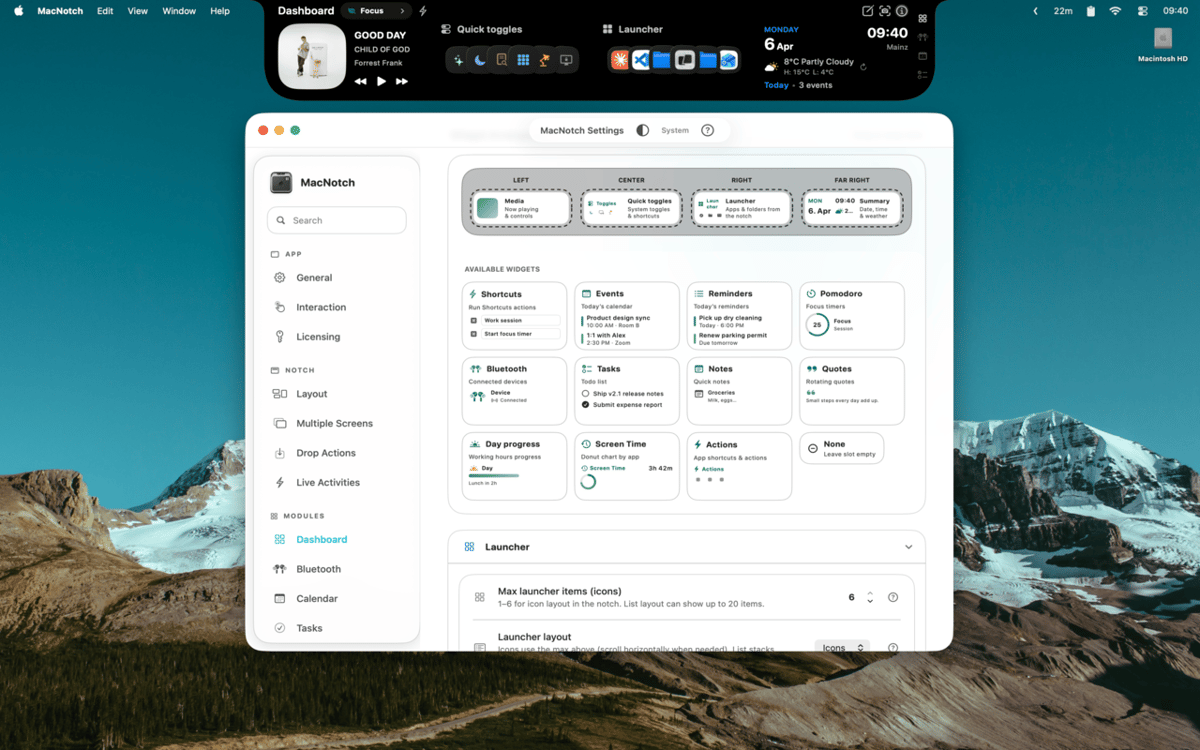
Passen Sie Ihre Notch mit Widgets an
Tasks, Events und Timer schnell verfolgen
Dateien ablegen für sofortige Aktion
MacNotch-Funktionen
Steuern Sie Ihre Musik und Medien
Sehen Sie, was gerade abgespielt wird, mit Albumcover, animierten Musikbalken und vollständigen Wiedergabesteuerungen – direkt über die Notch. MacNotch funktioniert mit Spotify, Apple Music, YouTube und anderen Browser-Playern – die Quelle Ihrer Musik spielt keine Rolle. Wechseln Sie Titel, spulen Sie durch einen Song oder betrachten Sie einfach das Cover, ohne etwas zu öffnen.
Behalten Sie den Überblick über Ihren Tag
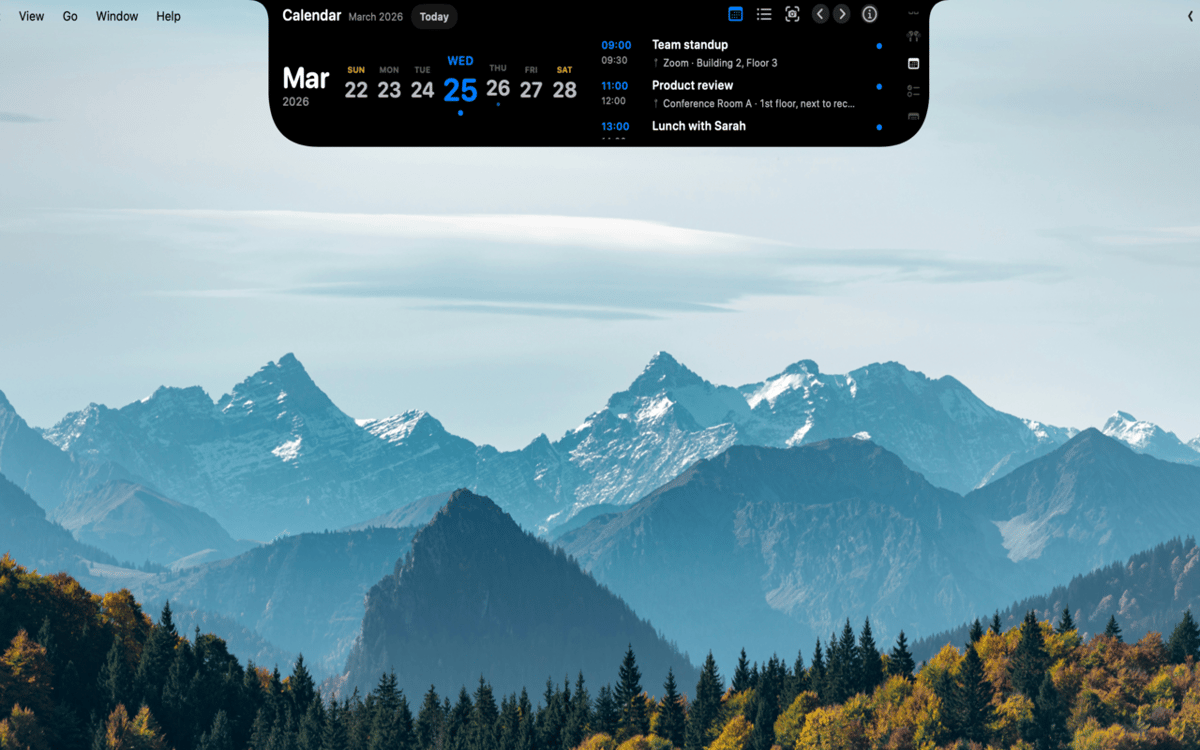
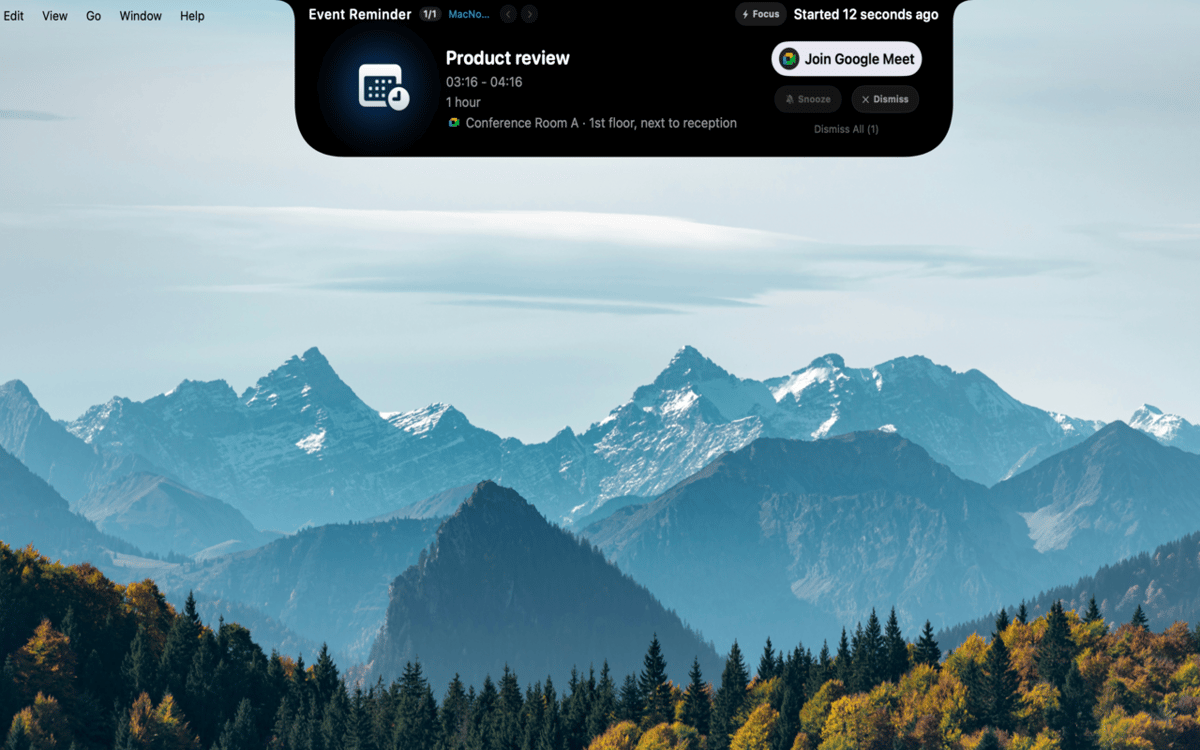
Termine, Erinnerungen und Fokus-Sessions an einem Ort verwalten. MacNotch zeigt anstehende Kalenderereignisse mit Countdown-Timern an und erkennt aktive Meetings, damit Sie immer wissen, was als Nächstes kommt. Es gibt einen integrierten Pomodoro-Timer mit visueller Fortschrittsanzeige, eine schlanke Aufgabenliste, die sich mit macOS-Erinnerungen synchronisiert, und ein Modul zum schnellen Erfassen von Notizen – alles, ohne Ihren Arbeitsablauf zu unterbrechen.
Erstelle dein eigenes Dashboard
Füllen Sie ein anpassbares Widget-Raster mit Wetter, App-Startern und Schnellzugriffen für den Dunkelmodus, True Tone und Night Shift. Erstellen Sie Profile wie „Arbeit Sie können außerdem die CPU-, RAM- und Speichernutzung im Blick behalten oder mit OpenAI oder einer lokalen Ollama-Instanz Texte in Echtzeit übersetzen.
Behalten Sie Ihre Geräte im Blick
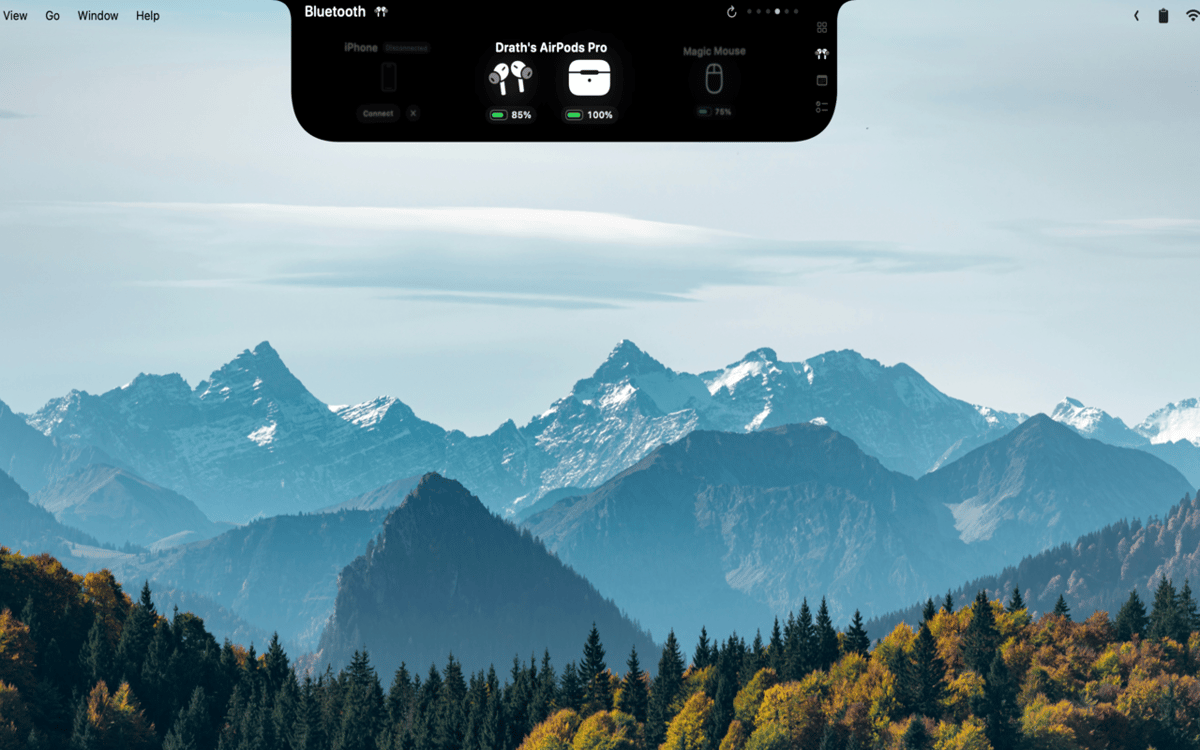
Zeigen Sie den Akkustand von AirPods (links, rechts und Ladecase), Kopfhörern, Mäusen, Tastaturen, Trackpads und Gamecontrollern in Echtzeit an. MacNotch warnt Sie rechtzeitig, wenn ein Gerät schwach wird, damit Sie nie während eines Anrufs oder Spiels überrascht werden.
Dateien ablegen, Aufgaben erledigen
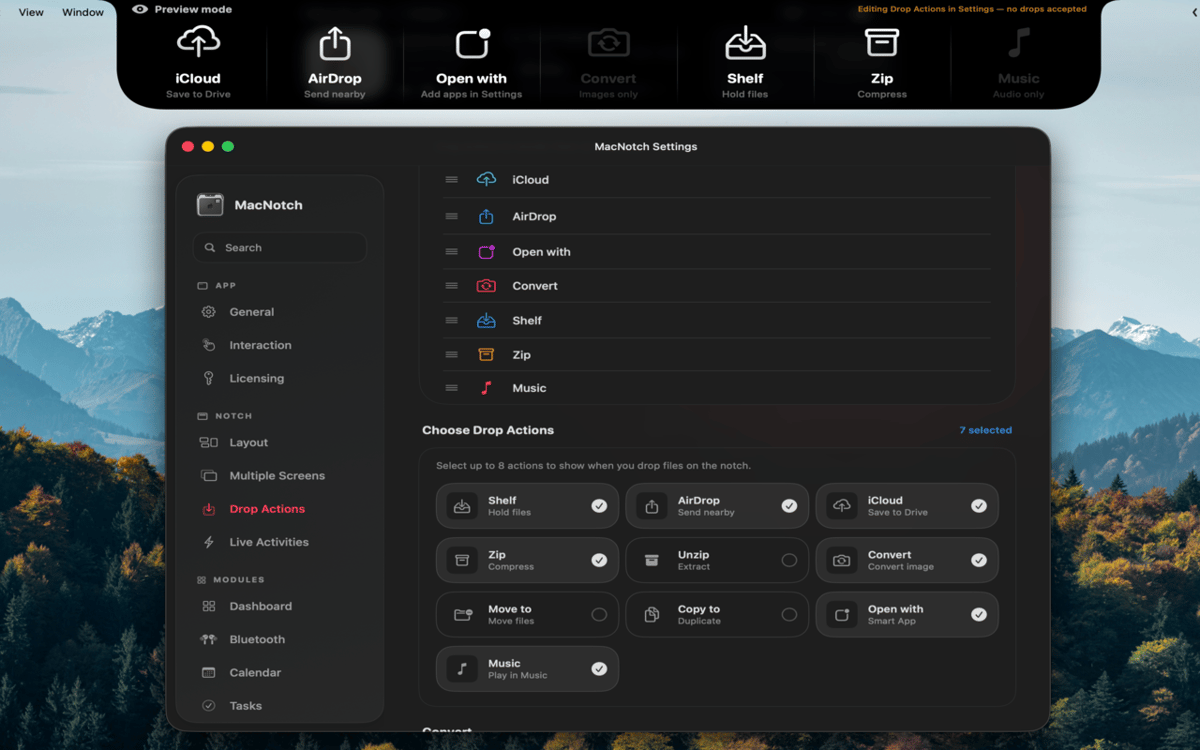
Ziehen Sie eine Datei auf die Notch, um sie sofort per AirDrop zu senden, zu komprimieren, Bilder zu konvertieren, in einen Ordner zu verschieben oder zu kopieren oder mit einer bestimmten App zu öffnen. Kein Durchsuchen von Finder-Menüs – einfach ablegen und loslegen. Es ist die Art von Abkürzung, die sich selbstverständlich anfühlt, sobald Sie sie haben.
Immer nützlich, auch wenn eingeklappt
Auch wenn die Notch ausgeblendet ist, zeigt sie weiterhin Live-Aktivitäten an: Informationen zur aktuellen Wiedergabe, Pomodoro-Countdowns, anstehende Termine und den Bluetooth-Status. Lautstärke- und Helligkeitsänderungen werden als System-HUD direkt in der Notch angezeigt. Die wichtigen Infos sind immer da, nie im Weg.
Bewertungen und Rezensionen
MacNotch
•
33 Bewertungen
Aarsh Oza
21. Sept. 2026
App-Version: 1.9.9.5
The app is looking and functioning top notch. Just few things that needs to be there is first to polish the look and also able to resize the notch when its active instead of taking up half of the width of screen.
Marcelo
10. Sept. 2026
App-Version: 1.9.9.4
Estou gostando bastante do MacNotch! Só notei algo que talvez seja um bug: depois que desliguei e liguei o notebook novamente, a opção de mostrar em telas externas ficou desativada, mesmo estando ativada antes. Mas a ferramenta é sensacional!
Georgi Kolev
9. Sept. 2026
App-Version: 1.9.9.4
Not bad but it needs live sports and finance tickers.
Erhalten Sie Hunderte von Apps mit Membership
Werden Sie Setapp Member und nutzen Sie mit nur einem Abonnement hunderte genialer Apps.
Testen Sie 7 Tage kostenlos, im Anschluss nur eine einfach monatliche Gebühr.
Setapp auf dem Mac installieren
Erkunden Sie Apps für Mac, iOS und Web. Finden Sie einfache Möglichkeiten für die Bewältigung täglicher Aufgaben.

Die gesuchte App finden
In Setapp wartet eine wunderbare App auf Sie. Installieren Sie sie mit einem Klick.

MacNotch
Abonnement wählen
Eine App oder mehr mit der Setapp Membership. Holen Sie sich Apps, so wie Sie es möchten.

Erhalten Sie Hunderte von Apps mit Membership
Werden Sie Setapp Member und nutzen Sie mit nur einem Abonnement hunderte genialer Apps.
Testen Sie 7 Tage kostenlos, im Anschluss nur eine einfach monatliche Gebühr.
1
Setapp auf dem Mac installieren
Erkunden Sie Apps für Mac, iOS und Web. Finden Sie einfache Möglichkeiten für die Bewältigung täglicher Aufgaben.
2
Die gesuchte App finden
In Setapp wartet eine wunderbare App auf Sie. Installieren Sie sie mit einem Klick.
MacNotch
3
Abonnement wählen
Eine App oder mehr mit der Setapp Membership. Holen Sie sich Apps, so wie Sie es möchten.
Die besten Apps
Von Planung und Routineaufgaben bis hin zu kreativen Tätigkeiten und Programmieren – mit den Apps von Setapp sind Sie bestens für Aufgaben gerüstet.

TypingMind
KI-Chat mit alternativer UI
Text erzeugen oder zusammenfassen
Prompt-Bibliothek nutzen
KI

Spark Mail
E-Mails verwalten
KI

CleanMyMac
Datenmüll entfernen

Bartender
Menüleiste anpassen

CleanShot X
Vielseitige Bildschirmfotos aufnehmen

Luminar Neo
Fotos bearbeiten
KI

ClearVPN
Sichere Verbindung herstellen

Craft
Mit Dokumenten arbeiten
KI
MacNotch
Notch-Dienstprogramm für Mac