
PasteJet
Intelligentere Zwischenablage, schnelleres Einfügen

Mac
Version 1.5.2
macOS 14.6 oder neuer
6.2 MB
1 Sprachen
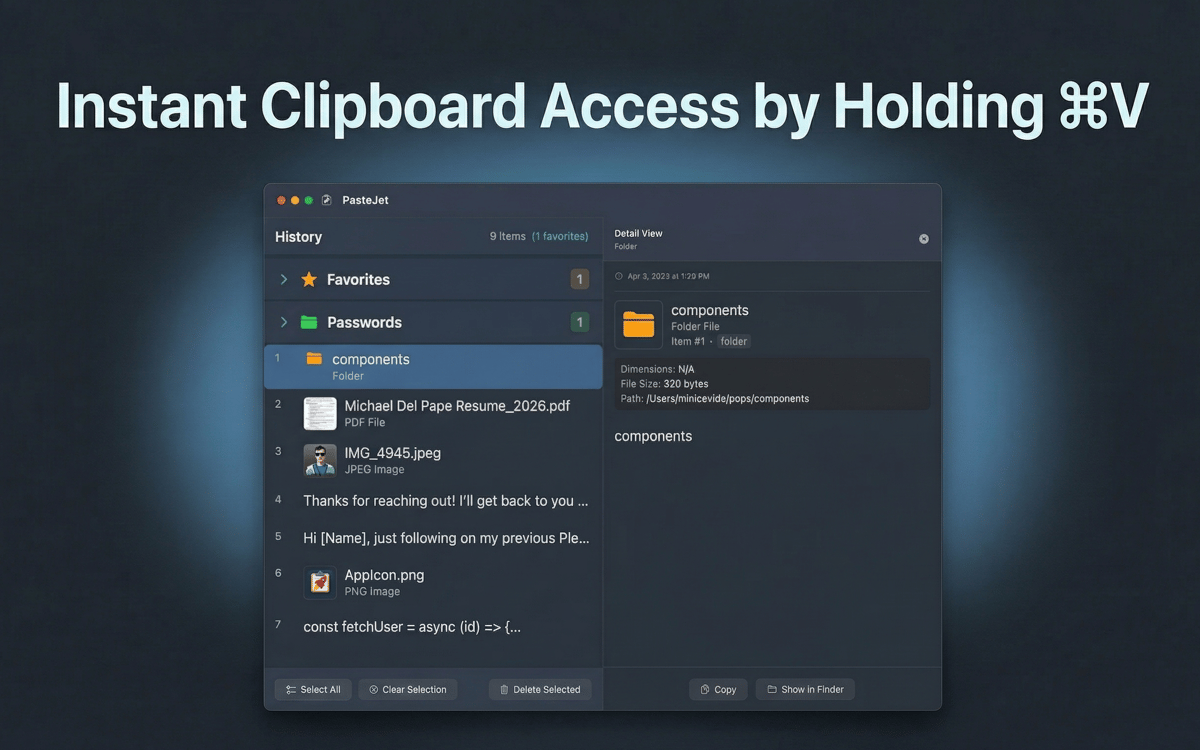
PasteJet ist ein Zwischenablage-Manager für Mac, der sich alles merkt, was Sie kopieren. Befindet sich in der Menüleiste und funktioniert mit einer einfachen Abwandlung von Cmd+V – antippen für normales Einfügen, gedrückt halten zum Durchsuchen des Verlaufs. Text, Bilder, Dateien, Links – speichert sie alle und hilft Ihnen, schnell zu finden, was Sie brauchen.
Aus dem gesamten Zwischenablage-Verlauf einfügen
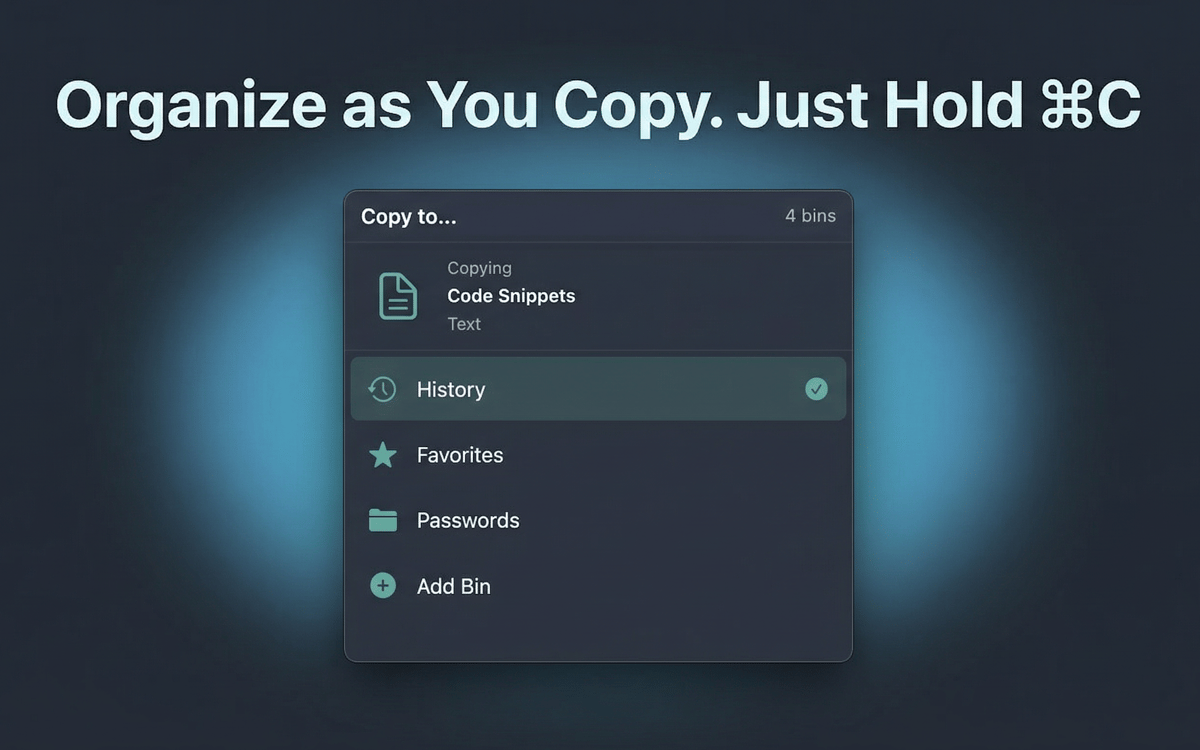
Kopierte Elemente in Sammlungen organisieren
Schnelles Einfügen per Tastendruck
Favoriten für wiederverwendbare Inhalte speichern
PasteJet-Funktionen
Cmd+V halten zum Durchsuchen, antippen zum Einfügen
Keine neuen Shortcuts zu erlernen. PasteJet nutzt die Tastenkombinationen, die Sie bereits verwenden. Ein kurzer Fingertipp fügt deine neuester Eintrag. Gedrückt halten und ein Popup mit dem kompletten Zwischenablageverlauf zum Auswählen erscheint.
Bis zu 500 Einträge im Verlauf speichern
PasteJet speichert automatisch alles, was Sie kopieren – Text, Bilder, Dateien und Links. Scrollen Sie durch Ihren Verlauf oder suchen Sie, um etwas wiederzufinden, das Sie vor drei Stunden kopiert haben.
Hefte deine bevorzugten Elemente als Favoriten an
E-Mail-Signaturen, Code-Snippets, Adressen – speichern Sie bis zu 10 Elemente, die Sie häufig einfügen. Sie sind immer nur einen Klick entfernt, ohne langes Suchen.
Mit Ablagen organisieren
Verwandte Elemente in benutzerdefinierten Sammlungen gruppieren. Behalten Sie Projektdateien, Referenz-Links oder Vorlagen übersichtlich sortiert, anstatt sie in einer langen Liste zu verlieren.
Arbeitet unauffällig in Ihrer Menüleiste
PasteJet bleibt im Hintergrund, bis Sie es brauchen. Kein Dock-Symbol, keine schwebenden Fenster. Klicken Sie auf das Menüleistensymbol oder halten Sie Befehl+V gedrückt – das ist alles.
Ihre Daten bleiben auf Ihrem Mac
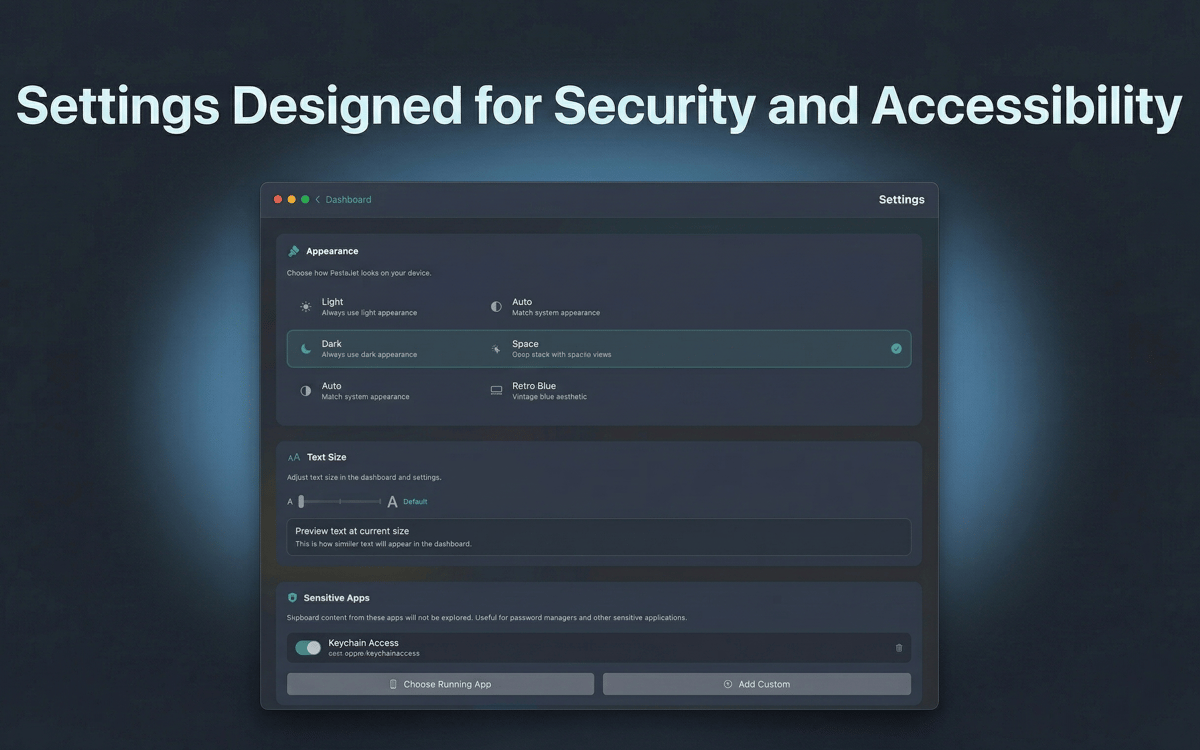
Der Zwischenablageverlauf wird lokal mit AES-256-Verschlüsselung gespeichert. Nichts verlässt Ihren Mac, nichts erreicht einen Server.
Erhalten Sie Hunderte von Apps mit Membership
Werden Sie Setapp Member und nutzen Sie mit nur einem Abonnement hunderte genialer Apps.
Testen Sie 7 Tage kostenlos, im Anschluss nur eine einfach monatliche Gebühr.
Setapp auf dem Mac installieren
Erkunden Sie Apps für Mac, iOS und Web. Finden Sie einfache Möglichkeiten für die Bewältigung täglicher Aufgaben.

Die gesuchte App finden
In Setapp wartet eine wunderbare App auf Sie. Installieren Sie sie mit einem Klick.

PasteJet
Abonnement wählen
Eine App oder mehr mit der Setapp Membership. Holen Sie sich Apps, so wie Sie es möchten.

Erhalten Sie Hunderte von Apps mit Membership
Werden Sie Setapp Member und nutzen Sie mit nur einem Abonnement hunderte genialer Apps.
Testen Sie 7 Tage kostenlos, im Anschluss nur eine einfach monatliche Gebühr.
1
Setapp auf dem Mac installieren
Erkunden Sie Apps für Mac, iOS und Web. Finden Sie einfache Möglichkeiten für die Bewältigung täglicher Aufgaben.
2
Die gesuchte App finden
In Setapp wartet eine wunderbare App auf Sie. Installieren Sie sie mit einem Klick.
PasteJet
3
Abonnement wählen
Eine App oder mehr mit der Setapp Membership. Holen Sie sich Apps, so wie Sie es möchten.
Die besten Apps
Von Planung und Routineaufgaben bis hin zu kreativen Tätigkeiten und Programmieren – mit den Apps von Setapp sind Sie bestens für Aufgaben gerüstet.

TypingMind
KI-Chat mit alternativer UI
Text erzeugen oder zusammenfassen
Prompt-Bibliothek nutzen
KI

Spark Mail
E-Mails verwalten
KI

CleanMyMac
Datenmüll entfernen

Bartender
Menüleiste anpassen

CleanShot X
Vielseitige Bildschirmfotos aufnehmen

Luminar Neo
Fotos bearbeiten
KI

ClearVPN
Sichere Verbindung herstellen

Craft
Mit Dokumenten arbeiten
KI
PasteJet
Intelligentere Zwischenablage, schnelleres Einfügen