
Tacque
Make your Mac keyboard sound mechanical
Mac
Version 1.2
macOS 15.0 oder neuer
28.1 MB
1 Sprachen
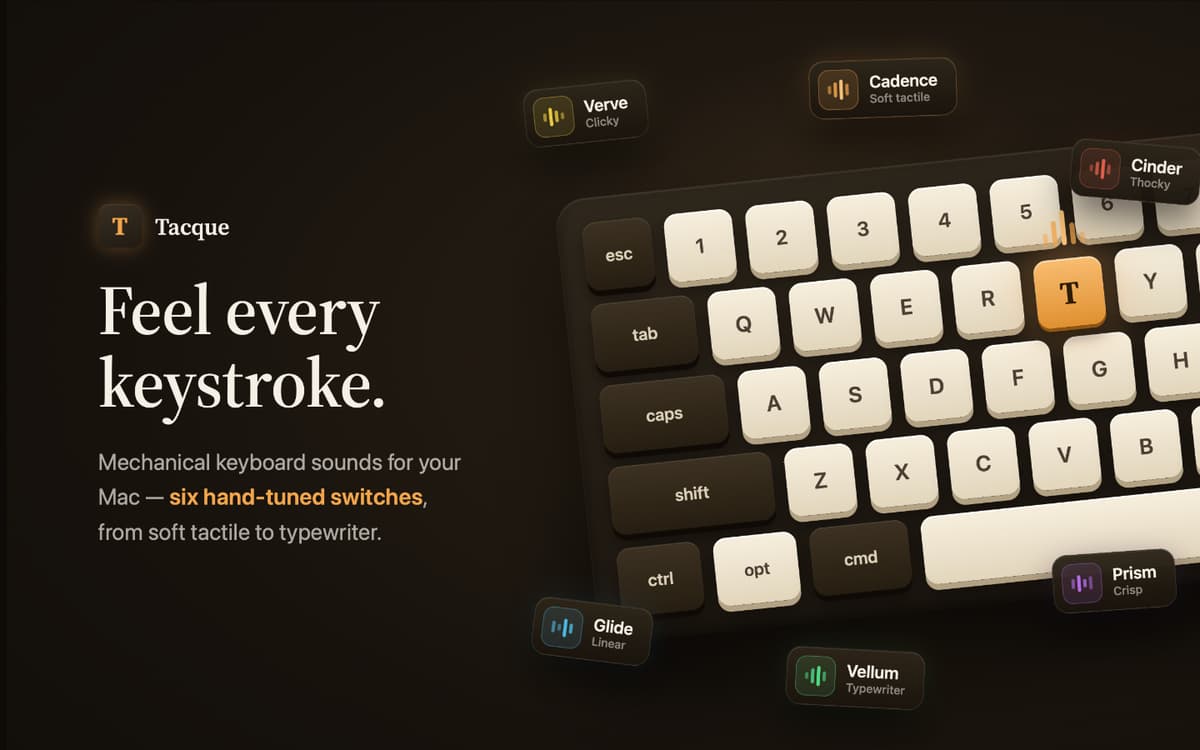
Tacque is a keyboard sound app for Mac. Add crisp mechanical switch sounds to every keystroke, whether you’re writing, coding, browsing, or chatting. Choose a sound pack, set the volume, and give a flat keyboard a little more character.
Add mechanical sounds to every keystroke
Choose from distinct switch sound packs
Import custom sounds from files or links
Pause automatically during calls and media
Tacque-Funktionen
Make every keystroke click
Tacque plays a mechanical switch sound whenever you press a key. It works across your Mac, so the satisfying clicks follow you from your editor to your browser and everywhere else you type.
Find your kind of keyboard
Pick from hand-tuned sound packs ranging from soft and thocky to sharp and clicky. Regular keys, Space, Enter, Backspace, and modifiers use distinct sounds to keep the experience natural.
Hear a more realistic board
Each key has its own subtle pitch. The same key stays consistent, while different keys sound slightly different. Stereo positioning places left- and right-side keys in the matching part of the soundstage.
Bring your own sounds
Import custom sound packs from a file on your Mac or directly from a link. Tacque supports popular community pack formats, giving you plenty of switch sounds to explore.
Know when to stay quiet
Tacque can mute itself automatically while your microphone is in use or when music and video are playing. You can also turn keyboard sounds on or off instantly from the menu bar.
Test sounds as you type
Open the menu bar popover and start typing to preview the selected pack. A live waveform responds to every keystroke, while quick controls let you adjust the volume without interrupting your flow.
Erhalten Sie Hunderte von Apps mit Membership
Werden Sie Setapp Member und nutzen Sie mit nur einem Abonnement hunderte genialer Apps.
Testen Sie 7 Tage kostenlos, im Anschluss nur eine einfach monatliche Gebühr.
Setapp auf dem Mac installieren
Erkunden Sie Apps für Mac, iOS und Web. Finden Sie einfache Möglichkeiten für die Bewältigung täglicher Aufgaben.

Die gesuchte App finden
In Setapp wartet eine wunderbare App auf Sie. Installieren Sie sie mit einem Klick.

Tacque
Abonnement wählen
Eine App oder mehr mit der Setapp Membership. Holen Sie sich Apps, so wie Sie es möchten.

Erhalten Sie Hunderte von Apps mit Membership
Werden Sie Setapp Member und nutzen Sie mit nur einem Abonnement hunderte genialer Apps.
Testen Sie 7 Tage kostenlos, im Anschluss nur eine einfach monatliche Gebühr.
1
Setapp auf dem Mac installieren
Erkunden Sie Apps für Mac, iOS und Web. Finden Sie einfache Möglichkeiten für die Bewältigung täglicher Aufgaben.
2
Die gesuchte App finden
In Setapp wartet eine wunderbare App auf Sie. Installieren Sie sie mit einem Klick.
Tacque
3
Abonnement wählen
Eine App oder mehr mit der Setapp Membership. Holen Sie sich Apps, so wie Sie es möchten.
Die besten Apps
Von Planung und Routineaufgaben bis hin zu kreativen Tätigkeiten und Programmieren – mit den Apps von Setapp sind Sie bestens für Aufgaben gerüstet.

TypingMind
KI-Chat mit alternativer UI
Text erzeugen oder zusammenfassen
Prompt-Bibliothek nutzen
KI

Spark Mail
E-Mails verwalten
KI

CleanMyMac
Datenmüll entfernen

Bartender
Menüleiste anpassen

CleanShot X
Vielseitige Bildschirmfotos aufnehmen

Luminar Neo
Fotos bearbeiten
KI

ClearVPN
Sichere Verbindung herstellen

Craft
Mit Dokumenten arbeiten
KI
Tacque
Make your Mac keyboard sound mechanical