Telescopo Markdown Studio
Markdown- und Diagramm-Viewer



Mac
Version 7.1.3
macOS 15.0 oder neuer
34.6 MB
1 Sprachen
Anstatt zwischen verschiedenen Apps oder Websites zum Lesen von Markdown, Mermaid, LaTeX oder SVGs zu wechseln, nutzen Sie einen schnellen, einheitlichen Viewer, der alles mit konsistenten Gesten und Tastenkombinationen unterstützt. Telescopo bietet native macOS-Unterstützung für ePub, PDF, CSV, JSON, YAML und über 70 weitere Formate – Tendenz steigend. Es ist schnell, schützt Ihre Dateien und hilft Ihnen, sich auf den Inhalt zu konzentrieren, nicht auf die Tools. Ideal für alle, die mit Dokumenten, Code oder Diagrammen arbeiten – Studierende, Autoren, Forscher, Entwickler und viele mehr.
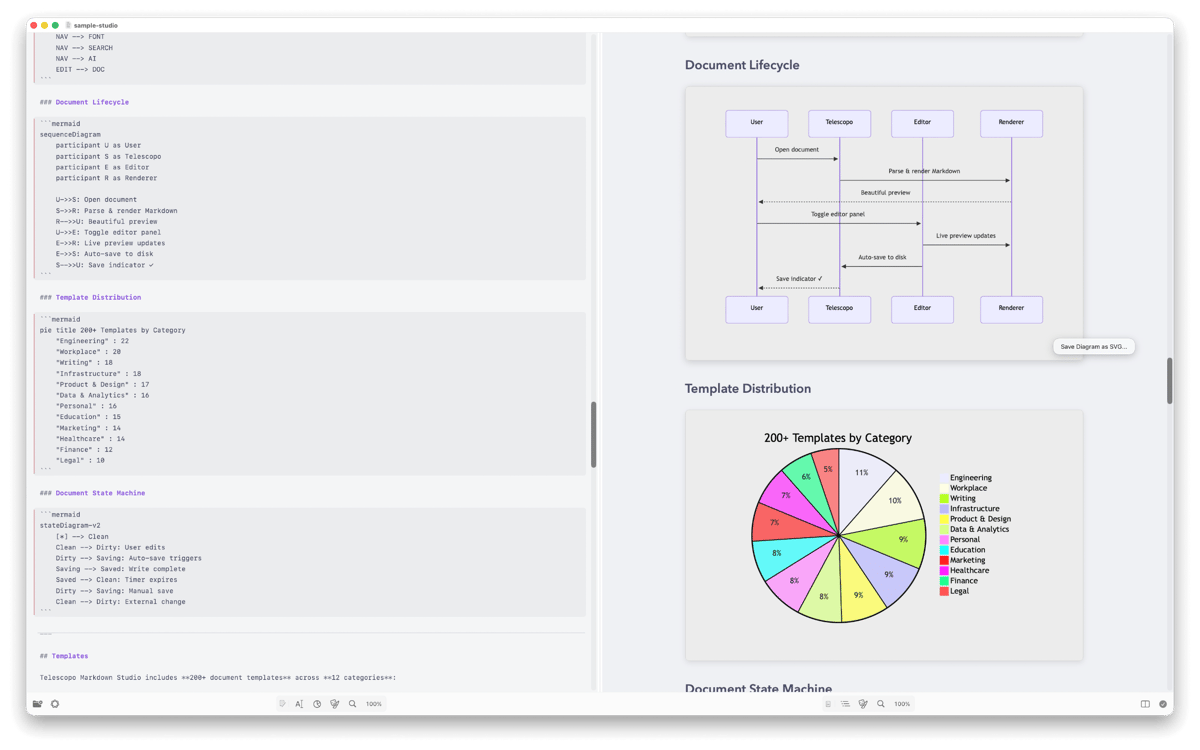
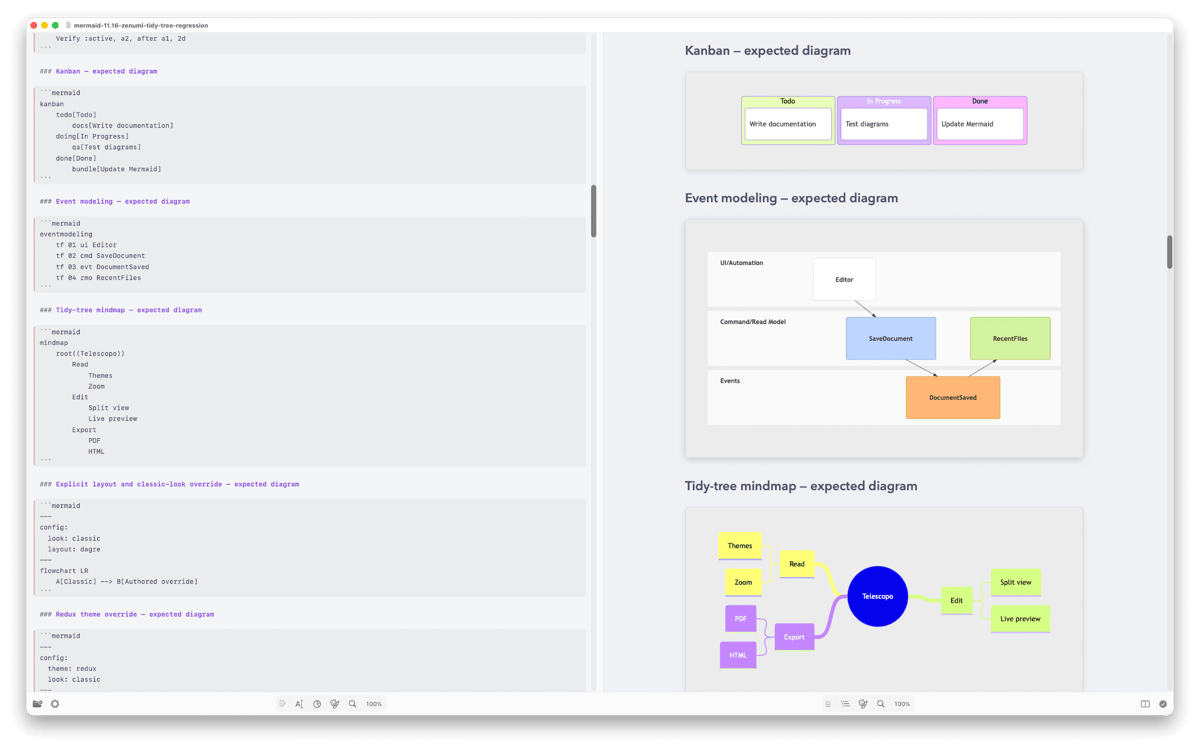
Markdown, Mermaid, LaTeX, SVG und mehr anzeigen
Markdown & Diagramme als PDF exportieren
Kapitel nahtlos durchsuchen und navigieren
KI-Zusammenfassungen direkt auf Ihrem Gerät
Telescopo Markdown Studio-Funktionen
Mehrere Dateitypen anzeigen
Öffnen Sie Markdown, Mermaid, LaTeX, SVG, ePub, PDF, Klartext, Code-Dateien (Swift, Python, JavaScript, Java, C/C++, Go, Rust, HTML/CSS, YAML und über 40 weitere), JSON, XML, CSV und mehr – alles in einer App. Jedes Format wird sauber dargestellt, sodass Sie keine separaten Apps für verschiedene Dateitypen benötigen.
Einfache Navigation in langen Dokumenten
Springen Sie blitzschnell zwischen Kapiteln, Abschnitten, Seiten oder Code-Funktionen. Dynamische Hervorhebung, intelligentes Scrollen und Tastenkombinationen erleichtern das Durchsuchen selbst sehr langer Dokumente.
Markdown mit geräteinterner KI zusammenfassen
Verwandeln Sie lange Markdown-Dokumente mithilfe von Apple Intelligence in prägnante Zusammenfassungen, ohne Ihre Daten online zu senden. Das spart Zeit beim Durchsehen von Notizen, Dokumentationen oder Recherchen.
Diagramme und SVGs perfekt darstellen
Komplexe Diagramme (Mermaid, LaTeX mit MathJax) und SVG-Grafiken werden in nativer, vektorgenauer Qualität angezeigt. Dank unendlichem Zoom und sanften Übergängen können Sie jedes Detail problemlos untersuchen.
Markdown und Diagramme als PDF exportieren
Erstellen Sie professionelle PDFs direkt aus Markdown mit themenbasierter Formatierung und eleganter Typografie. Sie müssen nicht zu einer anderen App wechseln, um Ihre Dokumente zu teilen oder zu drucken. Der PDF-Export wird für Markdown mit komplexen Inline-Mermaid-Elementen, Mermaid und LaTeX mit MathJax unterstützt.
Ihr Leseerlebnis personalisieren
Wählen Sie aus sechs handgefertigten Designs, passen Sie Schriftarten an und legen Sie für jeden Tab ein eigenes Design fest. Hell, dunkel, Retro, Cyberpunk – Sie können jedes Dokument genau so gestalten, wie Sie es wünschen.
Bewertungen und Rezensionen
Telescopo Markdown Studio
•
88 Bewertungen
Vira Tkachenko
1. Okt. 2026
App-Version: 7.1.3
Easy to use and capable markdown editor! Thanks! AI Assistant could be improved to make real edit operations, not just answering in the chat. Prompt I’ve tried “could you add a funny joke about sabbatical at the end of the document”
Antwort vom Entwickler
9. Okt. 2026
Hi Vira! As we use Apple's on-device AI to power these features, we've been a bit limited in capabilities. The good news is that we're working on making this AI Assistant far more capable in our editing workflows. We hope to share more soon about this major update that's coming.
Vado Zago
12. Sept. 2026
App-Version: 7.1.2
Getting better and better! Thanks!
Neil
31. Aug. 2026
App-Version: 7.1.2
This is exactly the Markdown viewing I've been looking for!
Erhalten Sie Hunderte von Apps mit Membership
Werden Sie Setapp Member und nutzen Sie mit nur einem Abonnement hunderte genialer Apps.
Testen Sie 7 Tage kostenlos, im Anschluss nur eine einfach monatliche Gebühr.
Setapp auf dem Mac installieren
Erkunden Sie Apps für Mac, iOS und Web. Finden Sie einfache Möglichkeiten für die Bewältigung täglicher Aufgaben.

Die gesuchte App finden
In Setapp wartet eine wunderbare App auf Sie. Installieren Sie sie mit einem Klick.

Telescopo Markdown Studio
Abonnement wählen
Eine App oder mehr mit der Setapp Membership. Holen Sie sich Apps, so wie Sie es möchten.

Erhalten Sie Hunderte von Apps mit Membership
Werden Sie Setapp Member und nutzen Sie mit nur einem Abonnement hunderte genialer Apps.
Testen Sie 7 Tage kostenlos, im Anschluss nur eine einfach monatliche Gebühr.
1
Setapp auf dem Mac installieren
Erkunden Sie Apps für Mac, iOS und Web. Finden Sie einfache Möglichkeiten für die Bewältigung täglicher Aufgaben.
2
Die gesuchte App finden
In Setapp wartet eine wunderbare App auf Sie. Installieren Sie sie mit einem Klick.
Telescopo Markdown Studio
3
Abonnement wählen
Eine App oder mehr mit der Setapp Membership. Holen Sie sich Apps, so wie Sie es möchten.
Die besten Apps
Von Planung und Routineaufgaben bis hin zu kreativen Tätigkeiten und Programmieren – mit den Apps von Setapp sind Sie bestens für Aufgaben gerüstet.

TypingMind
KI-Chat mit alternativer UI
Text erzeugen oder zusammenfassen
Prompt-Bibliothek nutzen
KI

Spark Mail
E-Mails verwalten
KI

CleanMyMac
Datenmüll entfernen

Bartender
Menüleiste anpassen

CleanShot X
Vielseitige Bildschirmfotos aufnehmen

Luminar Neo
Fotos bearbeiten
KI

ClearVPN
Sichere Verbindung herstellen

Craft
Mit Dokumenten arbeiten
KI
Telescopo Markdown Studio
Markdown- und Diagramm-Viewer