Marketplace Membership
Sign in Try free
Setapp logo
Home Marketplace Membership How it works Solve with AI+ Pricing Blog About Setapp
Sign in

Press Start on productivity

How to enter a flow state instantly 

On average, we need 15-20 minutes to start focusing on a task. All that time — just to start working. This combination of apps will help you reduce that time with…two buttons. Even more, they’ll help stick to your flow and not get sidetracked all the time. 

Apps to enter and maintain a flow state 
Press the Play button with Lofi Garden 

Every small detail matters when you sit down to work: your chair, the stuff on your desk, and even more so — the background noise. The recent “What’s that sound?” study says that 69% of employees are affected by noise pollution. On the other side, the right kind of noise helps hone their focus. For example, lo-fi music has been proven to put the brain in a state of enhanced focus. 

So here’s the tip: install Lofi Garden and press the Play button in the menu bar as soon as you turn on your computer with the intention to get some work done. The lo-fi beats will immerse you into a relaxing yet productive sound environment right away. No playlists, no searching for the right sounds — just one button. 


Stay in the flow with Daily 

Sound is powerful but not enough. Your brain also needs some discipline — kind of a signal saying “alright, now is the time you do the work and you shouldn't get sidetracked, you’ll get a break later.” 

Pomodoro timers and productivity trackers might help here. We suggest a minimalist tracker — Daily. 

Once in a while, Daily will check in, asking what you’re currently doing. Log your activity and press the confirmation button; or simply press that button if you’re continuing your previous activity. This will keep you in the flow, because you’ll know that your activity is being tracked, and you want the tracking results to be accurate. 
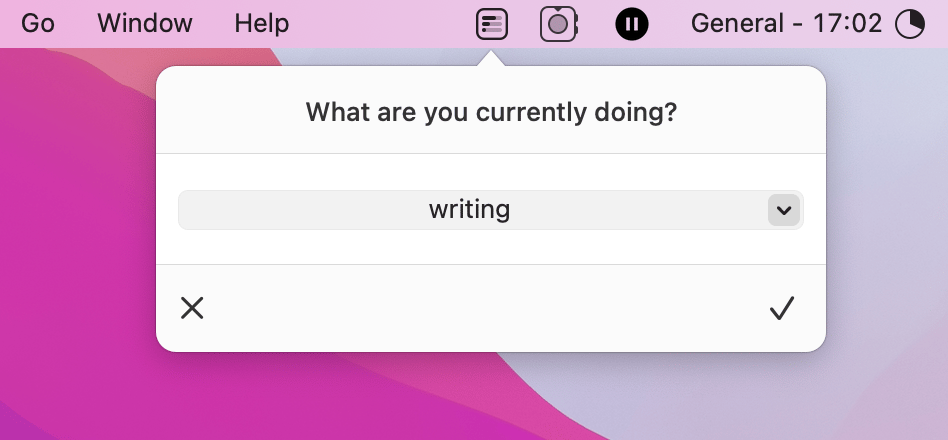
Tip: Those reminders from Daily are also a great way to remind yourself to take a break. Once the message pops up, ask yourself if it’s time to wind down, and feel free to track your breaks, too — just to ensure you’re getting enough rest throughout the day. 

Hope this duo of tools will help ramp up your productivity. Check out more use cases picked for you below.


More reads for you

Automate to-do lists
Task management kit
Kickstart 2022 with top picks
What to add to your 2022 toolkit
Setapp logo

Company

  • Home
  • All apps
  • How it works
  • Pricing
  • About Setapp
  • Download Setapp
  • Getting started with Setapp
  • Uninstall Setapp

Helpful

  • Support
  • Trust center
  • Join as a developer
  • Setapp reviews
  • Affiliate program
  • Blog

Inside the blog

  • Editorial process
  • How we evaluate apps
  • Human writing
  • Write for us

Best apps

  • VPN for Mac
  • YouTube downloader for Mac
  • Screen recorder for Mac
  • Recovery software for Mac
  • Password manager for Mac
  • Video editing software for Mac
  • Note–taking app for Mac
  • Terminal for Mac
  • Calendar app for Mac
  • Remote desktop for Mac
  • Cloud backup for Mac
  • Screenshot tool for Mac
  • Antivirus for Mac
  • Browser for Mac

Our best content

  • All macOS versions
  • All iOS versions
  • MacBook generations in order
  • iPhone releases in order
  • iPad generations in order
  • AirPods generations in order

How to's

  • View clipboard history on Mac
  • Change folder icon or color on Mac
  • Recover deleted iPhone photos
  • Access unrecognized external drive
  • Access your Mac remotely
  • Use recovery mode on Mac
  • View and kill processes on Mac
  • Stop Mac from sleeping
  • Check MacBook temperature
  • Fix frozen Mac
  • Reset iPhone
  • Reset iPad

Our tools

  • Apple serial number
  • iPhone serial number
  • Mac serial number
  • iPad serial number
  • AirPods serial number
  • Apple Watch serial number
  • Apple warranty number
  • Mac warranty checker
  • iPad warranty checker
  • HEIC to JPG
  • HEIC to PNG
  • HEIC to PDF
  • GPTs for Mac

Updates from our team, written with love

Love is coming your way, soon. This doesn’t look right, please try again. Try once more, our server fell asleep for a bit.
I agree to receive emails from Setapp as per this Privacy Notice.
Please select the checkbox to continue.
Need help? Terms of Use Privacy Notice
© 2026 MacPaw Way Ltd., 25 Serifou, Allure Center 11, Office No. 11-12, 2nd Floor, 3046 Zakaki, Limassol, Cyprus
Sweet, let’s get you started
or sign in with
Apple icon
Google icon
Create a strong password
Come up with a unique password for your Setapp account:
  • 8 characters minimum.
  • At least 1 uppercase letter.
  • At least 1 lowercase letter.
What should we call you?
Continue with new account:
Captcha is required