Marketplace Membership
Sign in Try free
Setapp logo
Home Marketplace Membership How it works Solve with AI+ Pricing Blog About Setapp
Sign in

Introducing Setapp AI+

Try GPT-4o and other AI models

Setapp AI+ is a fantastic package of tools you can use to experiment with top AI models, including GPT-4o, OpenAI’s new hyper-fast model that works across text, audio, and image.

Apps that support GPT-4o 
Chat with AI 

TypingMind gives you enjoyable AI interactions within one interface. You can even choose the AI character who matches your vibe and use community prompts to ask questions. 


Enhance your writing

Two writing assistants at your service: meet Elephas and Plus. 

Elephas will help you generate content from scratch, rewrite in different styles, summarize, and write technical stuff and code.


Plus follows you in your footsteps: in any app, select the text you’re working on, press Option + Space to open the AI assistant — it will help you rewrite, explain, summarize, etc. 


Get chat and writing helper in one app

BoltAI has it all. Set up your chat with the latest GPT-4o model and ask any questions or complete tasks. In other apps, use the BoltAI command to rewrite, clarify, summarize, or translate text. 


What other apps are included with AI+?

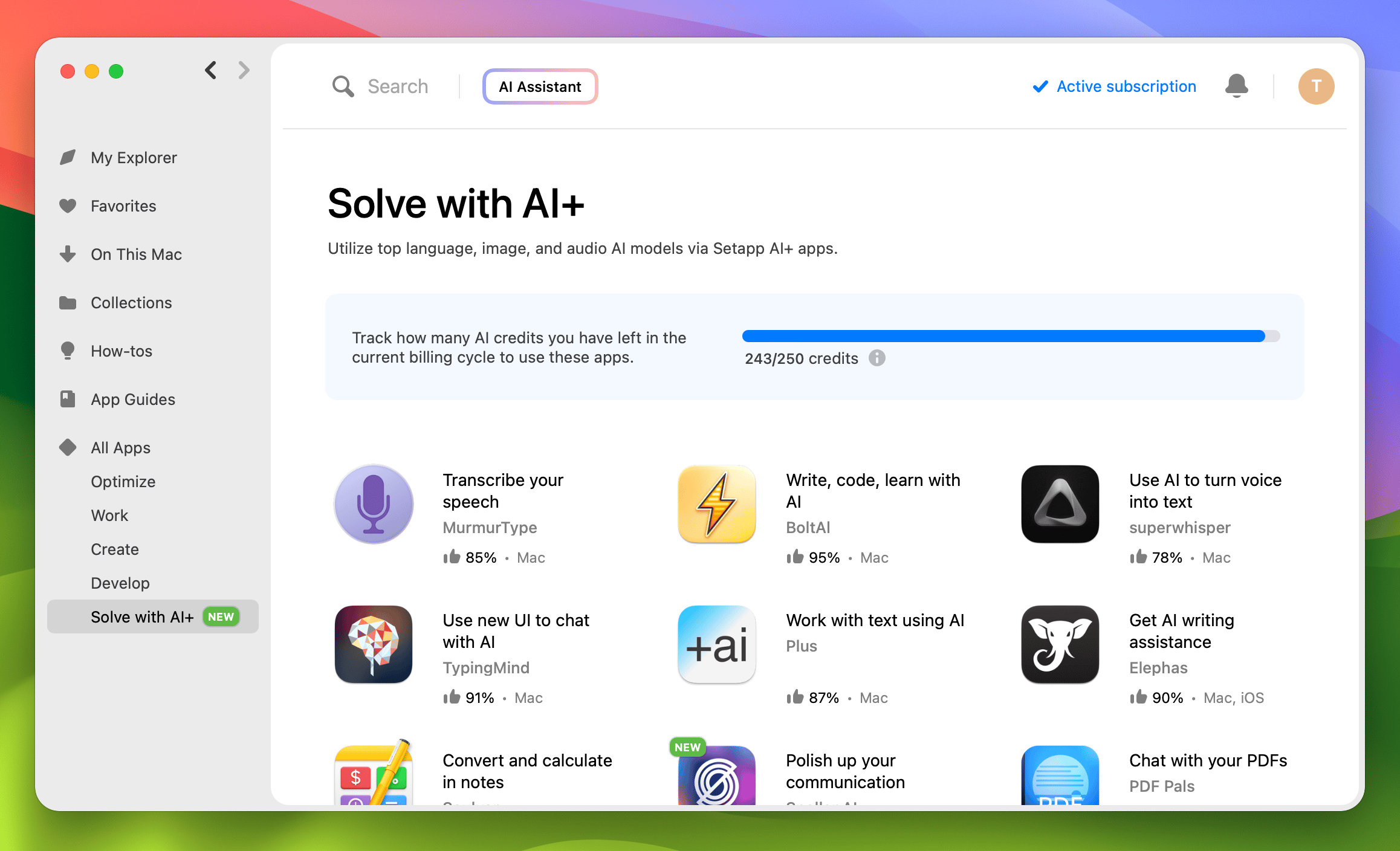
Setapp AI+ covers 10+ apps that use different models such as GPT-4 Turbo, Whisper-2, and more. Apart from TypingMind, BoltAI, Plus, and Elephas, you get the following apps: 

  • Ready to Send for automatic email generation
  • PDFPals to chat with PDFs of any size 
  • Soulver to calculate using natural language and AI
  • MurmurType to transcribe and translate speech 
  • superwhisper to make summaries of videos, podcasts, and more. 

Go to the Solve with AI+ category in the Setapp app to try all the AI+ apps. 
How Setapp AI+ works

Setapp AI+ offers two paid plans with different AI usage limits: AI Enthusiast for moderate use, and AI Expert for advanced use. Here they are at a glance: 

  • AI Enthusiast: 125 credits, 1 Mac, 1600 tokens per request. Pay $14.99 monthly or $161.88 annually. 125 credits let you create approximately 5000 messages with GPT-3.5 Turbo or 500 messages with GPT-4o.

  • AI Expert: 250 credits, 4 Macs and 4 iOS devices, 16 000 tokens per request. Pay $23.99 monthly or $259.09 annually. 250 credits let you create approximately 10 000 messages with GPT-3.5 Turbo or 1000 messages with GPT-4o.

You can check your credit balance in the Setapp account or in the Solve with AI+ category in the Setapp app.  

For those of you who don’t want to upgrade to AI+, you can still use your own API keys in any of the AI+ apps. What’s more, you will be getting 10 credits every month, included with your plan for free! That’s around 400 messages with GPT-3.5 Turbo or 40 messages with GPT-4o. 

Hope this how-to will help you solve tasks faster, and enjoy solving them, too! Check out more how-tos picked for you below.  

More reads for you

AI apps for productivity
Work less and focus when it matters
Top 10 AI apps to try today
For writing, photos, planning
Setapp logo

Company

  • Home
  • All apps
  • How it works
  • Pricing
  • About Setapp
  • Download Setapp
  • Getting started with Setapp
  • Uninstall Setapp

Helpful

  • Support
  • Trust center
  • Join as a developer
  • Setapp reviews
  • Affiliate program
  • Blog

Inside the blog

  • Editorial process
  • How we evaluate apps
  • Human writing
  • Write for us

Best apps

  • VPN for Mac
  • YouTube downloader for Mac
  • Screen recorder for Mac
  • Recovery software for Mac
  • Password manager for Mac
  • Video editing software for Mac
  • Note–taking app for Mac
  • Terminal for Mac
  • Calendar app for Mac
  • Remote desktop for Mac
  • Cloud backup for Mac
  • Screenshot tool for Mac
  • Antivirus for Mac
  • Browser for Mac

Our best content

  • All macOS versions
  • All iOS versions
  • MacBook generations in order
  • iPhone releases in order
  • iPad generations in order
  • AirPods generations in order

How to's

  • View clipboard history on Mac
  • Change folder icon or color on Mac
  • Recover deleted iPhone photos
  • Access unrecognized external drive
  • Access your Mac remotely
  • Use recovery mode on Mac
  • View and kill processes on Mac
  • Stop Mac from sleeping
  • Check MacBook temperature
  • Fix frozen Mac
  • Reset iPhone
  • Reset iPad

Our tools

  • Apple serial number
  • iPhone serial number
  • Mac serial number
  • iPad serial number
  • AirPods serial number
  • Apple Watch serial number
  • Apple warranty number
  • Mac warranty checker
  • iPad warranty checker
  • HEIC to JPG
  • HEIC to PNG
  • HEIC to PDF
  • GPTs for Mac

Updates from our team, written with love

Love is coming your way, soon. This doesn’t look right, please try again. Try once more, our server fell asleep for a bit.
I agree to receive emails from Setapp as per this Privacy Notice.
Please select the checkbox to continue.
Need help? Terms of Use Privacy Notice
© 2026 MacPaw Way Ltd., 25 Serifou, Allure Center 11, Office No. 11-12, 2nd Floor, 3046 Zakaki, Limassol, Cyprus
Sweet, let’s get you started
or sign in with
Apple icon
Google icon
Create a strong password
Come up with a unique password for your Setapp account:
  • 8 characters minimum.
  • At least 1 uppercase letter.
  • At least 1 lowercase letter.
What should we call you?
Continue with new account:
Captcha is required