Marketplace Membership
Sign in Try free
Setapp logo
Home Marketplace Membership How it works Solve with AI+ Pricing Blog About Setapp
Sign in

Keysmith

Record how you do things on Mac. Then assign shortcuts

Keysmith watches your flow and helps automate it with custom shortcuts. Create macros for the actions you do every day and work faster than ever. 

Vocabulary: macro is a set of actions you can run repeatedly on Mac or on the web. “To create a macro” in Keysmith means to record mouse clicks and keystrokes. 

To show you how it works, I’ve recorded a macro to enable Do Not Disturb every time I open Ulysses (my favorite writing app). I hate receiving any types of notifications when I’m writing, so I always put my Mac on mute. Keysmith helped me streamline this flow. And here’s how:

Step 1. Record new macro

In Keysmith, click on the plus button “New Macro” or select “Record New Macro” in the menu bar. You’ll see the recording window appear in the top right corner. 

Step 2: Act

Open Ulysses > Click on Control Center in the menu bar > Enable Do Not Disturb > For 1 hour. Then, I hit Stop recording in Keysmith to save the macro. 


Step 3: Assign a shortcut

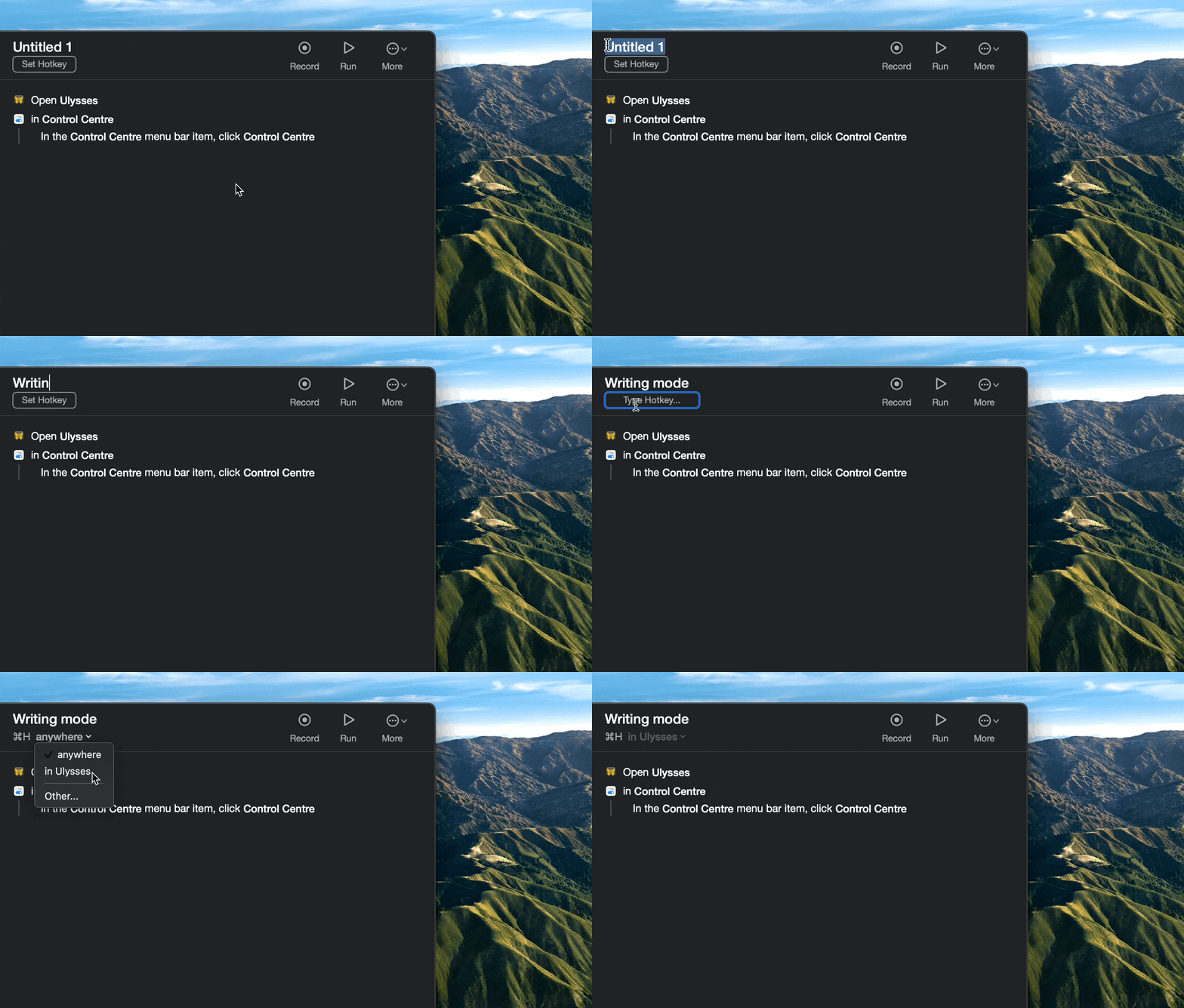
Name the macro and assign a shortcut to it. You can choose to trigger the macro anywhere or only in specific apps/websites. In my example, the macro called “Writing mode” will be triggered by Command + H in Ulysses.
Hope this use case will help you solve tasks faster, and enjoy solving them too! Check out more use cases picked for you below.

More reads for you

Rocket Typist
Notes alternative that helps you do less typing
Gemini
Remove duplicates and save space
Setapp logo

Company

  • Home
  • All apps
  • How it works
  • Pricing
  • About Setapp
  • Download Setapp
  • Getting started with Setapp
  • Uninstall Setapp

Helpful

  • Support
  • Trust center
  • Join as a developer
  • Setapp reviews
  • Affiliate program
  • Blog

Inside the blog

  • Editorial process
  • How we evaluate apps
  • Human writing
  • Write for us

Best apps

  • VPN for Mac
  • YouTube downloader for Mac
  • Screen recorder for Mac
  • Recovery software for Mac
  • Password manager for Mac
  • Video editing software for Mac
  • Note–taking app for Mac
  • Terminal for Mac
  • Calendar app for Mac
  • Remote desktop for Mac
  • Cloud backup for Mac
  • Screenshot tool for Mac
  • Antivirus for Mac
  • Browser for Mac

Our best content

  • All macOS versions
  • All iOS versions
  • MacBook generations in order
  • iPhone releases in order
  • iPad generations in order
  • AirPods generations in order

How to's

  • View clipboard history on Mac
  • Change folder icon or color on Mac
  • Recover deleted iPhone photos
  • Access unrecognized external drive
  • Access your Mac remotely
  • Use recovery mode on Mac
  • View and kill processes on Mac
  • Stop Mac from sleeping
  • Check MacBook temperature
  • Fix frozen Mac
  • Reset iPhone
  • Reset iPad

Our tools

  • Apple serial number
  • iPhone serial number
  • Mac serial number
  • iPad serial number
  • AirPods serial number
  • Apple Watch serial number
  • Apple warranty number
  • Mac warranty checker
  • iPad warranty checker
  • HEIC to JPG
  • HEIC to PNG
  • HEIC to PDF
  • GPTs for Mac

Updates from our team, written with love

Love is coming your way, soon. This doesn’t look right, please try again. Try once more, our server fell asleep for a bit.
I agree to receive emails from Setapp as per this Privacy Notice.
Please select the checkbox to continue.
Need help? Terms of Use Privacy Notice
© 2026 MacPaw Way Ltd., 25 Serifou, Allure Center 11, Office No. 11-12, 2nd Floor, 3046 Zakaki, Limassol, Cyprus
Sweet, let’s get you started
or sign in with
Apple icon
Google icon
Create a strong password
Come up with a unique password for your Setapp account:
  • 8 characters minimum.
  • At least 1 uppercase letter.
  • At least 1 lowercase letter.
What should we call you?
Continue with new account:
Captcha is required