Marketplace Membership
Sign in Try free
Setapp logo
Home Marketplace Membership How it works Solve with AI+ Pricing Blog About Setapp
Sign in

Photo editing toolkit

Replace Lightroom and Photoshop

Adobe’s Lightroom and Photoshop make a great match, and usually, you need both. Lightroom for catalogs and initial processing. Photoshop for retouching and deeper photo enhancement. The problem is that Adobe’s software is expensive and consumes too much RAM. Try these alternatives instead.

Photoshop + Lightroom alternative toolkit
Remove unwanted objects

TouchRetouch will help you remove a person in the background, get rid of the skin blemishes, lines, and any unwanted objects. Everything you need to eliminate imperfections.


Make quick edits

CameraBag Pro is a perfect app for various edits, from adjusting contrast and brightness to adding special effects and bokeh lights. No time tweaking it all? Make instant changes with dozens of presets for different photo types like architecture, landscape, or portrait.


Bring portraits to perfection

Portrait retouching sounds like a tedious job, but not with Luminar Neo. Its AI-powered retouching tools detect facial features so you can work directly with them. Smoothen the skin tone, remove imperfections, fix the light, and more.


There are many other tools to explore, from smart sky replacement to panoramas and time-saving presets.

Modify a batch of photos

Manage large photo collections with PhotoBulk, a great alternative to Lightroom's Catalogs. PhotoBulk will help you edit a batch of photos: resize, rename, and change metadata, all in one click. You can even add a watermark to the whole pack.


Edit metadata

MetaImage is a powerful tool to view and edit image metadata and geotags. The app supports over 90 image formats and numerous tags, including MakerNotes, EXIF, IPTC, and XMP. You can also create presets to update metadata in multiple photos — it's time to get everything organized.


Save disk space

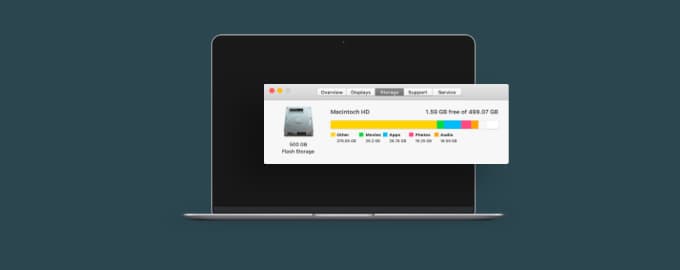
If you deal with photos, you probably deal with low disk space. It’s just never enough! Squash will help you compress photos so they weigh less, without ruining the quality. Try it, at least for the sake of the funny noises the app makes when squeezing photos. It’s oddly addictive.


Hope this how-to will help you solve tasks faster, and enjoy solving them, too! Check out more how-tos picked for you below.

More reads for you

Enhance photos with AI
Two apps to perfect your shots
Save space on Mac
Sync, clean up and squeeze files
Setapp logo

Company

  • Home
  • All apps
  • How it works
  • Pricing
  • About Setapp
  • Download Setapp
  • Getting started with Setapp
  • Uninstall Setapp

Helpful

  • Support
  • Trust center
  • Join as a developer
  • Setapp reviews
  • Affiliate program
  • Blog

Inside the blog

  • Editorial process
  • How we evaluate apps
  • Human writing
  • Write for us

Best apps

  • VPN for Mac
  • YouTube downloader for Mac
  • Screen recorder for Mac
  • Recovery software for Mac
  • Password manager for Mac
  • Video editing software for Mac
  • Note–taking app for Mac
  • Terminal for Mac
  • Calendar app for Mac
  • Remote desktop for Mac
  • Cloud backup for Mac
  • Screenshot tool for Mac
  • Antivirus for Mac
  • Browser for Mac

Our best content

  • All macOS versions
  • All iOS versions
  • MacBook generations in order
  • iPhone releases in order
  • iPad generations in order
  • AirPods generations in order

How to's

  • View clipboard history on Mac
  • Change folder icon or color on Mac
  • Recover deleted iPhone photos
  • Access unrecognized external drive
  • Access your Mac remotely
  • Use recovery mode on Mac
  • View and kill processes on Mac
  • Stop Mac from sleeping
  • Check MacBook temperature
  • Fix frozen Mac
  • Reset iPhone
  • Reset iPad

Our tools

  • Apple serial number
  • iPhone serial number
  • Mac serial number
  • iPad serial number
  • AirPods serial number
  • Apple Watch serial number
  • Apple warranty number
  • Mac warranty checker
  • iPad warranty checker
  • HEIC to JPG
  • HEIC to PNG
  • HEIC to PDF
  • GPTs for Mac

Updates from our team, written with love

Love is coming your way, soon. This doesn’t look right, please try again. Try once more, our server fell asleep for a bit.
I agree to receive emails from Setapp as per this Privacy Notice.
Please select the checkbox to continue.
Need help? Terms of Use Privacy Notice
© 2026 MacPaw Way Ltd., 25 Serifou, Allure Center 11, Office No. 11-12, 2nd Floor, 3046 Zakaki, Limassol, Cyprus
Sweet, let’s get you started
or sign in with
Apple icon
Google icon
Create a strong password
Come up with a unique password for your Setapp account:
  • 8 characters minimum.
  • At least 1 uppercase letter.
  • At least 1 lowercase letter.
What should we call you?
Continue with new account:
Captcha is required