
Taphouse
Homebrew ohne Tippen
Mac
Version 1.5.9
macOS 14.0 oder neuer
30.6 MB
6 Sprachen
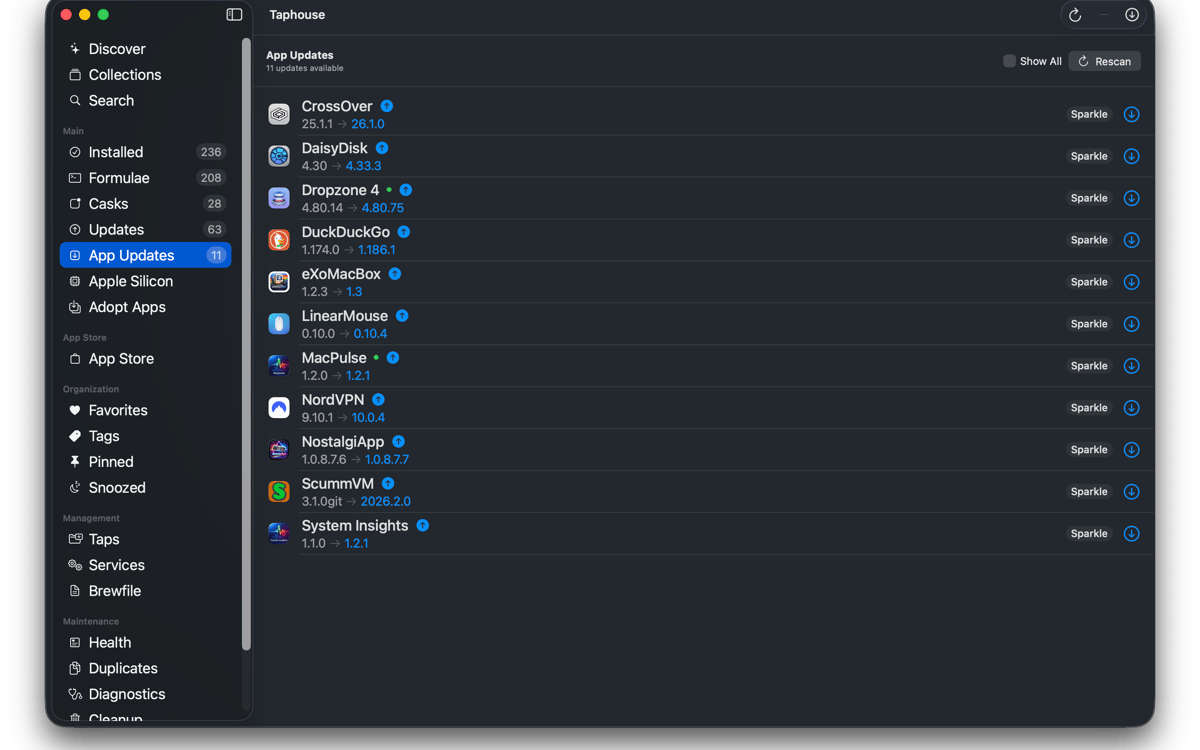
Taphouse ist eine native Homebrew-App für Mac, die brew-Befehle in einfache Point-and-Click-Aktionen verwandelt. Mit SwiftUI entwickelt, bietet es Ihnen eine übersichtlichere Möglichkeit, Pakete zu durchsuchen, zu installieren, zu aktualisieren und zu verwalten – ohne auf das Terminal zu verzichten, wenn Sie es weiterhin benötigen.
Brew-Apps visuell installieren
Pakete mit einem Klick aktualisieren
Brew-Dienste einfach verwalten
Setups zwischen Macs übertragen
Taphouse-Funktionen
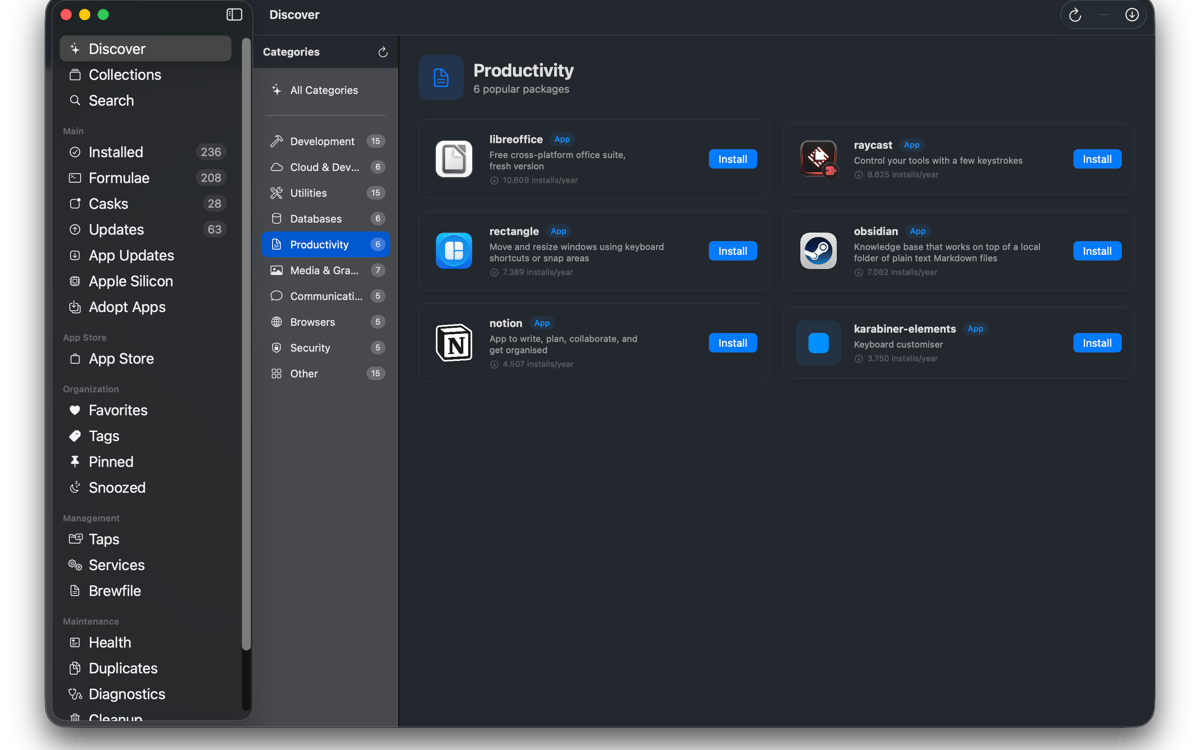
Durchsuchen und installieren
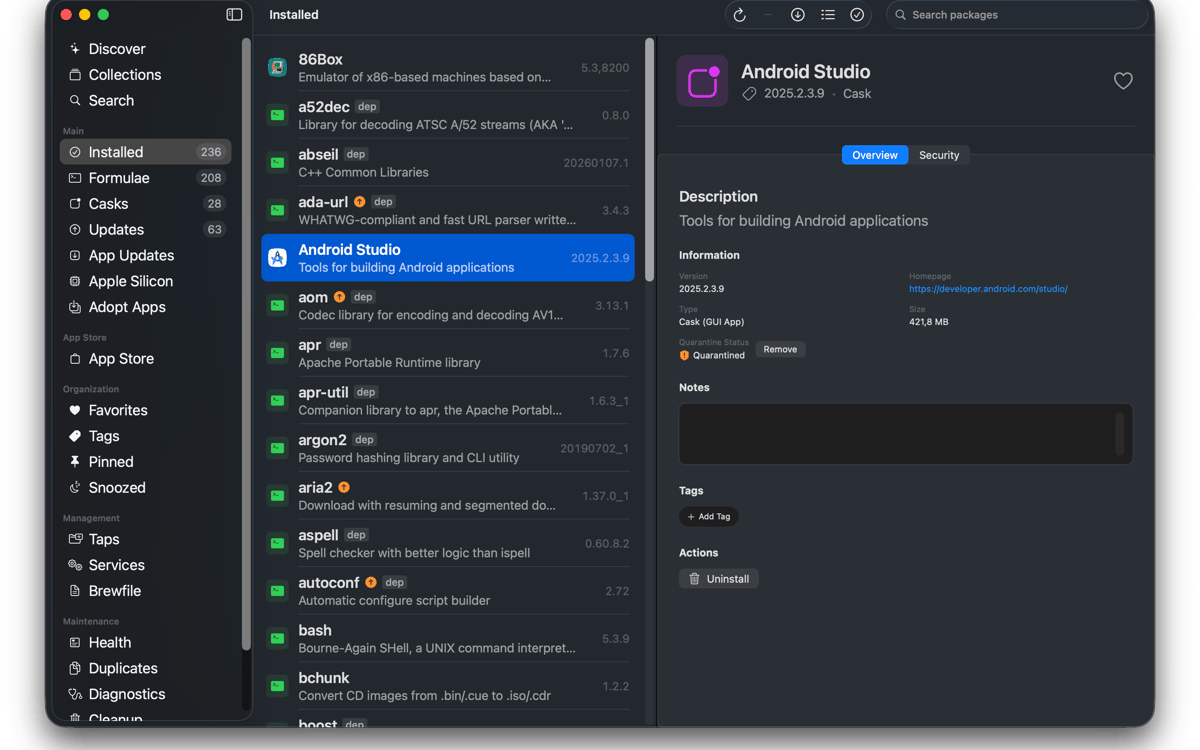
Durchsuchen Sie Homebrew-Formeln, Casks und Taps von Drittanbietern über eine einzige Suchleiste. Abhängigkeiten, Lizenzen, Festplattenbelegung und Homebrew-Hinweise vor der Installation prüfen. Installieren Sie Pakete mit einem Klick und verfolgen Sie die Live-Befehlsausgabe in Echtzeit. Kein Geheimnis. Einfach nur Homebrew, das sein Ding macht.
Verwalten Sie, was Sie haben
Sehen Sie alles, was Sie installiert haben, in einer übersichtlichen Liste. Filtern Sie nach Formeln, Casks, Favoriten, angehefteten Paketen oder verfügbaren Updates. Mehrere Pakete gleichzeitig auswählen, um sie zu aktualisieren, zu deinstallieren oder anzuheften. Sie können sogar bereits in Ihrem Programme-Ordner installierte Apps einbinden, damit künftige Updates ebenfalls über Homebrew laufen.
Immer auf dem neuesten Stand
Wähle aus, wann Taphouse nach Updates sucht und lass dich benachrichtigen, wenn etwas bereit ist. Automatische Hintergrundaktualisierungen sind ebenfalls verfügbar, mit batteriesparendem Verhalten, damit Ihr Mac nicht zum ungünstigen Zeitpunkt überlastet wird. Das Menüleisten-Symbol zeigt veraltete Pakete auf einen Blick. Laufende Apps aktualisieren? Taphouse kann diese zuerst sauber schließen, bevor das Upgrade durchgeführt wird.
Services, Taps und Brewfiles verwalten
Brew-Dienste starten und stoppen, ohne Befehle manuell eingeben zu müssen. Zapfhähne mit wenigen Klicks hinzufügen, entfernen und anheften. Importieren und exportieren Sie Brewfiles, um Ihre Konfiguration zwischen Macs zu übertragen. Die Suche unterstützt auch vollständige Tap-Pfade von Drittanbietern und kann fehlende Taps automatisch hinzufügen.
Homebrew gesund halten
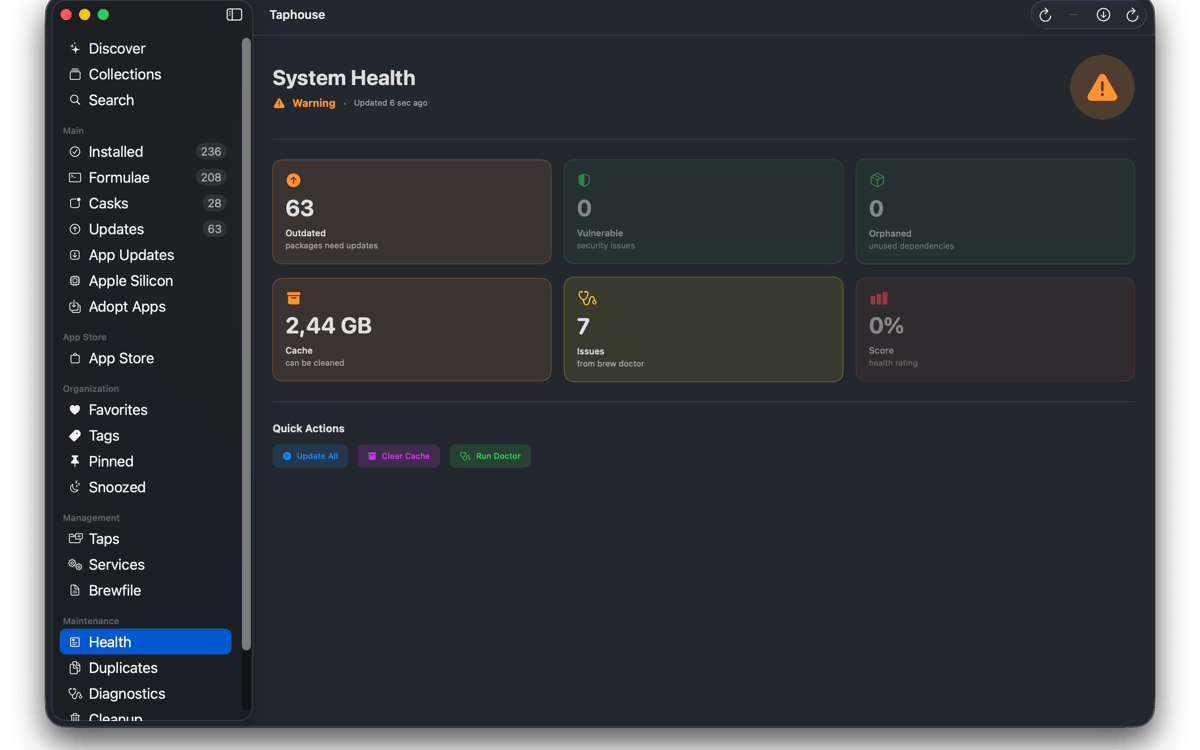
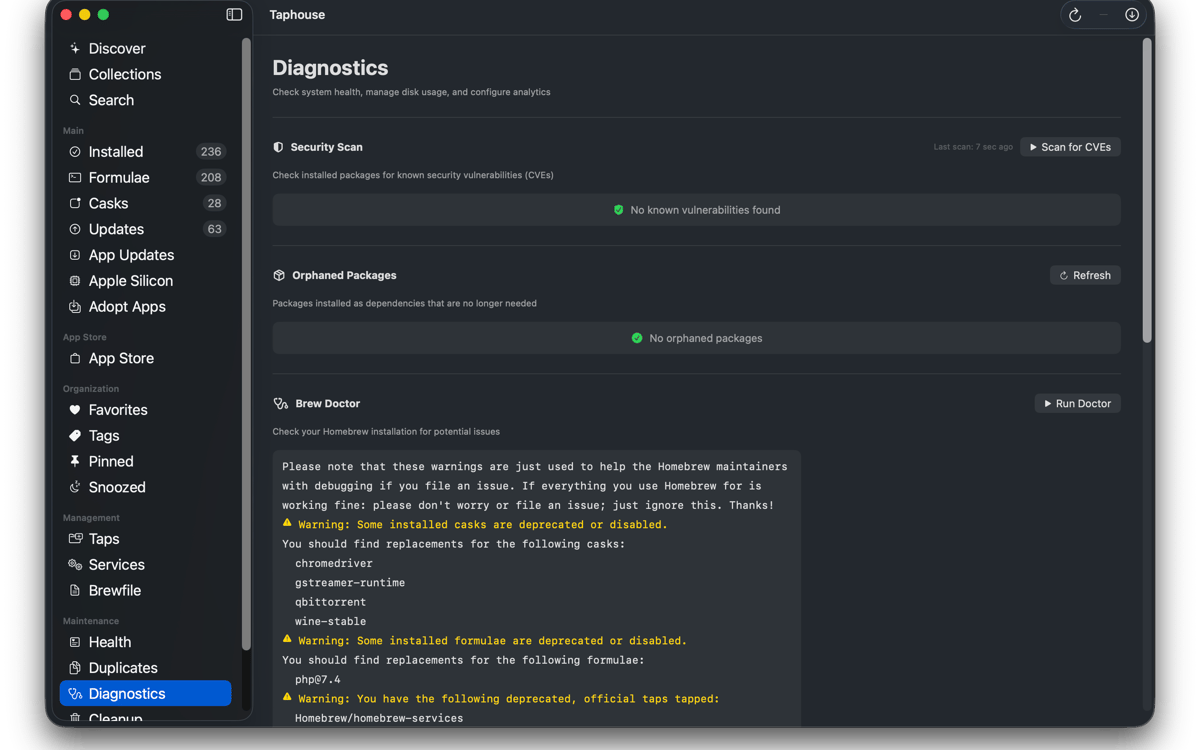
Führen Sie brew doctor in einer übersichtlichen Benutzeroberfläche aus, statt in einer unübersichtlichen Terminal-Textflut. Sehen Sie, wie viel Speicherplatz Homebrew verwendet, und löschen Sie nicht mehr benötigte Dateien. Sie können auch Quarantäne-Flags entfernen, doppelte Installationen nachverfolgen und Ihr Paket-Setup organisiert halten, ohne zwischen Tools wechseln zu müssen.
Und ein paar Extras
Taphouse bietet außerdem Installationsverlauf, Visualisierung des Abhängigkeitsbaums, Paketnotizen, Tags und Sammlungen, einen kompakten Listenmodus, Apple Silicon-Migrationstools und eine mas CLI-Integration. Alles basiert direkt auf echten Brew-Befehlen, sodass Ihre Konfiguration portabel, vertraut und vollständig unter Ihrer Kontrolle bleibt.
Bewertungen und Rezensionen
Taphouse
•
61 Bewertungen
Steve Solari
14. Okt. 2026
App-Version: 1.5.8.9
Makes updates easy because everything is in one place
Mike Procario
5. Okt. 2026
App-Version: 1.5.8.7
I have just started using it. My first time use went well.
Binu Alexander
5. Okt. 2026
App-Version: 1.5.8.7
Nice app , very useful
Erhalten Sie Hunderte von Apps mit Membership
Werden Sie Setapp Member und nutzen Sie mit nur einem Abonnement hunderte genialer Apps.
Testen Sie 7 Tage kostenlos, im Anschluss nur eine einfach monatliche Gebühr.
Setapp auf dem Mac installieren
Erkunden Sie Apps für Mac, iOS und Web. Finden Sie einfache Möglichkeiten für die Bewältigung täglicher Aufgaben.

Die gesuchte App finden
In Setapp wartet eine wunderbare App auf Sie. Installieren Sie sie mit einem Klick.

Taphouse
Abonnement wählen
Eine App oder mehr mit der Setapp Membership. Holen Sie sich Apps, so wie Sie es möchten.

Erhalten Sie Hunderte von Apps mit Membership
Werden Sie Setapp Member und nutzen Sie mit nur einem Abonnement hunderte genialer Apps.
Testen Sie 7 Tage kostenlos, im Anschluss nur eine einfach monatliche Gebühr.
1
Setapp auf dem Mac installieren
Erkunden Sie Apps für Mac, iOS und Web. Finden Sie einfache Möglichkeiten für die Bewältigung täglicher Aufgaben.
2
Die gesuchte App finden
In Setapp wartet eine wunderbare App auf Sie. Installieren Sie sie mit einem Klick.
Taphouse
3
Abonnement wählen
Eine App oder mehr mit der Setapp Membership. Holen Sie sich Apps, so wie Sie es möchten.
Die besten Apps
Von Planung und Routineaufgaben bis hin zu kreativen Tätigkeiten und Programmieren – mit den Apps von Setapp sind Sie bestens für Aufgaben gerüstet.

TypingMind
KI-Chat mit alternativer UI
Text erzeugen oder zusammenfassen
Prompt-Bibliothek nutzen
KI

Spark Mail
E-Mails verwalten
KI

CleanMyMac
Datenmüll entfernen

Bartender
Menüleiste anpassen

CleanShot X
Vielseitige Bildschirmfotos aufnehmen

Luminar Neo
Fotos bearbeiten
KI

ClearVPN
Sichere Verbindung herstellen

Craft
Mit Dokumenten arbeiten
KI
Taphouse
Homebrew ohne Tippen