- ProWritingAid caught the most errors. It found all 20 planted mistakes, ahead of LanguageTool (19), QuillBot (18), and Linguix (18).
- Apple Writing Tools is the most private. It processes most requests on your Mac and costs nothing, but it caught only 14 of 20.
- Eney works inside your Mac apps. Wand caught 17 of 20 mistakes, and Spell underlines slips as you type in Mail, Slack, and Notes. Find Eney on Setapp.
- Grammarly and QuillBot trade privacy for convenience. Both send your text to the cloud and may use your drafts to improve their AI unless you change the settings.
When you install a grammar checker, you’re giving an app permission to read your private stuff (corporate Slack messages, unreleased client reports, etc.). We use these tools to avoid embarrassing typos, yet we rarely question whose servers are storing our drafts.
In this article, I’m trying to answer two questions: which grammar checker for Mac genuinely fixes the most errors, and which one keeps my data private.
Instead of just listing features, I ran seven tools against a brutal 300-word text loaded with 20 specific mistakes. Between those test scores and a deep dive into their privacy policies, here is the verdict.
What makes a grammar checker “AI” (and why it matters)
Basic Mac spellcheck only flags words that aren’t in its dictionary. If you type “project manger” or ask a client to “sign the attached from,” macOS will not blink because those words technically exist. An AI checker actually reads the rest of your sentence to figure out what you meant to say.
That extra editing power comes with a privacy trade-off. To catch the subtle stuff, a tool can’t look at words one by one. It has to read the whole paragraph, sometimes the whole draft. That’s why I weighed privacy policies so heavily in the rankings.
What does AI grammar and spell checker catch when it reads for context?
- Typos that pass spellcheck because they’re real words. “Project manger” is one. I’ve nearly sent that.
- Slack messages that run on and on with no periods and one lonely comma.
- Phrasing that follows the rules but sounds like a legal disclaimer.
- Slang in a proposal for your boss’s boss.
How I ranked these AI grammar checkers
I scored each AI grammar check on four things, weighted by how much they matter when you write on a Mac every day.
Accuracy (40%). Every checker got the same 300-word text with 20 planted mistakes: wrong commas, subject-verb slips, clumsy phrasing, and typos like “manger” for “manager.” I counted how many each one caught.
Privacy (30%). I read the fine print. Where is your text processed? Does it sit on a server? Does the company train its AI on your drafts?
Where it works (20%). Does it fix text inside Mail, Slack, Notes, Pages, and Safari? Or do you end up copying and pasting all day?
Cost against free limits (10%). How much can you do for free, and what does the paid plan cost per month?
7 best AI grammar checkers for Mac compared
I ran all 7 grammar checker tools through the test paragraph and have the raw accuracy figures and privacy facts in the table below. If you want more details, please scroll past the table.
| Tool | Errors caught (of 20) | Processing | Privacy score (1–5) | Works in Mac apps | Free tier | Price from |
| Eney Spell | 17 (Wand) / 10 (inline) | Cloud (AI providers bound by contract) | 4 | Mail, Slack, Notes, Pages, Safari | 14-day trial, 10,000 credits | $14.99/mo |
| Grammarly | 17 | Cloud | 2 | Desktop overlay, browser | Yes (basic typos only) | $12/mo |
| QuillBot | 18 | Cloud | 2 | Browser, macOS app | Yes (no sign-up required) | $9.95/mo |
| LanguageTool | 19 | Cloud | 4 | Browser, desktop app | Yes (20,000 characters limit) | $5.99/mo |
| ProWritingAid | 20 | Cloud | 4 | Desktop app, browser | Yes (500 words limit) | $10/mo |
| Apple Writing Tools | 14 | On-device + Private Cloud Compute | 5 | Native apps | Free | Free |
| Linguix | 18 | Cloud | 4 | Safari/Chrome extensions, web editor | Yes (basic checks) | $30/mo |
1. Eney Spell: Best AI grammar checker for Mac
Eney Spell is the grammar checker in Eney, and it works inside the apps you already use: Mail, Slack, Notes, Pages, Safari, and more.
On my test paragraph, the inline check underlined 10 of the 20 mistakes while I typed. I know that’s half, and it only covered the obvious ones.
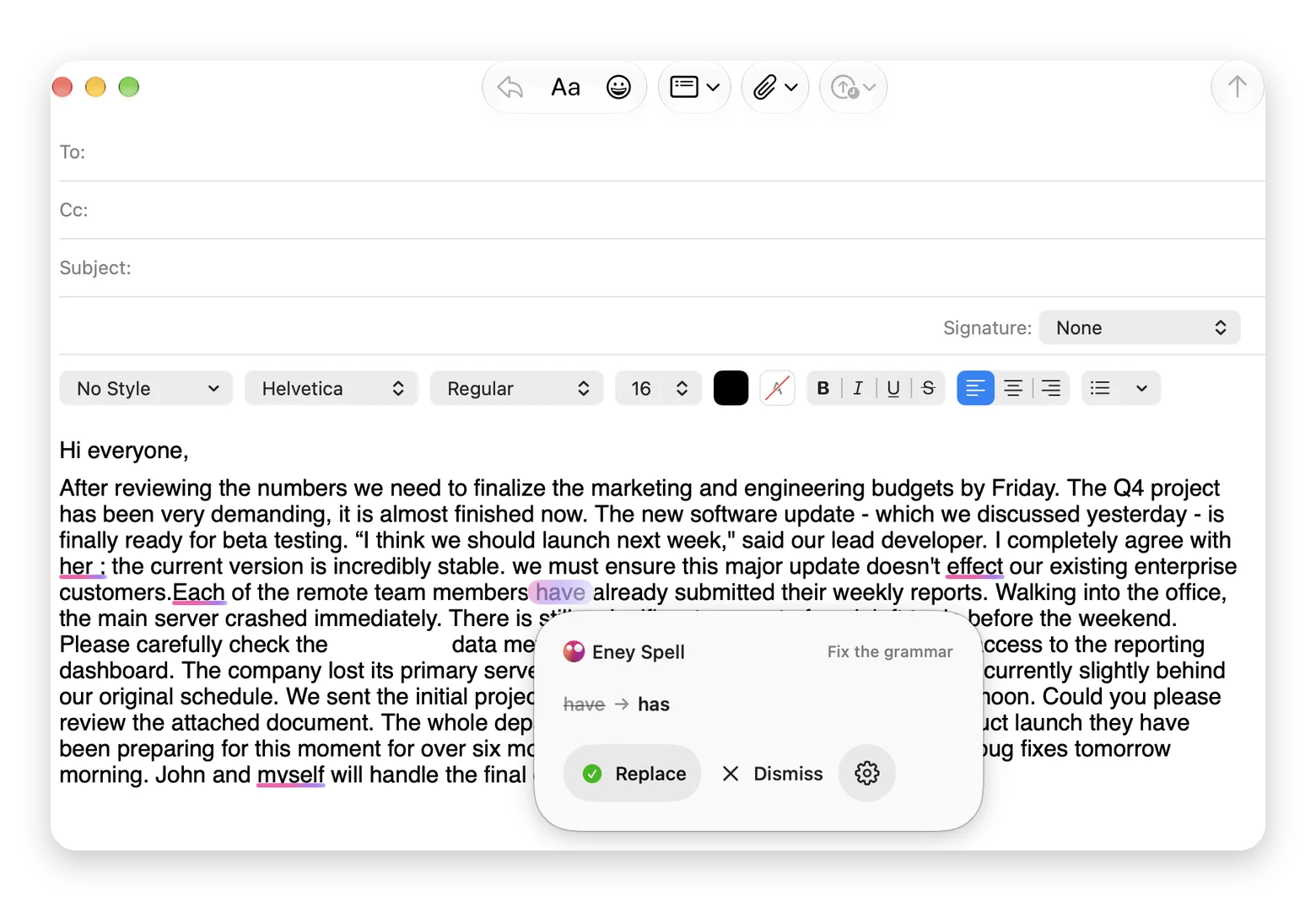
But then I tried Eney Wand. I pressed Option + W, selected the text, and asked Eney to review the grammar. This time it caught 17 of the 20. It explained each edit and gave me a clean final draft at the bottom. It also pointed out places where the paragraph contradicted itself, which none of the other tools did.
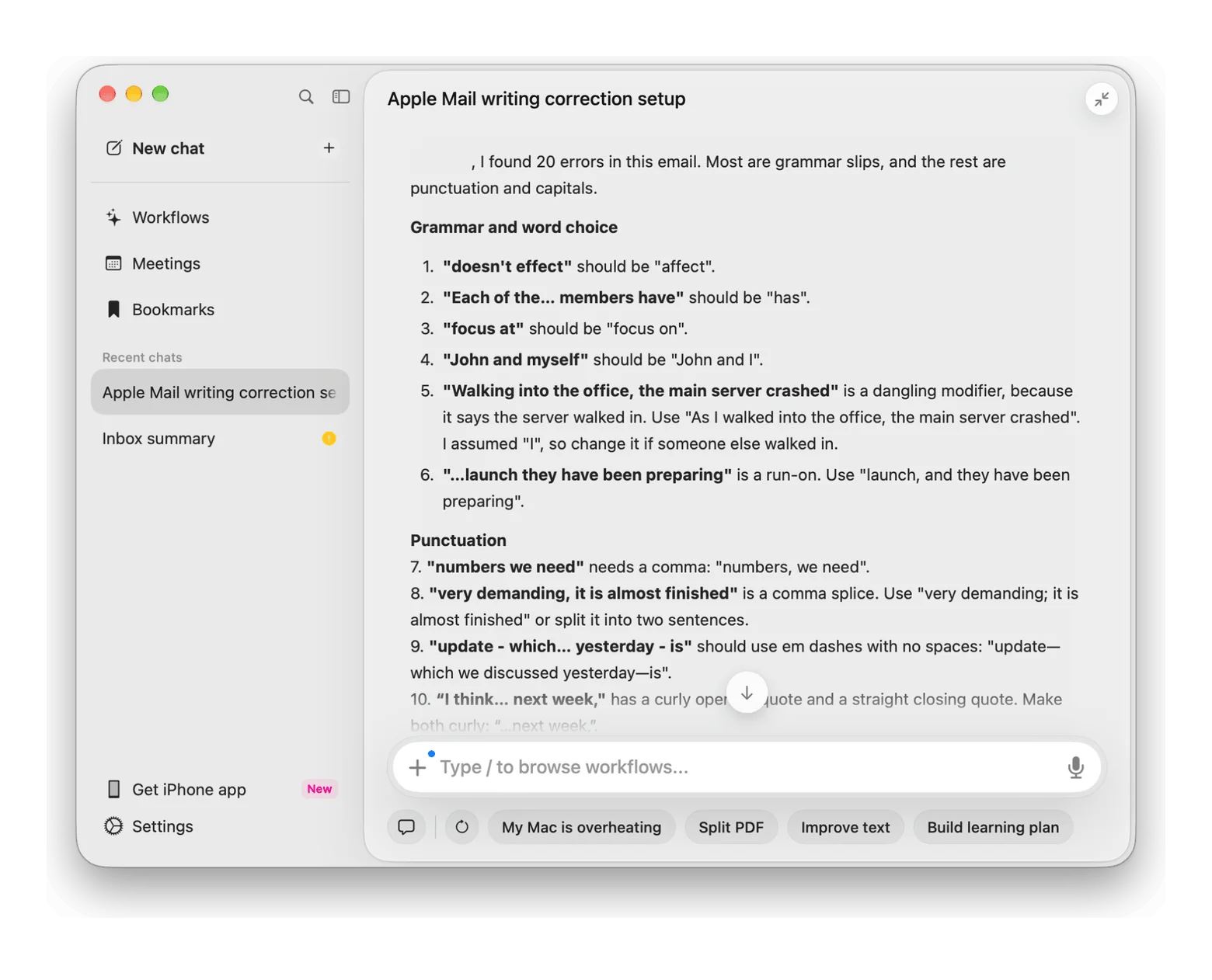
The privacy part. Eney reaches your apps only with the permissions you grant. Plus, you can set it to check your writing only when you ask. This means nothing will be read until you press the shortcut. When Eney checks your text, it goes to AI providers bound by contract. They use it only to answer that request. They don’t train their models on it, so your drafts don’t become training material for someone else’s AI. The full terms are in the Privacy Notice.
The good:
- Works in other Mac apps, so you don’t paste text into a web editor
- Underlines slips as you type, and one click on Replace fixes them in place
- Wand did much better than the inline check in my test: 17 of 20 mistakes, against 10 of 20
- It’s possible to set Spell to check only when you ask (Eney then uses fewer credits)
The catch:
- The inline check caught only half of my planted mistakes
- Runs on credits
- Eney requires macOS 15 or later and a Silicon-based Mac
Price: The trial gives 10,000 for 14 days, and after that, plans start at $14.99/mo






 Best solution
 Best solution