Best pick:Eney Spell is the best AI proofreader for Mac if you want one-step fixes in Mail, Slack, Notes, and your browser.
Best free option: Write with Siri proofreads for free on macOS 27, but it works only in supported native apps.
Most accurate: Grammarly and ChatGPT caught all 12 errors in my test, but Grammarly runs as an overlay and ChatGPT needs copy and paste.
Privacy: Eney Spell and Write with Siri process text primarily on-device, while Grammarly, ChatGPT, QuillBot, and ProWritingAid use the cloud.
Get Eney on Setapp: Eney is available as a standalone app on Setapp, and Setapp Membership adds 300+ more apps with a 7-day free trial.
AI proofreading often means writing an email or message, copying it, opening a chatbot, pasting it, reading it, copying it back, pasting it, and rechecking formatting. Seven steps just for a single email or message.
This doesn’t match the level of efficiency AI tools should offer. When I want to use an AI proofreader, I want it to fix the text wherever it is.
I compared six AI proofreading tools for Mac to see how many steps (and how much effort) it would take to fix a standard message. Plus how well they catch errors.
What an AI proofreader checks (and what it should not change)
A good AI proofreader should check:
Spelling – Catching typos, misspelled words, and commonly confused words.
Grammar and agreement – Checking subject-verb agreement, verb tenses, and sentence structure.
Punctuation – Fixing misplaced commas, missing periods, apostrophes, and other punctuation issues.
Wording and repetition – Spotting clumsy phrasing, unnecessary words, and repeated expressions.
Tone – Checking whether the tone is uniform or fits the recipient.
Consistency – Flagging variations in names, numbers, or dates within the same text.
A good AI proofreading tool should do all these while still preserving your voice, facts, and intentional stylistic choices. A casual Slack message shouldn’t come out looking like a corporate memo.
How I compared AI proofreaders
I needed a practical way to rank proofreading software for Mac, so I looked at three proofreading tasks that come up in everyday work:
Steps to fix – The number of steps it takes to correct text across Mail, Slack, Notes, and Google Docs.
Proofreading accuracy – We gave each AI proofreading tool the same 200-word email containing 12 intentional errors and counted how many it caught.
Privacy – Cloud vs. offline processing because it affects privacy.
This made it easy to eliminate some contenders and rank the six best AI proofreading apps for Mac.
Best AI proofreaders for Mac compared
Here’s a quick look at the best proofreading software for Mac and how they compare.
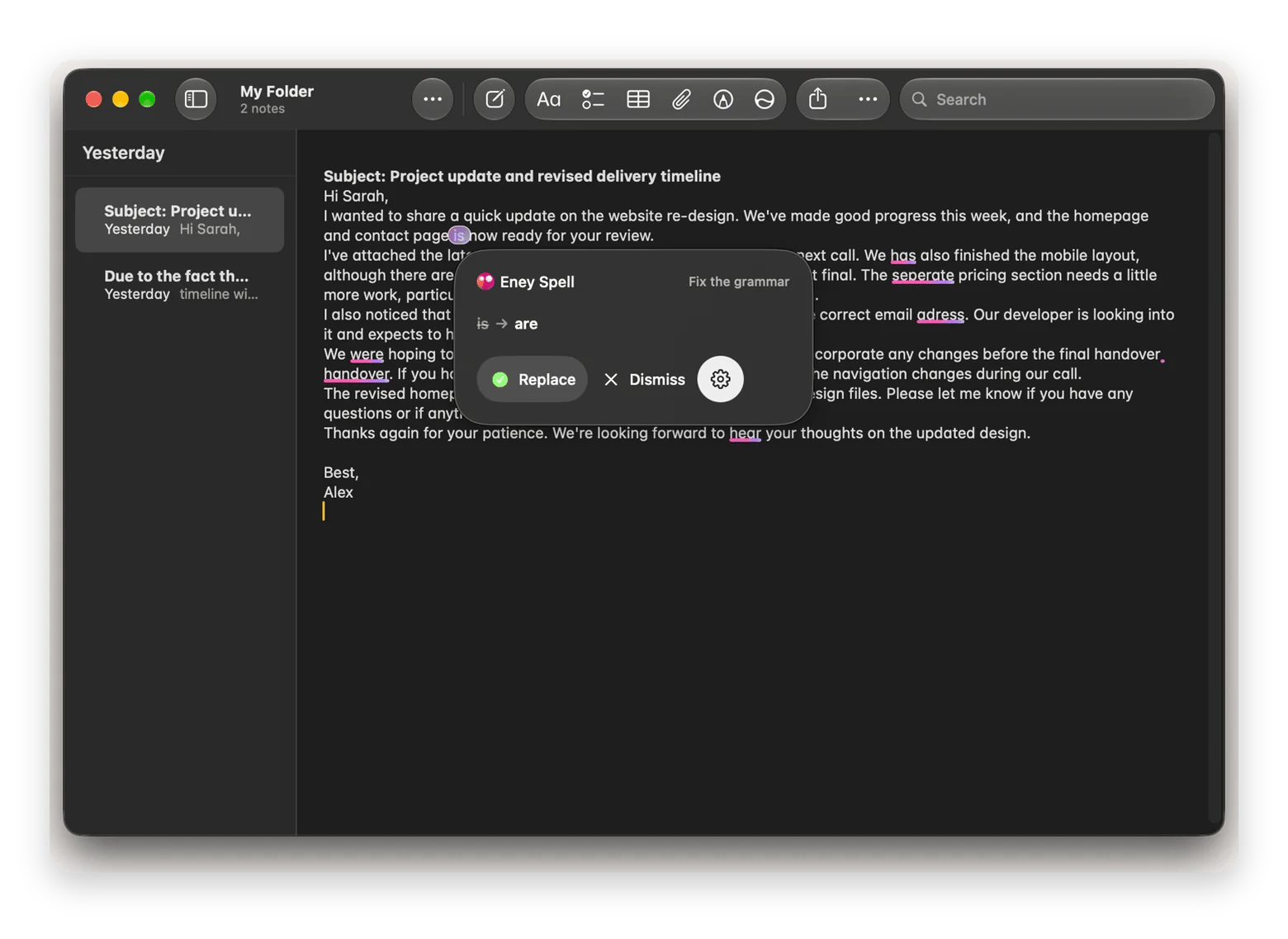
Eney Spell is the AI proofreader inside Eney, MacPaw’s AI assistant for Mac and iPhone. You can use it in Apple Mail, Slack, Notes, and your browser without copying text into a separate editor. You can activate it to work automatically or invoke it with ⌃⌃. It saves a lot of time for people who proofread dozens of messages in one day.
Here’s how to proofread with Eney Spell:
Write your email, message, or note in your preferred app.
Trigger Eney Spell using ⌃⌃.
Review the suggested corrections and accept them.
To activate auto proofreading as you write, go to Eney > Settings > Eney Spell > When To Check > As I Write.
In my 208-word email test, Eney Spell caught 11 of the 12 intentional errors.
Eney Spell relies on MacPaw’s AI stack and primarily processes text using on-device AI models.
Pros
Works across Mail, Slack, Notes, and browsers.
Primarily on-device processing.
No switching to a separate editor.
Does more hands-on tasks on a Mac.
Cons
Requires macOS 15 or later.
Requires an Apple silicon Mac.
Focuses on basic in-line proofreading.
Price: Eney is free to download and includes a 14-day trial with 10,000 AI credits, whichever you use up first. After that, you need AI credits to keep using Eney Spell, with credit plans from $14.99 USD/month for 10,000 credits. Get it on Setapp or eney.ai.
2. Write with Siri: best free native proofreader
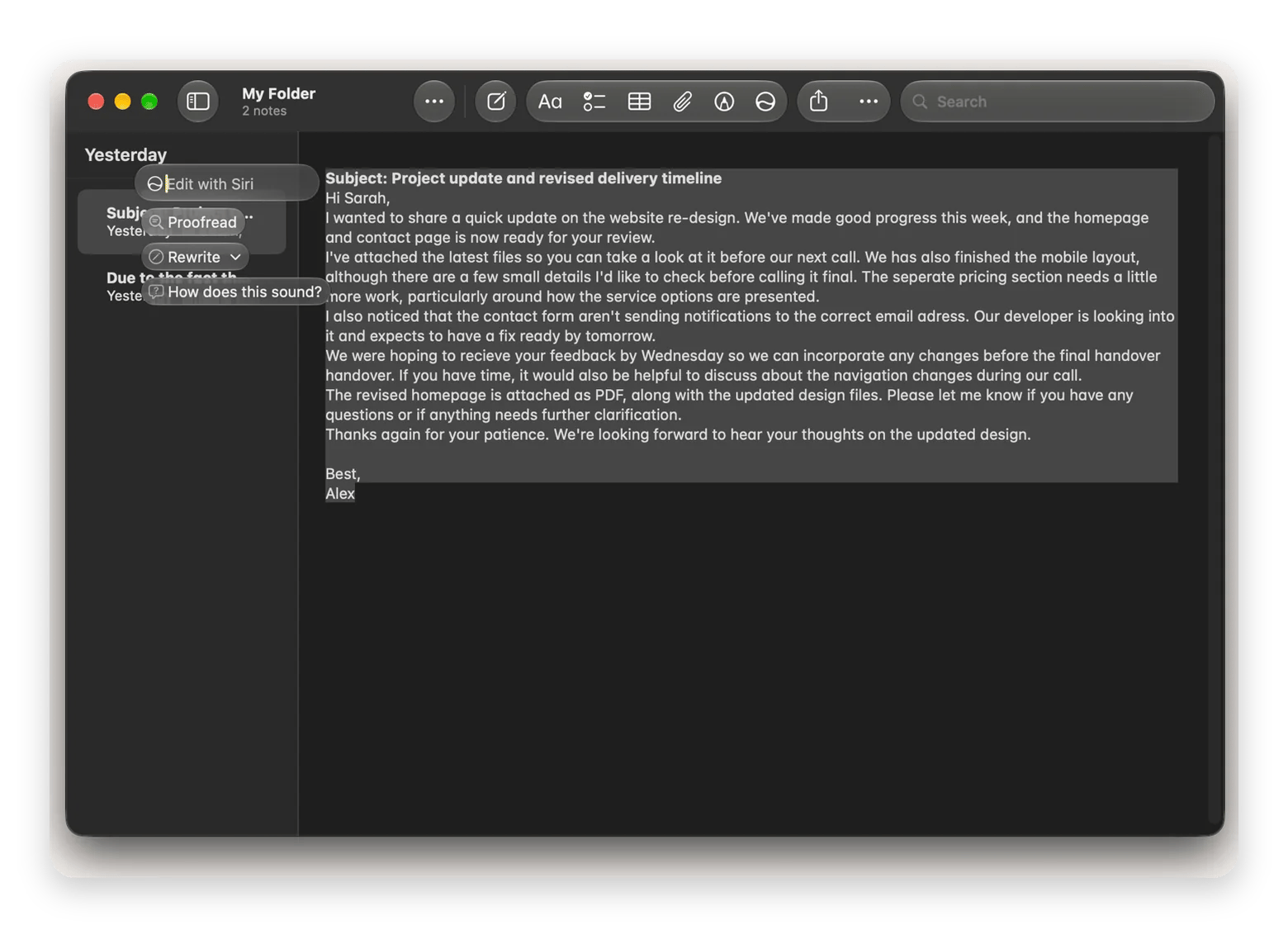
Apple Writing Tools, which macOS 27 has folded under Siri, offers a free native proofreader for Mac users. It has a proofreading option that checks spelling and grammar, and you can also change the tone to Friendly, Professional, or Concise. The Siri option appears when you highlight text and click the pop-up icon, while the Writing Tools option is available in the context menu.
The native AI proofreader for Mac is free and works locally with two steps, but it’s limited to a few native Mac apps.
Pros
Free with a compatible Mac.
Built into macOS.
Can proofread directly in supported apps.
Primarily on-device processing.
Cons
Requires compatible Apple hardware.
Availability varies across apps.
Relatively fewer proofreading features.
Pricing: Free.
3. Grammarly: best for suggestions across apps
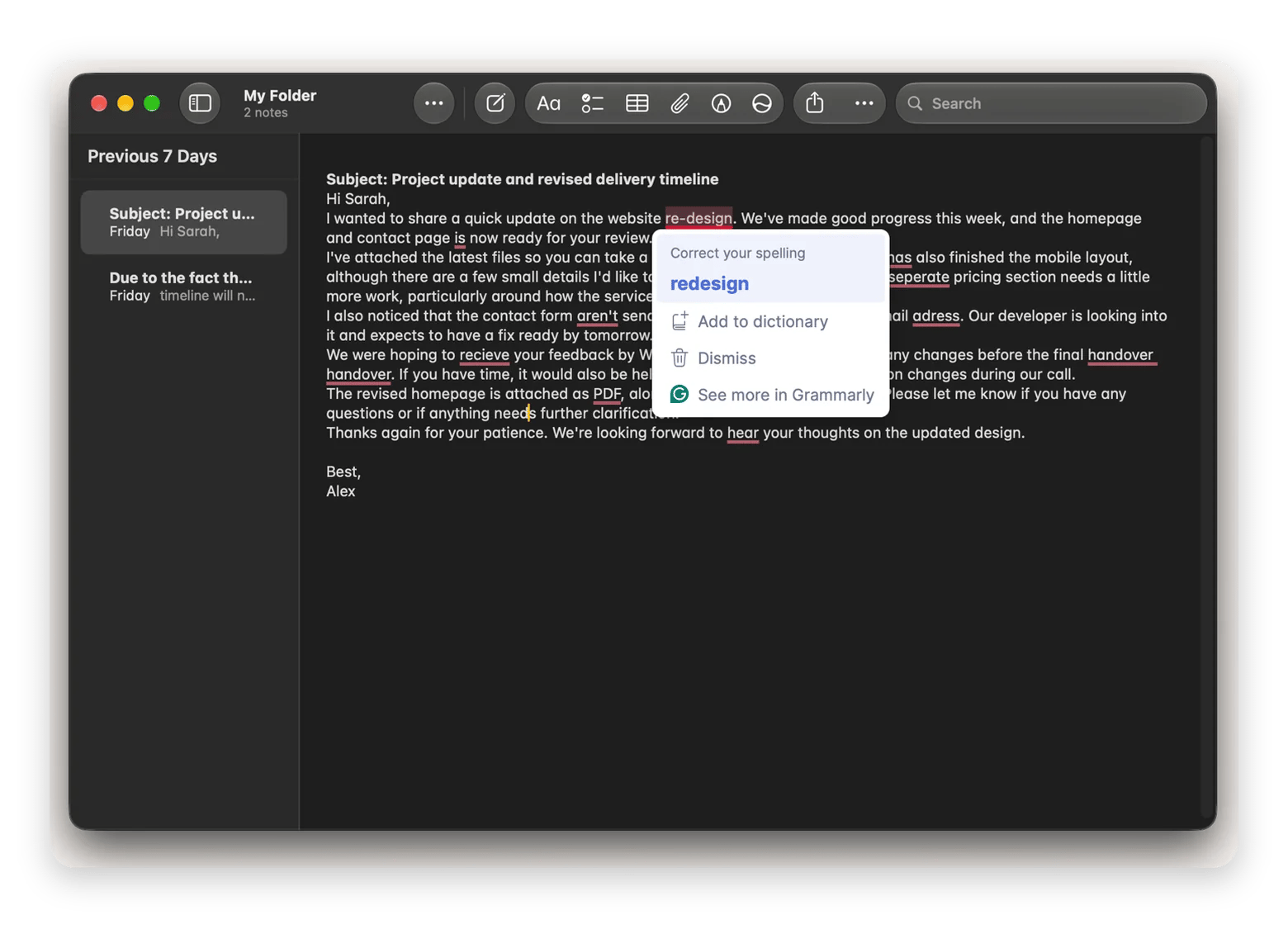
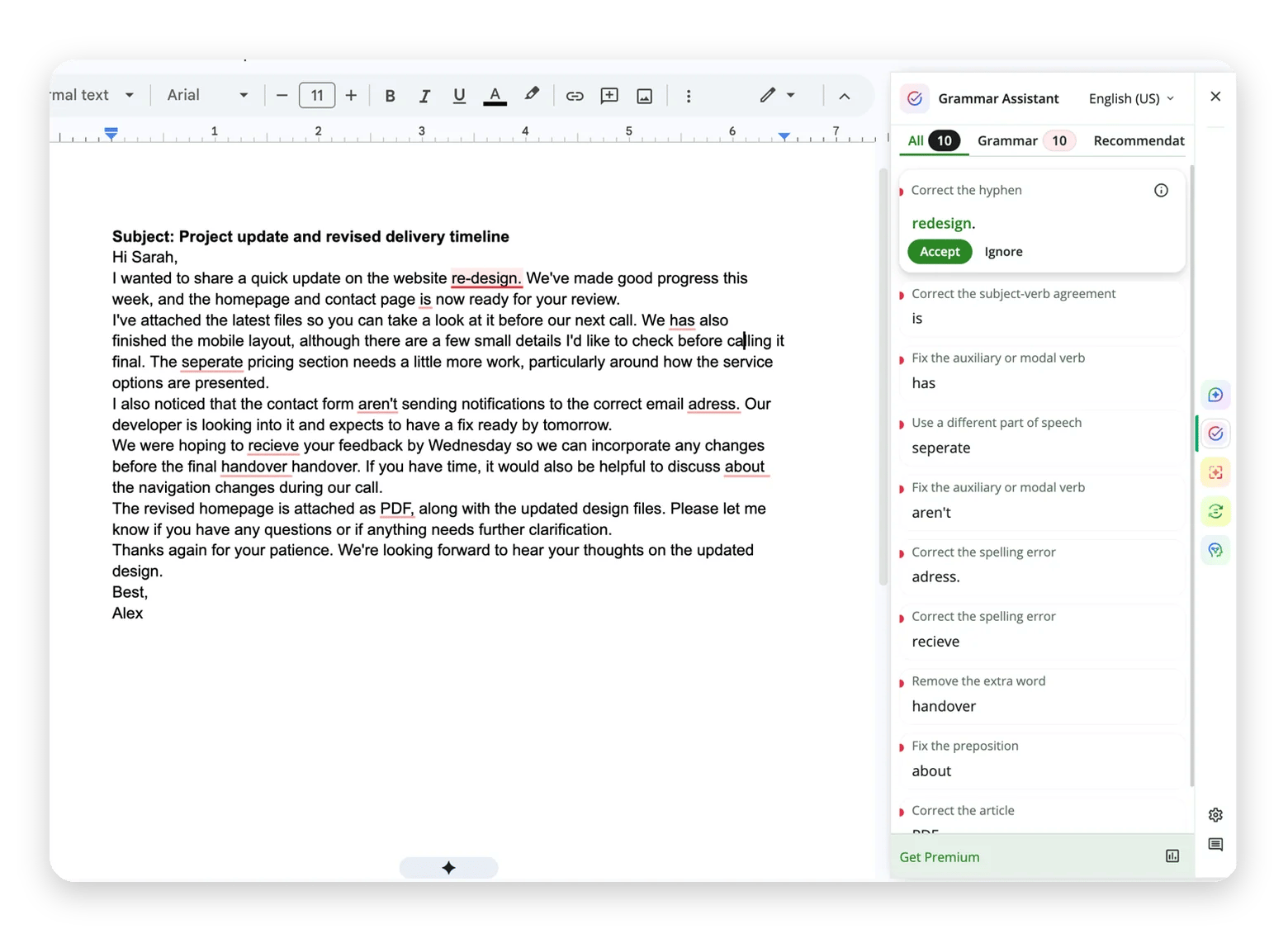
Grammarly is a popular proofreading software for Mac that makes it easy to check spelling, grammar, punctuation, and sentence clarity. It has a browser extension as well as a Mac app that lets you proofread as you write in any app.
When Grammarly detects an issue, it highlights it and displays a suggested correction as an overlay. It also checks context to enhance clarity, but all processing is done in the cloud.
Pros
Works across browsers and apps.
Offers tone and clarity suggestions.
Provides a free tier.
Cons
Advanced suggestions require a paid plan.
Cloud processing.
Relatively expensive.
Price
Free plan available.
Premium costs $30 USD month-to-month or $12 USD/month billed yearly.
4. ChatGPT: best for proofreading with extra context
ChatGPT isn’t a dedicated AI proofreader, but the macOS app simplifies the process compared to the browser version. When you press Option + Space, the floating version comes up and makes it easier to paste your text and write a prompt without app switching. However, copying the polished text back still requires you to open the full app.
Note that all processing happens in the cloud, and OpenAI may use the conversation to improve its models depending on your data controls.
Pros
Lets you specify tone and editing preferences.
Suitable for both short messages and longer documents.
The free plan is enough for proofreading.
Cons
Requires copying and pasting text between apps.
Uses cloud processing.
Usage limits on the free plan.
Price
Free plan available.
ChatGPT Plus starts at $20/month.
5. QuillBot: best for free browser and Mac-based proofreading
QuillBot provides a web editor, a browser extension, and a Mac app you can use to proofread text. These are part of a larger collection of writing tools that also includes a paraphraser, plagiarism checker, and a summarizer. When you install the extension or the Mac app, it automatically highlights issues as you write.
QuillBot processes the text using its cloud-based service, and according to the privacy policy, the data may be used to improve or personalize the services.
Pros
Free basic proofreading.
Offers paraphrasing and other writing tools.
Mac app and browser extension available.
Cons
Advanced writing suggestions require Premium.
Uses cloud processing.
Data storage and training settings require attention.
Price
Free plan available.
Premium costs $19.95 USD month-to-month or $8.33 USD/month billed yearly.
6. ProWritingAid: best for detailed document editing
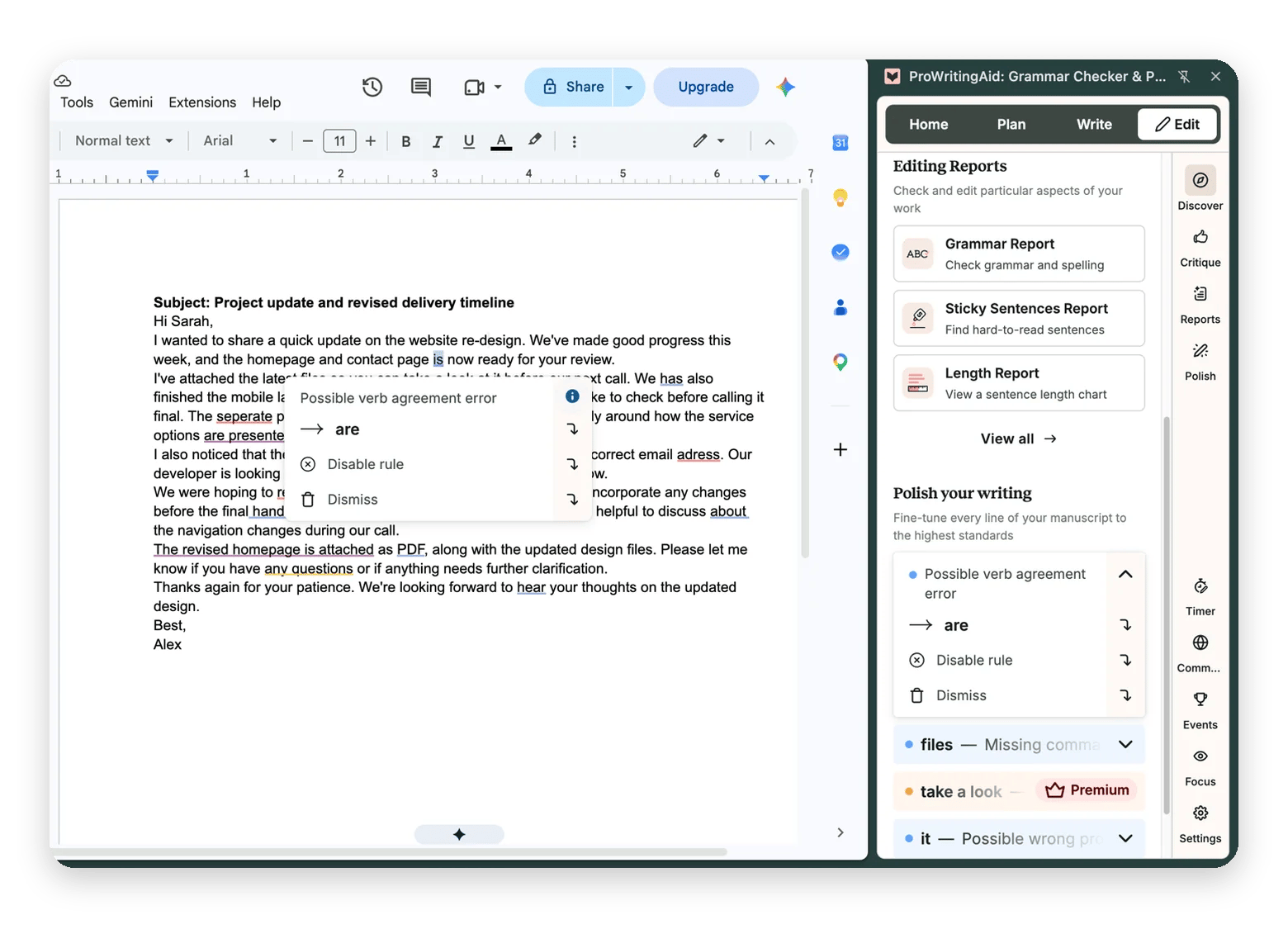
ProWritingAid is designed for long-form writers who need more detailed feedback than a basic grammar checker and paraphraser provides. It’s great for reports on your writing, but its browser extension is simple enough to work as an inline proofreader and grammar checker. You can then use the web editor and Mac app for more detailed document editing.
ProWritingAid processes data in the cloud, but it deletes it shortly after and doesn't use it for AI training.
Pros
Detailed grammar and style reports.
Identifies style and readability issues.
Useful for longer documents.
Cons
Much busier interface.
Most corrections are limited to the premium plan.
Cloud processing
Price
Highly limited free plan
Premium costs $30 USD month-to-month or $10 USD/month billed yearly.
AI vs human proofreader
An AI proofreader catches errors in seconds, while a human proofreader has an edge in context and judgment.
If you are considering both or choosing from the two options, here’s how they compare:
Criterion
AI proofreader
Human proofreader
Speed
Almost instant
Takes longer
Cost
Often free or subscription-based
Usually charged per word, page, or project
Meaning and tone
Follows instructions and suggests changes
Understands nuance and context
Confidentiality
Depends on processing and storage policies
Depends on the proofreader's confidentiality practices
If you just want to proofread your email, Slack messages, and quick drafts, an AI proofreading tool for Mac like Eney Spell can save you a lot of time. It also works across Mac apps.
For contracts, publications, or anything where precise wording matters, a human proofreader is still worth the investment. You can also handle the obvious errors with AI first, then bring in a human for the final review.
Which AI proofreader should you use?
The best AI proofreader for Mac depends on where you write and how much editing you do.
Here’s a quick decision framework that can help:
You want to proofread emails, Slack messages, and everyday Notes → Eney Spell.
You’d like a free app that works on native tools → Write with Siri/ Apple Writing Tools.
You work with long documents or need detailed editing → ProWritingAid.
Need help with wording and tone → Grammarly or ChatGPT for Mac.
Eney Spell is free and uses local AI, with the full assistant available for a 14-day trial through Setapp or eney.ai.
FAQ
What is the best free AI proofreader for Mac?
Write with Siri is the best fully free AI proofreader for Mac, although it works only in supported native apps and needs macOS 27. Eney Spell works across Mail, Slack, Notes, and browsers and is free to try for 14 days, after which it needs AI credits.
Can an AI proofreader fix my email directly in Apple Mail?
Yes, a compatible AI proofreader like Eney Spell or Write with Siri can correct text directly in Apple Mail. Eney Spell shows the errors and suggestions, while Write with Siri corrects the text and shows what it has changed.
Is it safe to paste work emails into ChatGPT for proofreading?
It depends on your company’s data policy. ChatGPT processes text in the cloud, and work emails can contain sensitive internal data, so on-device tools are the safer choice. Eney Spell and Write with Siri process text primarily on-device.
Does Eney Spell change my tone or only correct mistakes?
Eney Spell focuses on spelling, grammar, and wording corrections. To translate or ask questions about selected text, use Eney Wand
How accurate are AI proofreaders compared to Grammarly?
Most AI proofreaders catch almost every basic error. In my 208-word test, Grammarly and ChatGPT caught all 12, Eney Spell and ProWritingAid caught 11, and Write with Siri and QuillBot caught 10. Accuracy varies by tool and text, so review each suggestion before you accept it.
Too much to keep track of?
Let Eney bring your work together and help you get it done






 Best solution
 Best solution