- Best pick for any Mac app: Eney Spell caught 11 of 12 punctuation errors in the test and checks text right inside Mail, Slack, and Notes.
- Free options for quick checks: QuillBot and LanguageTool each caught 10 of 12 errors, and both have free versions you can use in the browser.
- The built-in tool has limits: Apple Writing Tools is free with macOS, but it caught only 8 of 12 errors and struggles with complex punctuation.
- Two quick fixes for quotes and dashes: Set smart quotes in System Settings > Keyboard, and type real dashes with Option-Hyphen (en dash) or Shift-Option-Hyphen (em dash).
- Try Eney and more Mac apps: Eney is available on Setapp, and Setapp Membership gives you 300+ other Mac apps, free for 7 days.
I write most of my Slack messages and client emails in a rush. Spelling is usually fine. My Mac will underline typos. The rest often slips through. Comma splices, a hyphen where a dash should be, quotes that are curly on one side and straight on the other. I don’t usually spot those until after I’ve hit send. So I was looking for something that would fix them as I typed in Mail or Slack. Last weekend, I tried seven punctuation checkers, and here’s how they fared.
What a punctuation checker should catch (and what macOS misses)
Spell check won’t help with most punctuation mistakes. These are the ones I’d want a checker to catch:
- Commas. Comma splices above all. Also a missing serial comma, or a comma in the wrong place.
- Dashes. A hyphen sitting where an en dash or em dash should be.
- Quotes. Straight and curly quotes or apostrophes mixed in one text.
- Semicolons and colons that the sentence doesn’t need.
- Spacing. A stray space before or after a mark.
- Capitals. A lowercase letter right after a full stop.
macOS catches spelling and some grammar, but it doesn’t check whether your dashes and quotes are consistent.
How I ranked these punctuation checkers
When testing punctuation checkers for Mac, I cared about four things.
- Does it work in every Mac app, or only in the browser? This mattered most, because I often write in Mail and Slack, not in a web editor.
- Where does my text get processed, on the Mac or on someone’s server?
- What do you get on the free tier?
- And the paid plan: what does it cost?
Best punctuation checkers for Mac compared
First, I’ll give you a quick overview of the apps I’m about to share. The table below contains the basics. If you’d like more information, just scroll down for in-depth descriptions, including the pros and cons.
| Tool | Works in | Punctuation errors caught (of 12) | Processing | Free tier | Price from | Best for |
| Eney (Eney Spell) | Mail, Slack, Notes, browser, any Mac text field | 11/12 | Cloud | 14-day trial, 10,000 credits | From $14.99/mo | Checking punctuation everywhere you type on Mac |
| Grammarly | Desktop app overlay, browser, Word | 10/12 | Cloud | Yes, limited | Free basic / $12.00/mo | Explanations of rules |
| LanguageTool | Browser, desktop app, Word/Docs add-ons | 10/12 | Cloud (self-host possible) | Yes | Free basic / $24.90/mo | Multilingual punctuation |
| ProWritingAid | Desktop app, browser, Word, Scrivener | 9/12 | Cloud | Yes, limited | Free (500 words) / $12.00/mo | Long-form reports |
| QuillBot (punctuation checker) | Browser, Word, macOS app | 10/12 | Cloud | Yes | Free | Free quick checks |
| Apple Writing Tools (Apple Intelligence) | Most native apps | 8/12 | On-device + Private Cloud Compute | Free with macOS | Free | Built-in baseline |
| Hemingway Editor | Standalone app / web | 9/12 | Local (classic) / cloud (Plus) | Web free | Free for a web version and $19.99 one-time desktop app | Readability, not strict punctuation |
1. Eney Spell — Best punctuation checker for any Mac app
Eney Spell is an AI writing assistant that makes fixes directly inside applications. For example, when you write messages in Slack or Apple Mail, the tool automatically underlines mistakes and provides a small window with the correct fix.
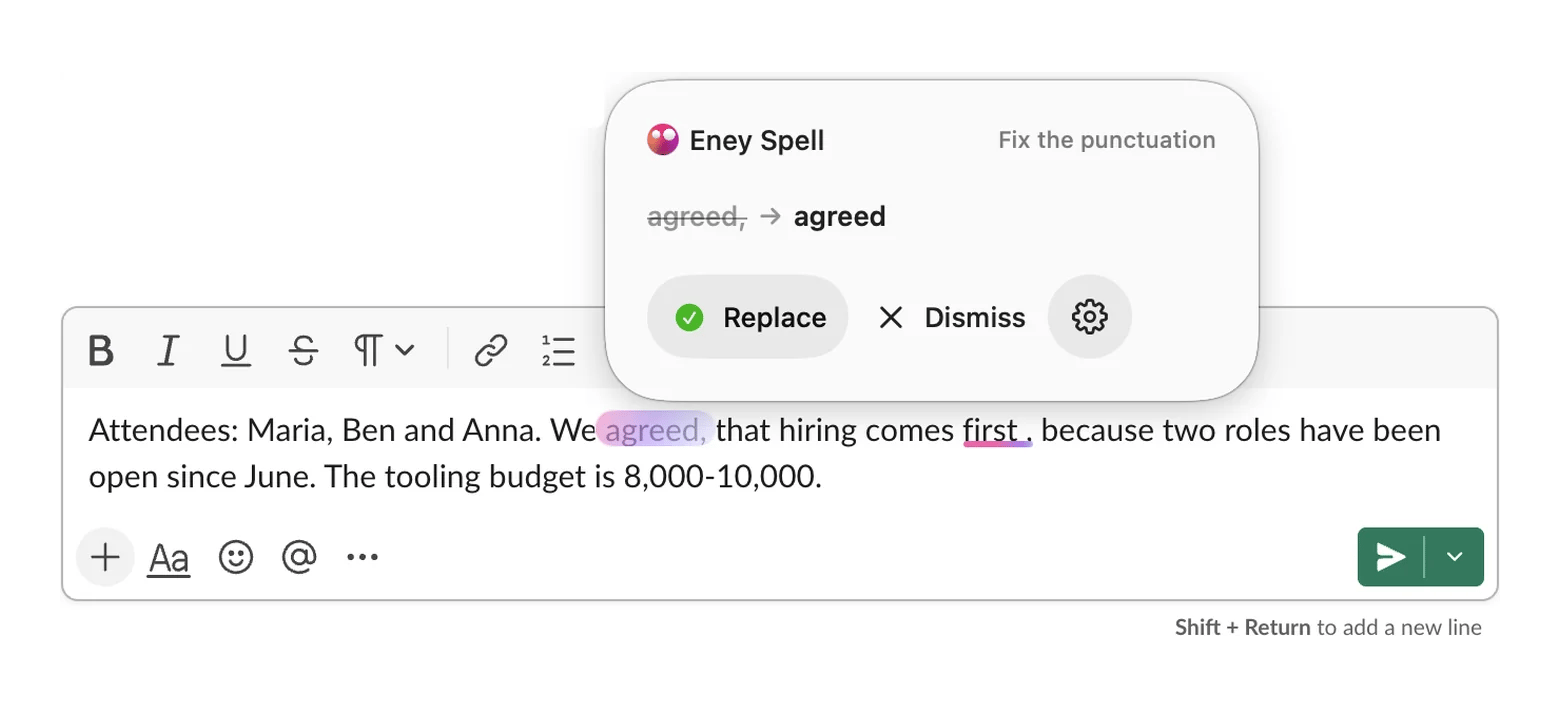
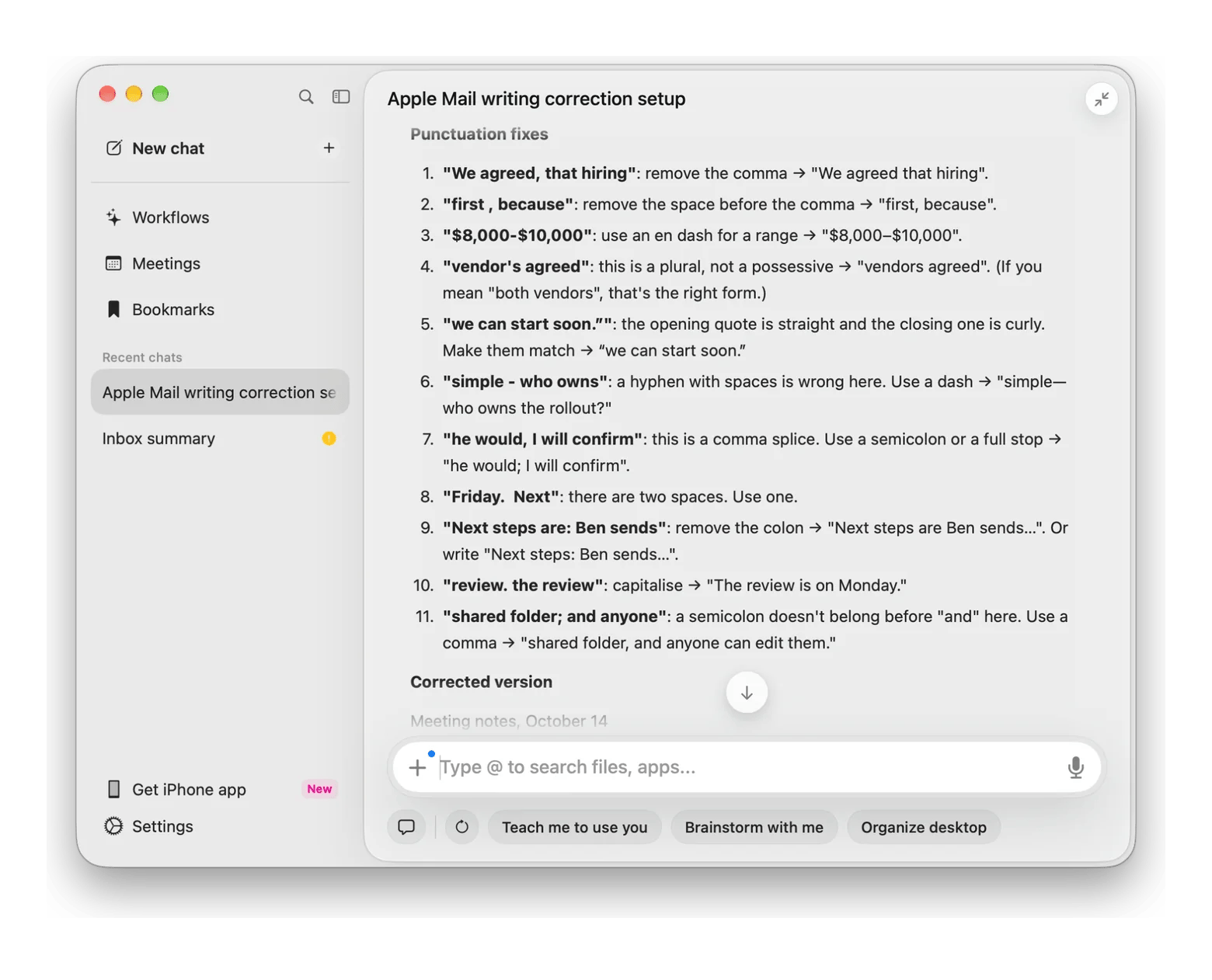
For a deeper review, you can use Eney Wand. Press Option + W, highlight the text you want to work on, and type: “Check the punctuation.” Eney instantly delivers the result with clear explanations. In my test, it caught 11 out of 12 errors, which is a highly respectable score. It is also extremely practical that the fully corrected version appears right after the explanations.
The good:
- Works directly inside different apps (Mail, Slack, Notion, various browsers)
- Gives clear explanations for the mistakes it catches
- Offers fast AI checks directly in your apps via secure cloud processing
The catch:
- Requires an Apple Silicon Mac (it will not even install on older hardware)
- Operates on a credit-based billing system
Price: 14-day free trial (includes 10,000 AI credits) / from $14.99/mo.






 Best solution
 Best solution