- Best overall for Mac: Eney Spell fixed text in place across the apps I tested, with no copy-paste step.
- Spell checker vs sentence checker: A spell checker catches misspelled words. A sentence checker also fixes structure, word order, and wordiness.
- Where most tools fail: Slack and Notion use custom text boxes, so Apple Writing Tools works reliably only in native apps like Mail.
- Quick no-install option: For an occasional paragraph, paste it into the free web editor of LanguageTool or QuillBot.
- Try it on your own Mac: Eney is a standalone app, so you can start its 14-day free trial, which includes 10,000 AI credits.
The best sentence checker apps for Mac in 2026 are Eney Spell, Grammarly, Apple Writing Tools, LanguageTool, ProWritingAid, QuillBot, and Hemingway Editor.
We ran three test sentences through each one inside Apple Mail, Slack, and Notion, then ranked them by what they caught and whether they fixed the sentence in place or made us copy and paste. Here is how each app did, and why a sentence checker catches what a spell checker misses.
Or get 300+ apps with Setapp Membership. Cancel anytime.
Spell checker vs grammar checker vs sentence checker
A spell checker finds misspelled words, and a grammar checker finds broken rules. A sentence checker rewrites the whole line.
You may think the spell checker built into your Mac is enough, since it already underlines mistakes as you type. For single words, it often is. Sentences are where it stops.
Take this one: “Please find attached the file which I have sent it to you yesterday.” Every word is spelled correctly, so a spell checker passes it. The sentence is still wrong, and a good reader trips on it.
A grammar checker may catch the stray “it” after “sent”.
A sentence checker goes further and rewrites the line, for example, as “I sent you the file yesterday. It’s attached.” That fix changes the word order and cuts the clutter, which a rule-based check doesn’t do.
| Tool type | What it catches | What it misses |
| Spell checker | Misspelled words | “I want to go their.” Spelled correctly, used wrongly |
| Grammar checker | Broken grammar rules | Sometimes, a correct sentence is so wordy that nobody wants to read it |
| Sentence checker | Structure, word order, redundancy, clarity, tone | It can be a clean sentence that says the wrong thing |
How I tested sentence checkers on Mac
- I wrote three test sentences: one run-on, one with unnatural word order typical for non-native speakers, and one overly wordy corporate sentence.
- I typed each sentence directly into Apple Mail, the Slack desktop app, and Notion.
- I scored the tools on three criteria: did it catch the problem, propose a usable rewrite, and fix the text in place without forcing a copy-paste round trip?
- I noted exactly where the text processing happens (locally on the Mac or in the cloud).
Best sentence checker apps for Mac at a glance
| App | Mail | Slack | Notion | Fixes in place | Processing | Price from | Best for |
| Eney (Eney Spell) | ✓ In-line fix | ✓ In-line fix | ✓ In-line fix | Yes | Cloud | 14-day free trial / from $14.99/mo | Sentence fixes anywhere on Mac |
| Grammarly | ✓ Overlay fix | ✓ Overlay fix | Partial (conflicts) | Overlay | Cloud | Free / from $12/mo | Explanations and tone |
| Apple Writing Tools | ✓ Native rewrite | ✗ Unsupported | ✗ Unsupported | Yes (native apps) | On-device / Private Cloud Compute | Free | Built-in rewrite |
| LanguageTool | ✓ Safari extension | ✓ Desktop app | ✗ Copy-paste | Browser/desktop app | Cloud | Free / $24.90/mo | Multilingual |
| ProWritingAid | ✓ Desktop widget | ✓ Desktop widget | ✗ Copy-paste | Desktop app | Cloud | Free / from $12/mo | Long documents |
| QuillBot | ✓ macOS app | ✓ macOS app | Partial (floating) | Browser/macOS app | Cloud | Free / $19.95/mo | Free paraphrasing |
| Hemingway Editor | ✗ Copy-paste | ✗ Copy-paste | ✗ Copy-paste | No (paste) | Local / cloud (Plus) | Free web / from $12.50/mo | Readability |
1. Eney Spell — best sentence checker for Mac
Eney Spell is an AI assistant for Mac and iPhone launched on October 15, 2026, and acts as an advanced real-time text editor. Instead of making you copy and paste text into a separate chatbot, it works natively within your desktop environment to enhance your daily writing workflow. It automatically fixes spelling, grammar, and phrasing errors directly inside the Mac applications you already use (like Apple Mail, Slack, Notes, and various web browsers).
- Apple Mail: Eney processed the text directly in the compose window. It successfully smoothed out awkward phrasing and corrected syntax.
- Slack: It proved highly effective for fast communication. Eney caught unnatural word order and allowed us to adjust the sentence structure right inside the input box before hitting send.
- Notion: While most checkers break custom formatting, Eney integrated seamlessly into Notion blocks. It gave us a native way to clarify messy drafts without forcing a copy-paste round trip.
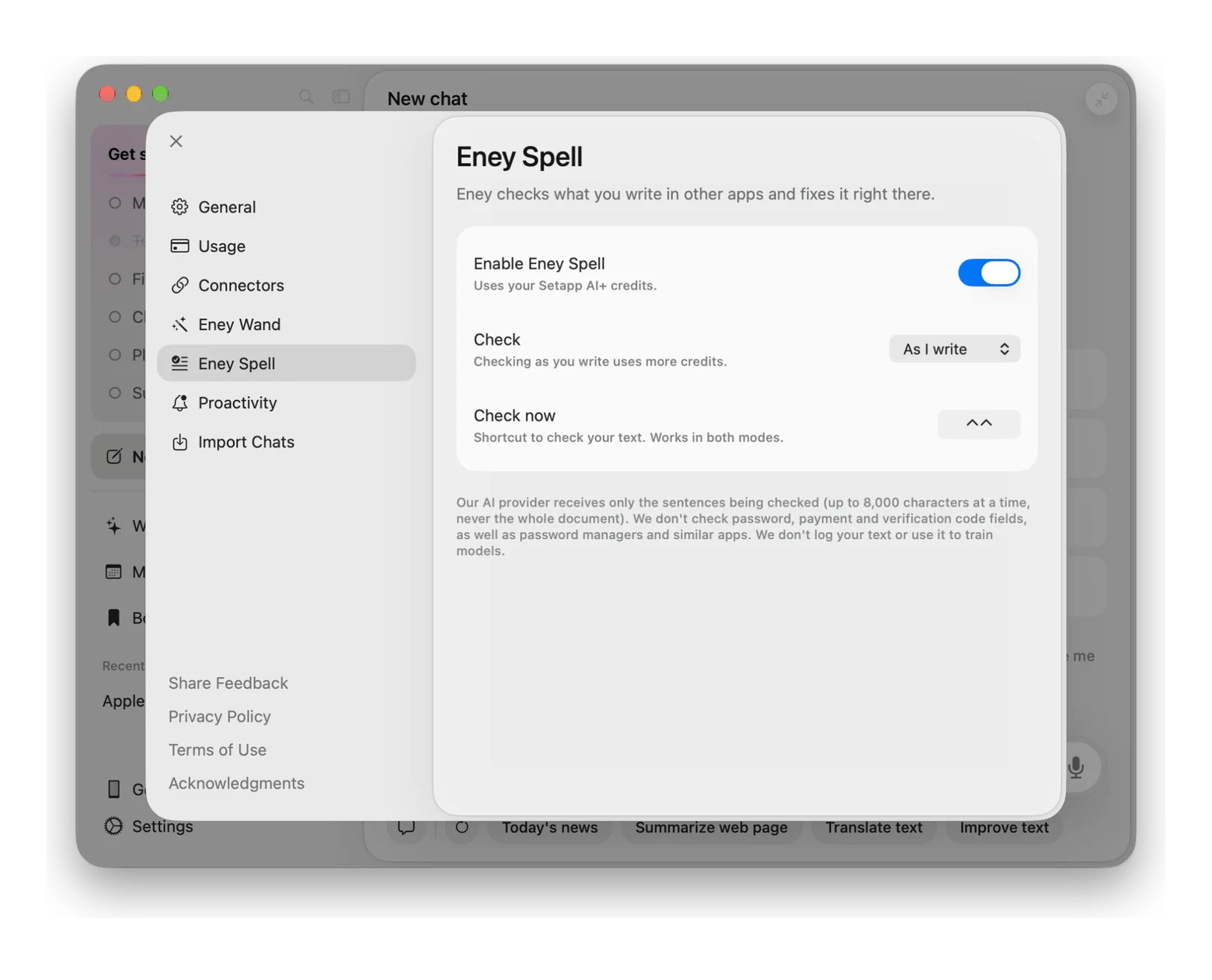
To enable Eney Spell:
- Download and open Eney.
- Go to Settings > Eney Spell > Enable Eney Spell.
- You’ll also see the specified keyboard shortcut (⌃⌃) to activate the assistant.
Eney will automatically underline typos and awkward phrasing as you type. Just click the highlighted text to fix it instantly.
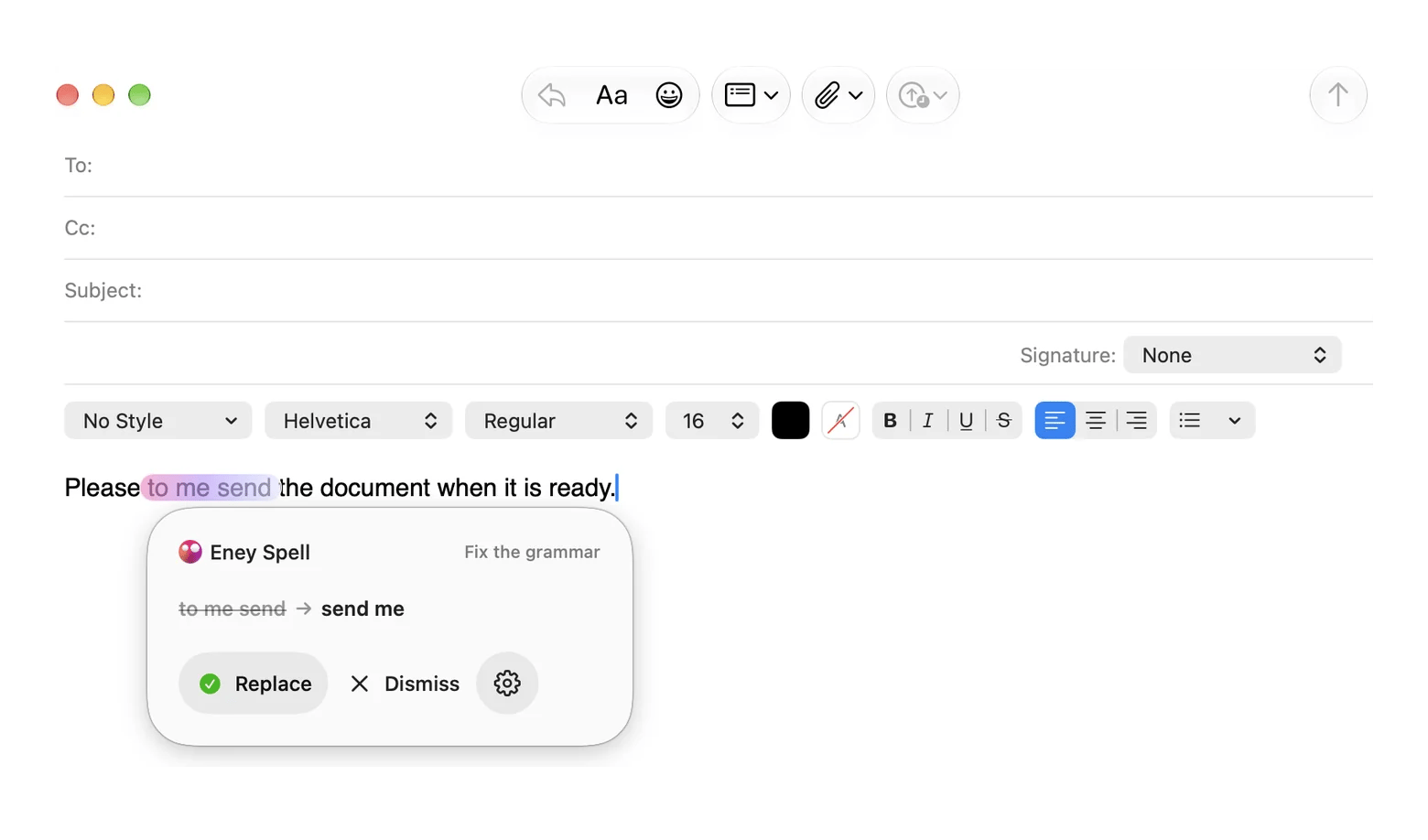
Eney uses MacPaw’s Mnemos AI stack to process text primarily on-device. It supports eight languages: English, German, Spanish, French, Italian, Polish, Brazilian Portuguese, and Ukrainian.
Limitations: The tool requires macOS 15+ and an Apple Silicon Mac. After the 14-day free trial, you receive 10,000 AI credits, followed by standard Setapp AI credits.
The good:
- Eney edits directly in your active window
- Text never leaves your Mac (which is a massive win for privacy)
- The app feels like a native macOS feature
The catch:
- Leaves older Intel Macs behind
- Capped at eight supported languages
- Switches to credit billing post-trial
Try Eney to fix your sentences seamlessly across your entire Mac.
2. Grammarly — Best for explanations and tone
Grammarly is the most recognizable grammar sentence checker available. It uses a floating overlay to suggest structural changes, tone adjustments, and clarity rewrites across the operating system.
Grammarly works well in Mail and Slack, as the corrections appear directly in the desktop overlay. When we tried it in Notion, however, the floating icon completely obstructs Notion’s own menus, and whenever you click the rewrite option, the text block simply gets dragged to another location.
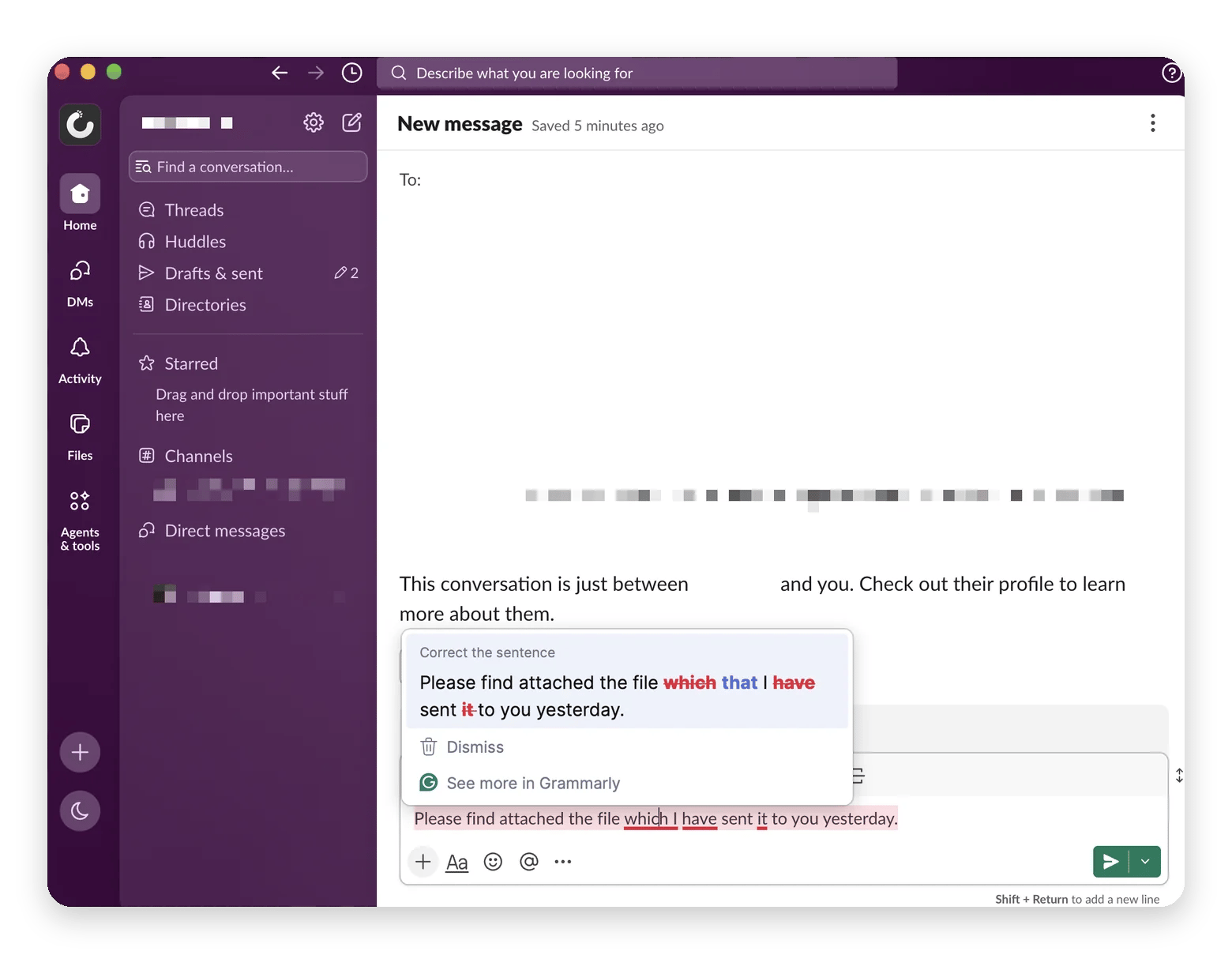
Limitation: The constant floating widget may be distracting and sometimes disrupts the UI elements specific to the app.
The good:
- Detailed explanations for every grammar fix
- Highly accurate sentence restructuring
- Excellent tone and style detection
The catch:
- Intrusive floating widget
- All text is processed in the cloud
- Expensive premium subscription tier
Price: Free / from $12/mo.
3. Apple Writing Tools — Best for the built-in rewrite
Built directly into macOS 15, Apple Writing Tools offer native rewriting capabilities powered by Apple Intelligence. It is the most deeply integrated sentence checker for Mac users on modern hardware.
Hit the rewrite shortcut in Mail, and the text changes instantly. Try that same shortcut in Slack or Notion, and you get exactly zero response. Electron apps do not use native Mac text boxes. You can highlight words all day, but the Apple system menu is not going to show up.
Limitation: It only works reliably in native Apple apps or software that strictly utilizes standard macOS text fields.
The good:
- Completely free and built-in
- Secure on-device and Private Cloud Compute processing
- Seamless integration in Apple Mail and Notes
The catch:
- Requires an Apple Intelligence-capable Mac
- Fails in third-party apps like Slack and Notion
- Cannot explain why a rewrite was made
Price: Free.
4. LanguageTool — Best for checking text in multiple languages
LanguageTool is a strong multilingual alternative to standard grammar checkers. It offers a dedicated Mac desktop app and browser extensions for checking text in multiple languages simultaneously.
It performed well in Mail and Slack via its desktop integration, catching the non-native word order issues immediately. Checking a sentence in Notion required copying the text out of the application and pasting it into the standalone LanguageTool editor.
Limitation: It rarely works directly in the app you are using. You usually have to copy your text into their editor.
The good:
- Exceptional support for dozens of languages
- Open-source core with a strong privacy focus
- The free version is actually useful
The catch:
- Forces copy-pasting for complex apps like Notion
- You will need Premium for advanced sentence restructuring
- Desktop app feels disconnected from native macOS
Price: Free / $24.90/mo.
5. ProWritingAid — Best for long documents
ProWritingAid is designed for intensive editing tasks such as long reports or manuscripts. The desktop widget was more than adequate for our tests with Mail and Slack, whereas Notion completely failed to handle the integration, so we had to copy our text out of the workspace altogether to apply the structural corrections.
Limitation: The interface is too overwhelming when being used for short emails or chat messages.
The good:
- Analyzes deep stylistic habits
- Rare lifetime license option
- Hooks directly into Scrivener
The catch:
- Way too bulky for quick emails
- The floating UI feels somewhat dated
- Cloud-only processing
Price: Free / from $12/mo.
6. QuillBot — Best for free paraphrasing
QuillBot is a paraphraser first. The Mac client is decent for quick edits, handling our Mail and Slack tests easily. But try it in Notion, and you lose your formatting almost every time the widget replaces a sentence.
Limitation: It focuses heavily on rewriting rather than explaining grammatical errors. You will not learn why your primary sentence was flawed.
The good:
- The paraphrasing engine is really powerful
- Multiple tone and style modes
- Capable macOS desktop app
The catch:
- It misses detailed grammar explanations
- Notion integration is spotty
- We noticed very aggressive upselling to the Premium tier
Price: Free / $19.95/mo.
7. Hemingway Editor — Best for readability
Hemingway is a strict sentence structure checker. It highlights any unnecessary words as well as passive voice. The issue is that it doesn’t take into account the way you work. There is no plugin for Slack and no entry in the Notion menu, so you have to copy each draft into its individual window and paste the edited version back in yourself.
Limitation: It merely highlights problems. It does not generate the rewritten sentence for you, and it forces a complete context switch out of your active window.
The good:
- Trains you to write concisely
- No subscription required for the standard desktop app
- Highlights structural issues instantly
The catch:
- Zero in-app integration
- Does not auto-correct (unless using the new Plus cloud AI)
- Ignores standard spelling errors
Price: Free web / from $12.50/mo.
How to check a sentence right now (no install)
You can check a quick draft without installing anything. Just use the standard copy-paste method:
- Open a site like LanguageTool and paste your text.
- Look at what the tool actually wants to change.
- Skip the “fix all” button so you don't lose your original context.
- Read the result aloud to see if it still sounds natural.
If you want to skip the copy-pasting entirely, Eney Spell does this natively inside your Mac apps.
Which sentence checker should you use?
For a heavy manuscript, ProWritingAid makes sense. If you only check a paragraph occasionally, the free QuillBot site is enough.
But if you use a Mac and hate copying text between apps all day, just install Eney and use its Eney Spell feature. It runs directly inside whatever window you are already using, so you don't have to open a new tab to fix a mistake. You can download the free version to see how it works.
Stop pasting drafts into a second window every time you write. Try Eney Spell on its own or 300+ more Mac apps with Setapp Membership. Free for 7 days.
Sentence fixes are only one part of AI on a Mac, which is covered in how I use AI tools on my Mac.
FAQ
1. What is the difference between a sentence checker and a grammar checker?
A grammar checker deals with strict rules such as the omission of commas or incorrect verb tenses. A sentence checker, on the other hand, considers the overall structure and will rewrite awkward phrasing, eliminate redundant words, and enhance the general flow of the text so that it becomes readable.
2. Is there a free sentence checker for Mac?
Yes, there are free web versions available for basic editing from tools such as LanguageTool or QuillBot; Eney Spell also has a free version for those who want a native Mac application that is able to correct text directly within the current window without the need for constant copy-and-paste.
3. Can a sentence checker work inside Slack and Notion on a Mac?
Usually, no. Most macOS checkers fail because Slack and Notion use custom code instead of native Apple text boxes. Eney Spell is one of the few tools built to successfully bypass this and fix text directly inside those apps.
4. Does Eney Spell rewrite whole sentences or only fix errors?
Eney Spell automatically catches typos and basic grammar mistakes. But if your sentence is structurally confusing or too wordy, you can use the Eney Wand feature to select text and rewrite it into a clear, natural-sounding phrase.
5. Will a sentence checker change my writing style?
Although it can do so, you will always remain in control. Most tools provide tone options such as formal or casual. Whenever an algorithm proposes a rewrite that sounds too mechanical or just doesn't match your style, you should simply ignore the suggestion and stick to your original voice.






 Best solution
 Best solution