In August, I told you here how MacMD Viewer got to $3,000 a month. The short version was “search did all the work.” A lot of you asked the obvious follow-up: how, exactly?
Today, MacMD has made $10,927 in direct sales, net of refunds, from 504 orders. I’ve never paid for an ad, never done a launch, and never paid anyone to feature it. Search is the only acquisition channel I’ve ever worked on.
Analytics can trace 337 of those sales, worth $7,221, straight to a search engine. Another 107 arrived as “direct,” with no source attached. I suspect most of those started with a search too: 21 of them landed straight on a blog article, and nobody types a URL like that by hand. I can’t prove it, so I only count the 337.
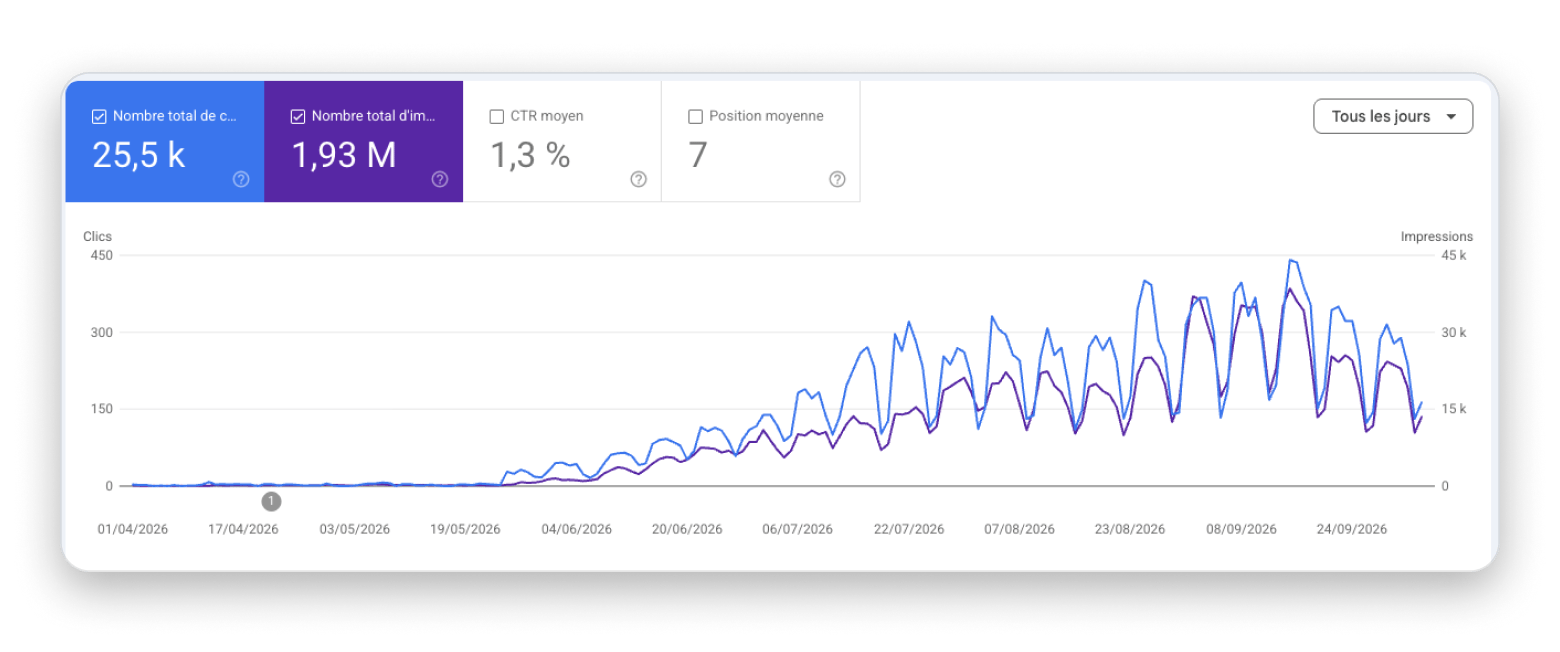
It wasn’t fast. Google sent me 70 clicks in April, 241 in May, then 2,083 in June, 5,998 in July, 7,471 in August, and 7,740 in September with a few days still to count. Count on about three months before search starts payin
This article is the method, in the order I’d follow it if I started again tomorrow. Each step ends with the prompt I’d give Claude Code to do it. Claude runs the steps; I make the decisions. You can use another assistant, or do them by hand. The order matters more than the tools.
Step 1: Write a One-Page Framing Doc
Before any keyword research, write one page that answers five questions. It takes an hour. Every later decision gets checked against it, and it’s the first thing I give Claude at the start of a session.
Who pays, in one sentence. For MacMD: people on a Mac who receive or write Markdown files and want to read them properly, without opening an editor.
What they type when they have the problem. Not your category name, their words: “open md file mac,” “markdown viewer mac,” “preview markdown in finder.”
Who you get compared with. The apps a buyer would weigh against yours, including the free ones. This list becomes your comparison pages in step 4.
What the product is, and what it isn’t. MacMD reads files and never edits them. Saying so up front sends away the people who would ask for a refund anyway.
The verified facts. Price, size, features, each with where it was checked. On my site, every page reads these from one file, and a check blocks any change that contradicts it.
I insist on the last one because roundups and AI answers copy whatever they find about you. One listing still says MacMD has 7 themes, because it mixed up the 7 color schemes for code blocks with the app’s 12 page themes, and I can’t edit it. Once a wrong number is out there, it spreads, so make sure it never starts with you.
Step 2: Measure Sales, Not Traffic
Build the measurement before the content. Otherwise you’ll optimize the wrong pages, and you won’t know it.
Count each sale on the page where the buyer landed
For a while, the page that brings in almost a third of my revenue looked, in my own numbers, like it had never sold a thing.
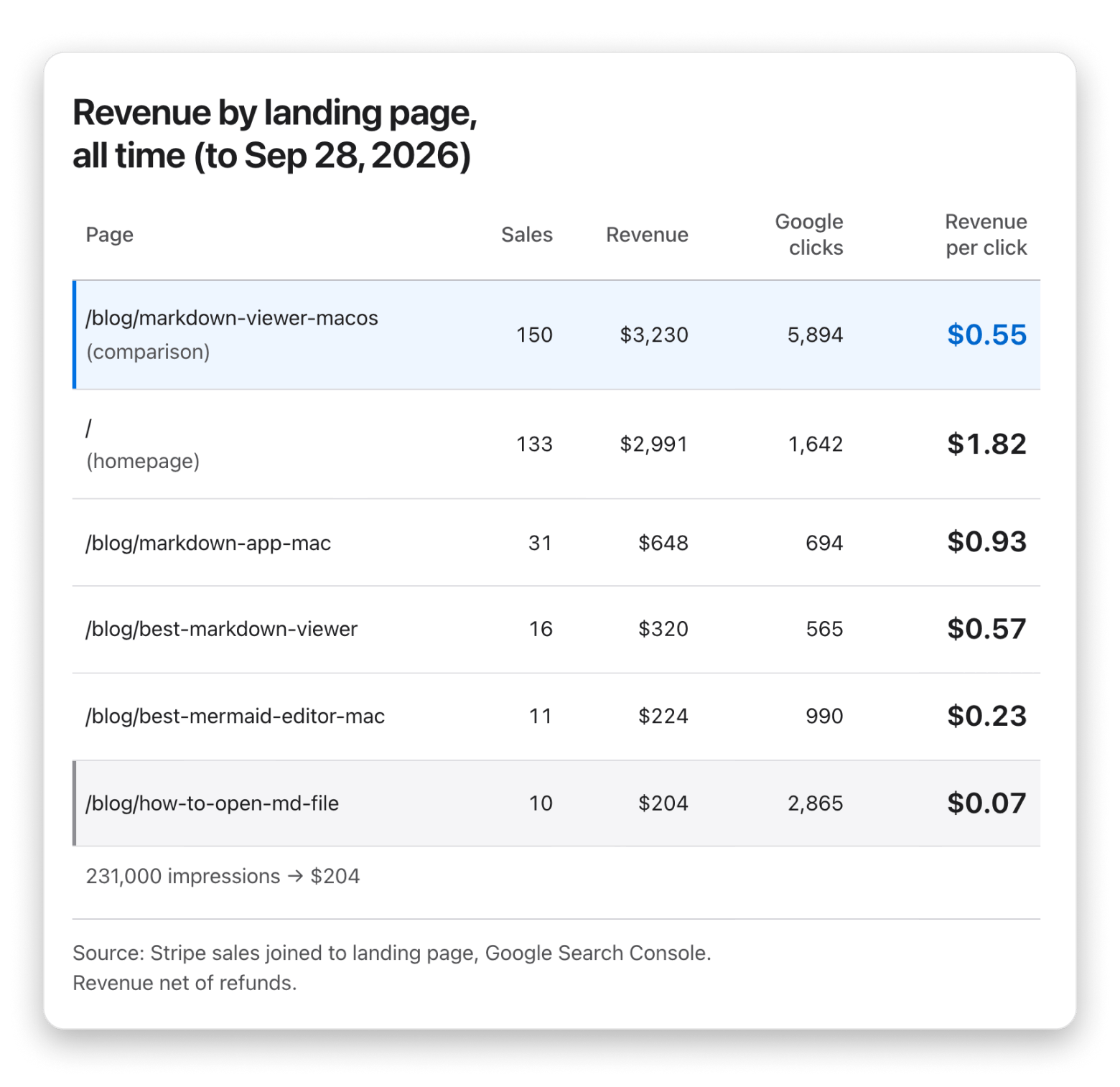
It’s a comparison of Markdown viewers for the Mac. My buy button lives on the homepage and the pricing page, so that’s where every sale got counted. The comparison page did the convincing, sent the reader elsewhere to pay, and got zero credit.
Once each sale was counted on the page where the buyer first landed, that page went to 150 sales and $3,230. Without that change, I would have polished my homepage and ignored the page that actually sells.
Put every number in one place
Every night, a small job on a cheap server loads everything into a single SQLite file: Google Search Console, Bing Webmaster Tools, my analytics, and every Stripe sale and refund. Once a week it adds DataForSEO data: backlinks, rankings, and where AI answers mention me. DataForSEO is the data behind most SEO tools, sold per call instead of per month, and it has a connector that lets Claude Code query it directly.
Claude reads that one file instead of five dashboards, and every answer comes with a query I can rerun. Two rules keep it honest:
Stale data stops the report. If a source hasn’t loaded in 72 hours, the report says so instead of quietly using old numbers.
Every fact is saved with the command that proves it and the date. Anything older than 30 days gets proved again before it drives a decision. Without this rule, an assistant reuses an old number as if it were fresh, or proposes work that was finished three weeks ago. I’ve seen it do both.
You don’t need my exact stack. You need three things: one place where your numbers live, sales tied to landing pages, and a rule that old facts get re-checked.
Step 3: Find the Searches Where People Buy
This is where I wasted the most time. A search can have huge volume and bring you nobody who will ever pay.
Vanity traffic versus buying traffic
The article with the most Google impressions explains how to open a .md file. It has 231,000 impressions, 2,865 clicks and $204 in sales: about 7 cents per click. My comparison page earns 55 cents per Google click ($3,230 for 5,894 clicks), eight times more. Someone opening one file isn’t shopping for an app.
I’ve published 83 blog posts. Fifteen have ever produced a sale.
The ones that sell answer searches with “Mac” in them. Over the app’s lifetime, not counting searches for MacMD by name, those searches bring 13% of my Google impressions but 45% of my clicks. A generic Markdown question shows my site to people who will never install a Mac app. The Mac version of the same question brings people who might. Bing taught me the same thing: with DuckDuckGo, it brought 49 sales, which is real money, but about half the Bing visitors to my guides are on Windows.
So before I work on a keyword, I ask one question: would someone typing this search pay for my app today?
How I find them
Start from the framing doc, not from a tool. Take the words from question 2 and the competitors from question 3.
Expand into buying patterns. For each competitor and each problem: “best X for Mac,” “X vs Y,” “alternative to X,” “how to do X on Mac.” These are the searches of someone choosing, not learning.
Get the volume, but don’t sort by it. Volume tells you a search exists. Twenty searches a month from people choosing an app beat 5,000 from people who want a quick answer.
Read page one before deciding. I skipped this once. I built a free in-browser Markdown viewer to rank for “md viewer mac.” In 90 days, it got zero impressions. Page one was all native apps you download. Google had already decided what that search meant, and a web tool wasn’t it.
On page one, I look at three things:
What type of page wins? Homepages, roundups, guides, videos, Reddit threads. If the top five are app homepages, a blog post won’t break in.
Do I already have a page that ranks for this? If so, I improve that page instead of writing a competitor to it.
Is there an AI Overview, and who does it cite?
The test, in one table
Signal
Buying search
Vanity search
Words
“for Mac,” “best,” “vs,” “alternative,” a competitor’s name
“what is,” “how to open,” a file format alone
Page one
Roundups, comparisons, app homepages
Wikipedia, docs, forum answers
Who searches
Someone choosing a tool
Someone who needs an answer and leaves
What to do
Build a page for it (step 4)
Write it only if it’s quick, and never before the buying pages
Step 4: Build the Pages in the Right Order
Once you have the buying searches, build in this order. It’s the order in which my pages actually make money.
The product page. Your homepage has to say, in the first two or three sentences, what the app is, who it’s for, what it costs, and what makes it different. Plainly enough that a person or an AI could quote it as is.
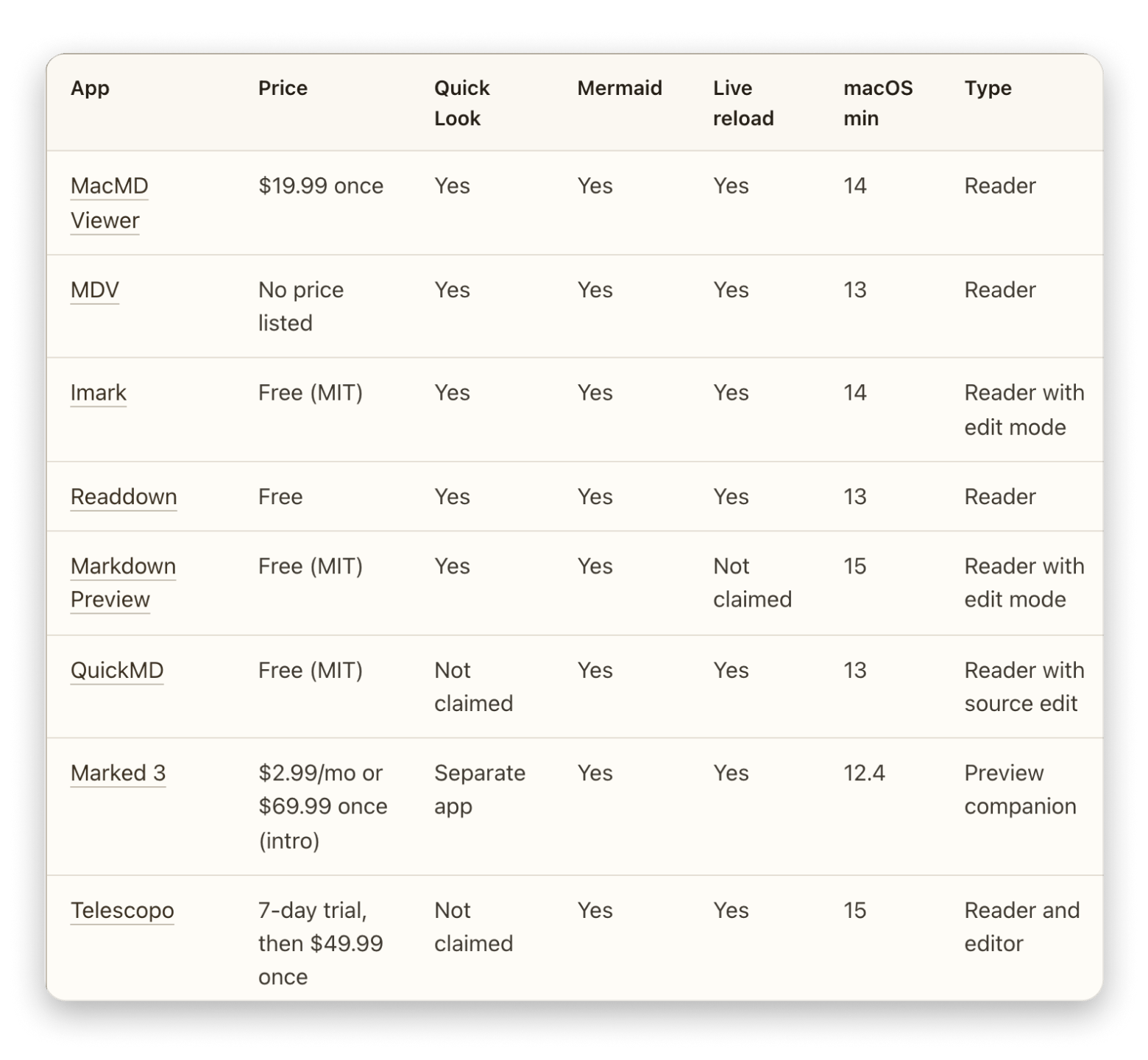
One “best X for Mac” comparison. This is my best-selling page. Be honest in it: include the free apps and say when they’re enough. Readers trust a comparison that doesn’t pretend you win everything, and the ones who choose you after reading it rarely ask for a refund.
3. “X vs Y” and “alternative to X” pages for each competitor in your framing doc. Short, factual, with a table.
4. “How to do X on Mac” guides where the answer involves a tool, ideally yours.
5. Everything else, last. Informational guides can bring impressions, and they show Google, and the AI assistants that read search results, that people choose your site on the topic. I keep mine. But they get what’s left of my time, not the first hours.
Before publishing, have a second agent check every statistic against its source. I use two free, open-source plugins for Claude Code, claude-seo and claude-blog. An assistant will happily write “studies show 73%…” with nothing behind it.
Prompt: “Using the buying searches from step 3, list the pages I need in this order: product page, main comparison, one vs page per competitor, how-to guides. Mark which exist, which need fixing, and which to write. Then run claude-blog’s fact-check and SEO check on every draft before I publish it.”
Step 5: Get Links by Email, One Site at a Time
When I first checked, my best-selling page had no links from other sites that pass ranking value. It ranked on its content alone. Links are one of the ways Google decides between two equally good pages.
What didn’t work
Big publications: zero for 25. I wrote to about 25 large tech sites. None said yes.
Directories: mostly a trap. Claude opened a live listing on each of 114 well-rated directories. Only 49 actually passed link value. I worked through 13 of them in one day, and one gave me a link I could verify as good. The others wanted payment, a link back, or hours of unpaid work. One well-known developer platform published my page with a tag telling search engines to ignore it.
Look for lists, not fans
“Would this writer like my app?” got me nowhere. The better question was: “does this site publish lists I could be part of?”
A site that sells refurbished Macs showed me the difference. It has nothing to do with Markdown, and it now lists MacMD in its “22 Best Mac Apps,” in exchange for a link back.
The method I use today
Find the lists. Claude runs “best Mac apps”-style searches through DataForSEO, in several countries and languages, plus searches for the apps I’m usually compared with, because a page that already cites them is a page where I belong. One full run: 493 searches for about one dollar.
Keep the sites that come back again and again, then read the pages. Keep the ones that really publish lists. Ranking signals set the priority; they don’t rule sites out. My first filters were too strict and threw out good sites whose titles didn’t say “Mac” or “Markdown.”
Remove the sellers. Anyone who sells links or sponsored listings goes on a do-not-contact list, along with every address that bounced or asked not to be contacted.
Find a human, and check the address. A named person when possible, and a domain that actually receives mail.
Write one email per site, in the site’s language, that names its actual list and says in two lines why MacMD fits there. I offer a free licence with no conditions.
Follow up once, and only once. Five days later, if there’s no reply, no bounce and no conversation already going, one short follow-up goes out in the same thread and the same language. Replies are matched by address, domain and subject line: an editor once said yes from a personal address, my checker missed it, and that “yes” sat unanswered for seven days.
Keep the mailbox healthy, then scale. SPF, DKIM and DMARC set up first. I started at 8 emails a day, moved to 12, and today send 50 a day, follow-ups included. Every email that leaves is printed in a daily report, so I read what went out under my name.
Verify every link on the live page. Before counting a link, Claude opens the page and checks that the link is there, followed, and on a page search engines are allowed to index. Check the published page, not the promise.
What it has given so far
The links I’ve won so far came from my first personal emails in July: an article on a Spanish Mac site, a listing on a Mac guide, and the refurbished-Mac roundup. The bigger system is only a few weeks old. It has had 21 replies to 316 first emails, and it’s too early to say how many will turn into links.
Keep your expectations realistic. My best link has sent me 17 visitors in total. Links don’t bring buyers directly. At best, they help your pages rank, and the rankings bring the buyers.
By the way: the strongest link MacMD has ever had is on this very blog, and it came from an email too. When MacMD joined Setapp, I emailed the person handling the partnership. A while later, I sent a second email to ask whether I could be featured in an article. That second email is why my column ran here in August, and why you’re reading this one now.
Step 6: Make AI Answers Quote You
In April, ChatGPT sent me a burst of traffic, and it looked like a new channel had opened. Looking closer, most of it went to a single guide about Mermaid diagrams, from people who weren’t looking for a Mac app. In total, chat assistants have sent me 741 visits and 8 sales. Small.
So I measured where AI actually mentions me instead of guessing:
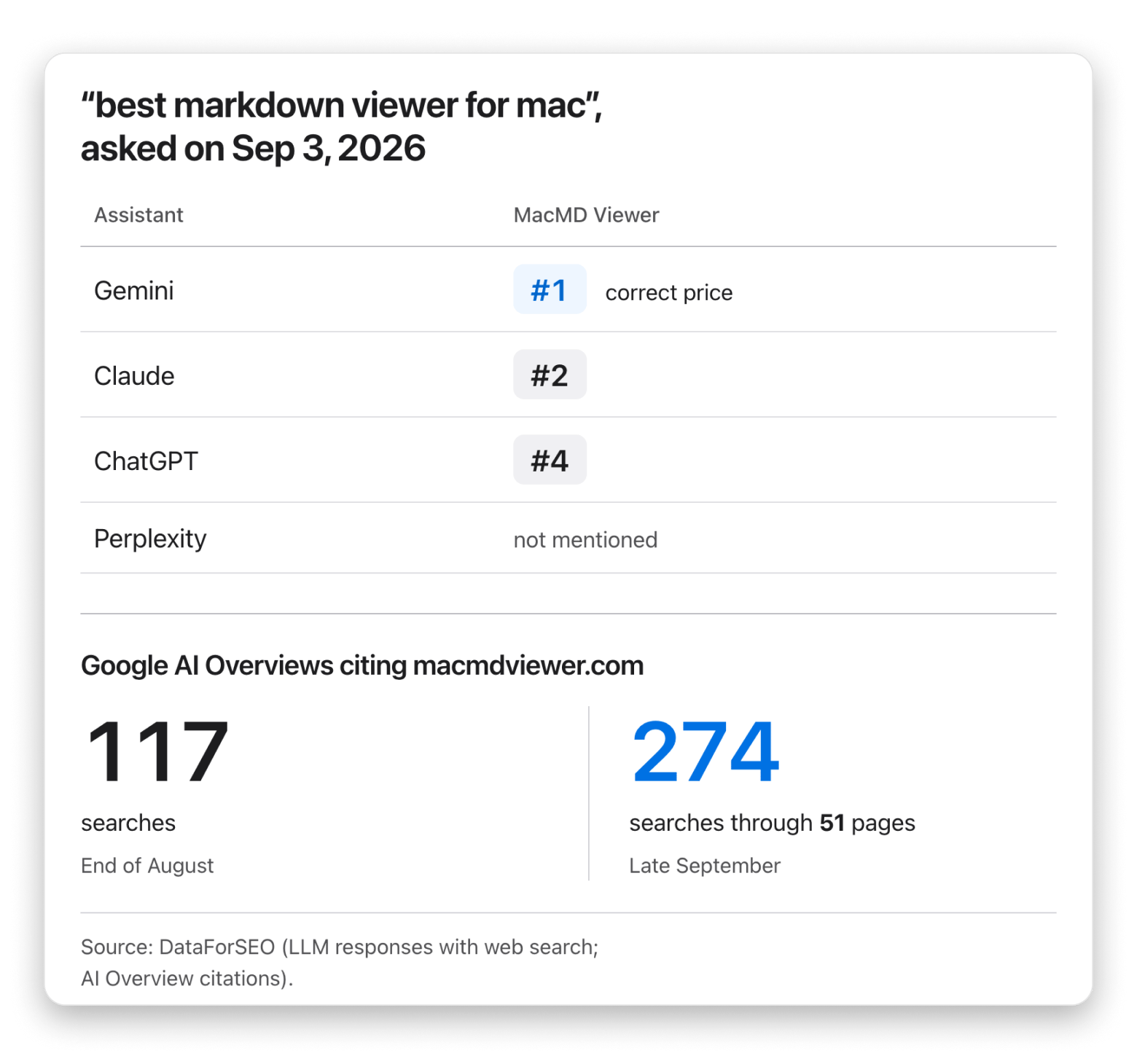
Chat assistants. On September 3, I asked ChatGPT, Gemini, Claude and Perplexity the same buying question, “best markdown viewer for mac,” through DataForSEO. Gemini named MacMD first, with the correct price. Claude named it second, ChatGPT fourth. Perplexity didn’t mention it.
Google’s AI Overviews, the answers above the regular results, are where it adds up. DataForSEO sees MacMD cited on at least 274 searches through 51 of my pages, up from 117 at the end of August. Those visits don’t show up as “AI” in analytics. They look like plain Google traffic.
The pages AI quoted were my comparison pages, like my roundup of Markdown apps for Mac, and my guides. Not my homepage, and not the llms.txt file I’d added for them. AI cites what already ranks. So I don’t have a separate AI strategy. I find the searches that trigger an AI answer and do steps 3 to 5 on them.
I only do two things for it:
Make each page that sells quotable: the short answer from step 4, near the top, on every one of them, not only the homepage.
Keep a fixed schedule: the same buying questions to the same assistants once a month, recorded, instead of checking every week and chasing noise.
Step 7: Run the Loop
Steps 1 to 6 are mostly set up once. This is the routine that comes after, the one I aim for and the one I’m teaching my agents to run. When a page sits at position 7, moving it to 3 is worth more than a new article at position 40, so most of the ongoing work is improving what exists.
Every week (about an hour)
Check the data is fresh. If a source is stale, fix that first. Everything else depends on it.
Revenue per landing page, last 28 days against the 28 before. If a page that sells is slipping, it jumps to the top of the list.
Pages in positions 5 to 15. For each one, sort its Search Console queries by impressions and look for the ones the page doesn’t really answer yet. Add a section, a table row, a paragraph.
High impressions, low click rate. Rewrite the title and description. It takes minutes.
Outreach. Answer every reply the same day, send the licences, and verify any new link on the live page.
Every month
Ask the assistants the same buying questions, and count AI Overview citations.
Audit backlinks: new, lost, and whether each one is still followed and indexable.
Refresh the keyword list: new competitors, new “X vs Y” searches, pages from step 3 still waiting.
Decide on one new buying page, or decide the best use of the month is fixing existing ones. Most months, it’s the second.
Re-prove every fact older than 30 days, including the ones in the framing doc.
What’s Next: The Same Playbook, Run by Agents
MacMD holds a 4.4 score on Trustpilot, and those reviews mean more to me than the $10,900. Now I want to see if the method works a second time, so I’m running it on three projects that start from close to zero: DokuTrak, a document-collection tool for accountants; claude/for, where I publish workflows like the ones in this article; and uneiapour, AI guides for French small businesses.
Most of this playbook still needs me in the loop: to read the report, pick the page to fix, check the drafts before they leave. What I’m building now is agents that run it on their own, from the nightly numbers to the weekly fixes and the outreach, and only come to me for the decisions that are really mine.
If you want to use them, try the method on your own product, or just follow along, write to me at [email protected], or follow me on X at @Crackx17_. I’ll post there what works and what doesn’t. And if you run a list or a blog where one of these apps fits, the same address works. You know how this started.






 Best solution
 Best solution