- Eney is the best AI writing assistant for everyday emails and messages. It fixes and rewrites text where you type. Eney
- Elephas rewrites in any text field. Select text, open Super Command, and rewrite, summarize, or continue writing. Elephas
- Spellar AI turns talking into drafts. Record a call or a ramble and get action items and a follow-up. Spellar AI
- TypingMind saves prompts for recurring formats. Reuse one update template across AI models. TypingMind
- Find the AI writing app that keeps your voice. Try Elephas, TypingMind, and 300+ more apps with Setapp Membership, free for 7 days. Or try Eney with a 14-day free trial and 10,000 credits
The best AI writing app for Mac depends on where you write. Eney works best for everyday emails and messages, Elephas for rewrites in any app, Spellar AI for turning spoken ideas into drafts, and TypingMind for recurring formats.
I write a lot, and I genuinely enjoy it. But not every piece of writing is fun, and some days I send fifteen follow-ups before lunch. That's when I started leaning on Grammarly and ChatGPT. They saved me time, but my emails slowly stopped sounding like me. So I went on the hunt for AI writing apps that work right inside my Mac and keep my voice. I ended up keeping 4 of them.
What actually makes an AI writing app good in 2026
For me, a good AI writing app does two things: it works where I already write, and it doesn't turn my text into something a robot would say. Writing from scratch isn't impressive anymore, since pretty much any chatbot can do that in seconds.
And it's not just me being picky. In a 2025 study, researchers found that people don't mind when AI fixes grammar in their manager's emails. But when most of the message was written by AI, only 40-52% of them saw the manager as sincere, compared to 83% when AI only helped a little.
Tools like Jasper or Copy.ai are built for long blog posts, but I needed help with everyday stuff like client replies and Slack updates. So I checked whether each app:
- Works system-wide, in the apps where I actually write
- Keeps my wording instead of rewriting everything into a template
- Saves my preferences and costs a fair price for daily use
You can read more about how Setapp evaluates apps.
Best AI writing apps for Mac at a glance
I tested four apps, and each one turned out to be great at a different kind of writing. Here's a quick comparison so you can see which one fits you best:
| App | Best for | Works system-wide | Learns your style |
| Eney | Everyday emails and messages | Yes (Mail, Slack, browser) | Remembers preferences |
| Spellar AI | Talking through ideas, calls | No, records in its own app | Custom summaries |
| TypingMind | Repeating writing formats | No, own chat window | Saved prompts |
| Elephas | Rewrites in any app | Yes, any text field | Custom writing styles |
The biggest thing to look at is whether the app works system-wide:
- Eney and Elephas show up right where you type, which is what I needed for emails and docs.
- Spellar AI and TypingMind work in their own windows, so I used them more for thinking out loud and recurring updates.
- If you have a Mac with Apple silicon, you also get Writing Tools from Apple Intelligence for free. You can select text in most apps and proofread it, rewrite it, or make it friendlier, more professional, or more concise.
Eney: Best overall for drafting and rewriting in your own voice, anywhere on your Mac
Eney by MacPaw is the AI assistant I'd recommend for everyday emails and messages, because it works right where you type. Its Eney Spell feature fixes spelling, grammar, and wording in Mail, Slack, Notes, and more, and Eney Wand lets you shake your mouse, point at any text on your screen, and ask for a rewrite or summary.
Eney also has memory. Tell it once that you prefer short, friendly emails, and it keeps that preference for later drafts. If you connect Gmail, it can find the right thread and draft a reply for you, and it always asks before sending anything.
How I tested Eney
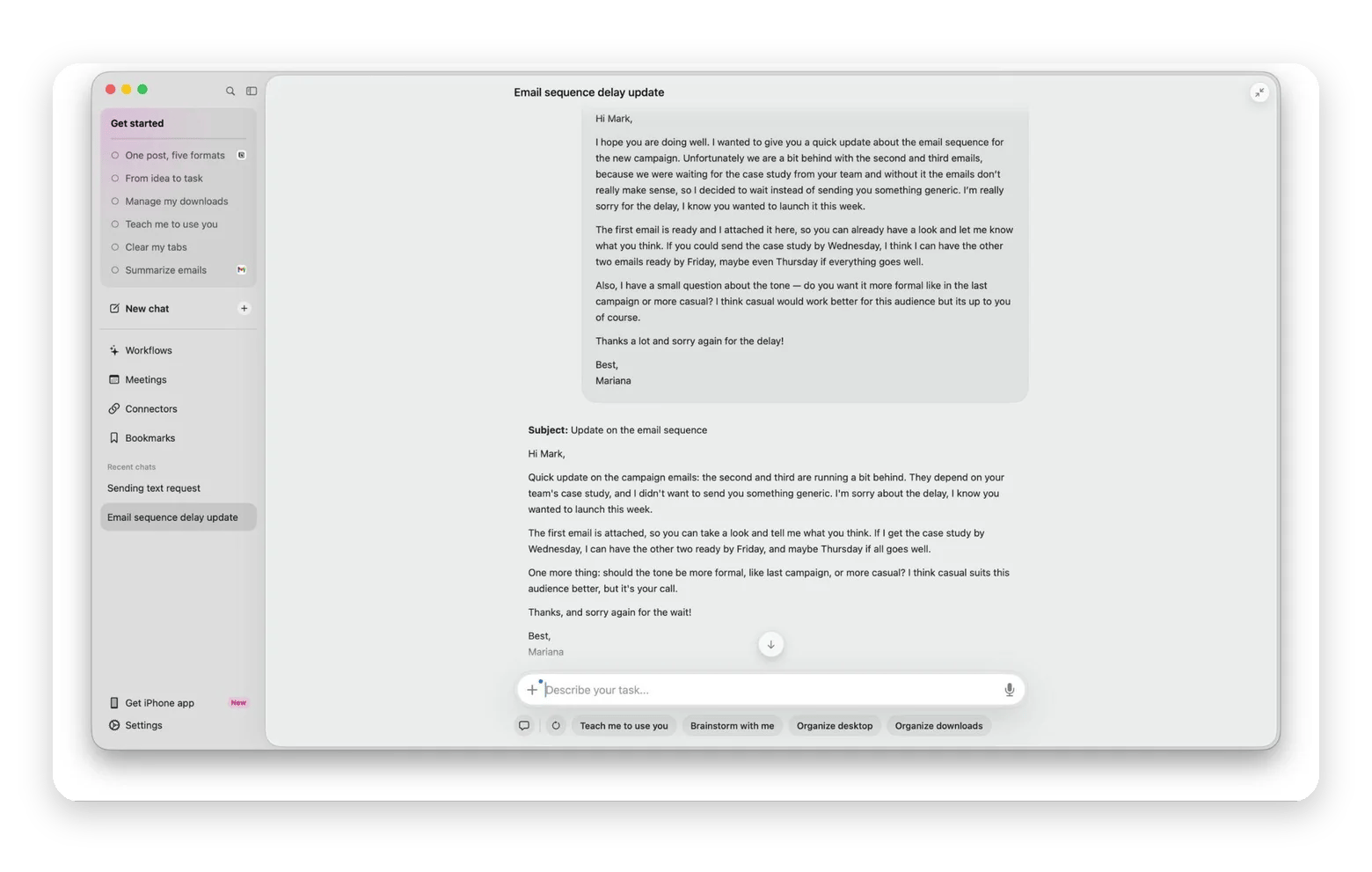
To see how much of my voice survives, I gave Eney a client email about a delay, the kind I'd normally spend way too long polishing. You can see it on the screenshot. My prompt was: “Improve this email. Make it shorter and clearer, but keep my tone and don't make it sound like a template.”
Eney cut my "I hope you are doing well" opener without me asking, made the email about a third shorter, and fixed my "its." It kept everything that mattered, though: the apology, the Wednesday/Friday timeline, and my opinion that a casual tone would work better. I'd still delete the second "sorry" myself, but the email sounded like me, just tidier.
If you want to try it on your own emails, Eney gives new users a 14-day free trial with 10,000 AI credits, which was more than enough for my tests.
Eney runs on Apple silicon only, so if you have an Intel-based Mac, you won't be able to use the tool.
Rating on Setapp: 97% (168 users)
Tip: Eney Spell is turned off by default, so switch it on in Eney's settings first. Also, Eney uses its most thorough AI model by default, which uses up credits the fastest, so pick a faster model for quick fixes.
For everyday emails and messages, Eney is the first app I'd install on a new Mac.
Spellar AI: Best for talking your way to a draft
Spellar AI is a meeting assistant at heart, but it's just as good at turning your own thinking out loud into a draft. You record, and it transcribes, summarizes, and pulls out action items, and then you can ask its chat to turn the note into a follow-up or an email. It works for real calls too, without adding a bot to the meeting.
How I tested Spellar AI
To test it, I recorded a one-minute ramble about a client campaign, with all the “um”s and one change of mind about subject lines. Spellar listed six action items before I even asked, and when I asked for a follow-up, it got my change of mind right. It also turned my "I need to double-check that number" into a task to confirm the 30% reply lift, instead of presenting it as a fact, and I really liked that.

It requires AI credits, and the audio is deleted after 30 days (the transcript stays).
Rating on Setapp: 81% (411 ratings).
TypingMind: Best for prompt-driven writers
TypingMind is the app I'd pick if you write the same kind of update every week, because you can save a prompt once and reuse it with different AI models.
How I tested TypingMind
I saved a "Slack campaign update" prompt with my exact format and an 80-word limit, and Setapp GPT-5.4 turned my messy campaign notes into a Slack message, then a friendlier version, without needing an API key. It works in its own window, though, so it won't help you inside Mail or Slack, and the sidebar takes a few minutes to figure out.
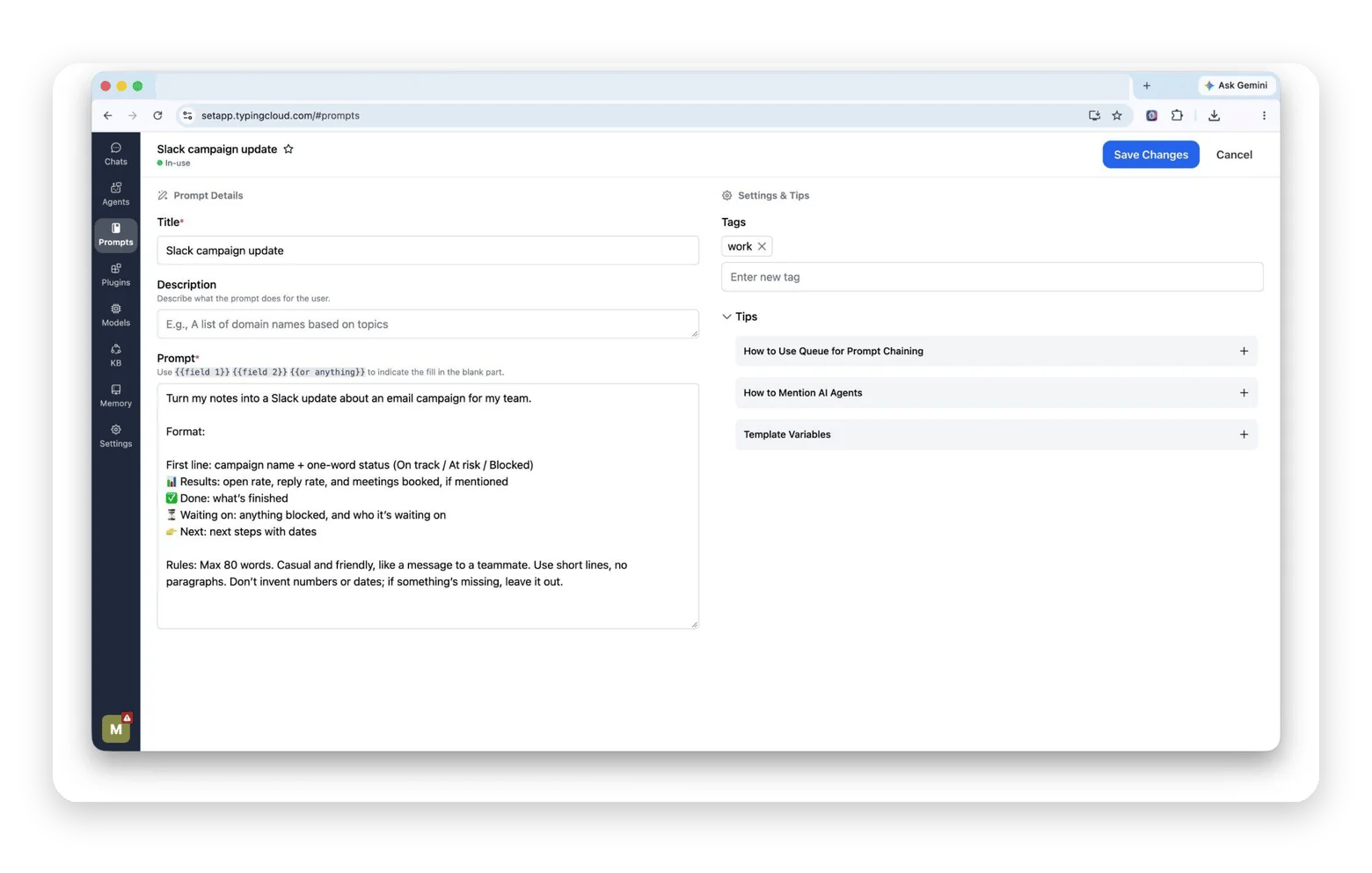
Keep in mind that TypingMind works in its own window, so it won't help you inside Mail or Slack the way Eney and Elephas do.
Rating on Setapp: 90% (1,362 ratings).
Elephas: Best for system-wide rewrites and tone control
Elephas works in pretty much any text field on your Mac: you select text, open its Super Command bar, and pick Smart Write, Fix Grammar, Continue Writing, or Summarize.
How I tested Elephas
I tested it in Notion, where I asked for a 300-word draft based on Stanford's AI Index 2026 findings, and Elephas wrote it right into my page using only the two numbers I gave it. I also gave it the full 400-page report in its own chat, and one follow-up prompt turned its bland first ideas into a pitch I'd actually use. You can save your own writing styles and favorite prompts as Snippets, too.
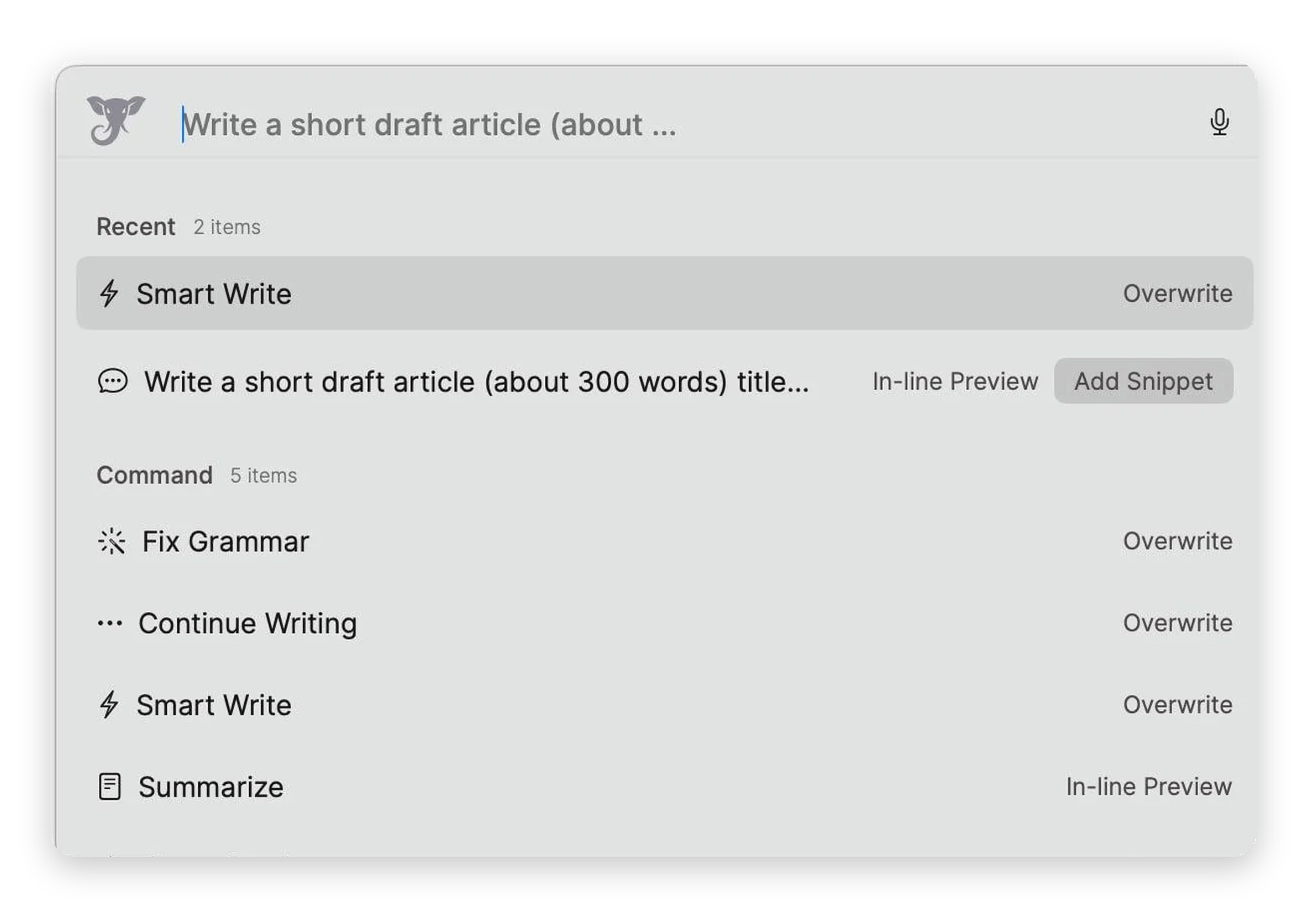
The draft still needed my edits, though. It kept labels like “Intro hook:” in the text and stretched the report's data in a couple of places.
Tip: If Elephas doesn't show up in other apps, go to System Settings > Privacy & Security > Accessibility and make sure it's turned on.
Rating on Setapp: 86% (793 ratings).
Which app for what you write: A quick decision guide
Choosing an AI writing app is more personal than it looks, so here's how I'd pick based on what you write the most:
- Daily emails, messages, brainstorming, and longer copy editing: Eney fixes and rewrites text right where you type.
- Client documents: Elephas drafts and rewrites inside apps like Notion, with your own writing styles.
- Drafting by voice: Spellar AI turns a recording or a call into notes, action items, and a follow-up.
- Recurring formats (reports, posts): TypingMind saves your prompts, so you don't have to set up the same request every week.
If you write a bit of everything, like me, start with Eney and add the others as you go.
Keeping your voice: How to use AI without sounding like AI
Even the best AI writing assistant will sound generic if you don't tell it what to keep. Here are the prompts I use the most (feel free to steal them):
- "Fix grammar and typos only. Don't change my word choice unless it's wrong."
- "Make this shorter, but keep my first sentence as it is."
- "Rewrite this in the style of the examples below," and then I paste two or three messages I wrote myself.
After that, I always read the text out loud. If something sounds like a sentence I'd never say, I put my original version back or rewrite it in a different way that sounds less template-ish.
It also helps to know which words give AI away. For example, when researchers analyzed more than 14 million PubMed abstracts, they found that "delves" showed up about 25 times more often in 2024 than the pre-ChatGPT trend predicted, and words like "showcasing" and "underscores" jumped too. So if one of these ends up in your draft and you didn't put it there, swap it out.
For more ideas, check out how I use AI tools on my Mac and our list of the best AI apps for Mac and iPhone.
Every writing pick in one subscription: Get the best AI writing app for each task
Before I found these apps, I was paying for Grammarly and ChatGPT separately, and it added up pretty fast:
| Setup | Monthly cost |
| Grammarly Pro (monthly billing) | $30 USD |
| ChatGPT Plus | $20 USD |
| Total | $50 USD |
| Setapp Membership (includes Eney, Elephas, Spellar AI and TypingMind) | From $14.99 USD + tax for 300+ Mac and iOS apps with a 7-day free trial |
To be fair, Grammarly Pro is $12 USD a month if you pay for a whole year upfront. But you still end up with two subscriptions for two tools that don't really work together. Over a year, that's $600 USD for the Grammarly and ChatGPT combo, compared to about $180 USD + tax for Setapp Membership.
With Setapp Membership, you get Elephas, Spellar AI, TypingMind, and 300+ other apps for Mac, iOS, and web in one subscription.
Every email you send should sound like you. Get Elephas, Spellar AI, TypingMind, and 300+ apps with one Setapp Membership. Free for 7 days. Get 300+ Apps. Or get Eney as a standalone app with its own 14-day free trial.
FAQ
What is the best AI writing app for Mac?
Eney is the best AI writing app for everyday writing on Mac, because it works right in Mail, Slack, more. That said, the best app is the one that fits how you write. A quick way to decide is to run one of your own emails through two apps and keep the one whose version still sounds like you.
Is there an AI writing tool that works in every Mac app?
Yes. Elephas works in almost any text field: select your text, press Ctrl + Space to open its Super Command bar, and choose to rewrite, summarize, or continue writing. If nothing happens, macOS may be using Ctrl + Space to switch keyboard languages, so change the shortcut in Elephas's Hotkeys settings.
Can AI write in my personal style?
Yes, if you give it the right examples. Pick samples of the same type you're writing, like past emails if you need an email, and update them once your style changes. Elephas can save these as custom writing styles, and Eney remembers preferences for later drafts.
What is a good Grammarly alternative with AI on Mac?
Eney is a good Grammarly alternative if you want proofreading and rewriting in one app. If you only need typo and grammar fixes, Apple's built-in Writing Tools may be enough. They're free on Macs with Apple silicon: select text, Control-click, and choose Writing Tools.
Can I turn voice notes into polished text on Mac?
Yes. For short notes, turn on Dictation in System Settings > Keyboard and speak into any text field. For longer ideas or calls, record them in Spellar AI and ask its AI chat to turn the transcript into an email or follow-up.






 Best solution
 Best solution