- Eney is the best overall pick. Eney transcribes calls in any app without a bot and drafts action items for your approval.
- WhisperTranscribe is best for recordings. WhisperTranscribe records or imports audio and adds speaker labels, timestamps, and custom spelling.
- Spellar AI helps during the call. Spellar AI records from your menu bar and gives you a live assistant for recaps and context.
- Cloud bots still win for shared libraries. Otter and Fireflies suit teams that need one searchable archive and CRM sync.
- You can try the stack on Setapp. Try WhisperTranscribe and Spellar AI free for 7 days with Setapp Membership, which includes 300+ apps. Eney has its own offer: a 14-day free trial with 10,000 AI credits.
The best AI meeting assistant for Mac is Eney, because it transcribes calls in any app without a bot and drafts action items for your approval. WhisperTranscribe is better for transcribing recordings, and Spellar AI suits meetings where you want a live assistant. All three record on your Mac, so no bot joins the call.
Ever had a client stop a call to ask, "Who invited the notetaker?" The meeting never quite recovers. A good AI meeting assistant should save you from writing notes, not make the room awkward. Below, I compare cloud bots with Mac-native apps and show you how to set one up.
Jump to the tool that fits your meetings:
- Eney: Best overall, from recording to follow-up in one assistant
- WhisperTranscribe: Best for dedicated transcription of calls and recordings
- Spellar AI: Best for the meetings where you do most of the talking
The problem with AI meeting bots nobody mentions
Cloud meeting bots join your call as a visible participant and send the audio to their own servers. That’s fine for many internal meetings, but it creates real problems with clients and sensitive topics.
- Visible to everyone. Tools like Otter, Fireflies, and Fathom work by adding a notetaker to Zoom, Google Meet, or Teams. Everyone sees it in the participant list, which can make clients uneasy.
- Banned by some companies. Some companies ban third-party AI notetakers like Otter.ai and Fireflies from their meetings outright, which leaves you taking notes by hand.
- Coverage gap. A bot can only join online calls, so in-person meetings, hallway chats, and phone calls fall outside it unless you open the vendor’s mobile app.
Mac-native tools take a different route: they record on your own Mac, so no one new joins the call. The same app also works for a room full of people.
Cloud bots vs on-device transcription: What you trade
I put cloud meeting bots and Mac-native apps side by side in the table below, comparing privacy, in-person coverage, call visibility, and cost, so you can see which trade-off fits your meetings.
| Feature | Cloud meeting bots | Mac-native apps |
| Privacy | Audio stored on vendor servers | Recorded on your Mac |
| In-person meetings | Need the vendor's app | Yes, record any room |
| Joins call as participant | Yes, visible to everyone | No bot in the call |
| Typical cost (USD) | $8 to $30 USD per user/month | From $14.99 USD/mo + tax |
| Example tools | Otter, Fireflies, Fathom | Eney, WhisperTranscribe |
The trade is convenience versus control, and neither side wins every meeting. If your calls include clients, lawyers, or patients, the privacy row will probably decide for you.
One caveat: Eney and Spellar AI still use cloud AI models to write summaries. So "no bot" doesn't always mean "nothing leaves your Mac." The difference is that Spellar AI transcribes on your device by default, so only the text goes out for summaries.
You can try WhisperTranscribe and Spellar AI free for 7 days with Setapp Membership. Eney has its own 14-day free trial with 10,000 AI credits.
Eney: From meeting recording to follow-up email in one assistant
Eney is a proactive AI assistant from MacPaw that covers the whole meeting cycle without a bot. It can remind you before meetings on your calendar. When a call begins in any app, it offers to transcribe it and write up the notes. Afterward, it drafts the action items, the recap, plus the next meeting invite, and waits for your approval before anything is sent.
Eney isn't a dedicated meeting app, since meetings are one of many tasks it handles. That's also its strength: the same assistant connects to Notion, Slack, and Google Drive, where your notes and tasks already live.
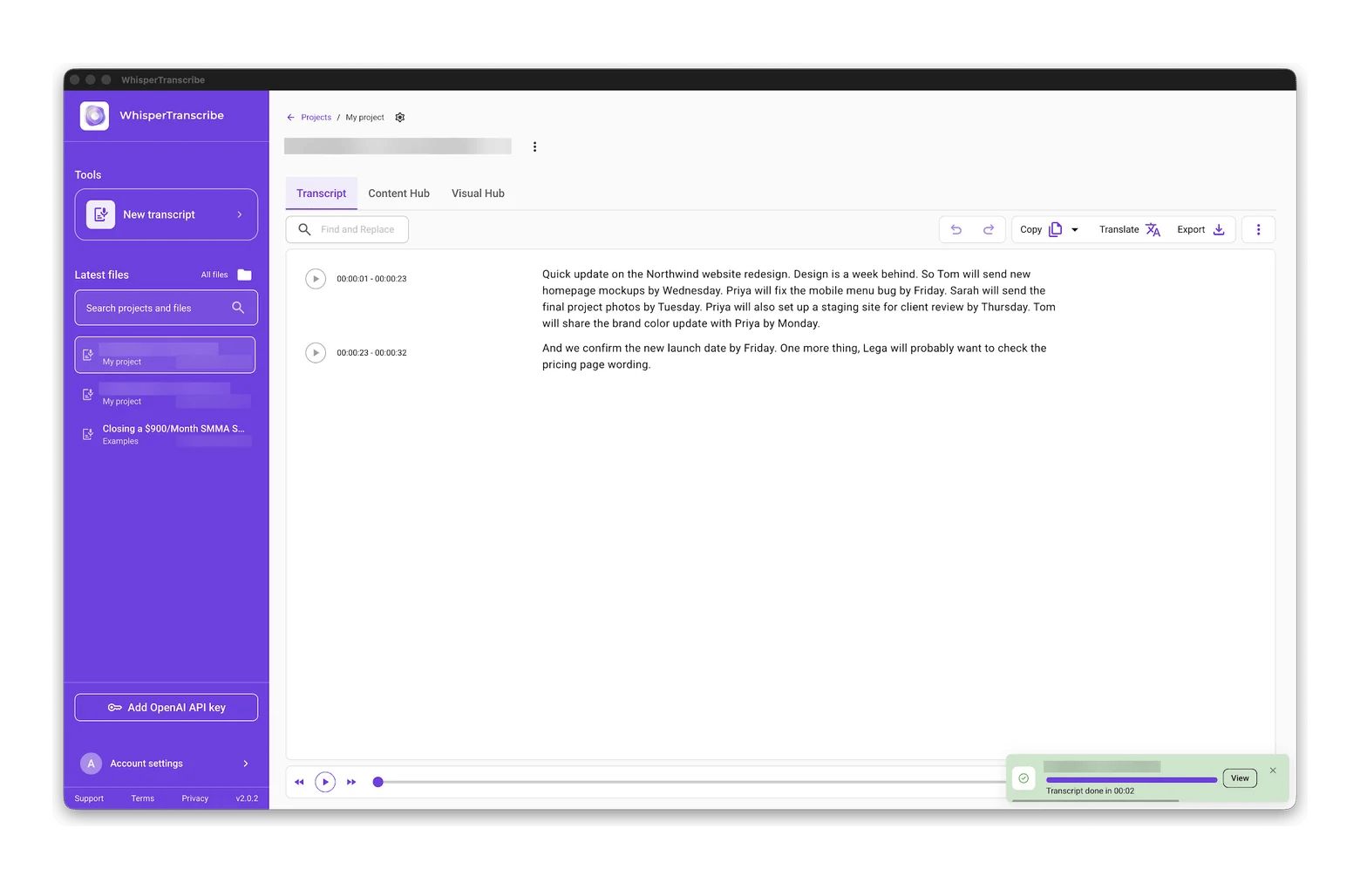
In my test, I played a recorded project update next to my Mac and then asked Eney for a quick recap. It listed each person's tasks and deadlines and flagged the possible legal review as an open item. But it heard "Northwind" as "Notewing," and it didn't draft a recap email because the meeting had no attendee list, so I still check names before sharing anything.
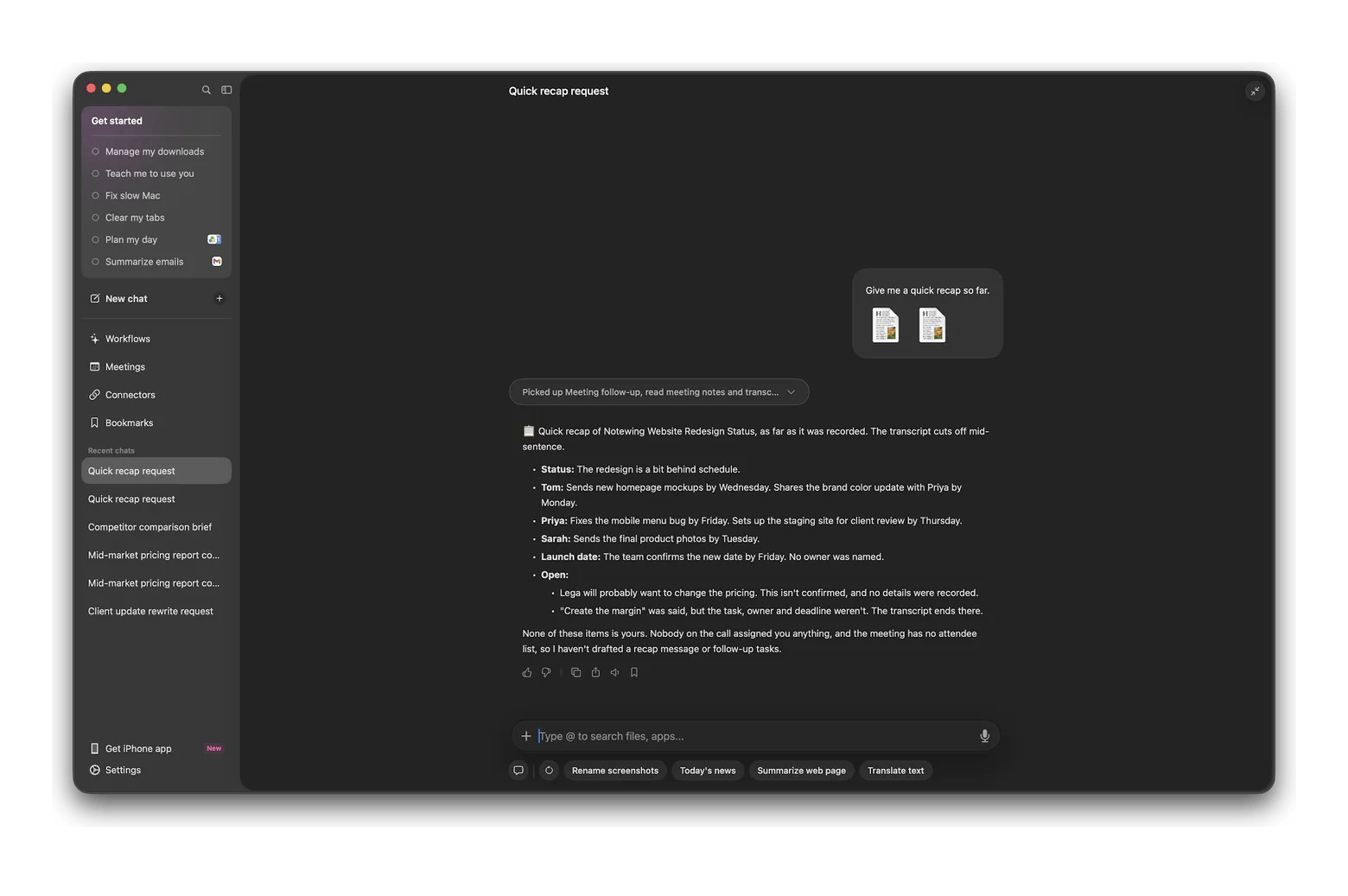
The limit is cost and hardware. Eney needs an Apple silicon Mac with macOS 15 or later, and every transcription and summary uses AI credits. All three apps here run on Setapp AI credits, so you don't need to manage separate application programming interface (API) keys from AI providers.
WhisperTranscribe: Dedicated transcription with no bot in the call
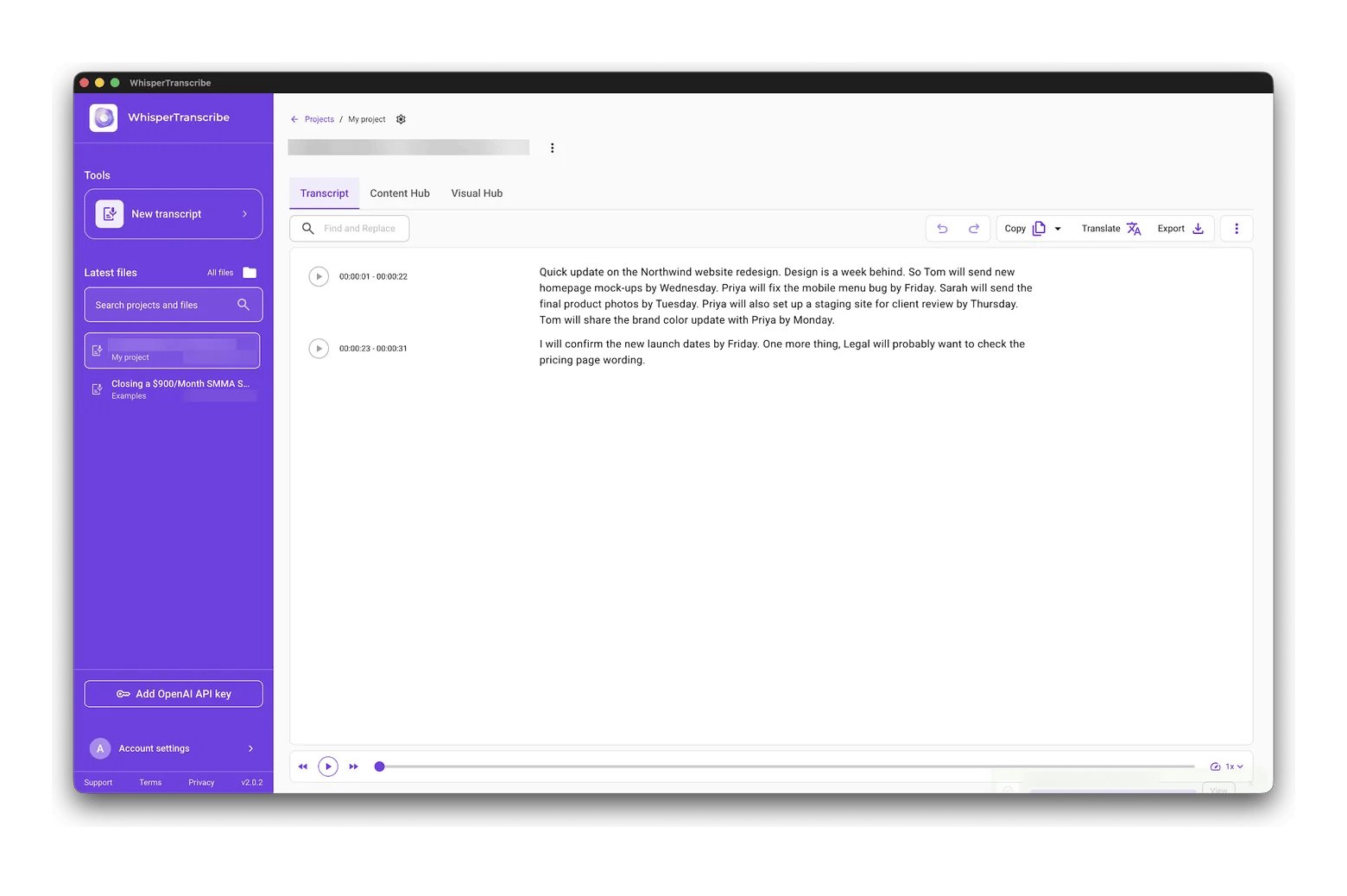
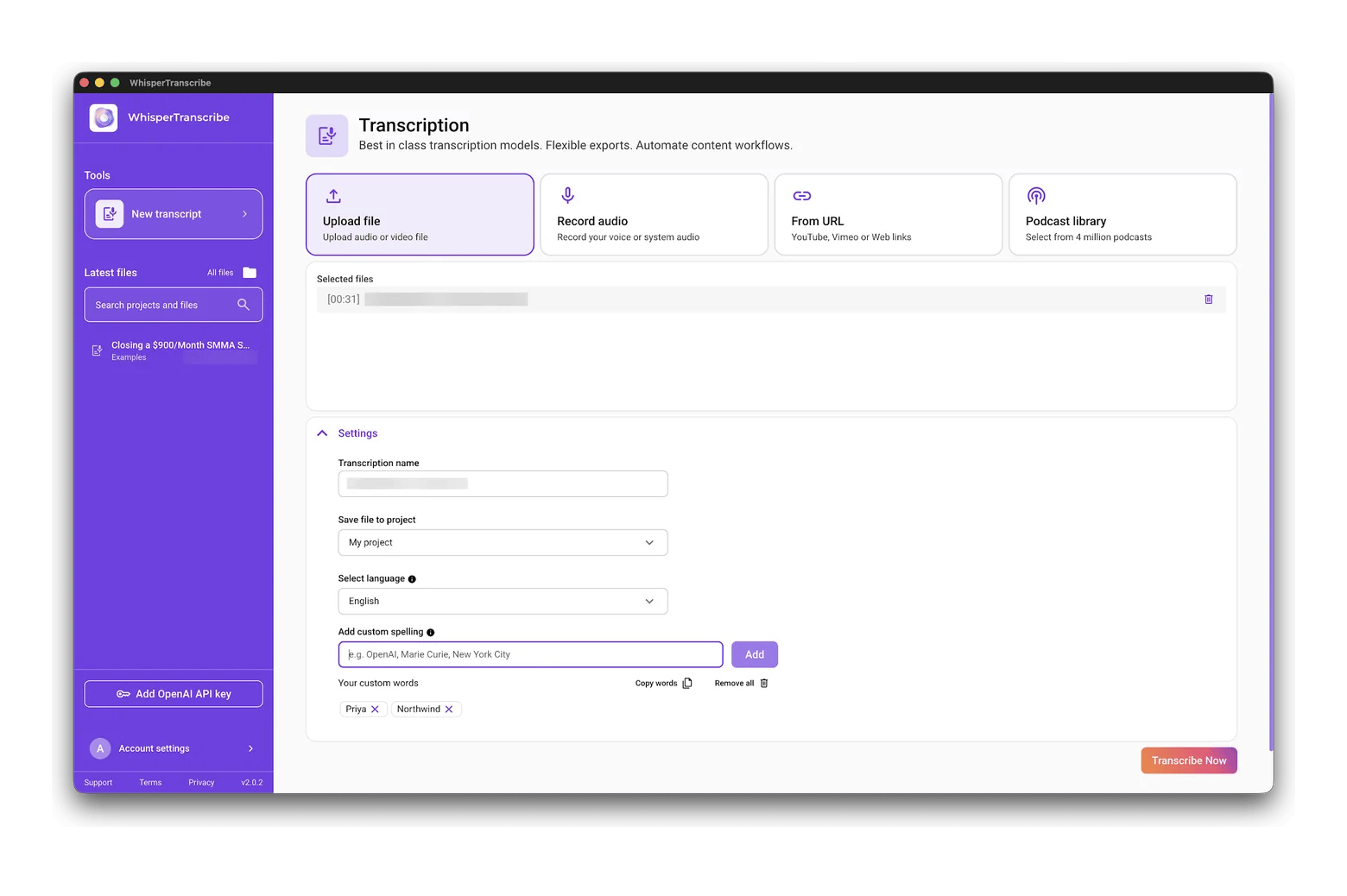
WhisperTranscribe is a specialist meeting transcription app for Mac that works on recordings rather than live calls. You can record in the app or import MP3, MP4, WAV, and other files for transcripts with speaker recognition, timestamps, and custom spelling. In my test, I imported the 31-second phone recording, and it spelled Northwind and Priya correctly once I added them to its custom spelling list. The limit: some recent Setapp reviews mention long files stalling near the end, so test it on a typical recording first.
Spellar AI: For the meetings where you speak
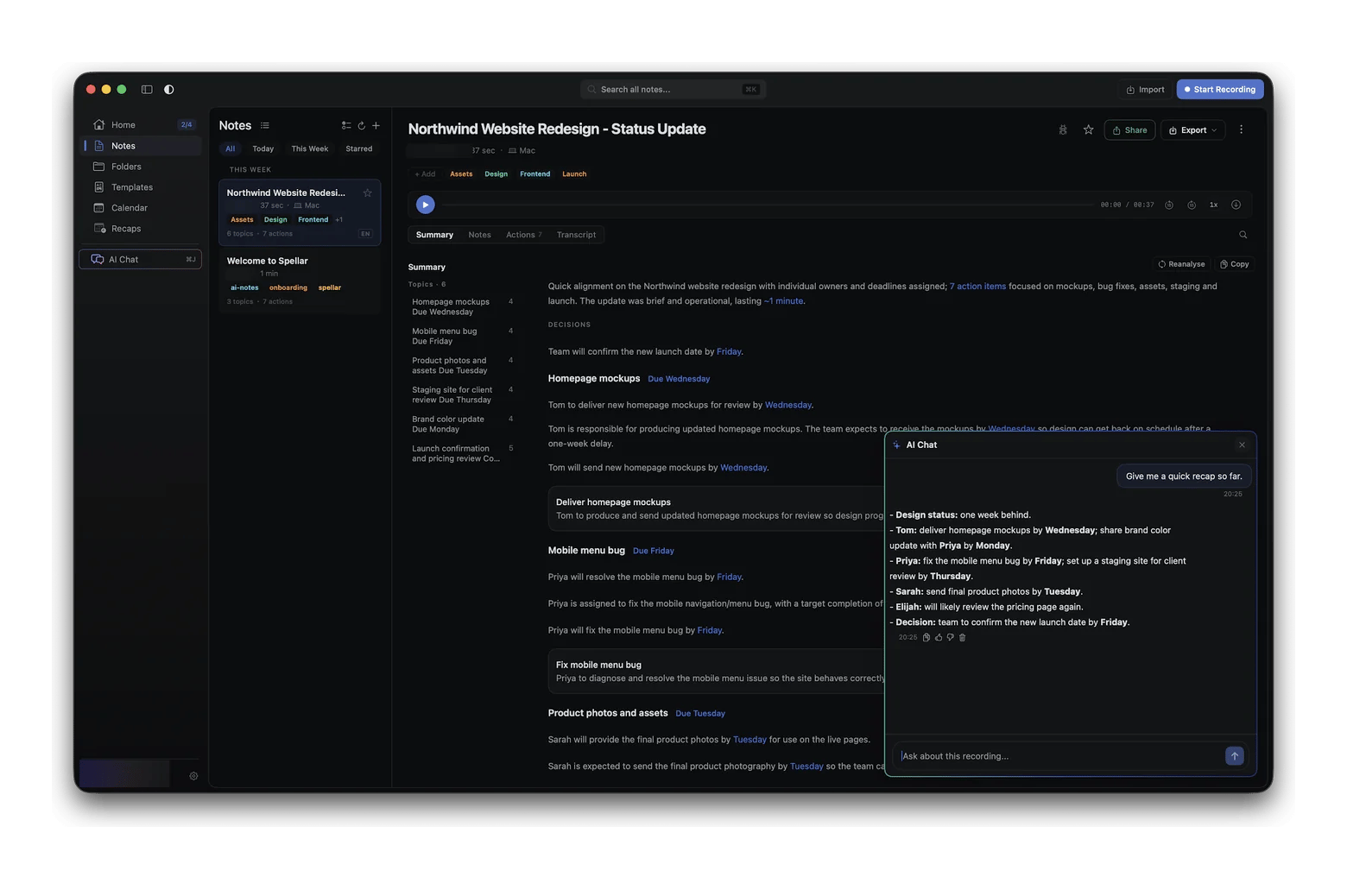
Spellar AI is a bot-free AI meeting recorder with a real-time assistant you can call up during a call for recaps, context, or brainstorming help. It records on your Mac from the menu bar and transcribes on your device by default, with cloud transcription only if you opt in. In my test, it turned the recording into seven action items with owners and due dates, though its live recap heard "legal" as a name, "Elijah."
How to set up your Mac for meeting capture in 10 minutes
You can be ready before your next call with a short setup, and you only need to do it once. Most of the time goes into permissions and a quick test. Here's the setup on macOS 27:
- Install Eney and WhisperTranscribe from Setapp, then open each app once to finish setup.
- Choose Apple menu > System Settings > Privacy & Security, then turn on access for both apps under Microphone and Screen & System Audio Recording.
- Connect your calendar in Eney so it can spot upcoming calls and remind you before they start.
- Record a two-minute test call with a colleague and check that both voices are captured clearly.
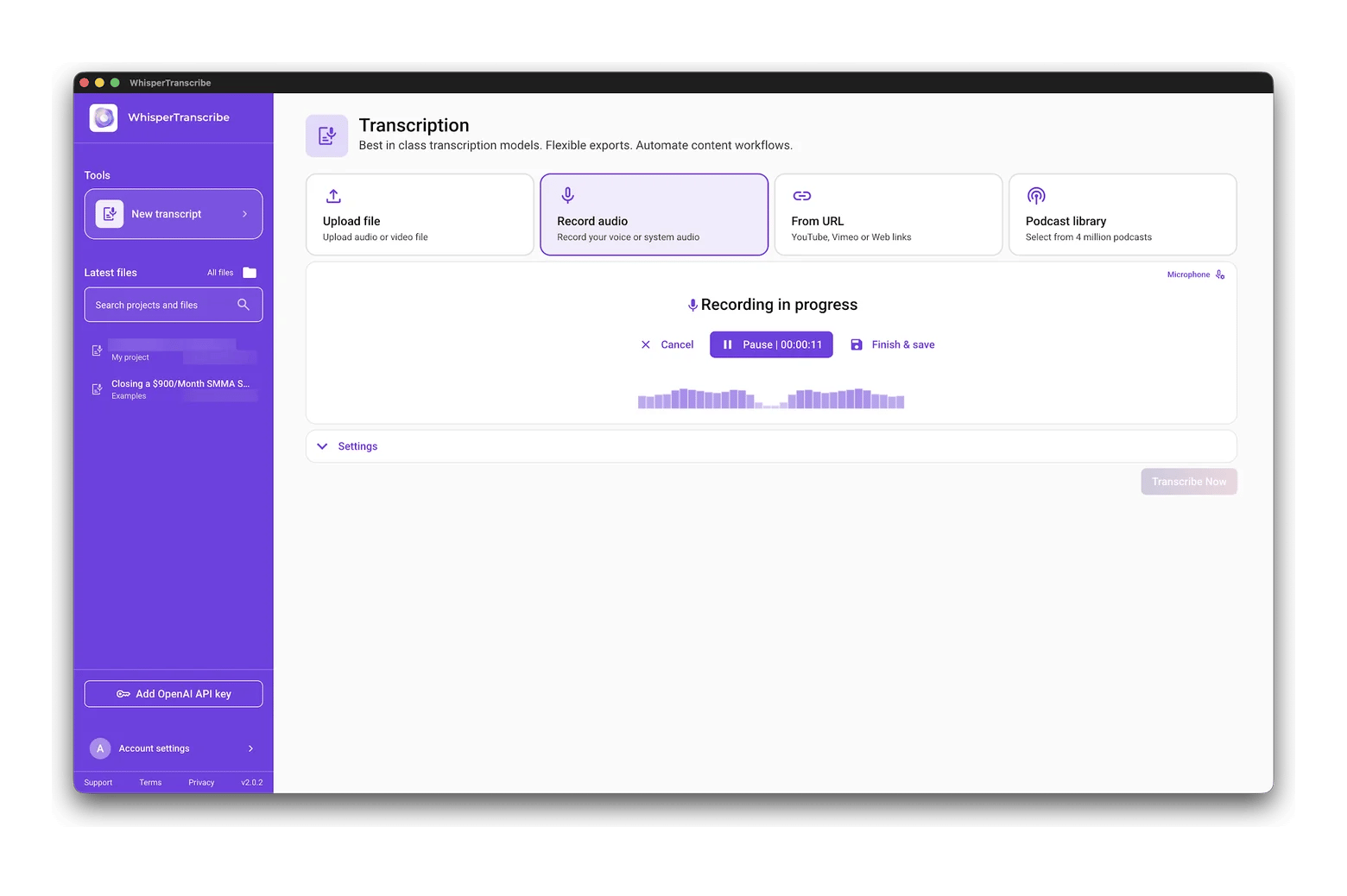
- Generate your first transcript and summary, then correct any misheard names before sharing.
The test call matters most. A common mistake is setting a headset as the input but not the output, so only your own voice gets recorded.
When your first transcript arrives, check three things before you trust the setup:
- Names of people, products, and clients
- Numbers, dates, and deadlines
- Who owns each action item
In my test, a quick clip recorded straight into WhisperTranscribe heard "Legal" as "Lega" and "product photos" as "project photos," which is exactly the kind of slip to catch. If any of these come out wrong, add the names to WhisperTranscribe's custom spelling list and move your Mac closer to the speakers. Once everything works, keep the apps open in the background so they're ready the moment your next call starts.
When a cloud bot is still the right call
A cloud bot is still the better choice for some teams. If everyone needs the same shared meeting library, with searchable recordings and comments, tools like Otter and Fireflies are built for that.
They also sync notes into customer relationship management (CRM) tools like Salesforce and HubSpot automatically, which sales teams rely on. And if your team mixes Mac, Windows, and phones, a cross-platform cloud tool keeps everyone on one system. You can also use both: a bot for internal team calls and a Mac app for client work.
What a Mac meeting assistant costs on Setapp
Cloud bots charge per user. Otter Pro costs $16.99 USD per month or $8.33 USD per month billed annually, and Otter Business is $30 USD monthly or $19.99 USD billed annually. Fireflies Pro is $18 USD monthly or $10 USD billed annually, and its Business plan is $29 USD monthly or $19 USD billed annually. For a five-person team on Otter Business, that's about $100 USD a month, billed for a full year upfront.
Setapp Membership starts at $14.99 USD/mo + tax and includes WhisperTranscribe and Spellar AI, plus 300+ apps for Mac, iOS, and web. The Mac plan includes 1,000 AI credits a month. Annual plans include fewer monthly credits.
The AI Enthusiast plan gives you 6,000 credits for $22.99 USD/mo + tax. AI Expert covers four Macs and four iOS devices with 9,000 credits for $35.99 USD/mo + tax. Eney is a standalone app on Setapp that runs on AI credits, with a credits subscription from $14.99 USD/mo.
If you mostly need transcripts, WhisperTranscribe alone may cover you, while Eney adds the full cycle from reminder to follow-up. Start a 7-day free trial of Setapp to get WhisperTranscribe and Spellar AI, plus 300+ more apps. Both use AI credits, included with your plan. Eney is a standalone app with its own offer: a 14-day free trial with 10,000 AI credits.
For more ideas, see the picks of the best AI apps for Mac and the best note-taking apps for Mac to store what you capture.
FAQ about AI meeting notes on Mac
What is the best AI meeting assistant for Mac?
For most people, Eney is the best AI meeting assistant for Mac, because it transcribes calls in any app without a bot. It also turns the notes into action items and can draft a recap and next invite for your approval. Choose WhisperTranscribe for dedicated transcription of recordings, or Spellar AI if you want a live assistant during calls. All three are available on Setapp.
Can I transcribe meetings without a bot joining the call?
Yes. Eney, Spellar AI, and WhisperTranscribe all record on your Mac, so nothing joins Zoom, Google Meet, or Teams as a participant. Other people won't see a notetaker, so tell them you're recording, both as a courtesy and because the law may require it.
Is it legal to record and transcribe meetings?
It depends on where everyone is. US federal law allows recording with one participant's consent, but about 11 states primarily require all-party consent. In the UK and EU, data protection rules also apply. The safest habit is to announce the recording at the start of every meeting. This isn't legal advice, so check your local rules.
Can AI transcribe in-person meetings on a Mac?
Yes. Because Mac-native apps record through your Mac's microphone, they work in a meeting room as well as on calls. WhisperTranscribe can record directly or transcribe a file from another device, and Eney can capture a meeting as it happens. Place your Mac near the middle of the table for clearer AI meeting notes on Mac.
What is the best private alternative to Otter for Mac?
Spellar AI is a strong private Otter alternative for Mac, since it records locally and transcribes on your device by default. Eney is the better pick if you want a meeting summary AI that also drafts follow-ups and tasks. Neither adds a bot to your calls, and both work for in-person meetings that Otter's bot can't join.





 Best solution
 Best solution