Best overall:Eney rewrites selected text in any Mac app and follows any instruction you type, from "shorter" to "more natural."
Best for quick fixes:Plus rewrites a selected sentence with one shortcut and saves your custom prompts.
Outside Setapp: QuillBot suits fine-tuned paraphrasing and ChatGPT suits long rewrites, but both mean copying text in and out.
Try them: Plus and BoltAI 2 come with a Setapp Membership, free for 7 days. Eney has its own 14-day free trial with 10,000 AI credits.
The best AI rewriter apps for Mac depend on how you edit: Eney rewrites selected text in any Mac app using your instructions, Plus is ideal for quick fixes with a keyboard shortcut. You can try Plus with a 7-day Setapp Membership trial or get Eney with its own 14-day free trial.
Rewriting is a big part of my workday, and I used to do all of it in a browser tab: paste, rewrite, copy, paste back, fix the formatting. Somewhere around the tenth round trip of the day, I started looking for rewriters that just show up where I'm typing.
The best AI rewriter apps for Mac at a glance
I tested each AI rewriter against the things that matter in everyday writing: how well it works across Mac apps, how flexible its rewrite options are, whether it preserves my voice and facts, and what it costs to use.
If you have a Mac with Apple silicon, Apple’s Writing Tools can rewrite text for free: Control-click it and choose Writing Tools > Show Writing Tools. It’s handy for quick tone fixes, but it only has three tone presets and no humanizing option, which is where Eney and Plus fill the gap.
Setapp has two more apps that can rewrite your text:BoltAI 2 runs saved prompts on selected text with a hotkey, and Manzoni polishes drafts with on-device AI. Both come with Plus in Setapp Membership, so you can try all three free for 7 days.
Rewriter, paraphraser, or humanizer: What is the difference?
These three terms often get mixed up, but each one does a different job:
AI rewriter: Changes how your text reads. It can make it shorter, friendlier, or clearer for a new reader.
Paraphraser: Puts the same idea into different words, usually so you don't repeat a source's phrasing.
AI humanizer: Edits AI-written text so it reads more naturally, with varied sentences and fewer stock phrases.
Eney: Best AI rewriter for Mac, including humanizing
Eney by MacPaw is the AI rewriter I'd pick for everyday work, because it rewrites text in any app without switching windows. Its Eney Wand feature works with whatever text you select, from a LinkedIn draft to a Google Doc.
There are no preset rewrite modes to pick from. You describe what you want (shorter, longer, friendlier, more formal, or more natural), and Eney rewrites the text to match.
You can rewrite a paragraph with Eney in three steps:
Select the text you want to rewrite.
Press Option-W to open Eney Wand.
Type a short instruction, like "make this friendlier and cut it in half," and copy the result.
Tip: For smaller fixes, press Control twice to run Eney Spell, which checks spelling, grammar, and wording in Mail, Slack, Notes, and your browser. To check as you type, choose Eney > Settings > Eney Spell > Check > As I Write.
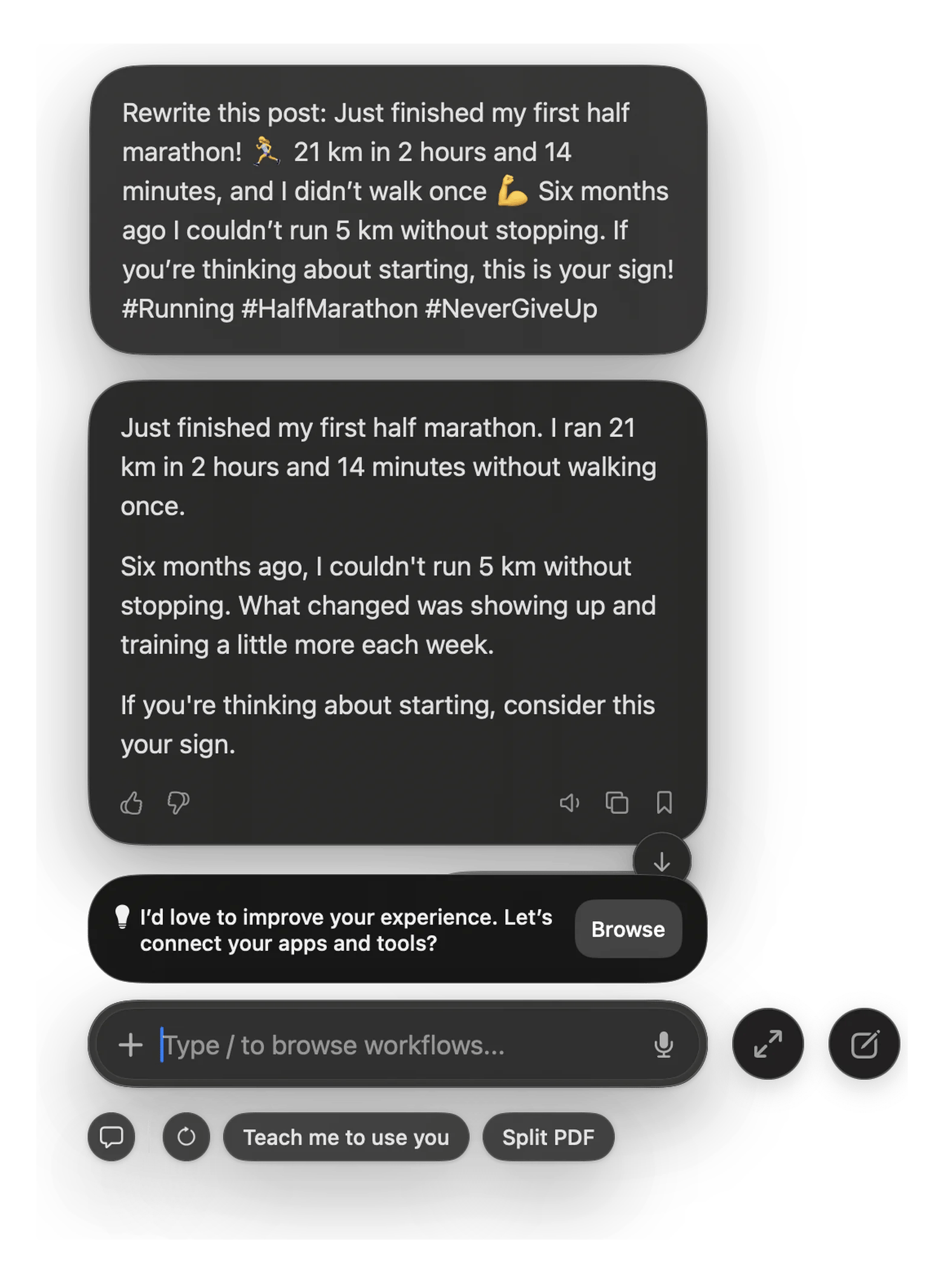
My favorite part is that Eney remembers your preferences. In one chat, I told it to never use hashtags or emojis in my LinkedIn posts. Then I opened a new chat, pasted a post full of both, and typed only "Rewrite this post."
Humanizing with the AI writing assistant skill
Eney humanizes text through its AI writing assistant skill, which drafts, rewrites, improves clarity, and adjusts tone. When it rewrites, it keeps your original meaning and key details unless you ask otherwise, and it aims for a natural rhythm without generic AI phrasing.
Eney doesn't include this skill by default, so add it first: open the use case page, copy the prompt, and create a custom skill from it. Then tell Eney you want to write or polish something and paste your draft. I still read every result before posting it, because no rewriter can guarantee text will pass an AI detector.
Pros:
Rewrites text in any Mac app, including Google Docs
Takes any instruction, from "shorter" to "less formal"
Remembers your writing preferences
Smooths out AI-sounding drafts with its AI writing assistant skill
Cons:
Needs an Apple silicon Mac with macOS 15 or later
Best for: anyone who rewrites posts, docs, and messages all day and wants one shortcut for all of it.
Rating on Setapp: 97%
Eney isn't one of the apps in Setapp Membership, so it comes with its own trial: 14 days and 10,000 AI credits for new users. You can download it through Setapp and log in with your existing Setapp account, or sign up at eney.ai with a new account.
Plus: Best for quick rewrites in any app
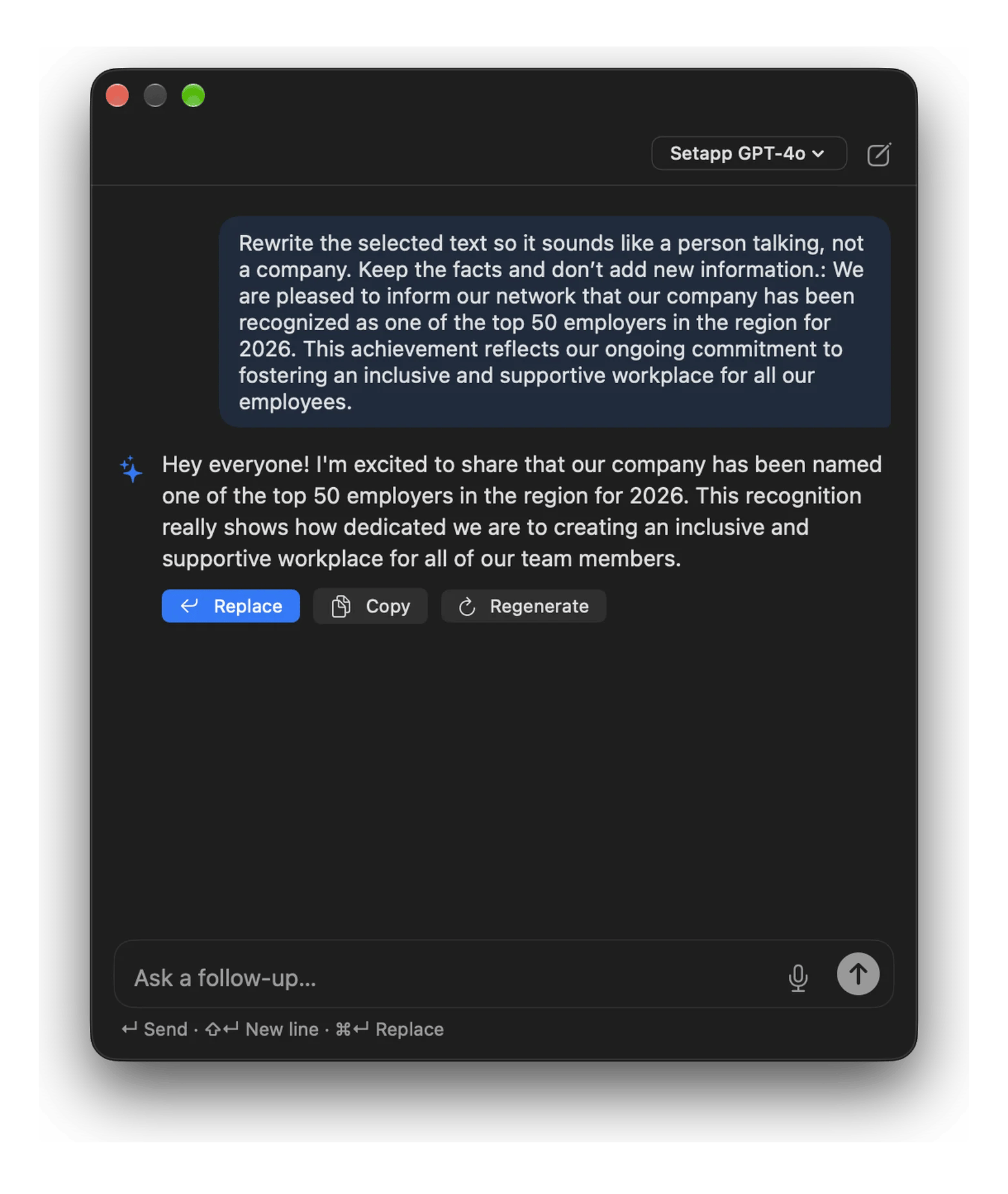
Plus is a small AI assistant that works with the text you just selected. Select a sentence in any app, press Option-Space, and ask Plus to improve, summarize, explain, or translate it, then copy the result with one click.
That makes Plus a handy sentence rewriter, and custom prompts make it even faster. I added my own, like Make it casual and Shorten to one sentence, so now all I have to do is select text in any app, press Option-Space, and pick one. Plus shows the rewrite in a small window, where I click Replace to swap it into my text, Copy, or Regenerate to get another version.
One small heads-up: Option-Space is a popular shortcut, and the ChatGPT Mac app and launchers like Alfred use it too. If Plus doesn’t open when you press it, another app has probably claimed the shortcut, so change it in one of them.
Pros:
Works in any app with one shortcut
Saves custom prompts for repeat rewrites
Also summarizes, explains, and translates
Cons:
Runs on a cloud model (Setapp GPT-4o by default), so it needs an internet connection
No ready-made humanize mode, so you write that prompt yourself
Needs AI credits to run
Best for: quick sentence rewrites when you don't need a full AI assistant.
Rating on Setapp: 86%
Other AI rewriters worth considering
These four tools aren't on Setapp, but they usually come up first when you search for an AI rewriter. Each one is a good fit for a specific kind of rewriting.
QuillBot
QuillBot is built around paraphrasing. The free plan rewrites up to 125 words at a time in Standard and Fluency modes, and Premium adds the rest of its nine modes, including Formal, Shorten, and Expand, plus unlimited custom modes.
Pros: synonym slider, freeze words, nine paraphrasing modes
Cons: works in its own editor or a browser extension, so you copy text in and out
Price: free for 125 words per rewrite; Premium from $8.33 USD/month billed annually.
QuillBot is a good choice if you want more control over the wording, since freeze words keep your names and terms untouched (its stronger modes can shift meaning, though).
Grammarly
Grammarly is the closest match to Eney's workflow, because its Mac app suggests rewrites right where you type. Pro adds full-sentence rewrites, tone changes, and a humanizer.
Pros: works across Mac apps, checks grammar while you rewrite
Cons: only 100 AI prompts a month on Free, and everything is processed in the cloud
Price: free plan; Pro is $12 USD/month billed annually or $30 USD month to month
Grammarly makes more sense if you need strict grammar checks or a shared team style guide.
Wordtune
Wordtune shows several versions of one sentence to click through, in casual or formal tone, shorter or longer. It usually stays close to what you meant.
Pros: several options per sentence, good at keeping your meaning
Cons: browser extensions only, with no Mac app or Safari extension
Price: 10 free rewrites a day; Advanced from $6.99 USD/month billed annually
Wordtune comes in handy when you’re stuck on one sentence and want to compare phrasings. For options outside the browser, see these Wordtune alternatives for Mac.
ChatGPT
ChatGPT is the most flexible AI rewriter here, because you can explain what you want in plain words and keep refining. Its Mac app opens with Option-Space, but you still copy text in and out.
Pros: handles long, detailed instructions and whole documents
Cons: copy-paste workflow, and the Free plan has usage limits (plus ads in the US)
Price: free plan; Go is $8 USD/month and Plus is $20 USD/month
ChatGPT works well for bigger rewrites, like turning a report into a LinkedIn post over a few rounds.
Before and after: One paragraph, four rewriters
I gave four rewriters the same paragraph and instruction. It's a product update in that stiff style AI drafts often have, so it tests rewriting and humanizing at once.
Original paragraph:
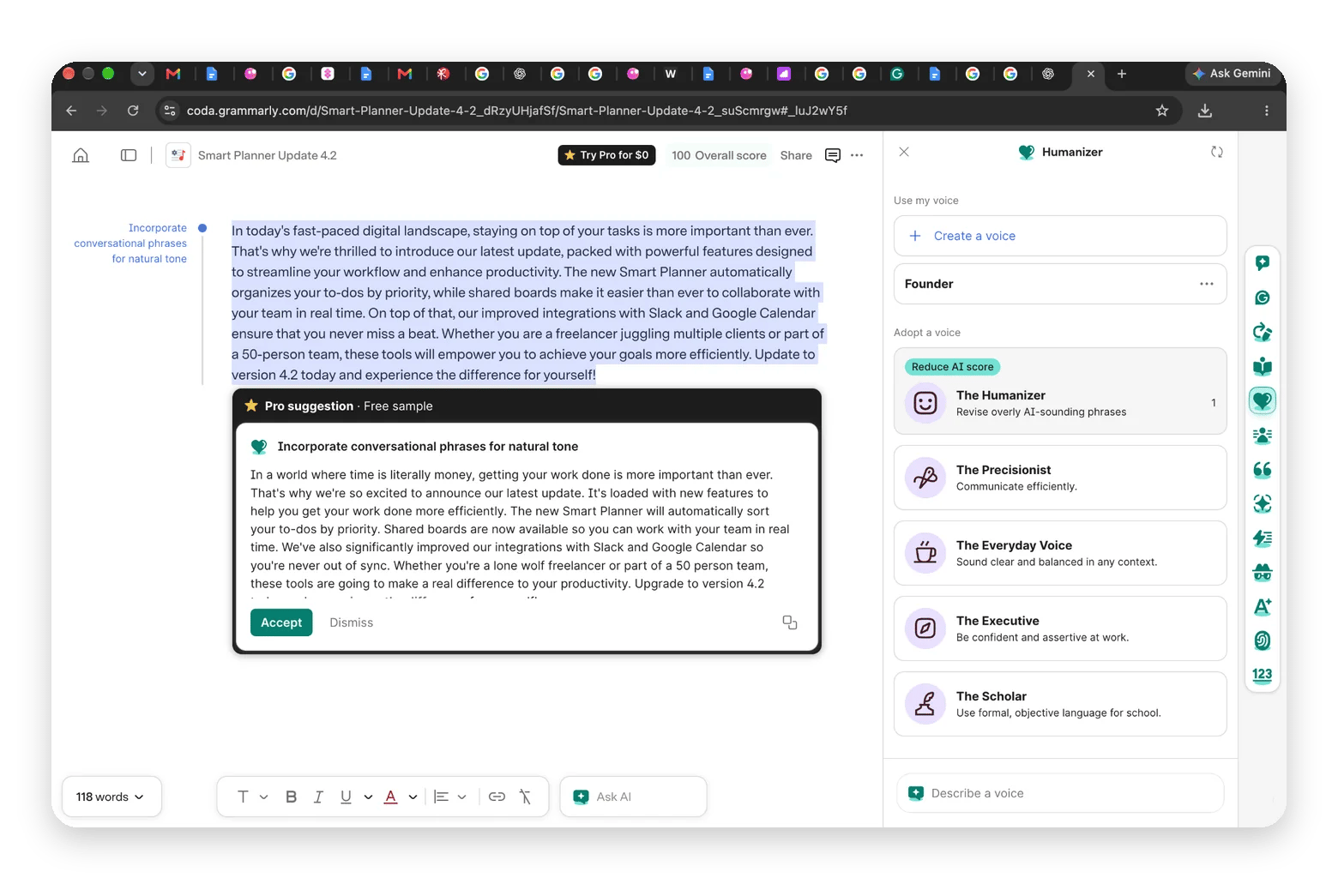
In today's fast-paced digital landscape, staying on top of your tasks is more important than ever. That's why we're thrilled to introduce our latest update, packed with powerful features designed to streamline your workflow and enhance productivity. The new Smart Planner automatically organizes your to-dos by priority, while shared boards make it easier than ever to collaborate with your team in real time. On top of that, our improved integrations with Slack and Google Calendar ensure that you never miss a beat. Whether you are a freelancer juggling multiple clients or part of a 50-person team, these tools will empower you to achieve your goals more efficiently. Update to version 4.2 today and experience the difference for yourself!
Instruction:
Rewrite this as a LinkedIn post from the app’s founder. Make it sound like a real person talking, not a press release: cut buzzwords like “thrilled,” “empower,” and “never miss a beat,” and vary the sentence length. Keep it under 80 words, with no hashtags or emojis, and keep every fact: Smart Planner, shared boards, Slack and Google Calendar, 50-person teams, and version 4.2.
Eney
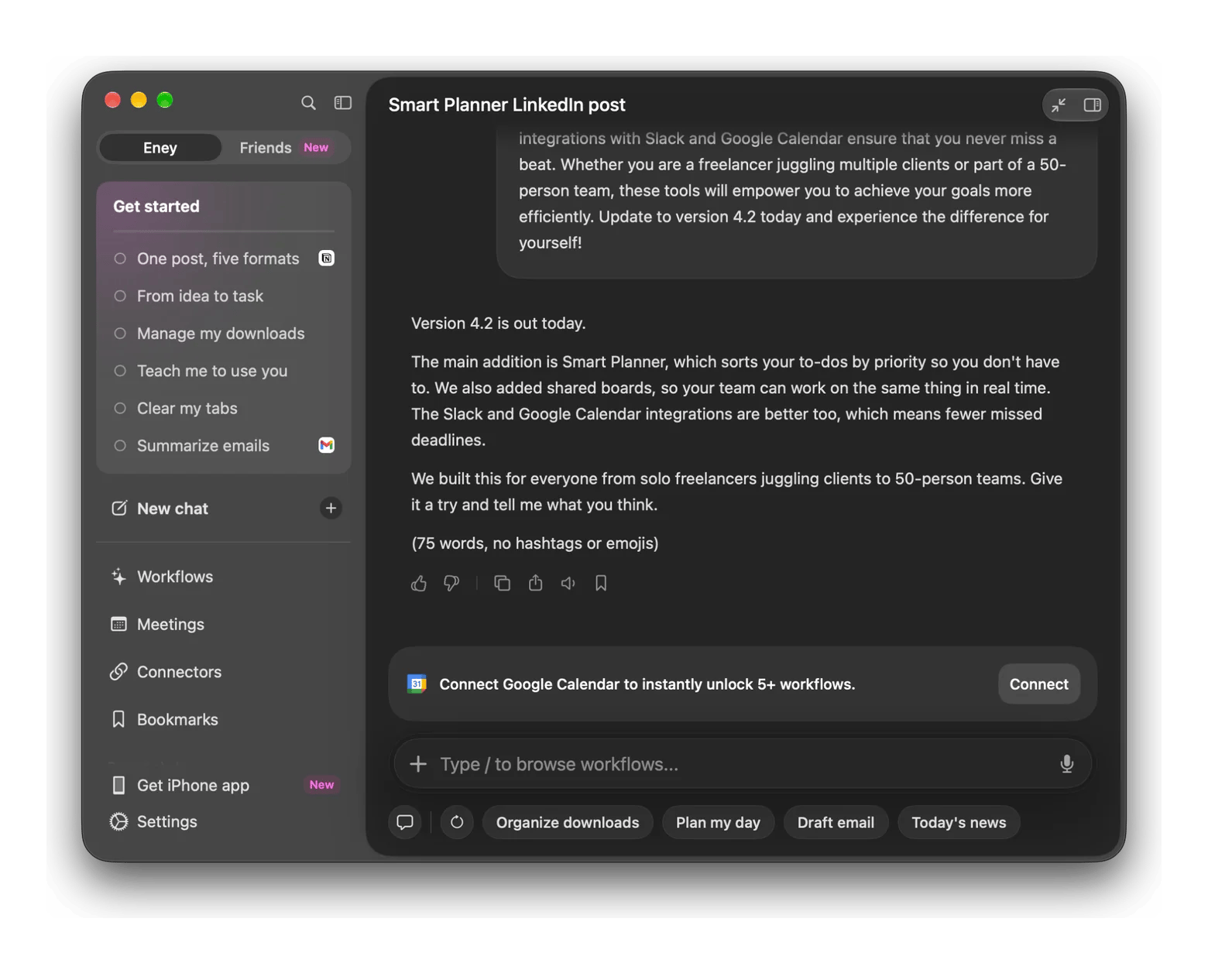
Eney did what I'd do as an editor. It opened with the news ("Version 4.2 is out today"), cut every buzzword, kept all five facts, and ended by asking readers what they think. I'd post it after deleting the word-count note it added at the end.
Plus
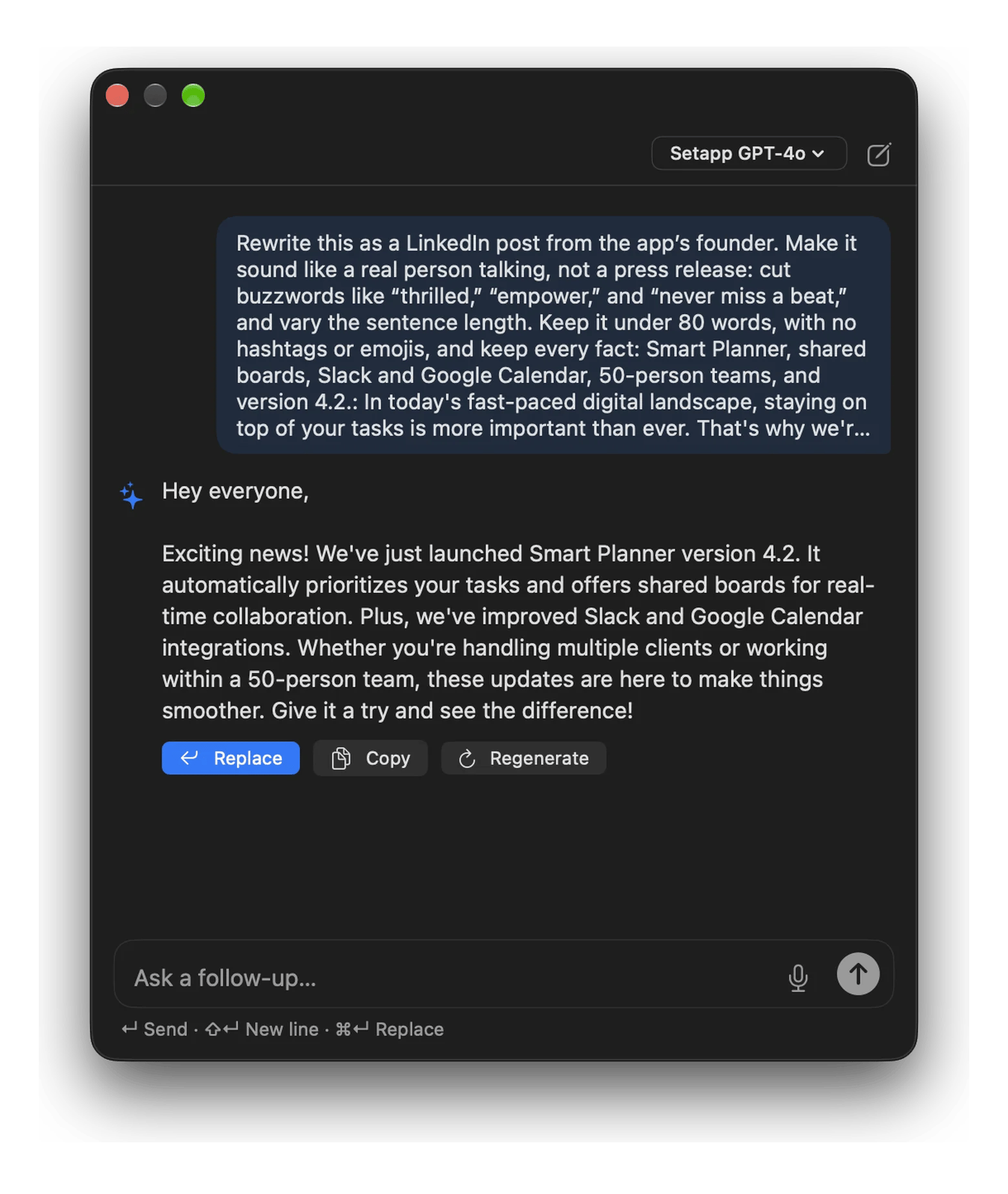
Plus got all the facts in, but the tone slipped right back into launch mode with "Exciting news!" It also called the release "Smart Planner version 4.2," which turns one feature into the whole app.
Grammarly
Grammarly's Humanizer kept the facts but swapped the old clichés for fresh ones ("time is literally money," "lone wolf freelancer"), and the post stayed about as long as the original, so I'd still be editing this one.
ChatGPT
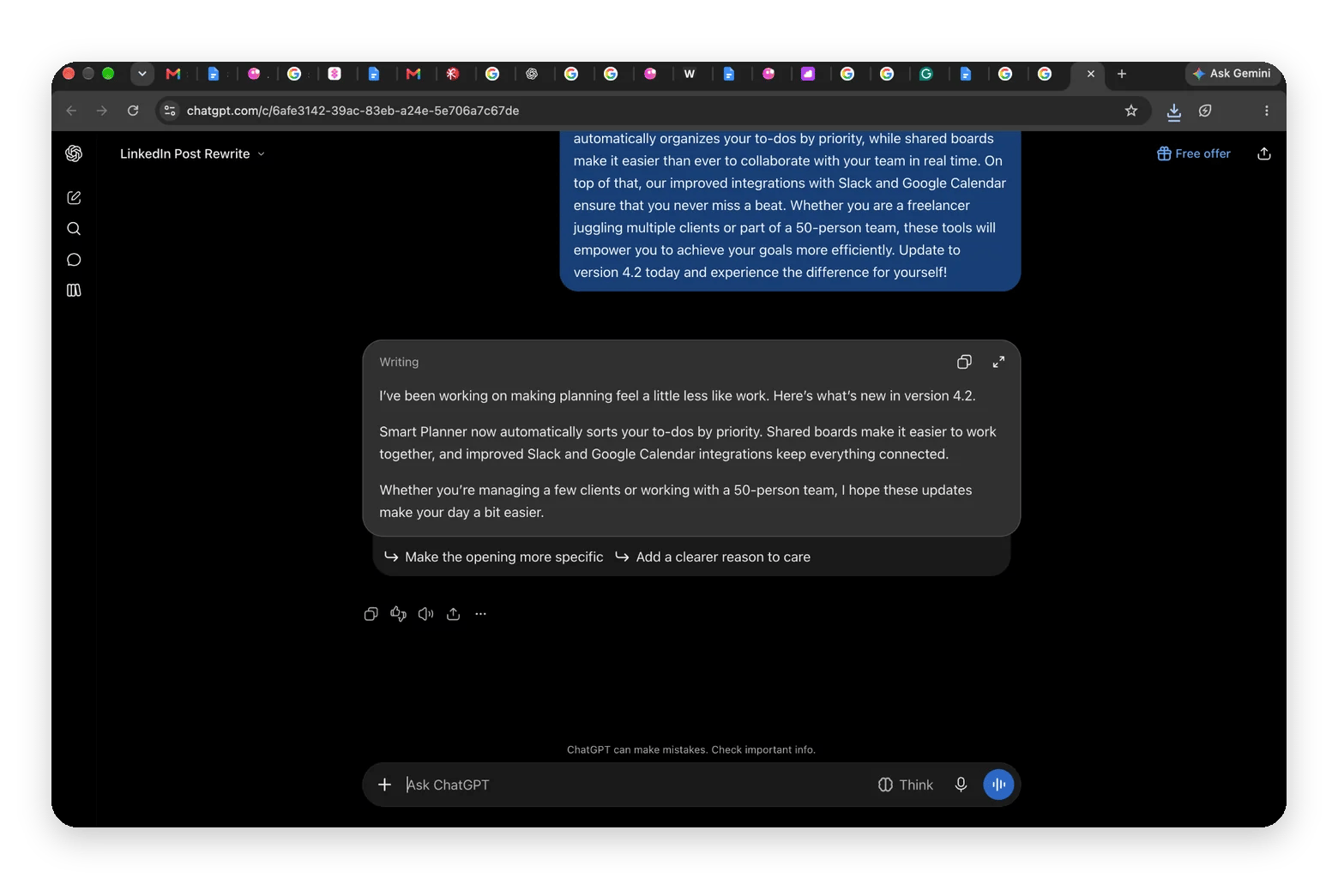
ChatGPT came closest to Eney. The opening ("I've been working on making planning feel a little less like work") sounds like a real founder, and every fact is there. To me, only the last line felt a bit too polite for a launch post.
How to rewrite text without losing your voice
After running the same posts through four rewriters, I noticed they all drift toward one safe, polished voice unless you push back. These five habits help me keep my rewrites sounding like me:
Be specific about tone. A short instruction like "make it casual" works, but it leaves the tool to guess what casual means to you. I add one or two details, like who I'm talking to or what to avoid, and the first draft comes out much closer to my voice.
Say what must stay. Before I hit rewrite, I list the names, product terms, and numbers that can't change. It takes 10 seconds and saves me from hunting down a wrong date later.
Rewrite in sections. With anything longer than a post, I go one paragraph at a time. That way I can see exactly what changed, and one weak paragraph doesn't drag the rest down.
Edit the result. I treat every rewrite as a first draft. My last step is always putting back one phrase that sounds like me and cutting the generic closing line AI loves to add.
Check the facts. I read the new version side by side with my original. Rewriters sometimes add a reason or a result I never wrote.
Choosing the best AI rewriter for Mac
For most people, Eney is the best AI rewriter for Mac: it rewrites text in any app with Option-W and smooths out AI-sounding drafts with its AI writing assistant skill. For quick sentence rewrites, Plus does the job with Option-Space and saved prompts.
Try BoltAI 2 for hotkey prompt templates, or Manzoni to keep drafts on your Mac. Outside Setapp, you can try QuillBot for paraphrasing and ChatGPT for long rewrites.
Plus, BoltAI 2, and Manzoni are all part of Setapp, so you can try them free for 7 days. Eney comes with its own 14-day trial and 10,000 AI credits.
FAQ
What is the best AI rewriter for Mac?
Eney is the best AI rewriter for Mac. Select text in any app, press Option-W, and tell it how to rewrite. For quick rewrites with saved prompts, try Plus.
Is using an AI rewriter considered plagiarism?
No, not when you rewrite your own text. Rewording someone else's work and passing it off as yours is still plagiarism, so cite your sources and check your school's or publisher's AI rules.
Can an AI rewriter make text pass AI detectors?
No rewriter can guarantee that, since AI detectors often disagree with each other. Eney's AI writing assistant skill makes AI-sounding text read more naturally, but your own examples and edits matter most.
What is the difference between an AI rewriter and a paraphrasing tool?
An AI rewriter changes how text reads (tone, length, clarity), while a paraphraser restates the same idea in new words. Eney and Plus follow your instructions, and QuillBot uses preset modes.
How do I rewrite text in any app on a Mac?
Select the text and use a system-wide rewriter: press Option-W in Eney or Option-Space in Plus. On Apple silicon Macs, you can also Control-click the text and choose Writing Tools.
Too much to keep track of?
Let Eney bring your work together and help you get it done






 Best solution
 Best solution