The best AI for research on Mac is a chain, not one app.PDF Search finds the right pages, BoltAI reads them, and Eney turns them into a brief.
Keep the find stage strict. Fewer, better pages make every later answer more accurate.
Ask for page numbers every time. Open the source and check any figure before it reaches a client or professor.
Give the synthesis step a rule for weak evidence. Telling the tool to mark single-source claims stops one weak source from passing as consensus.
Start with the apps that fit. BoltAI and PDF Search come with a Setapp Membership and its 7-day free trial, and Eney is a standalone app with its own 14-day free trial.
The best AI for research on Mac is a three-tool chain: PDF Search finds the right pages, BoltAI reads them closely, and Eney synthesizes everything into a brief. No single app handles all three stages well, so each tool gets one job.
Picture 40 PDFs, a dozen browser tabs, and a two-page competitor brief due on Friday. Finding the sources takes an hour. Reading them takes three days. That gap is where the best AI for research earns its keep. Below, I cover Mac apps for each research stage, then walk through a real workflow that turns a pile of sources into a one-page brief. All three are available through Setapp. BoltAI and PDF Search come with Setapp Membership. Eney is a separate standalone app.
Research in 2026: The bottleneck isn't finding, it's reading and synthesizing
AI helps most after you've found your sources, when you need to read and connect them. Search engines already surface plenty of material in seconds, but working through 40 PDFs and spotting what they agree on still eats days.
That's why I treat research as a workflow with three stages: find, read, and synthesize.
Find: Discover relevant web sources and files stored locally on your Mac.
Read: Review long documents and extract key information, including important data and tables.
Synthesize: Compare sources, connect findings, and draft useful content.
If you're a grad student who needs AI for research papers, tools like Elicit and Consensus are excellent for discovering and mapping academic literature. This article serves a different researcher: the analyst, consultant, or writer who needs AI research tools for reports, articles, and notes stored on a Mac.
Best AI research tools for Mac at a glance
I tested each app on a real research task: a competitor brief built from software companies' public annual reports. I judged each one on speed, accuracy, and whether I could trace every claim to its source.
Each app covers one stage, so they work best as a chain rather than as rivals. PDF Search finds the right pages, BoltAI reads them closely, and Eney pulls everything together. You can try all three for free on Setapp.
Eney: Ask questions across everything you've collected
Eney is a proactive AI assistant from MacPaw that works across your Mac, its files, and your connected apps, which makes it my pick for the synthesis stage. That makes it my pick for the synthesis stage. It isn't a dedicated research tool, but it can find files on your Mac. It also connects to Google Drive, Notion, Slack, and Gmail, so your sources don't need to live in one place. Its memory layer remembers what you tell it, updates facts when you correct them, and shows you when an answer draws on something it remembered. Eney needs a Mac with Apple silicon running macOS 15 or later.
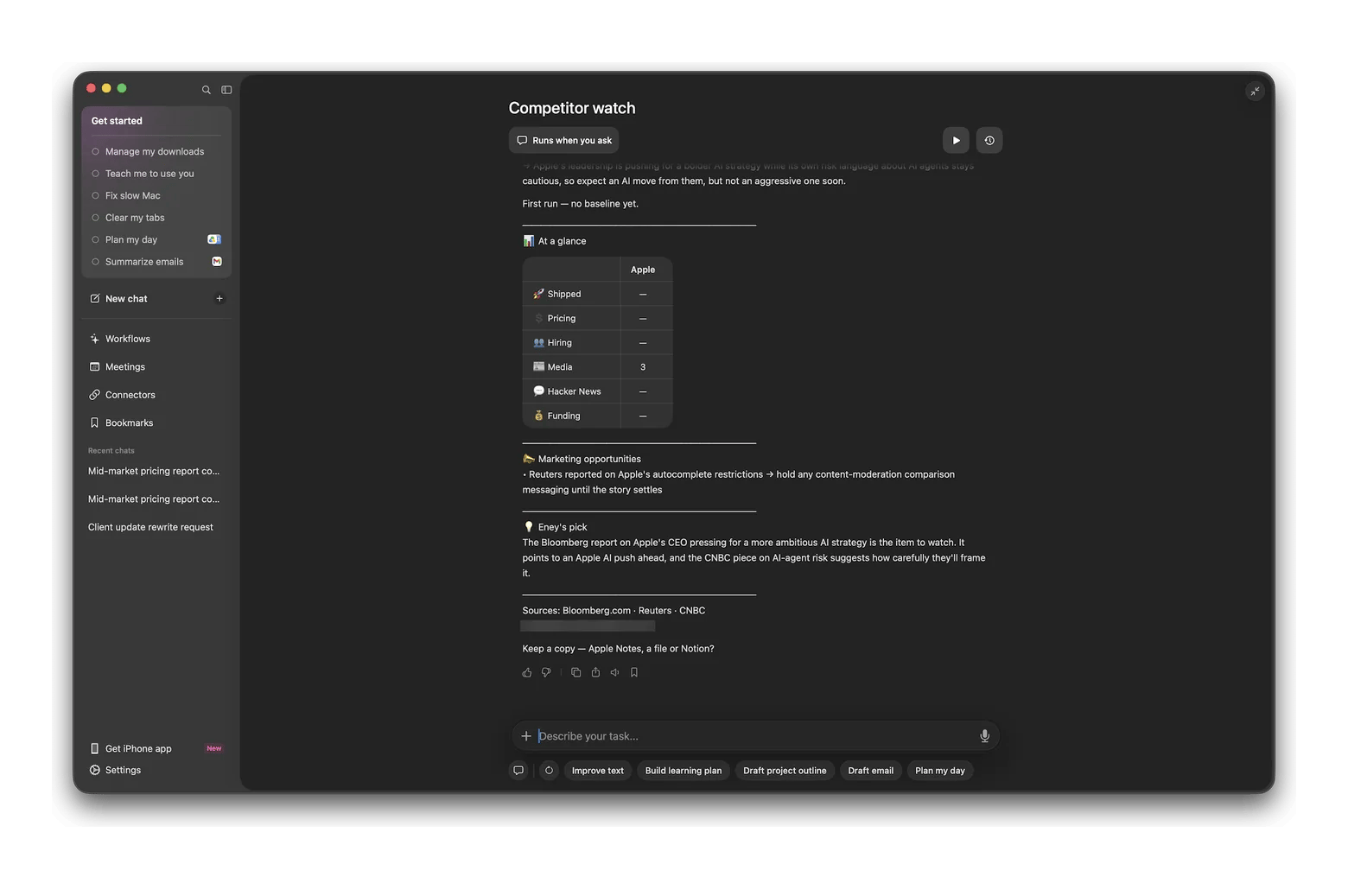
Eney also has ready-made workflows like Competitor watch, which tracks a company's launches, pricing, hiring, and media coverage.
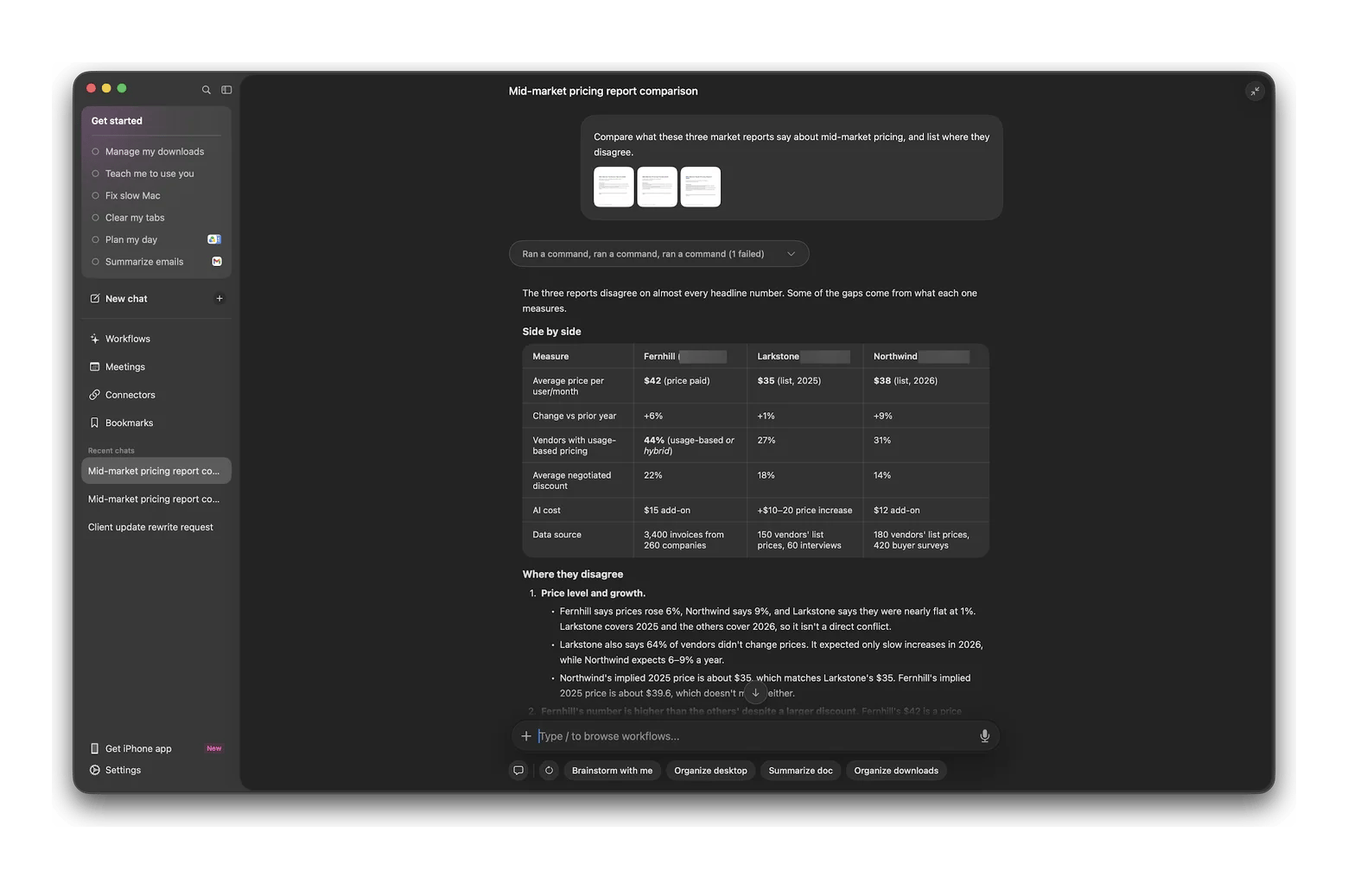
In my test, I attached three short sample market reports and asked Eney: "Compare what these three market reports say about mid-market pricing, and list where they disagree." It returned a side-by-side table with each report's figures. It also pointed out that one report covered 2025 while the others covered 2026, so their numbers weren't a direct conflict.
Every request uses Setapp AI credits. Eney is free to try for 14 days with 10,000 AI credits. After that, it needs an AI credits subscription, starting at $14.99 USD/mo for 10,000 credits.
BoltAI: The reading accelerator for PDFs and web pages
BoltAI is a native Mac AI client that answers questions about PDFs, Word files, and spreadsheets you attach, including scanned PDFs through optical character recognition (OCR). You choose the model for each job, from OpenAI, Anthropic, and Google to local models. A web fetch tool lets it read a page you link. If you already pay an AI provider, BoltAI also accepts your own application programming interface (API) key. When I asked it to "extract the methodology and findings only, with page numbers" from a set of lecture slides, it cited page numbers and said plainly that the slides had no empirical findings. Unlike Eney, BoltAI won't search your whole Mac.
PDF Search: When your research lives in a hundred PDFs
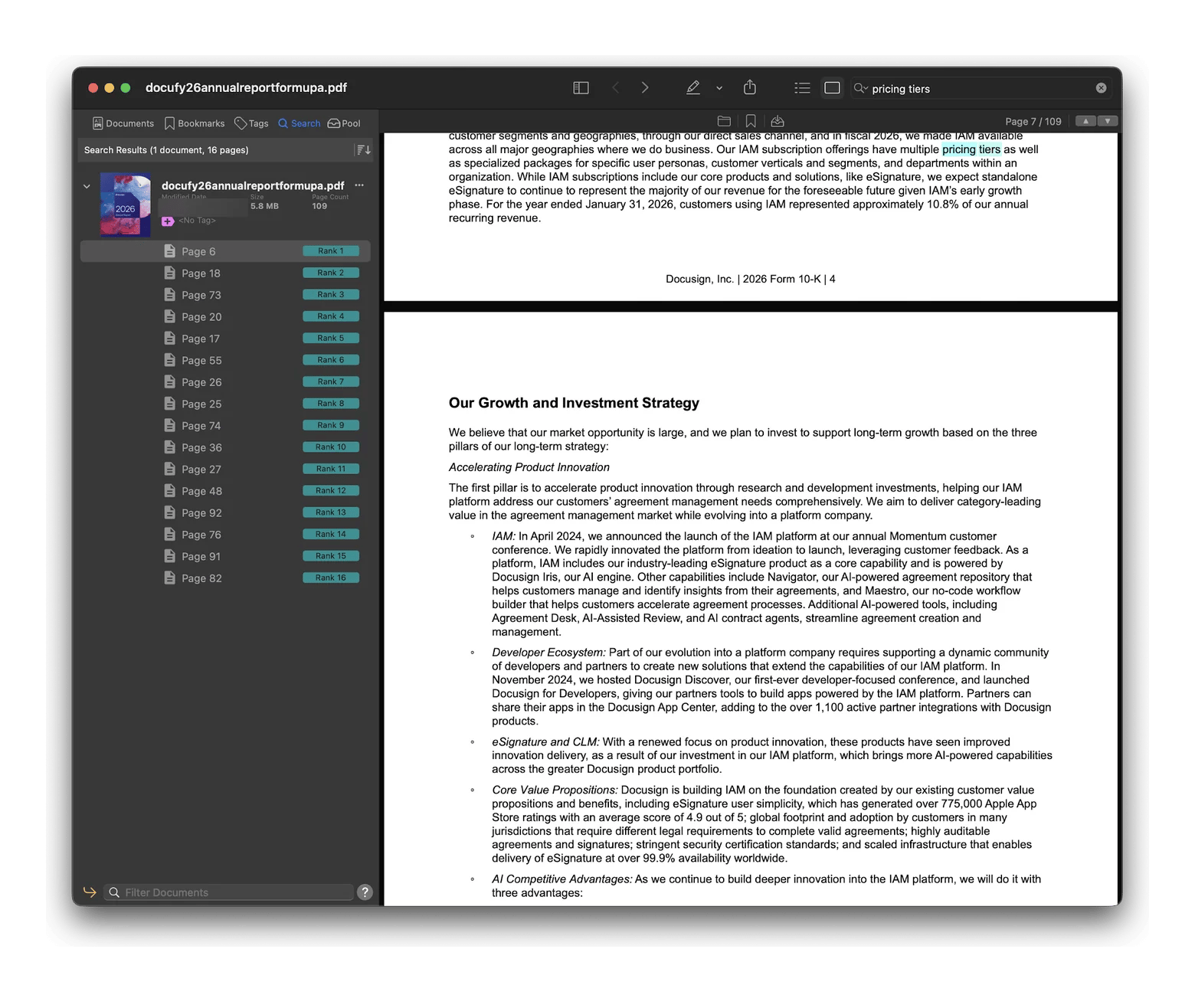
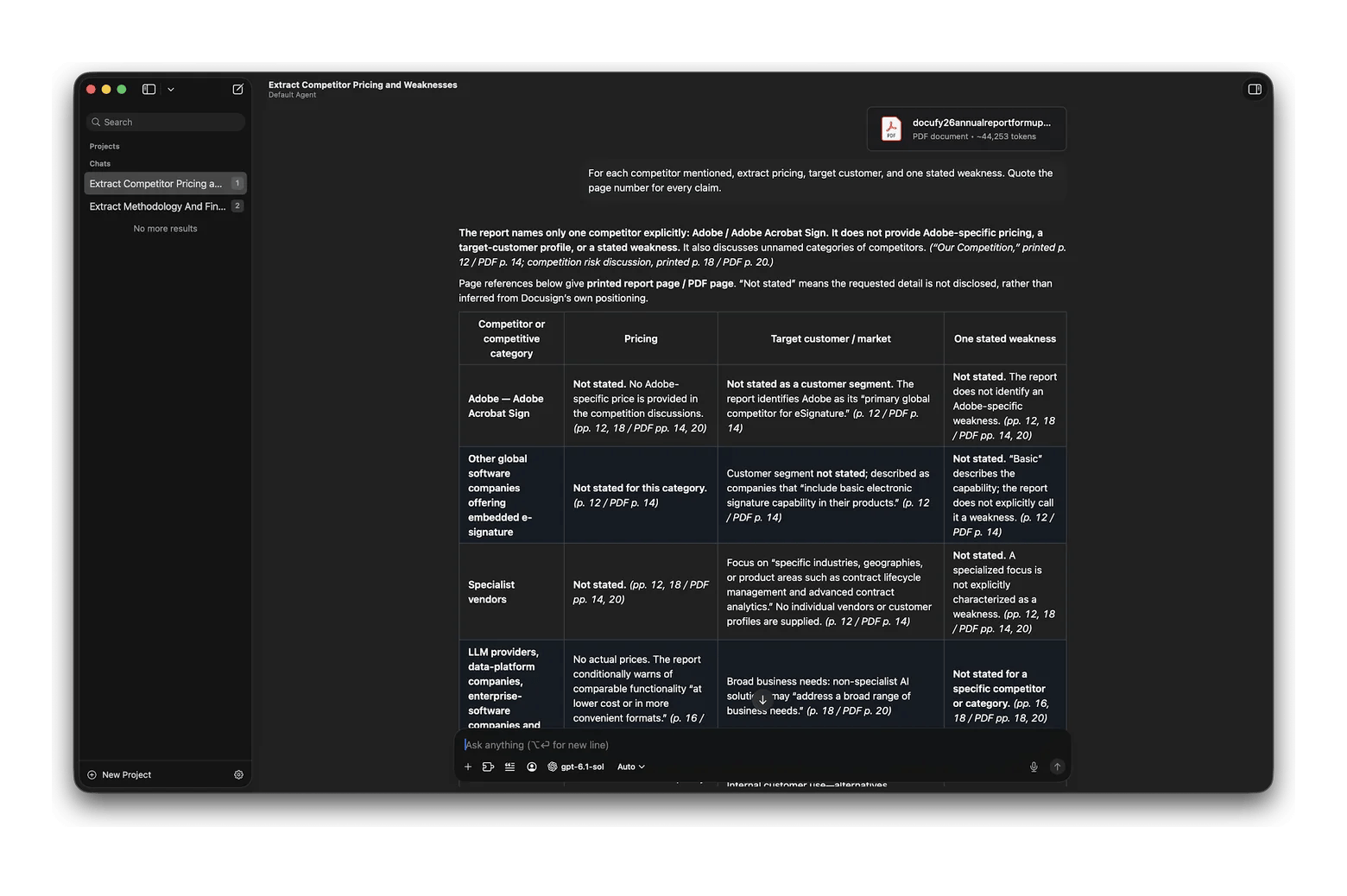
PDF Search is a specialist tool that searches thousands of PDF pages at once and ranks results by relevance, including related terms and text inside images. It doesn't write answers, but in my test, it searched DocuSign's 109-page annual report for "pricing tiers" and ranked 16 matching pages, best match first. One catch: to index Word or Pages files on Mac, you need its free PDF Converter utility first.
A real research workflow: From 12 sources to a one-page brief
Here's the pipeline I used for a competitor brief, with the prompts I actually typed. I collected 12 public annual reports from software companies, then ran the first full pass on DocuSign's report to test each stage.
Find the right pages with PDF Search.
Read each source with BoltAI.
Synthesize with Eney.
Each stage hands clean output to the next, so the order matters.
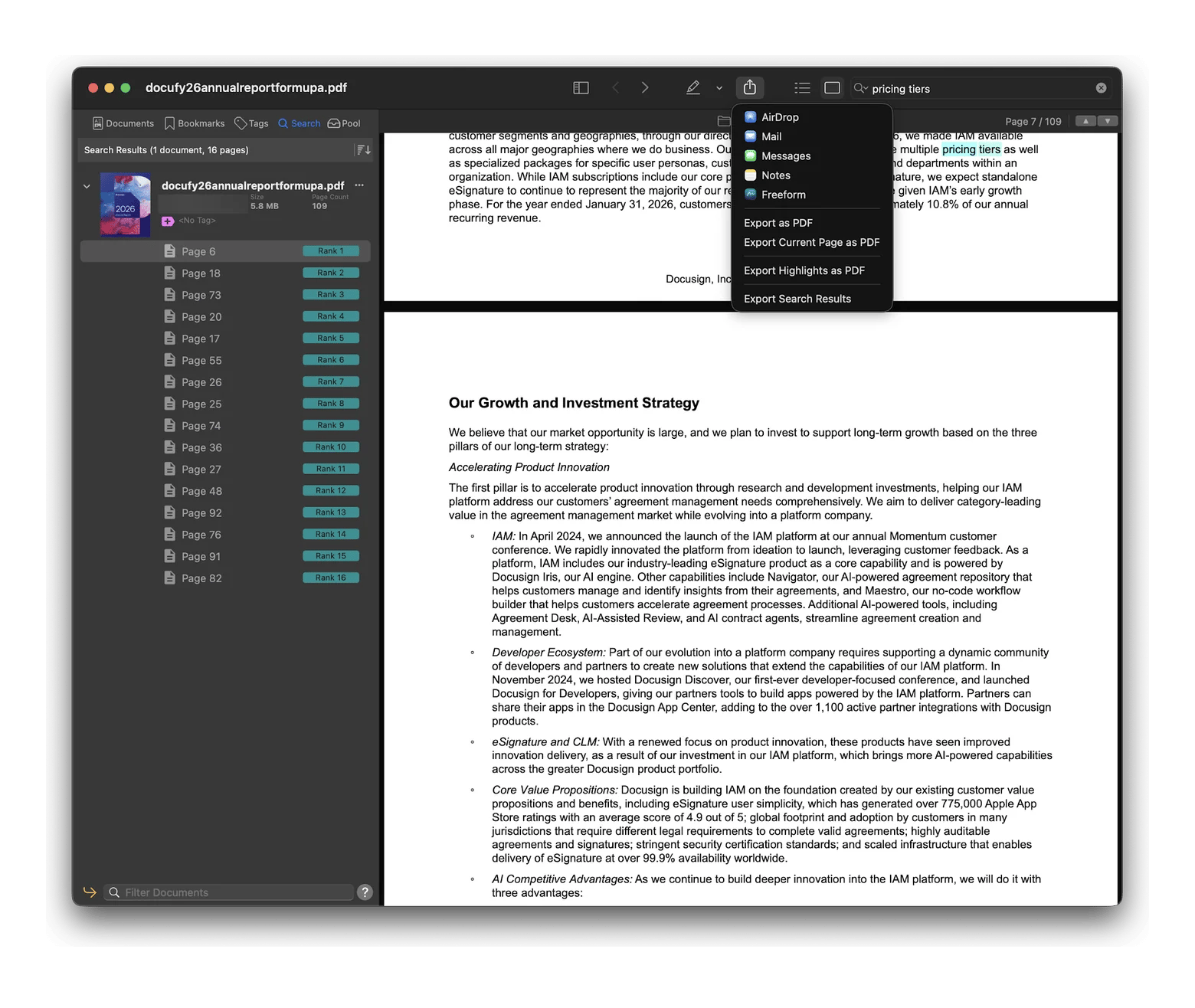
I opened DocuSign's 109-page report in PDF Search and searched for "pricing tiers." It ranked 16 pages, with page 6 first. The Share menu then offered Export Search Results, which saves just those pages as a new PDF.
Next, I attached the DocuSign report to BoltAI and sent one prompt: "For each competitor mentioned, extract pricing, target customer, and one stated weakness. Quote the page number for every claim." BoltAI returned a table with both the printed and PDF page number for every claim. The report names only one direct competitor, Adobe Acrobat Sign, so most cells said "Not stated" instead of guessing.
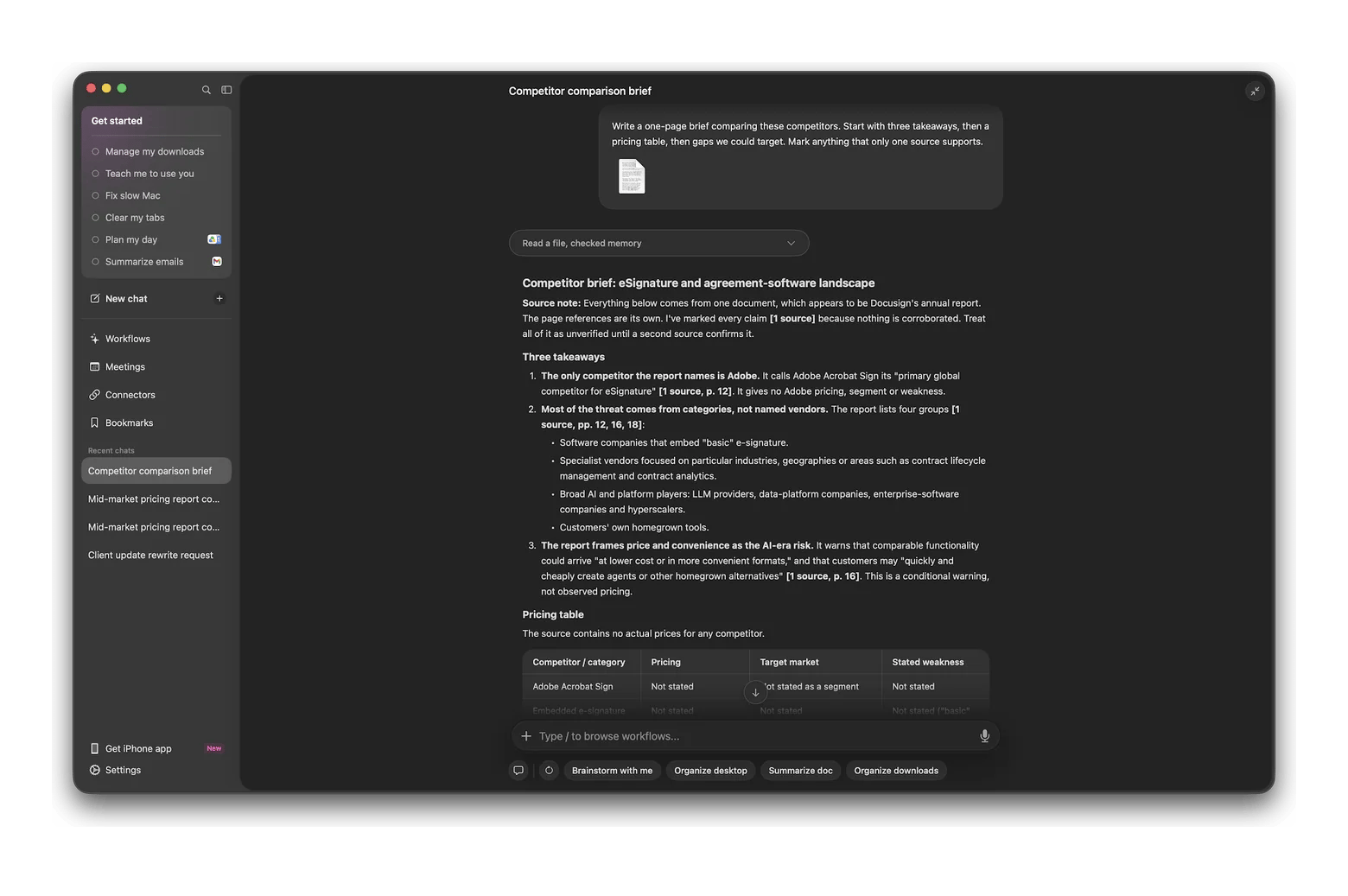
Finally, I gave Eney the BoltAI table and asked: "Write a one-page brief comparing these competitors. Start with three takeaways, then a pricing table, then gaps we could target. Mark anything that only one source supports." Eney wrote three takeaways, a pricing table, and a list of gaps. Because everything came from one report, it marked every claim "[1 source]" and suggested adding a second source before relying on it.
Two lessons I'd pass on.
Keep the find stage strict: fewer, better pages make every later answer more accurate.
Write your synthesis prompt like a brief for a colleague, with a clear structure and a rule for weak evidence.
AI research tools are fast, but they still make mistakes, so build checks into your workflow. Always ask for page numbers or links, then open the source to verify anything that will end up in front of a client or professor.
Spot-check every number against the original, since models often round figures or mix up years. When two sources disagree, ask the AI to show both positions instead of picking one. For an AI literature review, treat the summary as a map, not a substitute for reading the key papers yourself. Finally, keep a short log of which tool produced which claim, so you can retrace your steps if a number is questioned later.
Get the AI research stack for Mac: Membership plus Eney
Setapp Membership starts at $14.99 USD/mo + tax and includes BoltAI and PDF Search, plus 300+ apps for Mac, iOS, and web. The monthly Mac plan includes 1,000 AI credits a month, and the monthly Power User plan offers 6,000 credits for $22.99 USD/mo + tax. Eney is a standalone app available through Setapp, not part of Membership. It has its own 14-day free trial with 10,000 AI credits.
The time savings don't come from smarter AI. They come from giving each tool one job and passing clean output to the next stage. If you only need one tool, Setapp Marketplace lets you buy or subscribe to single apps. You can try BoltAI and PDF Search free for 7 days with Membership, and start Eney's 14-day trial separately.
FAQ
What is the best AI for research?
The best AI for research on a Mac is a three-tool chain: PDF Search finds the pages, BoltAI reads them, and Eney synthesizes what you've collected. For academic paper discovery, Elicit and Consensus are strong complements.
Can AI summarize multiple PDFs at once on Mac?
Yes. BoltAI lets you attach several PDFs to one chat and ask for a combined summary, and Eney can compare documents you point it to. For best results, ask for page numbers and summarize in batches of a few documents rather than dozens at once.
How accurate are AI research tools?
They're accurate enough to speed up reading, but not enough to trust blindly. Models can misread tables, round numbers, or confuse dates. Ask for page numbers, spot-check key figures against the original, and treat any claim that only one source supports with extra caution.
Can AI answer questions from my own documents?
Yes. BoltAI answers questions about PDFs, Word files, and spreadsheets you attach. Eney works across files on your Mac and connected apps like Google Drive and Notion. For AI PDF research across hundreds of files, PDF Search finds the relevant pages first.
What is the best AI research tool for students on a Mac?
Students writing papers should start with Elicit or Consensus to find studies, then use BoltAI to read and question the PDFs they collect. PDF Search helps once your reading list grows large. Check your school's AI policy too, since rules on AI-assisted work vary between courses and schools.
Unlock AI apps
Access 260+ Mac/iOS apps, including AI tools, with one Setapp subscription.






 Best solution
 Best solution