Chatbots give answers, agents do the work: Ask a chatbot to clean your Downloads folder and you get steps. Ask an agent, and the folder’s already clean.
Eney is the best AI agent for everyday work: It handles files, mail, and calendar from one plain request.
BoltAI 2 turns your Mac into an AI workspace: Connect different AI models to your files and apps through MCP servers, and give them tools to handle tasks.
Claude Code leads the way for coding: It builds, runs, and fixes code on its own, even if you’ve never coded before.
Try two of these agents on Setapp:BoltAI 2 comes with Setapp Membership and a 7-day free trial. Eney is a standalone app with its own 14-day free trial.
The best AI agent for Mac is Eney, especially for handling everyday tasks across files, email, and calendar with simple natural-language requests. You can also try BoltAI 2 with a 7-day Setapp Membership free trial, or get Eney with its own 14-day free trial.
At some point, I noticed I was spending more time reading and copy-pasting AI answers than doing the actual work. Agents and chatbots work in very different ways, and knowing that helps you pick the right tool. I’ll break down the differences, then share the three best AI agents I found.
Chatbot vs AI agent: The difference in one example
An AI chatbot mostly explains things. It can help with certain tasks, but you have to bring every document and text into the chat yourself. Most of your time goes into uploading, downloading, checking, re-uploading, and copy-paste loops.
An AI agent is built to finish the task for you. You say what you want, and it plans the steps and works through your apps and files on its own. You just have to approve the important parts, and it takes care of the rest.
Here’s how a chatbot and an agent handle the same request, “Clean up my Downloads folder”:
Let’s compare!
Chatbot
AI agent
What you get
A list of steps
A cleaned-up folder
Who does the work
You
The agent
What happens to files
Nothing yet
Sorted into folders
Your part
Follow the steps
Review and approve
Agents don’t know more than a chatbot. They just have permission to work on your Mac, which is also why it matters what you give them access to.
A little reassurance: A lot of people hold back because agents sound complicated, like something only tech people use. They’re not. If you can chat with AI, you can use an agent. Just pick one that suits you.
Best AI agent apps for Mac: My top 3
These three are the AI agents for Mac that actually did real work on mine:
Eney is my pick for the best AI agent in 2026 for everyday work, and it’s beginner-friendly. Eney is a standalone app on Setapp with its own 14-day free trial and 10,000 AI credits.
If you code, Claude Code is the clear pick.
If you work with several AI models, BoltAI 2 can gradually turn that chat app into an agent as you add MCP (Model Context Protocol) tools. It comes with your Setapp Membership.
Here’s a closer look at each one.
Eney: The personal AI agent for your Mac
Eney is MacPaw's proactive AI assistant. Of all the best AI agents I’ve tested, Eney feels the most personal. It’s like having an attentive assistant right beside you.
You type or say what you need, and it works across Finder, Mail, Calendar, and Reminders, plus connected apps like Gmail, Slack, and Notion.
The best part is it shows you the plan and the steps, and it asks before doing anything critical. So nothing ever feels out of your control. For an autonomous AI on Mac, I like the way it’s built.
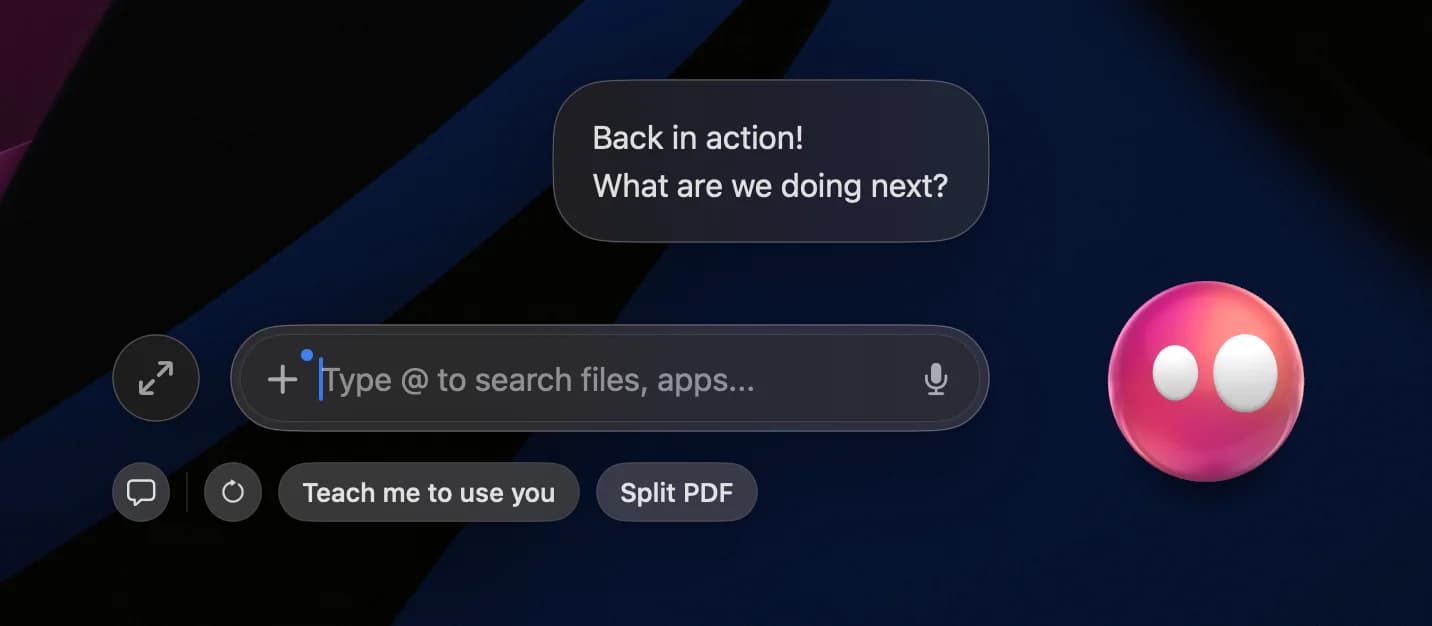
This is the floating chat view you get when you open Eney. To open the full window, click the expand button (the two arrows).
Features
Simple setup, easy to use
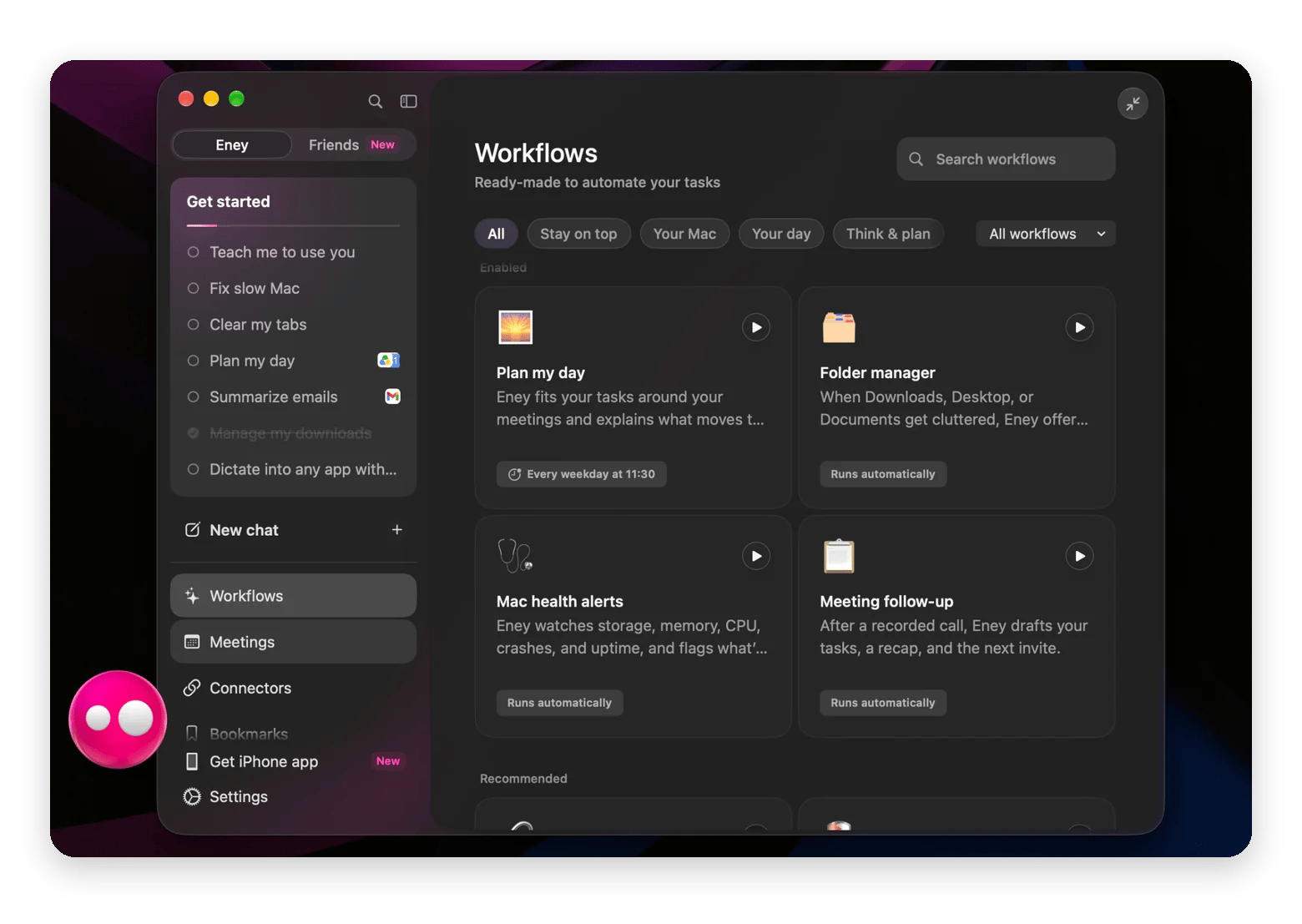
Ready-made workflows for routine tasks
Works across Mac and iPhone
Access to many apps, including Finder, Mail, Calendar, Reminders, Gmail, Slack, Notion, and browser tabs
Breaks bigger jobs into steps and asks for approval before critical actions
Limitations
Runs on AI credits: 14-day free trial with 10,000 AI credits, then an AI credits subscription from $14.99 USD/mo + tax
Not fully offline: Many tasks need an internet connection
Apple silicon Macs only: M-series with macOS 15 or later
Needs clear requests: Vague ones get a follow-up question instead of a result
Note: Before you start, give Eney access in System Settings > Privacy & Security when it asks. Otherwise, Eney can’t read your text or work inside your apps.
Claude Code: The coding agent that ships real changes
Claude Code is Anthropic’s coding agent. It’s one of the most serious coding agents out there and a big step forward for developers. It reads your project, creates new files and scripts, runs commands, installs what’s missing, tests the result, and fixes its own errors until everything works.
But it’s not just for developers. If anything, it’s even more useful for non-coders. With a basic sense of how the pieces fit together, it’s like hiring a senior developer to bring your ideas to life.
Features
Available in the Terminal, the Claude desktop app, and code editors like VS Code
Handles Git tasks, from commits to pull requests
Edits multiple files and runs commands, scripts, and tests
Connects to GitHub, docs, and databases through MCP servers
Asks before editing files or running commands
Limitations
Needs a paid Claude plan or an Anthropic API key
Built for code projects, not everyday tasks like email or calendar
Not available on Setapp
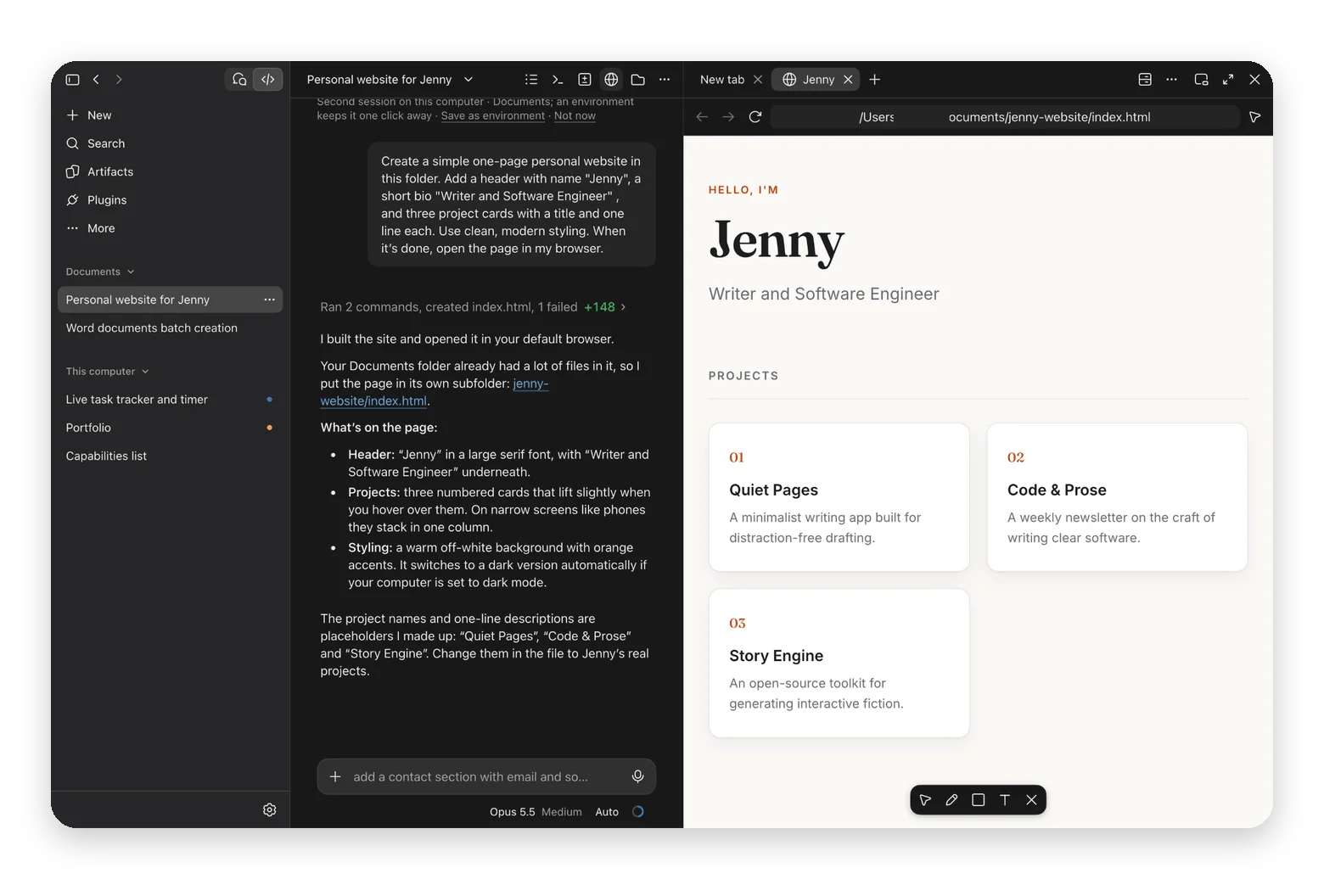
Here’s a simple sample task, just to show you what the interface looks like.
BoltAI 2: Your AI client, growing agent abilities via MCP
BoltAI 2 is a native Mac AI app and MCP client. It connects AI models to the files and apps on your Mac. It becomes an agent once you give it the right tools.
Add an MCP server for your files (Filesystem server), browser, or calendar, and it can perform actions instead of just talking about them.
Features
Works with Claude, GPT, Gemini, and local models
Connects to your files and apps through MCP servers
Shows every step it takes in the chat
Included in Setapp Membership
Limitations
Takes a few extra steps to set up
Most local MCP servers need Node.js installed first
Capabilities depend on the tools you add
AI features use your Setapp AI credits or your own API key
What about Operator, ChatGPT Agent, and the cloud agents?
Many of the best AI agents are cloud-based. They're capable, but they mostly work in a browser or on a remote computer, not directly with the files and apps on your Mac:
ChatGPT agent: OpenAI’s agent (which now includes Operator) uses its own virtual browser. Great for web research and online forms.
Claude: Anthropic’s agent in the Claude app. It can work in folders you connect and use your browser on paid plans.
Perplexity Comet: An AI browser that works inside your tabs. Great for comparing products and filling in forms.
They're great for web-heavy jobs. For everyday work on your own files, inbox, and calendar, AI agents that work directly on your Mac (like Eney) feel more comforting.
Three real tasks, three agents: A mini field test
A good agent makes your work easier, and a bad one can make it even more complicated. So I gave each AI agent one everyday task to show you how they actually handle it.
Eney: Sorting out my downloads folder
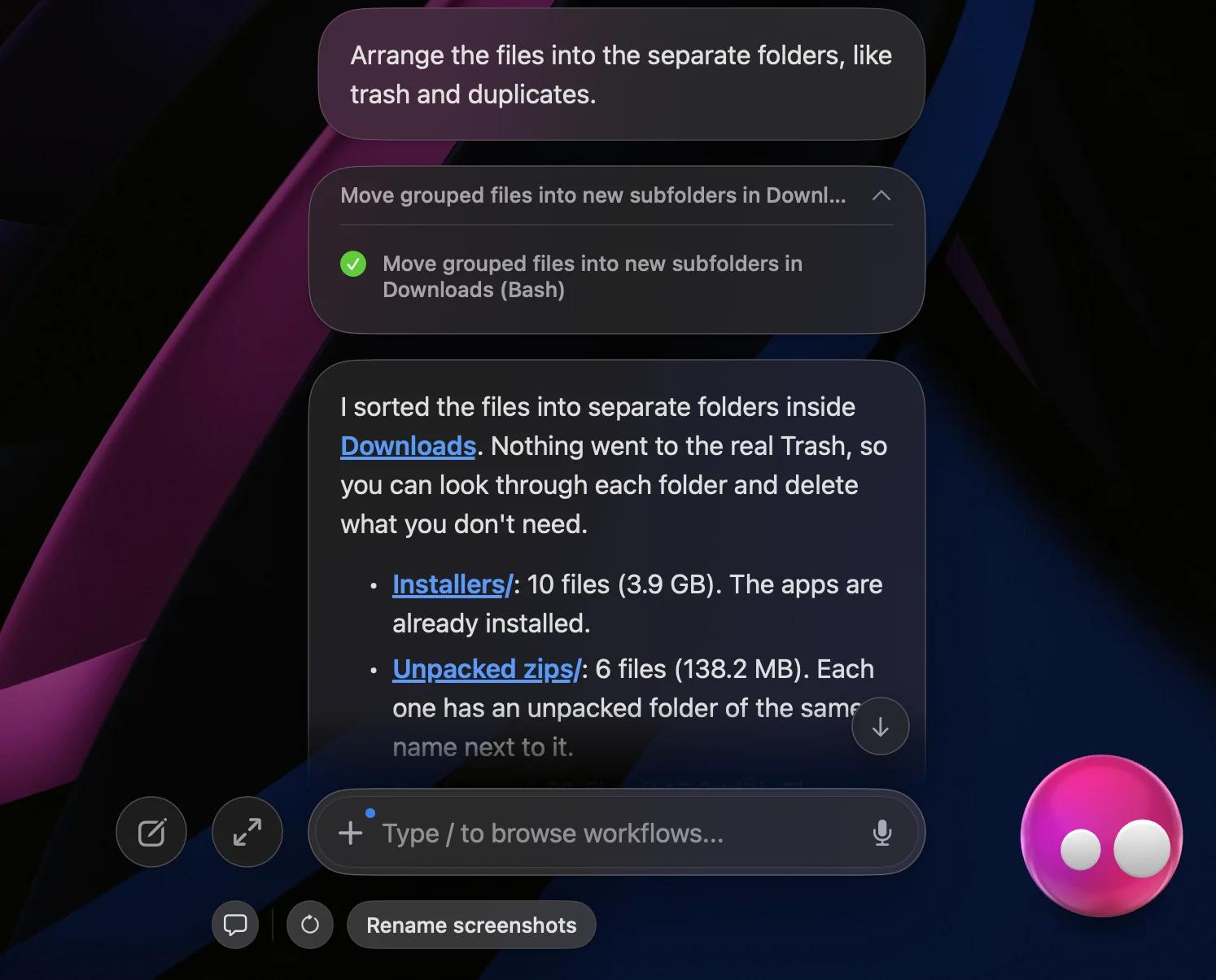
I asked Eney: “Arrange the files into separate folders, like trash and duplicates.”
It did a perfect job. It sorted everything into subfolders inside Downloads. I checked every folder, and nothing was in the wrong place. I used the word “trash” on purpose to see if it would confuse it with the real Trash. It didn’t. It made a separate folder, and nothing was deleted without my OK.
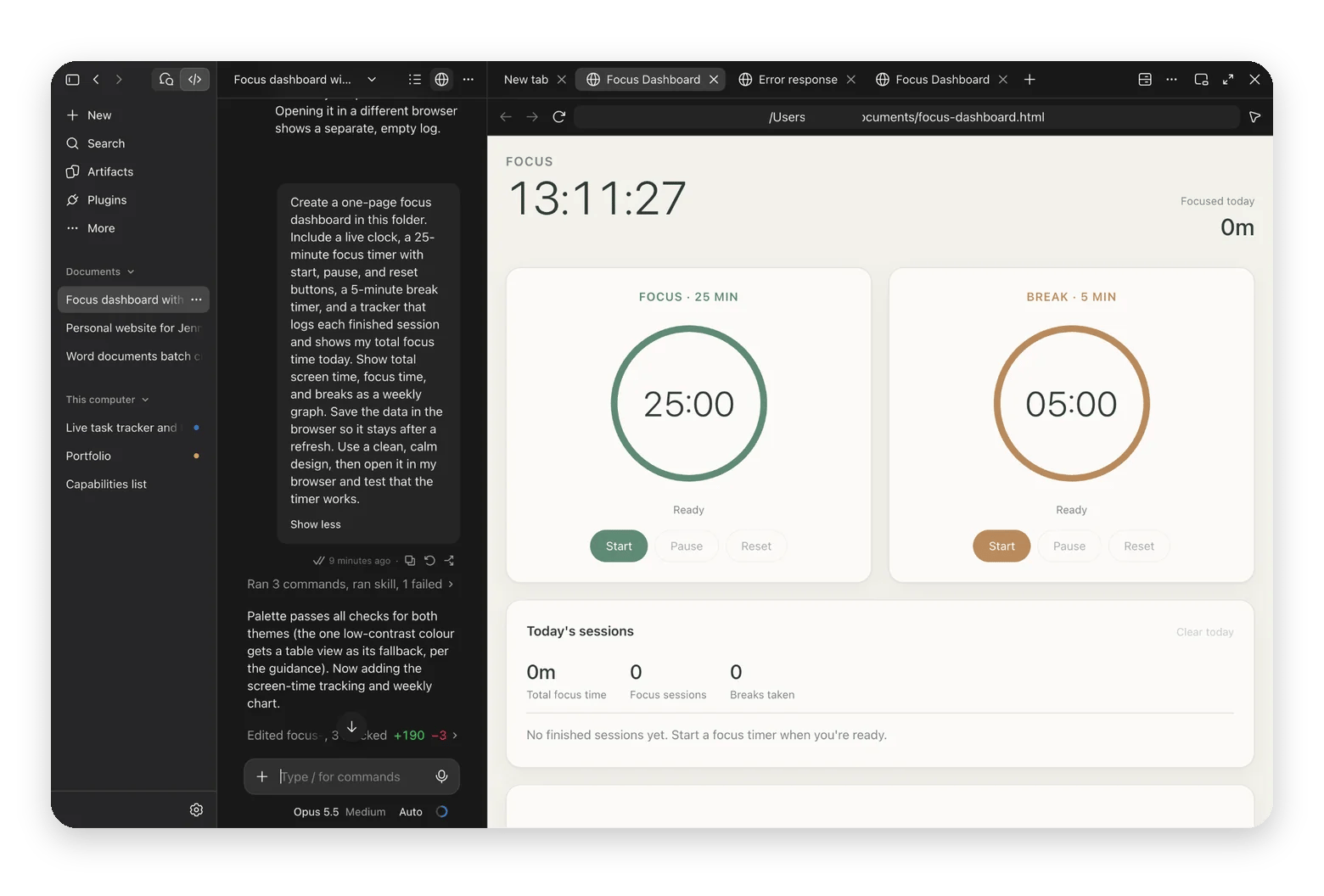
Claude Code: Building a focus dashboard
If you already code, you don’t need me to show you what Claude Code can do.
But if you’re just starting out and wondering how it works, here’s how one small prompt made a simple, working focus dashboard within a few minutes. You can build far more complex things than this.
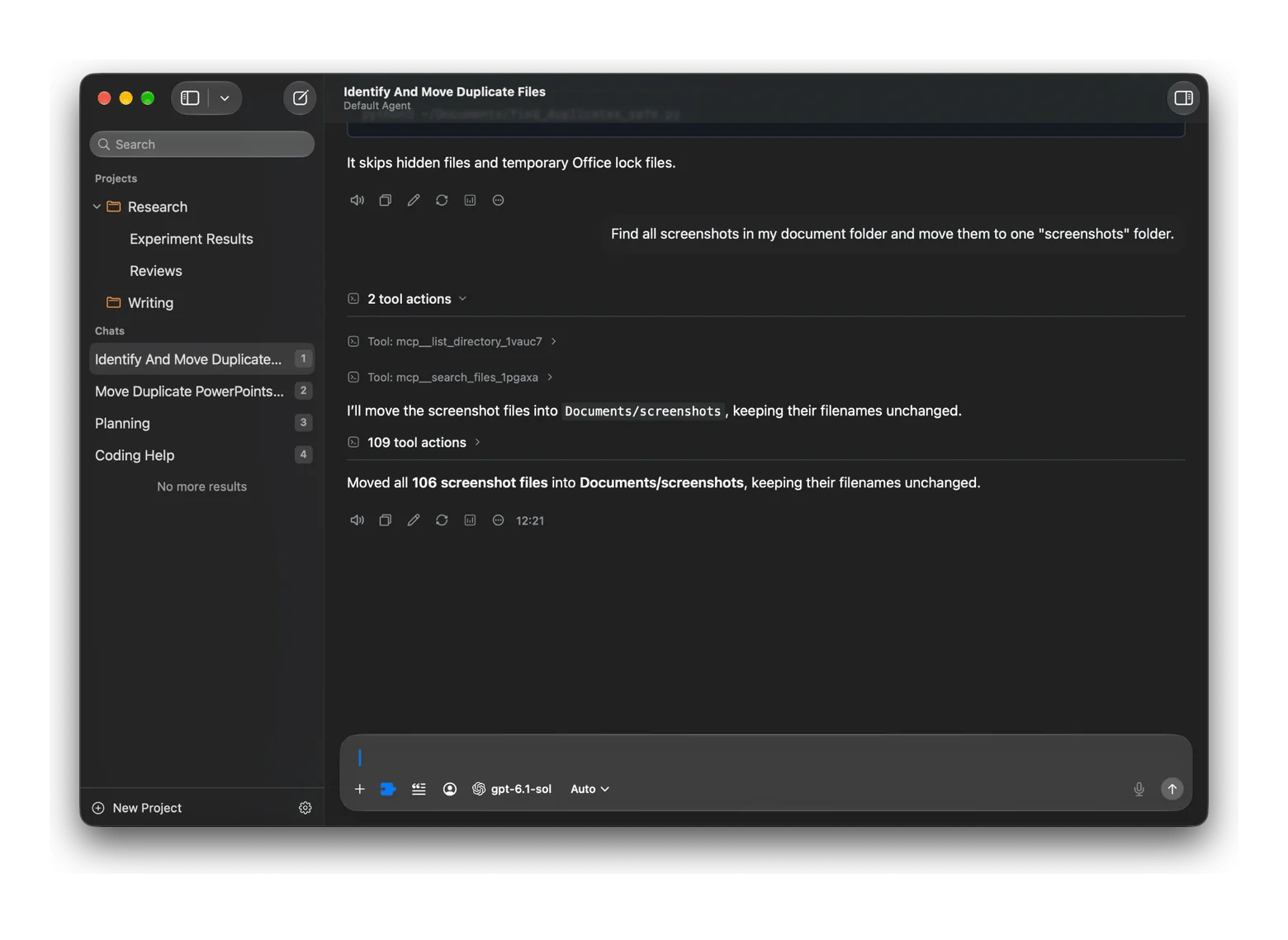
BoltAI 2 + MCP: Moving screenshots into one folder
With the Filesystem server on, I asked it to move all the screenshots in my Documents folder into one “screenshots” folder. It found them, created the folder, moved them over, and showed every step to me.
None of these agents is flashy, but they saved me close to an hour of clicking. That's what AI agents that take action are good at today. Just hand them small, boring tasks you'd rather not do yourself.
You can read about other users’ experiences with BoltAI 2, or try it yourself with a 7-day free trial.
Honest expectations: Where agents still fail
Even the best AI agents can fail sometimes. In one Fortune report, a Meta researcher watched an always-on agent delete her whole inbox even though she had told it to check with her first.
Sometimes, it’s just a miscommunication. We type to AI fast, with typos and half-finished sentences, and it usually gets what we mean. But when an agent gets it wrong, it doesn’t just answer wrong. It acts wrong. Or we forget a recurring task, and it keeps running.
Here's what I'd keep in mind:
Be specific: Vague requests get vague, or wrong, results.
Keep confirmations on: Anything that sends, moves, or deletes should wait for your OK.
Always review the output: Agents can be confidently wrong, so always do a final check.
Start with low-risk tasks: Try tasks like sorting files before you hand over your inbox.
Over on TidBITS, Adam Engst writes that he can't imagine giving an agent permission to spend money for him. I'm not there yet either.
The best AI agents for Mac, ready in Setapp
If you're ready to move past copy-pasting AI answers, two of these agents are a click away in Setapp.
You can start for free and try it on your own tasks: BoltAI 2 is included in Setapp Membership, along with 300+ apps, from $14.99 USD/mo + tax. Membership starts with a 7-day free trial. Eney is a standalone app on Setapp, separate from Membership. It has its own 14-day free trial with 10,000 AI credits, then runs on AI credits.
Claude Code comes straight from Anthropic with a paid Claude plan.
The best AI agent for Mac depends on the job. For everyday tasks across files, mail, and calendar, Eney is the best AI agent in 2026 in my testing. For coding, Claude Code is hard to beat. If you already use several AI models, BoltAI 2 becomes an agent once you add MCP tools.
What is the difference between an AI agent and a chatbot?
The difference between an AI agent and a chatbot is that a chatbot answers, while an agent acts. A chatbot tells you how to clean your Downloads folder. An agent plans the steps and sorts the files itself.
Can an AI agent actually control my Mac?
Yes, an AI agent can control parts of your Mac, but only what you allow. Apps like Eney need permissions in System Settings to work with your files, mail, and calendar. Good agents usually ask before they send, move, or delete anything.
Are AI agents safe to let run on my computer?
AI agents are generally safe to run on your computer if you limit what they can access. Even the best AI agents misread requests sometimes, so give them access only to the folders and apps they need, keep confirmations on for risky actions, and review their work.
Is there an AI agent that works with my files and email?
Yes, there are AI agents that work with your files and email. Eney works with Finder, Apple Mail, and Calendar out of the box, plus Gmail and other apps through connectors. Among the AI agent apps I tested, it was the most natural fit for this kind of everyday work.
Too much to keep track of?
Let Eney bring your work together and help you get it done






 Best solution
 Best solution