The verdict is 4.2 out of 5: Elephas is one of the most Mac-native AI writing assistants I’ve tested.
It’s best for people who write all day: Emails, docs, and replies, especially if English is your second language.
The biggest con is AI credits: They run out fast, so heavy users need their own API key.
It’s included inSetapp Membership: Get Elephas Standard from $14.99 USD/mo + tax, plus 300+ apps.
My honest take: Elephas is one of the best AI writing assistants for Mac, especially for everyday emails, documents, and replies.
I tried Elephas AI for a week, the privacy-first knowledge assistant and writing tool for Mac. I made it my main assistant for everyday writing and engineering work.
Here’s my Elephas review: how it went and whether it’s worth paying for.
Verdict first: Is Elephas worth it in 2026?
Yes, Elephas is worth it if you write or handle documents on your Mac every day. I rate it 4.2 out of 5, based on a week of writing, planning, and research work.
Elephas brings AI into your apps and works with your files locally. So, it feels like a second brain sitting beside you while you work.
Skip it if you only need grammar fixes, because Grammarly does that better. Whether it’s worth it for you depends on the kind of work you do, and whether one more subscription makes sense. Setapp Membership includes the Standard version at no extra cost.
What is Elephas and how does it work?
Elephas is a privacy-first AI writing and knowledge assistant for Mac. It rewrites, summarizes, and drafts replies in any app where you can type, and it answers questions from your own files.
It’s not a general-purpose AI like ChatGPT, where you have to open a chat whenever you have a question. Elephas is an assistant that comes to you with one call. It can access and work with your files so you don’t copy and paste between apps.
What the Elephas app offers:
Privacy, Elephas’s biggest advantage: It stores your Brains locally and only shares what’s needed for each chat. If you work with confidential information and don’t want to hand your files to online AI models, Elephas is one of the safest picks.
Brains and Super Brain: You can build personal knowledge bases from your own files, like PDFs, notes, and docs.
Works inside your apps: Rewrite, summarize, and reply right in Mail, Pages, Slack, or your browser.
AI tasks with keyboard shortcuts: Select text, hit a shortcut, and rewrite or draft a reply in seconds.
Online or offline: Use cloud models like GPT, Claude, or Gemini for complex tasks and switch to an offline model for private stuff.
Why use Elephas when you already have ChatGPT or Claude?
Elephas AI isn’t a better model than ChatGPT or Claude. It runs on their models. What you get is everything around the model: an assistant that knows your files and works right beside you with no copy-pasting or tab switching. So, know what you’re paying for.
You can also pick a preferred AI model or go offline. For online models, you can use your Setapp AI credits or add your own API key.
Elephas review scorecard
Here’s how I scored it for this Elephas AI review after a week of daily use. The scores are based on my own experience, so your mileage may vary.
Category
Score
Why
Writing quality
4.5/5
Natural rewrites, rare misses
Ease of use
3.5/5
Took me two days to set it up
Mac integration
5/5
Works in nearly every Mac app
Speed
4.5/5
Offline mode is a bit slower
Pricing value
3.5/5
Good value; credits run out
Overall
4.2/5
Strong pick for daily writers
Elephas’s everyday rewrites were great, but its default AI model feels a bit weaker on deeper tasks. For deep research, I recommend adding your own API key or using ChatGPT or Claude directly.
A week of real use: What Elephas got right
I used Elephas on whatever my week threw at me, and here are four tasks it handled well.
Before we get into them, know these basics to get started:
Permissions: Give Elephas access in System Settings > Privacy & Security when it asks. Without it, Elephas can’t see the text you select.
Super command: Press Control-Space to pop open the Elephas window right where you’re working. Then type a request or pick an action from the list.
Direct shortcuts: Skip the menu and jump straight to a task (like Control-Command-P for a professional rewrite). You’ll find all the shortcuts in Preferences > Shortcuts.
Now, let’s see what it got right.
Writing and polishing emails with Elephas
If you’re a non-native speaker and deal with professional emails every day, you’ll love this one. Its email rewrites sound natural, as if you wrote them on a good day. There are two ways you can do it.
Direct shortcut: Draft your email in Mail > Select the text > Press Control-Command-P for an instant professional rewrite.
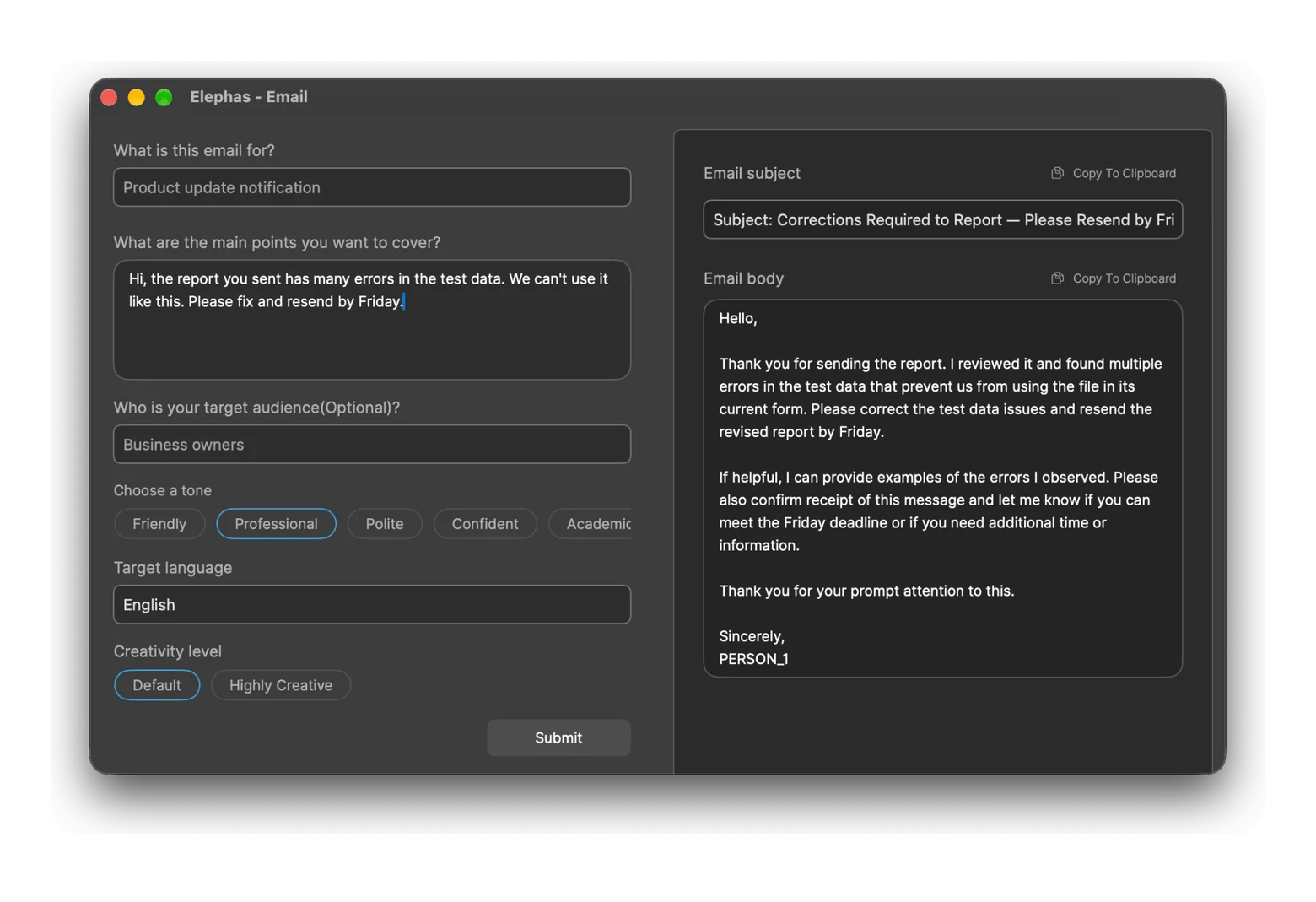
Polish in the Elephas email window: Press Control-Command-E to open the Write email window > Type what you want to say > Copy the polished version (like in the image below).
The second option lets you choose the audience, tone, language, and creativity level, so the rewrite matches what you have in mind.
Turning messy notes into readable docs
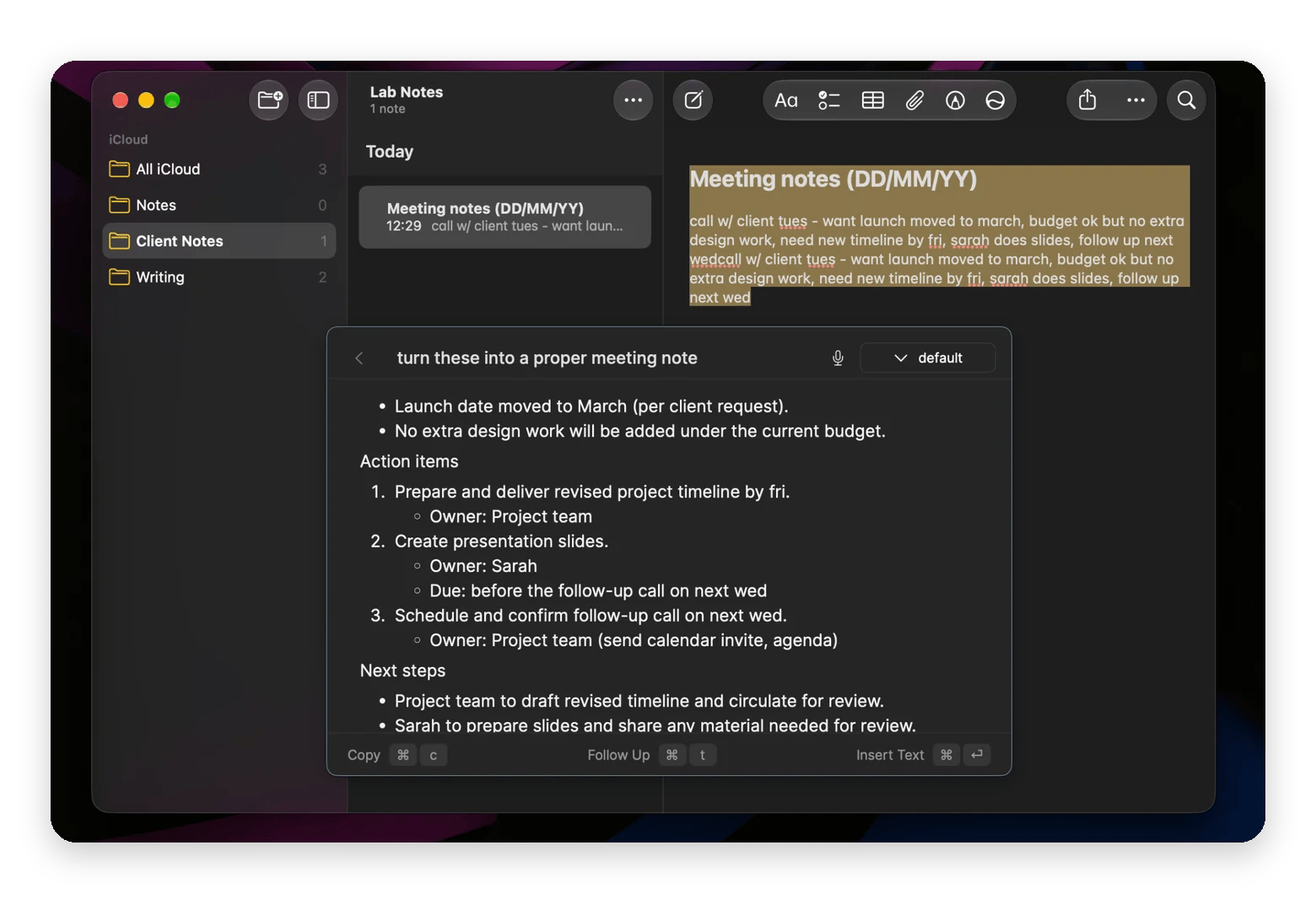
With an engineering background, my notes are fast and messy. If you also write rough meeting notes, lab results, or quick to-dos, Elephas can clean them up right where you wrote them, in Notes, Pages, or Word.
Select your text > Press Control-Space to open Super command > Type what you need and press Return or choose a built-in action if one fits.
Replying to long email threads
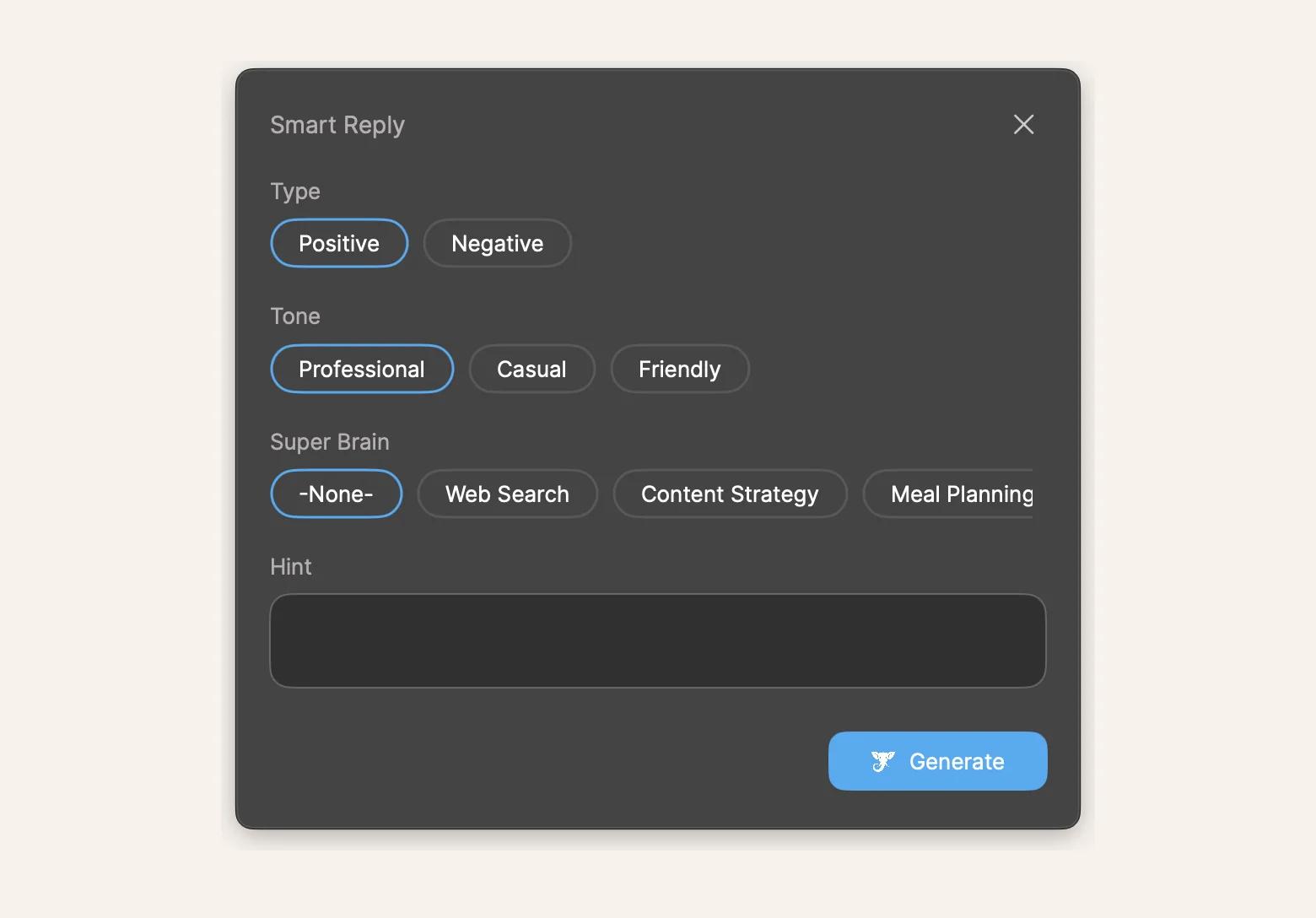
Smart Reply reads a thread and drafts a response for you.
Open the thread > Select all the messages (Command-A) > Press Control-Command-R. You can also choose a response type, tone, and add a quick hint about what you want to say.
Even on 15-message email chains, the first draft is usually about 80% there. I just tweak a sentence or two and hit send.
Super Brain: Asking questions about your own files
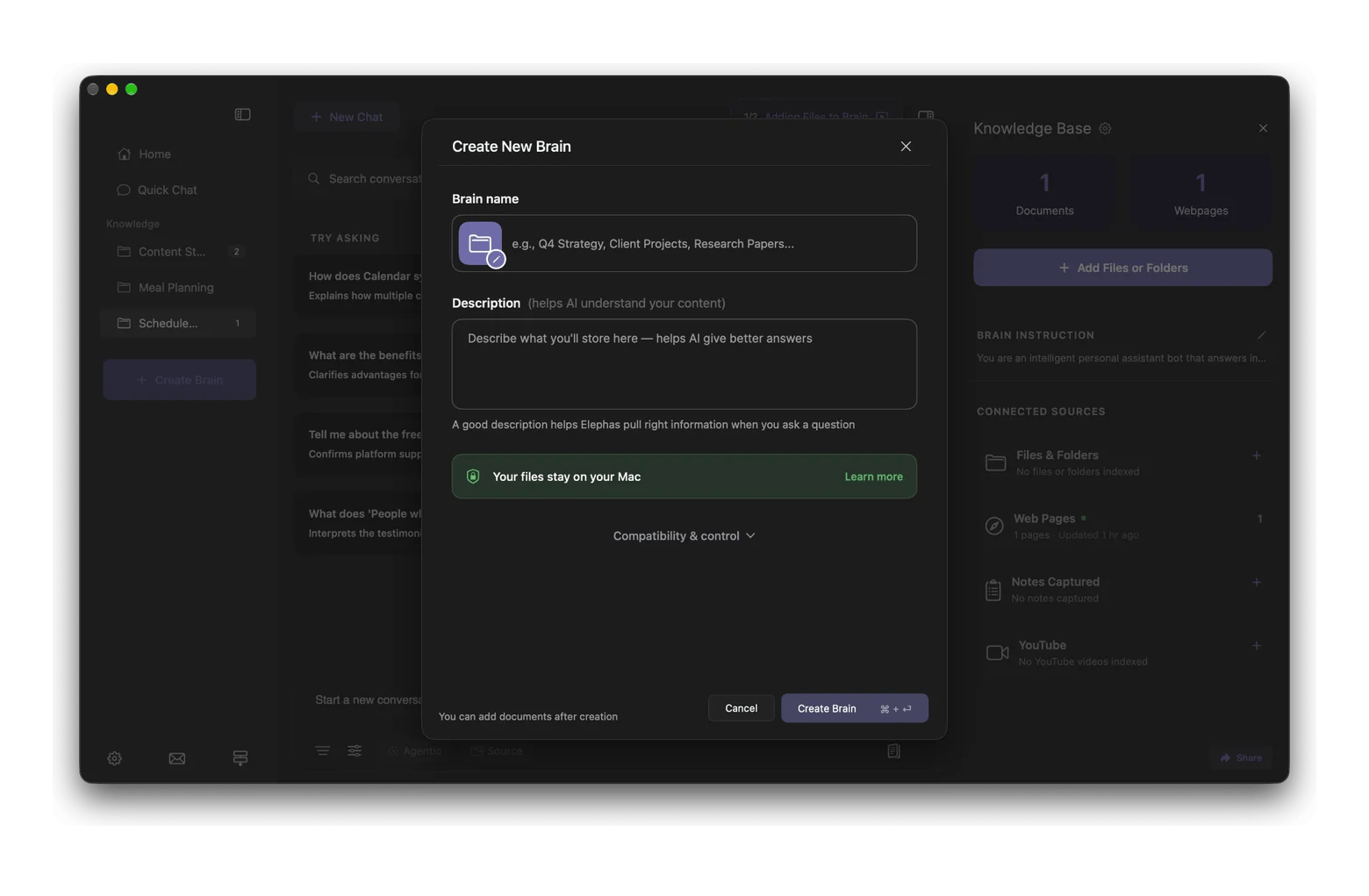
If you work on big research projects or literature reviews, where you keep coming back to hundreds of files over time, Super Brain is the feature to try. You can add your PDFs, docs, notes, and even URLs to a Brain.
To try it, click Create Brain > Add a Brain name and description. Then add your files, links, or folders.
All of this runs natively on my Mac, with no browser tabs. I saw a Capterra reviewer who said they appreciate that “it’s a native macOS app, so there are no lags or performance issues.” That matched my week with Elephas on Mac.
Where Elephas falls short
A few things bugged me during my week with Elephas:
AI credits run out fast: I used up a big chunk of my monthly Setapp credits in a few days. If you write or query files all day, you’ll need your own API key.
It’s a lot of app: The settings are busy, and setup took me a couple of days.
Offline AI is weaker: The offline model is noticeably weaker than cloud models, so I only used it for private drafts. This matters if you often work without the internet.
None of these are deal-breakers, but they’re worth knowing before you commit.
Elephas vs. the alternatives: Grammarly, Notion AI, raw ChatGPT
Comparing these three? Here’s a quick look:
Grammarly: Better at catching grammar and spelling as you type, and it also works on Windows and the web.
Notion AI: Great if your work already lives in Notion. Outside Notion, it can't help, while Elephas works in almost any Mac app.
ChatGPT: Still the best for long brainstorming chats, and it has a free tier. But copying text back and forth gets old fast, and Elephas lets you switch between models.
Fixing grammar and rewriting text are basic features now. Most AI tools handle them. What sets them apart is what each one is built for, so pick the one that matches how you work.
If you mostly need clean grammar, start with the list of Grammarly alternatives for Mac is a better place to start. For quick one-click proofreading, Eney works well alongside Elephas.
Pricing: Standalone vs Setapp
This is the part that decides it for most people. Here's what you pay:
Elephas standalone: Personal is $19 USD per month, or $15 USD per month billed yearly. Professional is $29 USD per month, or $24 USD per month billed yearly, with more AI usage.
Elephas on Setapp: The Standard version is included in Setapp Membership, from $14.99 USD/mo + tax, along with 300+ other apps.
If you’d also use three or more other apps from the catalog, Membership is almost certainly the better deal. Go standalone if you need the Notion and Obsidian integrations or want Elephas on more than one Mac.
Either way, AI usage has limits. The Mac plan includes 1,000 AI credits a month on monthly billing and 300 on annual billing. When they run out, you can add your own API key, switch to the offline model, or move to an AI+ plan with more credits, such as AI Enthusiast at $22.99 USD/mo + tax with 6,000 credits.
Note: Elephas can't use a ChatGPT Plus or Claude Pro subscription. It needs an API key.
Final verdict and who should get Elephas AI
Elephas AI won't replace your own thinking, but it takes the friction out of everyday writing. And it works right inside the apps you already use. I rate it 4.2 out of 5.
It's great for anyone who writes emails, docs, and replies all day, especially non-native English speakers who want their writing to sound natural. Skip it if you only need grammar fixes, or if you need Notion and Obsidian integrations on Setapp. If meetings are a big part of your day, Spellar AI pairs well with it: Spellar transcribes and summarizes the call for you.
Elephas and Spellar AI are both included in Setapp Membership, along with 300+ other Mac apps. Try them free for 7 days and see if this Elephas review matches your own week.
FAQ
Is Elephas worth it?
Yes, Elephas is worth it if you write every day on your Mac. In my week of testing, Elephas AI saved me real time on emails, docs, and replies. It's less worth it if you only need grammar fixes. The best value is through Setapp, where Elephas is included in Setapp Membership.
What does Elephas AI do on Mac?
Elephas rewrites, summarizes, and drafts text in any Mac app where you can type. Select text, press a shortcut, and pick an action, like a professional tone or a smart reply. The Elephas Mac app also lets you build Brains from your own PDFs and notes, so you can ask questions about them.
Is Elephas better than Grammarly?
Elephas is better than Grammarly if you want rewrites, tone changes, and drafted replies. Grammarly is better for real-time spelling and grammar checks, and it also works on Windows and the web.
Does Elephas need a ChatGPT or OpenAI subscription?
No, Elephas AI doesn't need a ChatGPT subscription. On Setapp, it uses your Setapp AI credits. You can also add an API key from OpenAI, Anthropic, Google, and others, or use an offline model. Even if you have a ChatGPT Plus or Claude Pro subscription, you cannot use it for Elephas.
Is Elephas included in Setapp?
Yes, Elephas is included in Setapp Membership. It gives you the Standard version of the app, plus 300+ other apps, from $14.99 USD/mo + tax. You can also try Elephas free for 7 days.
AI tools for Mac, iPhone, and iPad
Generate and improve text, create summaries, and tackle your tasks faster.






 Best solution
 Best solution