Soulver is the best AI calculator for Mac for everyday math.Soulver reads plain English, units, currencies, and dates, and shows each answer as you type.
Calculators and math solvers do different jobs. A calculator returns exact numbers, while a solver explains each step. Eney and Wolfram Alpha cover step-by-step solutions.
Calculation engines beat chatbots on exact numbers. Soulver, Apple Math Notes, and Wolfram Alpha follow fixed rules, while chatbots can slip on arithmetic, so check the final figure.
Eney shows its working, with its own free trial.Eney is a standalone app with a 14-day free trial and 10,000 AI credits. It needs an Apple silicon Mac with macOS 15 or later.
Try the everyday calculators on Setapp.Soulver is a part of Setapp Membership, which has 300+ apps in one subscription. Start a 7-day free trial.
The best AI calculator app for Mac is Soulver, which handles everyday math in plain English, while Eney helps solve more complex problems. You can try Soulver, and 300+ other apps with a 7-day Setapp Membership free trial, or get Eney with its own 14-day free trial.
An AI calculator for Mac reads math written in plain English, like "250 euros in dollars," and returns the answer. I keep a running tally of my money, and for years it lived in a spreadsheet I avoided opening. I wanted to type "rent + 18% tax" and get a number. So I asked each app below the same five questions – a percentage problem, unit conversion, currency exchange, word math problem, and an equation of algebra.
The top AI calculator apps for Mac at a glance
I compared the apps by their main use case, support for plain-English input, free access options, and the key limitation to consider before choosing one.
Soulver: Best calculator for plain-English math on Mac
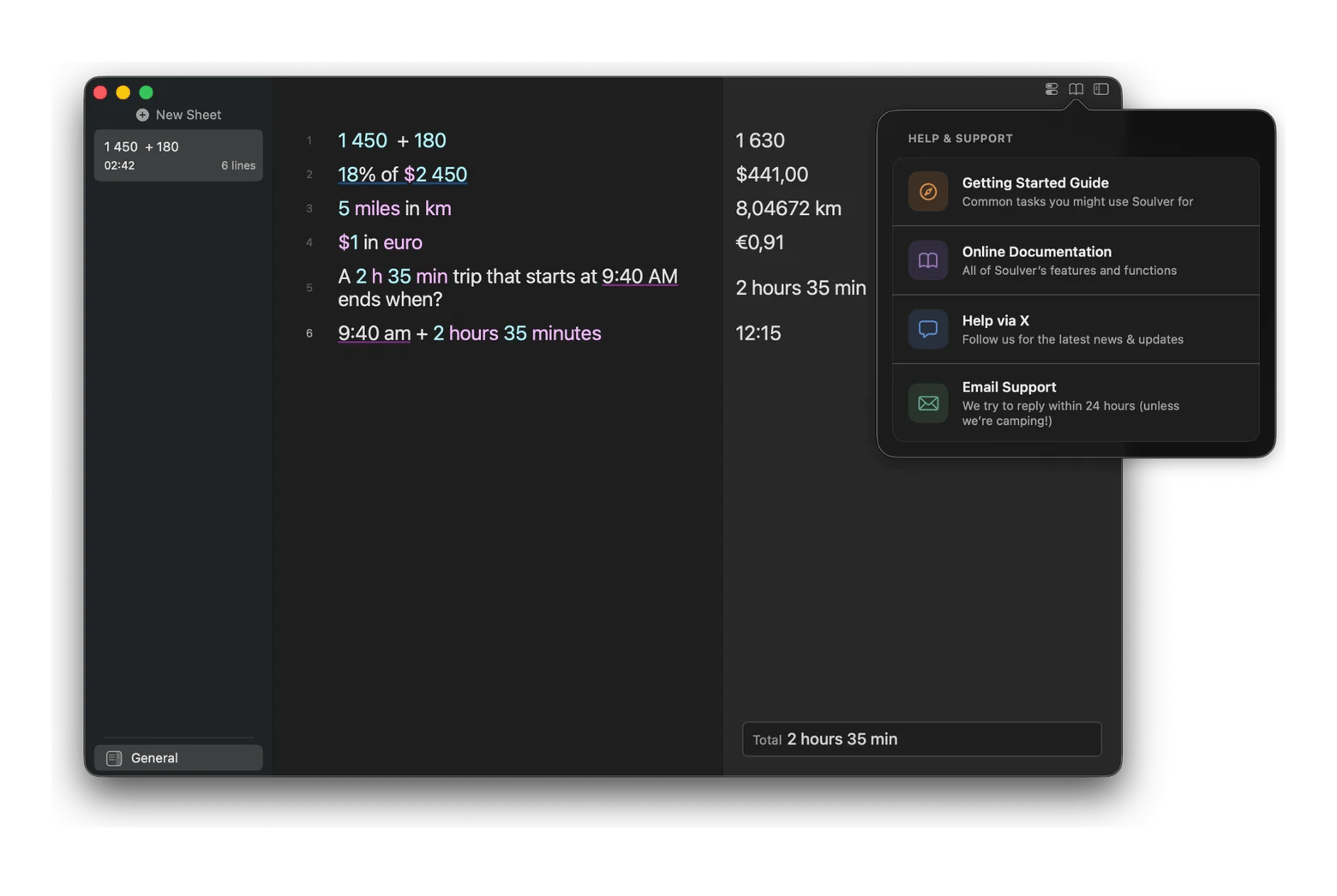
Soulver is the natural language calculator I'd pick for everyday math on a Mac. Its interface is similar to a notes app — you write the calculation on the left and the results for each line appear on the right.
How the notes-style sheet works
Every row in Soulver is a small calculation, and the words around numerals don’t disrupt your math. Type "Rent 1,450 + utilities 180" and you get 1,630, with your labels still on the line. One more feature is the definition of variables that makes, e.g., budget = $4,000 applicable to all lines below it. And just think of the references to previous cells the way you do when you fill spreadsheets.
Examples with units, currencies, and dates
Soulver accepts input like this:
Units: "500 meters in feet" or "5 miles in km"
Money and crypto conversion: "250 EUR in USD" (uses live rates)
Dates and time zones: "days until March 1" or "3pm Sydney time in Lisbon"
Percents and ratios: "18% of $2,450"
Interest and loans: "interest on $35K after 3 years at 4.5%"
Soulver can also be used with Spotlight, Automator, and Terminal, and so one can get a quick total without even launching the app.
How I tested Soulver
All four everyday problems came out right on the first try. "18% of $2,450" returned $441, "5 miles in km" gave 8.05 km, and the euro conversion used the current rate without me looking it up. The word problem took one revision: Soulver didn't get "A 2 h 35 min trip that starts at 9:40 AM ends when?", but inputting "9:40 am + 2 hours 35 minutes" gave 12:15 pm. The algebra equation was the only miss, which is fair for a calculator.
Rating on Setapp: 99%
Pros
It reads plain English, units, and live currency rates.
Soulver keeps calculations as notes you can reopen and edit.
It runs on Mac and iOS.
Cons
Won't solve equations or display how equations were solved.
Must phrase longer word problems accurately to get the right result.
Requires macOS 14.6 or later.
Best for: tracking budgets, conversions, invoices, and keeping math next to its context.
If you're looking for a lighter natural language calculator, Numi, which is also available on Setapp, works in a similar way and can be linked with Alfred.
You can get Soulver, Numi, and 300+ more apps with Setapp Membership for your everyday needs (free for 7 days and cancel anytime).
Eney: Best for asking math questions in a wider AI workflow
Eney by MacPaw is the pick for math that is explained, not just answered. It's an AI assistant for Mac and iPhone.
How to ask Eney a math question
Describe the problem in your own words by opening Eney. A question like 3x + 7 = 25 gets you the solution plus the reasoning. The homework helper presents the topic first and then goes over parts that are tough and offers step-by-step solution when you want it. For a CSV or Excel file, the data analysis skill does the metrics you ask and highlights the main calculations and assumptions.
How I tested Eney
Eney subtracted 7 from both sides, then divided by 3. It explained that the goal is to isolate x, then substituted x = 6 back into the equation to check the answer. For 18% of $2,450, there was the one correct answer but Eney took longer than Soulver whose answers appear as you type.
Rating on Setapp: 97%
Pros
Provides you with the full story, not just the result.
Catches the natural way math problems worded in spoken English.
Can look up a spreadsheet document and explain how the numbers were calculated.
Cons
Only runs on Apple silicon based Mac computers at or above macOS 15 or later.
Each request eats up an AI credit.
Not intended for exact, repeated calculations.
Best for: students who want to find out mathematical processes through an algorithm, professionals who get a grip into data numbers.
Eney is more than a math assistant: it also helps manage meetings, summarize recordings, work with files and calendars, proofread text, and automate everyday tasks on your Mac.
Other AI calculators and math solvers worth considering
Five tools apart from Setapp cover what Soulver and Eney don't, especially camera input and detailed homework steps.
Wolfram Alpha: The solution comes in step-by-step
Math is used to obtain the answers, not just text prediction, so this makes Wolfram Alpha the most reliable source here for exact math results. It includes algebra, calculus, statistics, and units. The results are provided free of charge, but step-by-step solutions need Pro, which is $5/month billed yearly or $9.99 monthly.
Photomath: Best for problems on paper
I often do math by writing in a notebook, then taking a photograph. For this, I flip my iPhone camera into running Photomath. It points at the question and gives me a free step-by-step solution. This is much easier than using a camera instead and downloading the photo to AI chats. Photomath's Plus version even includes an animated explanation and a solution manual for $9.99/month or $69.99/year. The only bad news is that it is a phone-based app that won’t integrate with a Mac workflow.
ChatGPT: Best for word problems
ChatGPT is useful for turning math problems written in words into equations, and it explains each step. ChatGPT is great at decoding poor-quality texts and explaining how it arrived at a result. It has a software interface which can be downloaded from the Mac platform. Still, as it’s an AI, it can make arithmetic mistakes. It’s always better to double-check each numerical value from such conversations. I use the free version and it’s enough for everything I could think about.
Apple Math Notes: Best free option on Mac
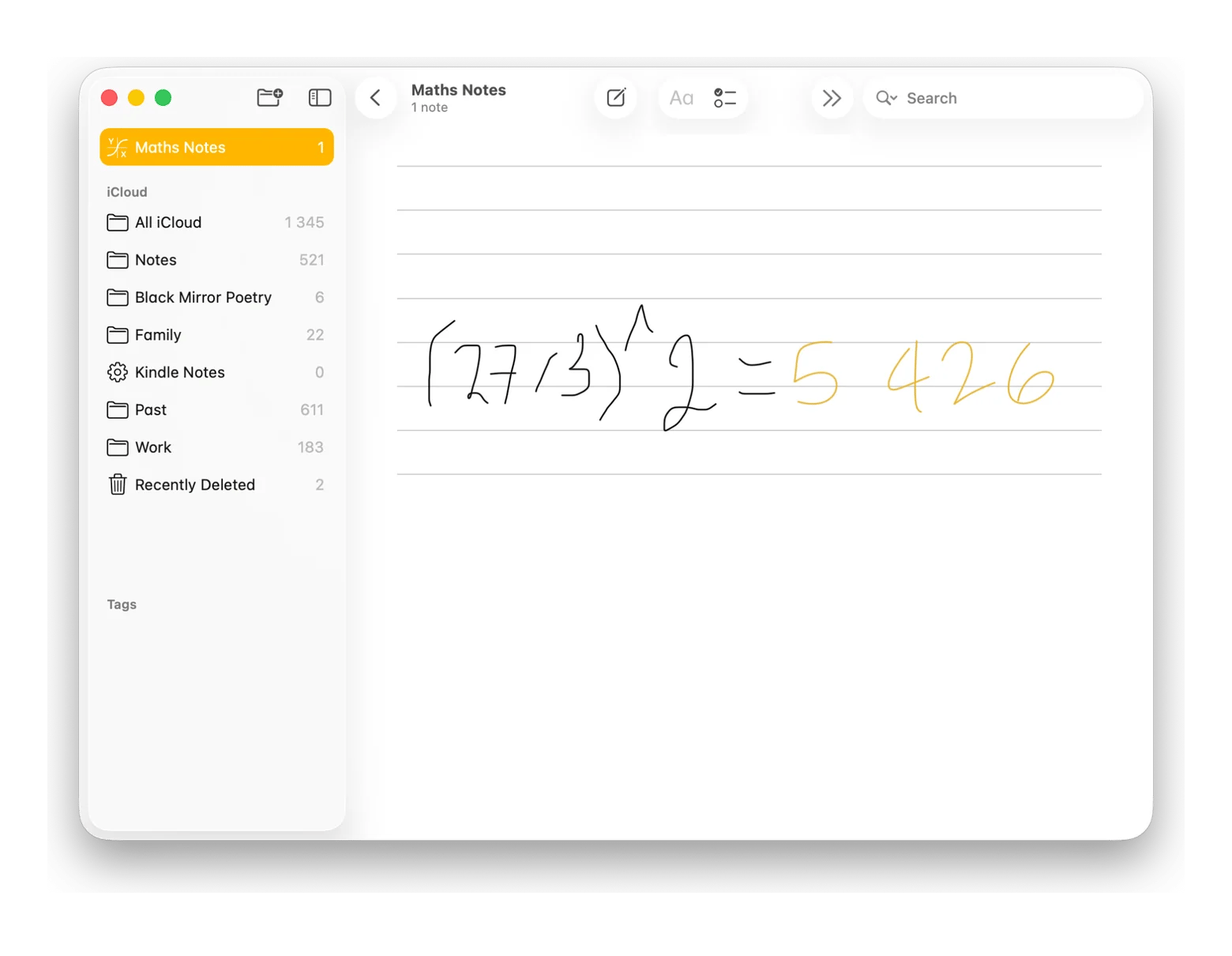
Notes on Mac can solve math as you type. If you type in an expression such as (27/3)^2= in the Notes app, it will display the result of the calculation. You can even set up variables and do unit conversions. It is free and comes pre-installed on the Mac. It requires math symbols and an equals sign to do the calculation though, and as such is not the best for more complex problems that require several steps to solve.
The simplest option is the Google search box. Type the problem in and you get a quick answer. It's perfect for one-off conversions such as 100 USD to EUR, but it doesn't keep your work.
Can you trust an AI calculator with exact math?
As a rule of thumb, you can trust an AI calculator that is based on a calculation engine but not necessarily every answer provided by a chatbot. The reason is that calculation engines like those of Soulver, Apple Math Notes and Wolfram Alpha use fixed rules to calculate. Thus, inputting the same expression again will yield the exact same output. On the other hand, language models predict the next word or character in a text and can make mistakes in doing so, even in simple arithmetic.
A February 2026 study from Google researchers, AI-rithmetic, found that frontier language models lose accuracy on addition as numbers get longer. The authors note they can even fail on two- or three-digit sums.
A better approach is to use a chatbot or Eney to set up and explain the problem, then check the final number with a calculator. Assistants that run code for the calculation tend to make fewer errors on simple arithmetic.
Best AI calculator for Mac: What I prefer most and other options
I use Soulver for most of my everyday math such as budget, conversion, dates etc. For everything else I use:
My advice is to go with Setapp Membership. It gives you access to Soulver, Numi, and 300+ other apps for Mac, iOS, and web, covering all kinds of everyday tasks. You can try it free for 7 days, cancel anytime, and continue for $14.99/month + tax. If you only need an AI assistant for more complex calculations, Eney is another option, with a 14-day free trial and 10,000 AI credits to explore.
FAQ
What is the best AI calculator for Mac?
Soulver is the best everyday math app for Mac. It can understand natural English, units, up-to-date currency rates, and dates. You can even see the answer as you type. Eney and Wolfram Alpha are better for step-by-step solutions to problems.
Is there a calculator for Mac that understands plain English?
Yes, there are natural language calculator apps such as Soulver and Numi for Mac. They allow you to write 250 EUR in USD or 18% of $2,450 and get the answer right there. Apple Math Notes is also available in Notes but it requires you to use math symbols and an equals sign to calculate.
Can AI solve math problems accurately?
For most calculation engine-based apps such as Soulver and Wolfram Alpha, the results are exact. While chatbots based on large language models can explain problems well, they can also make many errors, especially with long numbers. So, it’s best to use a calculator to verify the final answer.
Does Mac have a built-in AI calculator?
Math Notes on Mac will almost do the job of an AI calculator. When you open the Notes app, you can type in any expression ending with an equal sign and the app will calculate the answer for you. You can even use variables in your calculations and convert units. However, it is not able to understand full sentences or provide step-by-step solutions to problems.
What is the difference between an AI calculator and an AI math solver?
An AI calculator can convert plain English to exact numbers such as 5 miles in km. An AI math solver on the other hand can explain how to solve a problem step-by-step such as an algebra equation. Soulver, being a calculator app, is different to solvers such as Wolfram Alpha, Photomath, and Eney’s homework helper.
Unlock AI apps
Access 260+ Mac/iOS apps, including AI tools, with one Setapp subscription.






 Best solution
 Best solution