- Eney acts instead of chatting: Eney finds files, drafts replies, and manages your calendar from one request.
- BoltAI 2 adds models to Claude: BoltAI 2 runs Claude, GPT, Gemini, and local models in one Mac app.
- TypingMind upgrades the chat itself: TypingMind adds prompt libraries, AI characters, and side-by-side answers.
- BoltAI 2 and TypingMind come with Setapp: Try both free for 7 days with Setapp Membership.
The best Claude alternatives for Mac are BoltAI 2 for using multiple AI models in one native Mac app, TypingMind for a customizable AI chat experience, and Eney for everyday task automation.
Claude is still my favorite AI, so this isn’t a breakup post. But it’s easy to get too comfortable with one tool and stop looking around, and that’s how you miss useful things. So I tested a few Mac apps that could power up my daily workflow.
This isn’t about a Claude alternative that replaces it. It’s about adding tools alongside Claude to build a small, personal setup.
Why look for a Claude alternative at all?
Most people look for a Claude AI alternative because they hit usage limits or want more capabilities with multiple models. Claude itself is still excellent, so it's usually about wanting more, not leaving.
These are the reasons I hear most, and the ones I ran into myself:
- Tight usage caps: Pro has a five-hour limit and a weekly cap, and heavy days burn through both. Adding other tools lets you save Claude for complex work.
- Only one model: With an app like BoltAI 2, you can use Claude, Gemini, and GPT in one chat.
- Limited Mac actions: Claude’s Cowork can work with folders you choose and connects to apps like Gmail and Google Calendar, but it isn’t built around Mail, Calendar, and Finder. A native Mac assistant like Eney is built for that.
- No offline mode: Everything runs in the cloud. There’s no local model for sensitive data.
Each Claude alternative I’ll share below solves at least one of these.
Claude alternatives for Mac at a glance
If you’re after apps like Claude that do a bit more, here’s how my three picks compare with the Claude desktop app:
| App | What it adds | Models | Acts on your Mac | On Setapp |
| Claude Desktop | The baseline | Claude only | Folders you connect | No |
| Eney | Does tasks for you | Local + cloud models | Files, mail, calendar | Standalone, 14-day trial |
| BoltAI 2 | One app for many models | Claude, GPT, Gemini, local | Files and apps you connect | Yes, in Membership |
| TypingMind | Better prompts and chats | Claude, GPT, Gemini, more | Through plugins | Yes, in Membership |
The pattern is simple:
- Want AI to do tasks for you? Pick Eney. It’s the most different from Claude.
- Love Claude but want ChatGPT and Gemini too? BoltAI 2 is the natural Claude desktop alternative.
- Frustrated with the chat itself? TypingMind gives you better tools for the same models.
BoltAI 2 and TypingMind are included in Setapp Membership, and you can try them free for 7 days.
Eney: the alternative that acts, not just answers
Eney is MacPaw's AI assistant for Mac, and it's a very different kind of Claude alternative.
Claude is brilliant at conversation. Eney does the task itself: it finds files, checks your inbox, drafts emails, and adds events to your calendar from a plain request. It works with Finder, Mail, Calendar, and Reminders out of the box, and connects to apps like Gmail or Notion.
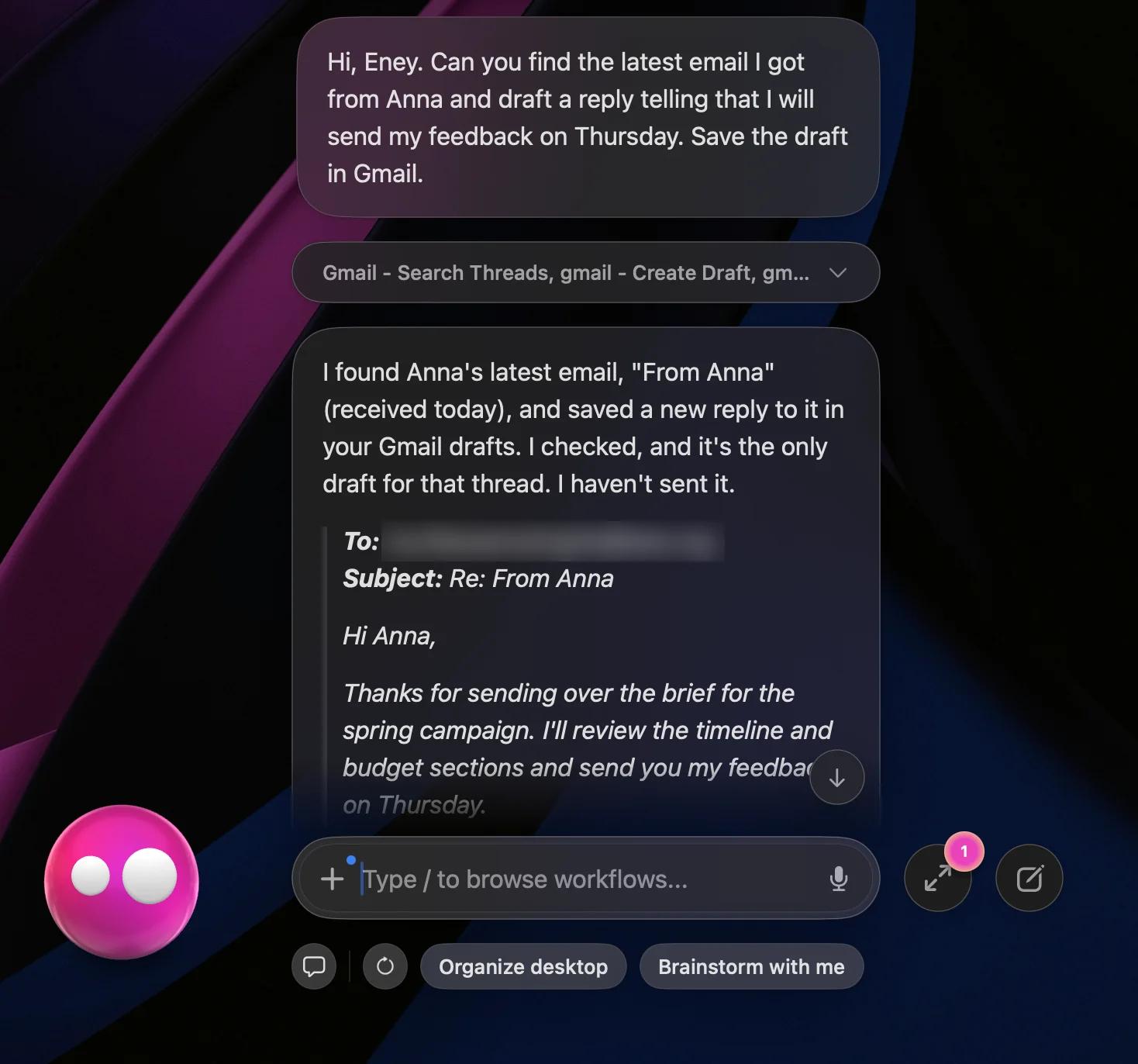
Here’s a simple task I gave Eney to show you how it works. It found the email I asked, read it, drafted a reply, and saved it in my Gmail drafts. It also told me it hadn't sent anything, so I could read the draft first. Claude could have written that reply too, but I’d have had to find the email, paste it in, and copy the draft back.
One limit: Eney runs on AI credits, not your own API key. It needs an Apple silicon Mac with macOS 15 or later. You get a 14-day trial with 10,000 credits. After that,an AI credits subscription starts at $14.99 USD/month for 10,000 credits.
If you want the full feature tour of Eney, Setapp's Eney overview covers every skill.
BoltAI 2: Keep Claude, add every other model
BoltAI 2 is the Claude alternative that lets you expand instead of switch. It’s a native Mac app that runs Claude, GPT, Gemini, Perplexity, Mistral, and other local models through Ollama in one app.
With BoltAI 2, you can pick the best model for each task. If your daily struggle is Claude’s usage limits, BoltAI 2 gives you a way around them: keep using Claude through Setapp AI credits or your own API key, or switch to GPT or Gemini for simpler tasks. In the model picker, Claude and OpenAI models sit under one Setapp provider, so switching takes one menu choice.
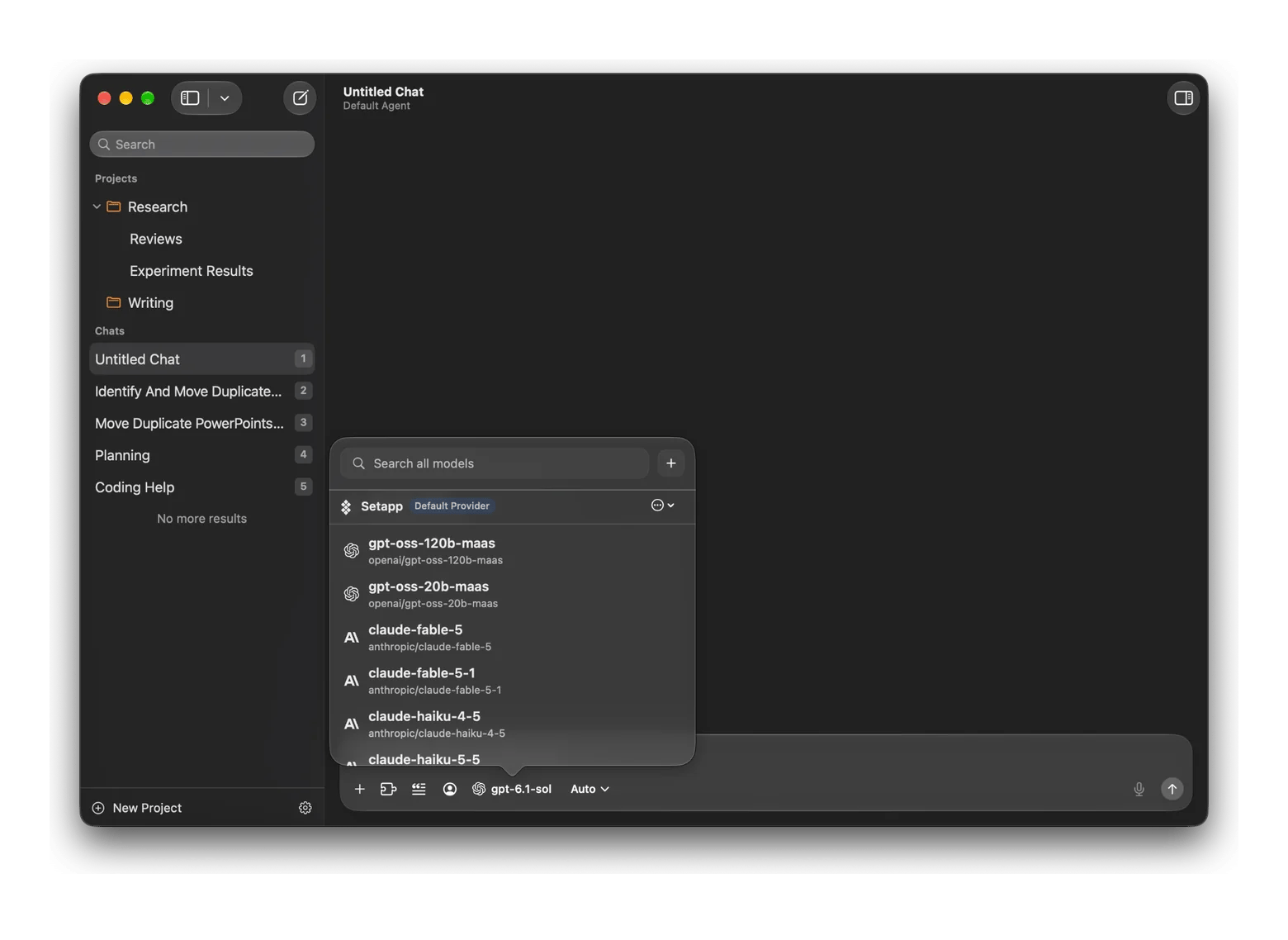
One limit: Running Claude through an API key bills per use, so a long day of heavy chats can cost more than you'd expect.
If you want to go further, BoltAI 2 also supports MCP tools, which I cover in my guide to the best MCP servers for Mac.
TypingMind: a better cockpit for the same models
If the model is fine but the chat window frustrates you, TypingMind offers a cleaner interface with a prompt library, built-in AI characters, chat folders, and multi-model responses, where Claude and GPT answer the same prompt side by side.
My favorite detail: I saved my go-to editing prompt there. Now it's two clicks away in every chat. No more scrolling through pages of old conversations to find it.
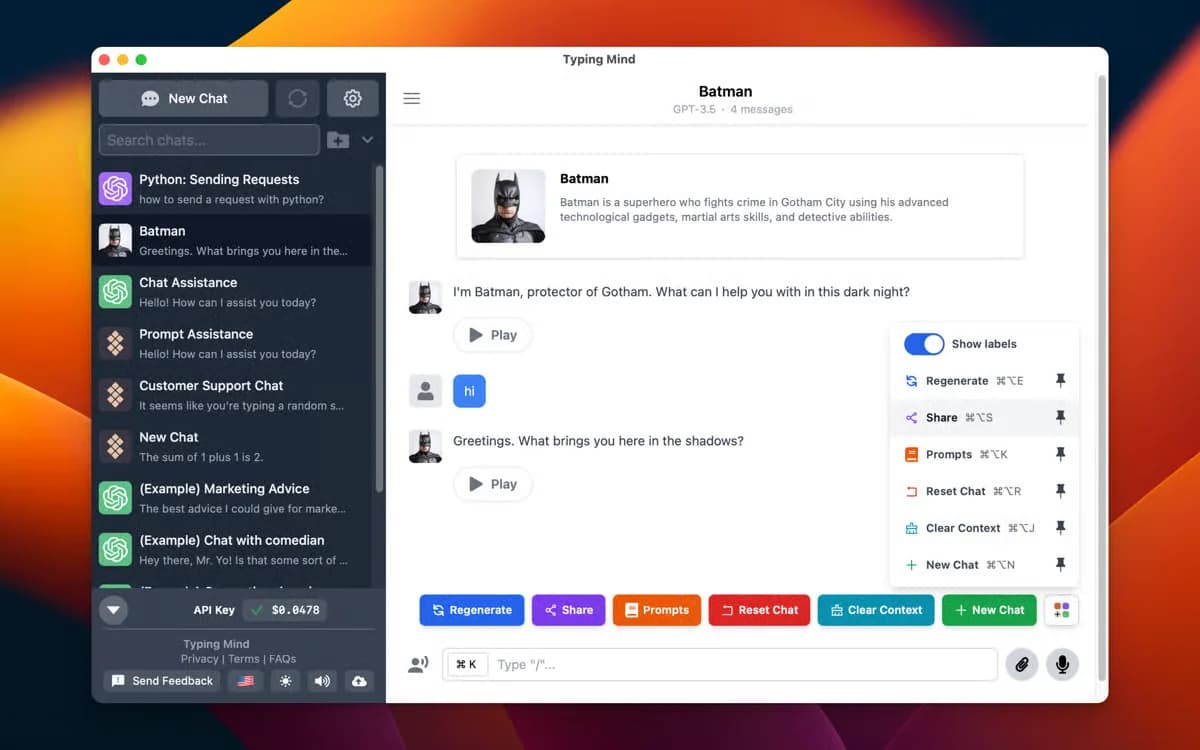
One limit: Setapp AI credits work only in the Mac app, not in the web version, so use the Mac app or add your own API keys.
Which alternative fits your reason for leaving?
The right Claude alternative on Mac depends on what's bugging you:
- You keep hitting usage caps: BoltAI 2, so you can switch to another model and keep working.
- You want more than one model: BoltAI 2 or TypingMind, both with Claude, GPT, Gemini, and more.
- You want AI to do things on your Mac: Eney, for files, mail, and calendar.
- You want better prompt tools: TypingMind, with its prompt library and side-by-side answers.
- You want to work offline sometimes: BoltAI 2, with a local model through Ollama for private drafts.
You can mix these, and none of them asks you to give up Claude.
Can you keep using Claude with these apps?
Yes, you can keep using Claude with all three. BoltAI 2 and TypingMind run Claude models directly, so either works as a Claude desktop alternative without losing Claude. Eney works alongside the Claude app without getting in its way.
One thing to know: your Claude Pro subscription doesn't carry over to other apps. They connect to Claude through an API key, which Anthropic bills separately per use, or through Setapp AI credits in both apps.
So you're not choosing something better than Claude. You're choosing what to add around it.
The best Claude alternatives for Mac, in Setapp
BoltAI 2 and TypingMind are both included in Setapp Membership, along with 300+ apps for Mac, iOS, and web, from $14.99 USD/mo + tax. Try Membership free for 7 days and see which one earns a place next to Claude on your Mac.
Eney is a separate, standalone app with its own 14-day free trial and 10,000 AI credits. Try it on your own tasks, and cancel whenever you need to.
For more AI picks, see our best AI apps for Mac and our Claude vs ChatGPT test.
FAQ
What is the best Claude alternative for Mac?
The best Claude alternative for Mac depends on why you're looking. Eney is the best pick if you want AI that acts on your files, mail, and calendar. BoltAI 2 is best if you want Claude plus other models, and TypingMind is best for prompt tools and side-by-side answers.
Is there an AI like Claude that can take actions on my Mac?
Yes, there's an AI like Claude that can take actions on your Mac. Eney finds files, drafts and sends emails, and adds calendar events from plain-language requests. It works with Finder, Mail, and Calendar out of the box and asks before anything risky. It needs an Apple silicon Mac with macOS 15 or later.
Can I use Claude models in other Mac apps?
Yes, you can use Claude models in other Mac apps like BoltAI 2 and TypingMind. They connect to Claude through an Anthropic API key, billed per use, or through Setapp AI credits. A Claude Pro subscription doesn't work in third-party apps.
What is a free alternative to Claude Pro?
The simplest free alternative to Claude Pro is Claude's own free plan, or the free tiers of ChatGPT and Gemini. If you want to avoid limits entirely, you can run a local model through Ollama in BoltAI 2, which works offline and has no usage caps.
Is there a Claude alternative without usage limits?
The closest thing to a Claude AI alternative without usage limits is a local model, which runs on your Mac with no caps. Using Claude through an API key in BoltAI 2 or TypingMind also avoids the Pro plan's five-hour and weekly caps, though you pay for what you use and API rate limits still apply.






 Best solution
 Best solution