Help Scout and Freshdesk are the top picks for most teams. Help Scout suits small, email-first support (free for up to 5 users), while Freshdesk is the closest like-for-like Zendesk swap at $19 per agent per month.
Zoho Desk and FreeScout are the cheapest ways in. Zoho Desk gives you 3 agents free forever, and FreeScout is a free, self-hosted desk if you can manage a server.
Zendesk Suite Team runs $55 per agent per month while most of the alternatives here start well under $30, and several have a real free tier.
Only Front ships a native Mac app among all ten desks, so your Mac tooling matters more for support work than any single feature list.
Whichever desk you choose,TextSoap,CleanShot X andPopClip speed up the browser-tab work around it — cleaning pasted text, capturing annotated screenshots, and cutting clicks from every reply. All three come with Setapp, free for 7 days.
The short answer: The best Zendesk alternatives for Mac are Help Scout for small email-first teams, Freshdesk for the cheapest like-for-like swap, and Zoho Desk or FreeScout if price alone decides it.
How I tested: I signed up for the free tiers and trials I could start without a sales call, pointed a real support address at each one, and cross-checked every price against current published pricing as of September 2026. Kayako is sold through sales only, so its section is based on its published pricing and documentation.
Best Zendesk alternatives for Mac: Quick overview
Help Scout: best for small email-first teams; customers get replies instead of ticket numbers.
Freshdesk: best for low-cost ticketing; the closest thing to a like-for-like swap.
Intercom: best for in-app product chat in a SaaS product.
Front: best shared inbox for teams, and the only one with a native Mac app.
HubSpot Service Hub: best if you already run HubSpot.
Zoho Desk: the cheapest paid plans, plus a free tier for 3 agents.
Kayako: classic ticketing without the Zendesk sprawl.
Chatwoot: best for open-source self-hosting.
FreeScouttobest free self-hosted desk.
Gorgias: best for Shopify stores.
Make any help desk faster on your Mac with Setapp tools:
TextSoap: cleans what customers paste at you in one action.
CleanShot X: turns a confusing fix into an annotated screenshot.
Note: All figures are list prices based on annual billing where offered. Software as a service (SaaS) pricing can change constantly, so it’s always best to check before you budget.
What to know before you switch
Here are the five things I’d want to know before moving a support inbox off Zendesk:
Zendesk Suite starts at $55 per agent per month (Suite Team), but Support Team at $19 covers email ticketing alone.
Zoho Desk and self-hosted Chatwoot or FreeScout are the most generous permanently free options. Freshdesk’s free tier is now 2 agents for 6 months.
Only Front ships a real Mac app, so your Mac tooling actually matters more than any feature list.
AI customer service is billed per resolved conversation at many of these desks, from $0.75 to around $2.00. That line breaks budgets, not the seat price.
Migrating will cost about two weeks of team efficiency, not just a weekend.
Detailed reviews of each Zendesk alternative
Next, I’ll show you each alternative in detail: what it does, its key features, its pros and cons, and who it is best for:
Tool
Best for
Mac app
Free tier
Price from (paid)
Help Scout
Small email-first teams
Browser
Up to 5 users
$25/user/mo
Freshdesk
Low-cost ticketing
Browser
2 agents, 6 months
$19/agent/mo
Intercom
In-app product chat
Browser
Trial only
$29/seat/mo
Front
Shared inbox teams
Native app
Trial only
$25/seat/mo
HubSpot Service Hub
HubSpot users
Browser
Up to 2 users
$15/seat/mo
Zoho Desk
Zoho users
Browser
Up to 3 agents
$7/agent/mo
Kayako
Classic ticketing
Browser
Quote only
$1 per AI resolution + quote
Chatwoot
Open-source self-hosting
Browser
Self-hosted
$19/agent/mo
FreeScout
Free self-hosted desk
Browser
Free forever
$0
Gorgias
Shopify stores
Browser
Trial only
$10/mo, 50 tickets
Help Scout: The email-first pick for small teams
Help Scout is a shared inbox that works much like regular email, so customers get replies instead of ticket numbers. Behind the scenes, your team gets assignment, private notes, saved replies, and workflows. You also get Docs for knowledge base software and a live chat support tool. That makes it a strong Zendesk alternative for teams whose support runs mostly on email.
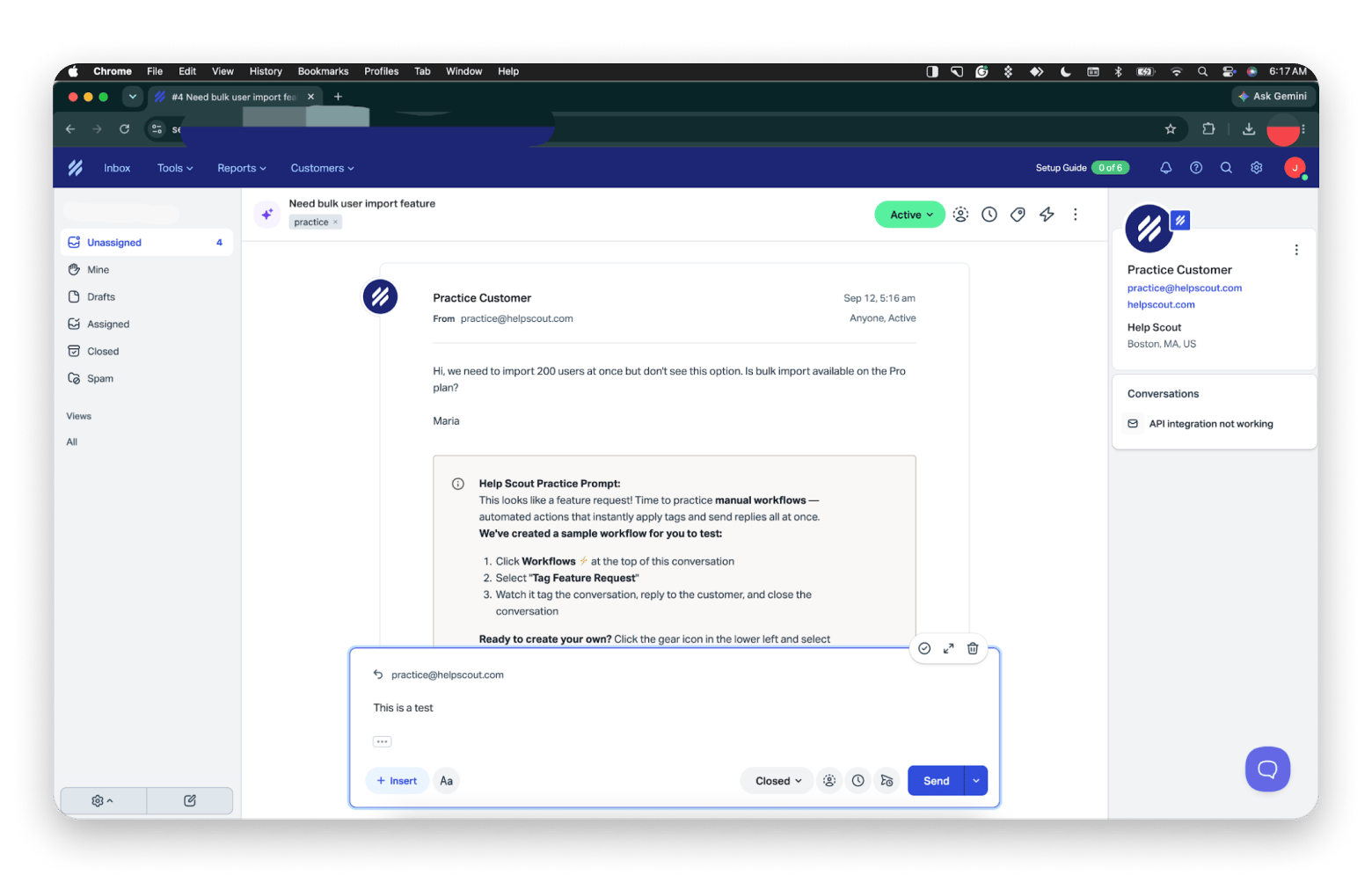
What won me over was the onboarding. My new inbox came pre-loaded with practice conversations, and one walked me through a sample workflow that tagged a feature request, replied to the customer, and closed the conversation in one click.
Key features:
Shared inbox with assignment, private notes, and saved replies
Docs knowledge base and a live chat widget
Manual and automatic workflows
Optional AI Answers, billed per resolution
Pros:
Customers get replies instead of ticket numbers
Free for up to 5 users
Quick to set up, with practice conversations to learn on
Cons:
Its automation is thinner than Zendesk’s
There is no phone channel
The free5-plan25-person at 100 contacts a month
Price: Standard is $25 per user per month, and there is a free plan for up to 5 users.
Best for: It is best suited for a 5 to 25 person email-first team.
Freshdesk: The obvious Zendesk alternative for startups
Freshdesk is probably the closest thing here to a like-for-like swap, but at a fraction of the cost. It is a classic ticketing help desk: emails become tickets with priorities, statuses, and SLA timers, with automations on top. Growth is $19 per agent per month and covers ticketing, a portal, and a knowledge base.
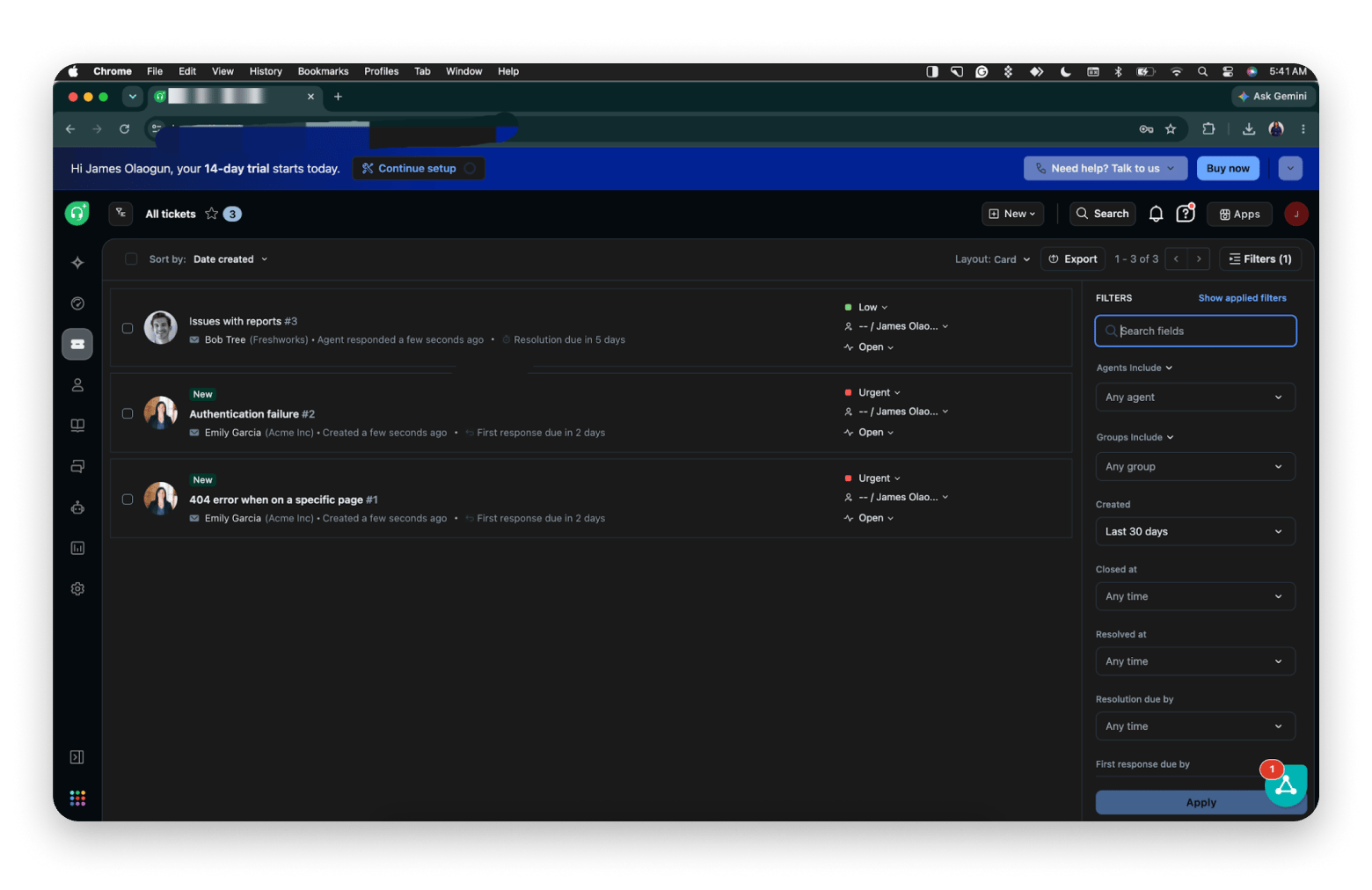
Freshdesk started me on a 14-day trial with three sample tickets already in the queue, each with a priority and a countdown to its first response or resolution deadline. It felt the most like Zendesk of anything I tried.
Key features:
Ticketing with priorities, statuses, and SLA timers
Automations and canned responses
Customer portal and knowledge base
Freddy AI as a paid add-on
Pros:
A fraction of Zendesk’s cost
Familiar, Zendesk-like ticket model
Realistic sample tickets in the trial
Cons:
The old 10-agent free plan is gone and has been replaced by six months for two agents
Live chat pushes you into Freshdesk Omni
AI costs extra on top of the seat price
Price: Growth is $19 per agent per month, Pro $55, and Enterprise $89.
Best for: It is best for a founder scaling a conventional desk.
Intercom: Best for in-app support in a SaaS product
Intercom’s messenger is still the oncenteryone copies, and if customers ask questions inside your product, nothing here really comes close. Alongside the messenger, you get a shared inbox, a help centre, and Fin, its AI agent. Seats start at $29, while Fin charges $0.99 per resolved outcome.
I signed up for Intercom’s trial to test it. There is no free plan to fall back on, so it is worth lining up your test conversations before you start the clock.
Price: Seats start at $29, plus $0.99 per resolved Fin outcome.
Best for: Best for a SaaS founder whose support lives in-product.
Front: The best shared inbox for support teams
Front brings email, SMS, and social messages into one inbox that several people can work on at once, making it a genuine shared inbox for support teams. Teammates can assign, comment on, and reply to the same conversation without forwarding emails around. Starter is $25 per seat but caps you at 10 seats and one channel, so most teams e,nd up on Professional at $65.
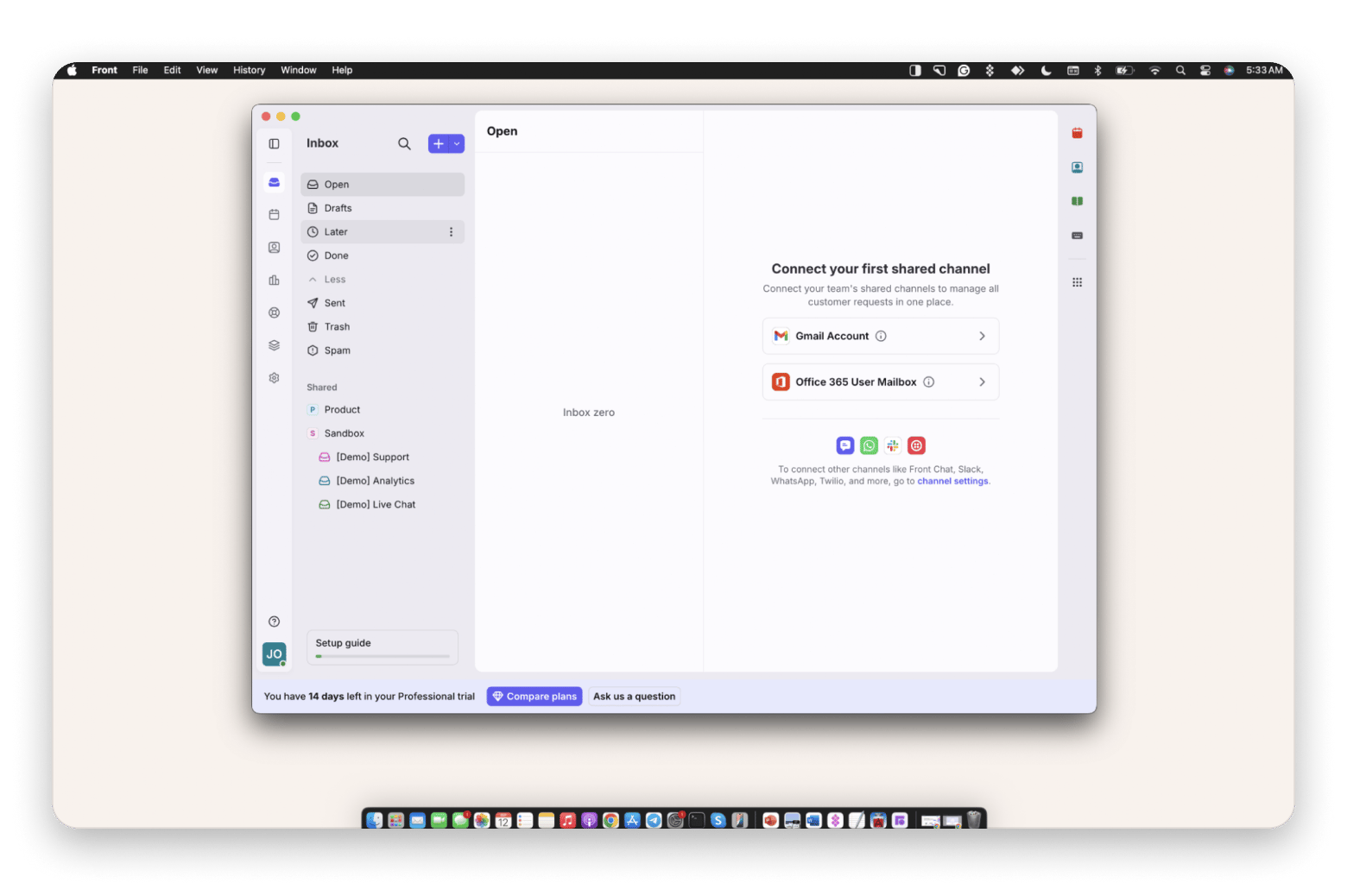
I ran Front in its Mac app rather than a browser tab, and it felt like a real email client. The Professional trial gave me 14 days and a sandbox with demo Support, Analytics, and Live Chat inboxes before I connected a real inbox.
Key features:
One inbox for email, SMS, and social messages
Assignment, internal comments, and shared drafts
Rules and analytics
Native desktop app for Mac
Pros:
The only real Mac app on this list
Works well when several teams share inbox duty
Trial includes demo inboxes
Cons:
Starter caps you at 10 seaA channel
Most teams end up on Professional at $65
AI features cost extra below Enterprise
Price: Starter is $25 per seat, Professional $65.
Best for: A small operations team that shares inbox duty.
HubSpot Service Hub: Best if you already run HubSpot
The argument for Service Hub is context: a conversation opens with the customer’s full sales history right beside it because it is all part of the same customer relationship management (CRM) database. If your company already pays for HubSpot, that shared record is hard to beat. If it does not, you are paying CRM prices to get a help desk.
I signed up for HubSpot’s free tools to test Service Hub. The free tier is enough to see tickets and the CRM working together, but the knowledge base and SLAs stay locked until Professional.
Key features:
Tickets and a shared inbox connected to HubSpot’s CRM
Knowledge base, customer portal, and SLAs on Professional
Connects with more than 1,500 apps
Pros:
Free tools cover 2 users
Full sales history beside every conversation
Grows with the rest of HubSpot
Cons:
Professional jumps to $90 plus a $1,500 onboarding fee
Less useful if you do not run HubA
Price: Free tools cover 2 users, while Starter is about $15 per seat annually, and Professional jumps to $90 plus a $1,500 onboarding fee.
Best for: Best for a team that is already paying for HubSpot.
Zoho Desk: The cheapest smallcenteress helpdesk here
Zoho Desk has the friendliest pricing here, along with a free-forever tier covering 3 agents. It is a full ticketing system with a help centre, community forums, and social and chat channels. Express is $7 per agent but caps at five, so Standard at $14 is the more realistic entry point for a small business helpdesk. Generative AI icenterled rather than metered, while native Zia AI starts on Professional.
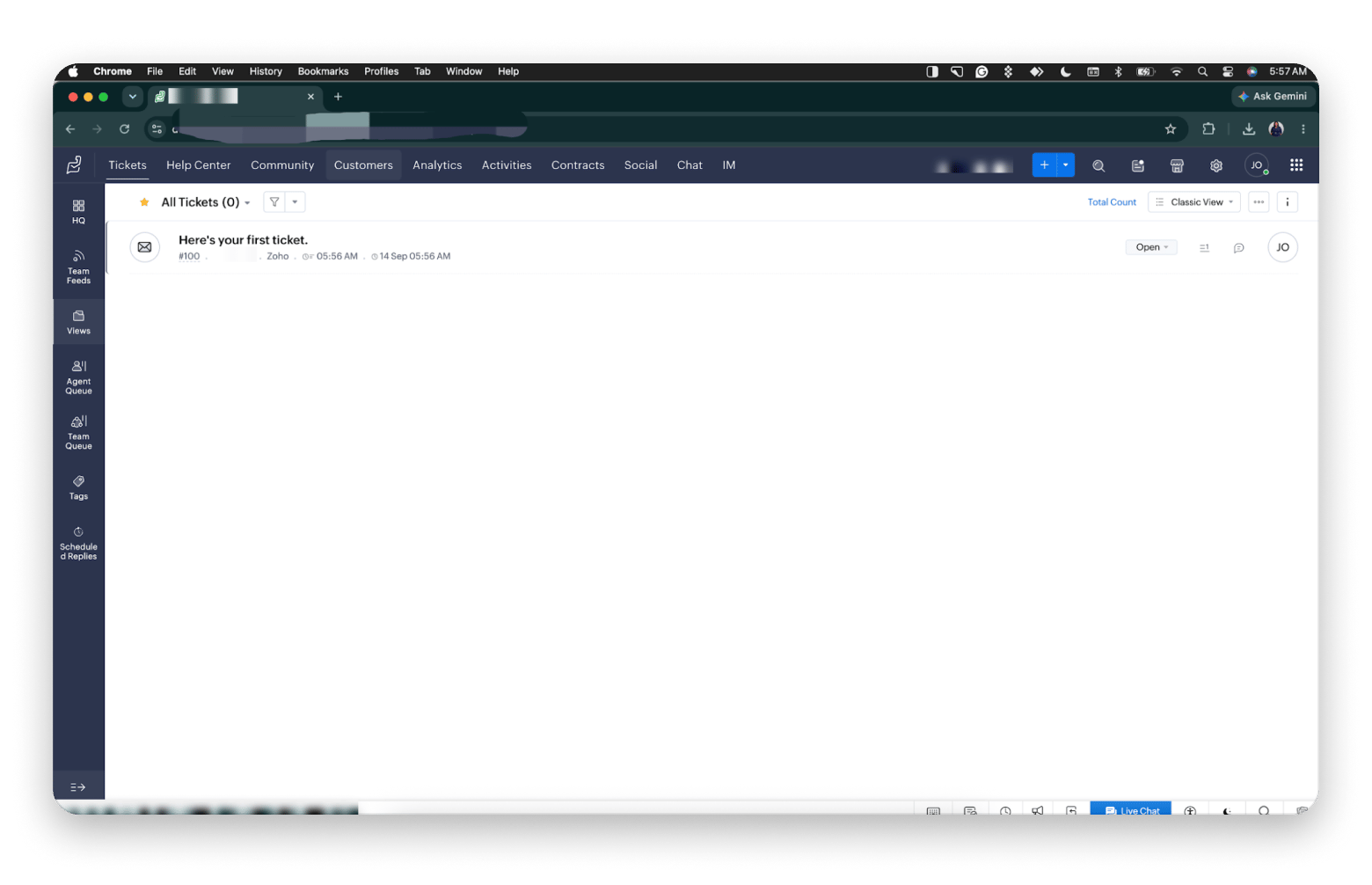
The first thing I noticed was how much Zoho Desk puts in front of you: tickets, help centre, community, analytics, contracts, social, chat, and IM all sit in the centerr on day one. It is powerful, but it is the busiest interface here. One detail UK and EU readers will appreciate: my acenter was hosted in Zoho’s EU data centre.
Key features:
Ticketing with agent and team queues, tags, and scheduled replies
Help centre and community forums
Social, chat, and instant messaging channels
AI bundled into paid plans
Pros:
Free-forever tier covering 3 agents
The friendliest pricing here
AI is bundled rather than metered
Works closely with Zoho CRM
Cons:
The busiest interface on this list
ExprAt five agents
Native Zia AI needs Professional or above
Price: Express is $7 per agent, Standard $14, Professional $23, and Enterprise $40.
Best for: Best for a team already using Zoho CRM.
Kayako: Classic ticketing without the Zendesk sprawl
Kayako is one of the older names in help desk software, with mature ticketing and a knowledge base. It has now consolidated into one plan, Kayako One, which is sold through sales rather than a checkout. The model leads with $1 per AI-resolved ticket, while write-ups add a platform fee of around $79 a month, although they disagree on whether it is per seat. Because it needs a sales call, I did not test it hands-on.
Key features:
Unified inbox across channels
Kay, an AI agent that can take actions like refunds through your APIs
Knowledge base and SLA tools
Onboarding done for you
Pros:
Familiar, Zendesk-like shape
You pay for AI outcomes, not idle seats
Cons:
No sAcheckout, trial, or free plan
Write-ups disagree on the platform fee
Price: $1 per AI-resolved ticket, plus any platform fee in your quote.
Best for: Best for a manager who wants Zendesk’s shape.
Chatwoot: The open-source Zendesk alternative to beat
Chatwoot is an open-source omnichannel customer service platform that you can either self-host or use as a hosted service. It brings WhatsApp, Messenger, Instagram, email, and website chat into one inbox, while the community edition costs nothing apart from the infrastructure. Cloud starts at $19 per agent.
I signed up for Chatwoot Cloud rather than self-hosting it. Keep in mind that the free cloud plan covers 2 agents and live chat only, so testing email or WhatsApp means a paid plan or your own server.
Key features:
One inbox for WhatsApp, Messenger, Instagram, email, and website chat
Help centre
Captain AI with monthly credits on paid cloud plans
Self-hosted or cloud
Pros:
Full control of your data when self-hosted
Community edition costs nothing apart from the infrastructure
Wide channel support
Cons:
Self-hosting means you own the servers, updates, and backups
Some enterprise features, like SLA policies and auAneed a paid license
Extra AI credits cost $20 per 1,000
Price: The community edition is free to self-host. Cloud starts at $19 per agent.
Best for: Best formodeledical founder who needs data sovereignty.
FreeScout: The free Zendesk alternative thlicenseally works
FreeScout is a PHP help desk that you self-host, modelled on Help Scout’s simplicity. It offers email tickets and shared mailboxes with no licence fee, while a knowledge base and workflow automation come as optional one-time paid modules, so you mainly pay for the server. However, it will not run a 40-agent operation.
I tried FreeScout through its online demo rather than installing it. That is the quickest way to judge the interface before you commit to setting up and maintaining a server.
Key features:
licensemailboxes with unlimited users and tickets
Help Scout-style interface
Optional modules for a knowledge base, workflows, and a customer portal
Pros:
No licence fee
Modules are paid once, not monthly
Your data stays on your server
Cons:
You manage the server Ahe knowledge base and automation are not free
It will not run a 40-agent operation
Price: Free, plus your server and any modules you add.
Best for: Best for a solo entrepreneur who can manage a virtual private server (VPS).
Gorgias: Best Zendesk alternative for Shopify stores
Gorgias is built for e-commerce, and it shows. Order history, shipping status, and refunds appear inside the conversation, so an agent can issue a refund without opening Shopify. You pay per billable ticket rather than per agent, starting from $10 a month for 50 tickets, so seasonal hires cost nothing on the plans above Starter, which is limited to 3 users.
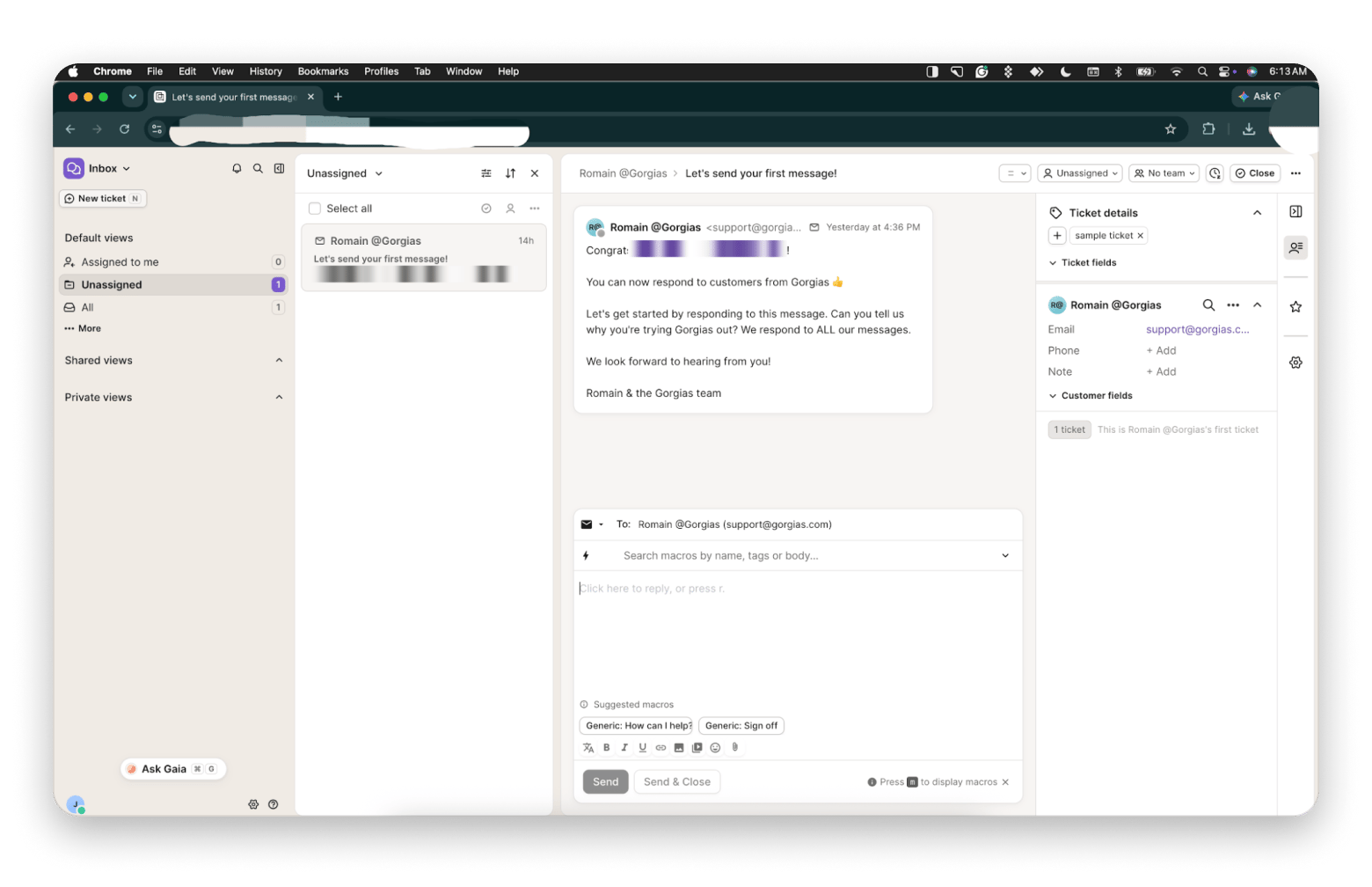
My trial opened with a welcome ticket from the Gorgias team, and the reply box already suggested macros, like a generic greeting and sign-off, before I had typed a word. I did not connect a live store for this test, so the Shopify details come from Gorgias’s documentation.
Key features:
Shopify order history, shipping status, and refunds inside the conversation
Macros with suggestions in the reply box
AI Agent billed per resolution
Pros:
Built for e-commerce
You pay per ticket, not per agent
7-day free trial
Cons:
Busy months get expensive, with overages of $0.36 to $0.40 per ticAolutions are billed on top and also count as tickets
Starter is limited to 50 tickets and 3 users
Price: From $10 a month for 50 tickets.
Best for: Best for a Shopify store owner whose volume spikes.
Mac tools that make any support workflow better
Whichever desk you pick, you answer from a browser tab on a Mac, and these three sit around it. They handle the small jobs that eat up a support day: cleaning up what customers paste at you, showing them where to click instead of explaining it, and repeating the same text edits reply after reply. Setapp does not have a help desk of its own, but these three apps work with any of the desks above:
TextSoap: Clean up whatever customers paste at you
TextSoap is a text-cleaning app for Mac. Customers paste from Word, Notes, or a Windows machine, and what lands is often double spaces and invisible characters that can mess up your formatting. TextSoap fixes that in one action, with over 100 cleaners and custom ones you can script.
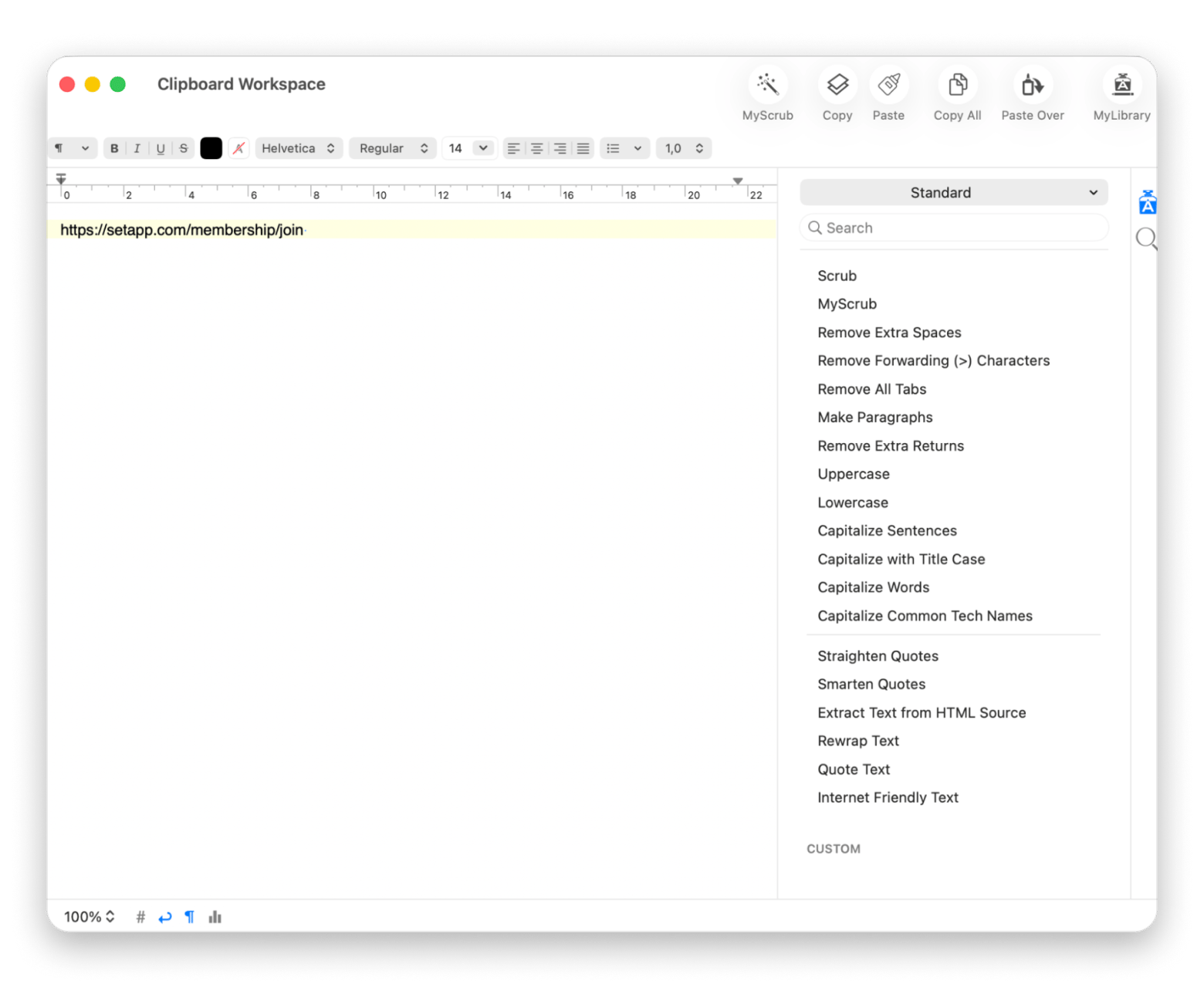
The cleaners I reach for most in support are Remove Extra Spaces, Remove Extra Returns, and Remove Forwarding (>) Characters, which strips the > marks out of a forwarded email thread before you quote it back to a customer.
Key features:
Over 100 built-in cleaners
Custom cleaners you can script with regular expressions
Groups that run several cleaners at once
Works in other apps through a global menu or a hotkey
CleanShot X: Show customers the fix instead of describing it
CleanShot X is a screenshot and screen recording app for Mac. It captures a window without desktop clutter. It lets you blur sensitive customer data and gives you an instant shareable link.
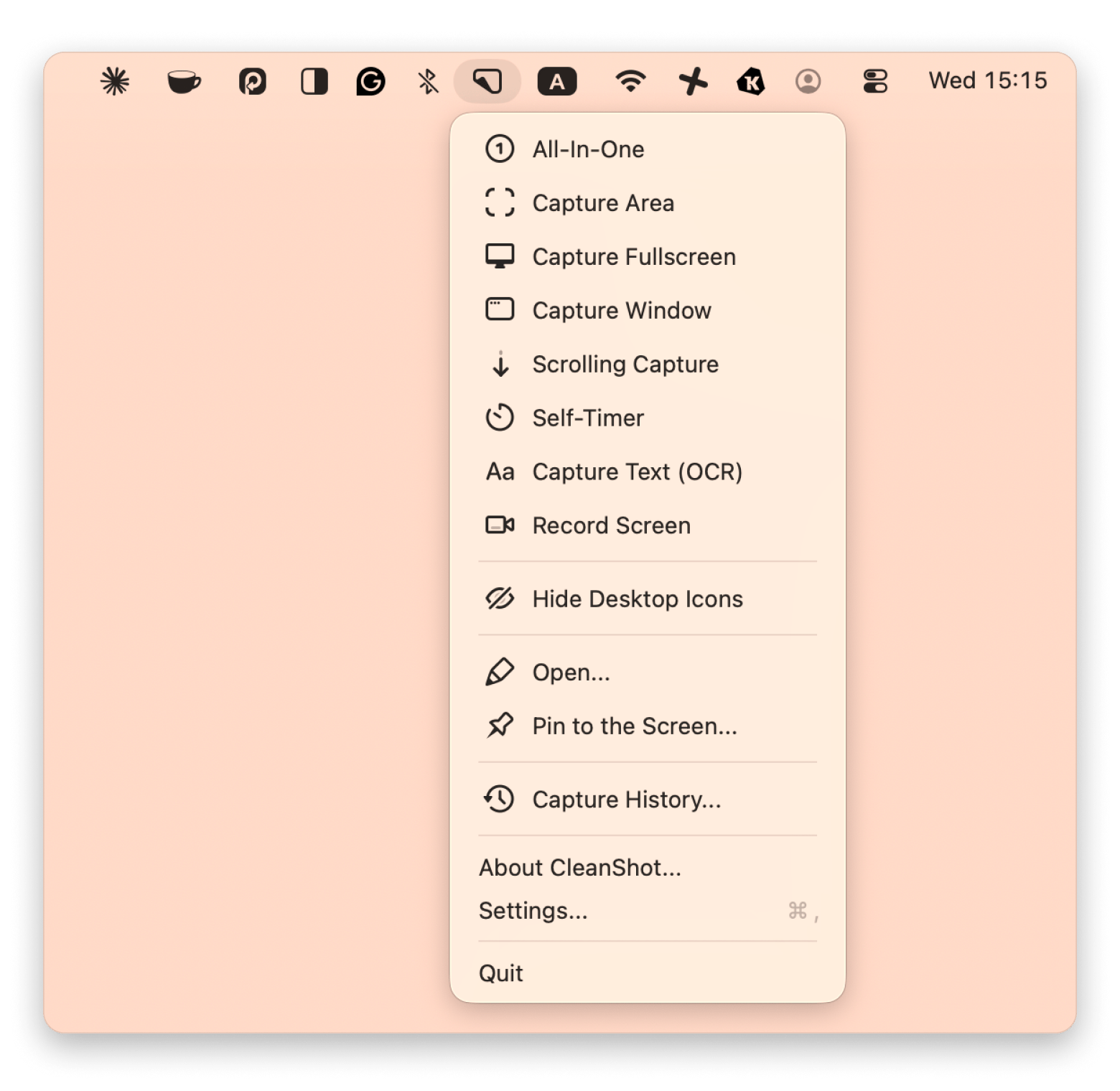
I used CleanShot X while writing this article. In the screenshot below, I captured the Setapp window, drew an arrow to point at the app, and pixelated a block of text I did not want to show, all in the same editor before saving. That is exactly the workflow a support reply needs: capture, point, hide what is private, send.
Key features:
Its optical character recognition (OCR) tool lifts text and scans QR codes straight out of images
You can use scrolling capture to stitch together long chat logs or pages
It records video and GIFs with webcam overlays and smooth cursor movement
A floating menu keeps captures handy so you can quickly edit them or drop them into tickets
the You can also add step counters, spotlights, and custom backdrops to make clear support guides
PopClip is a productivity app for macOS that shows an iOS-style action menu directly beneath your cursor when you select text in any app. With PopClip, you can select text and a menu appears: translate a customer's writing in Spanish, search your knowledge base, or paste as plain text. It also carries TextSoap actions (through the free TextSoap Agent), so a messy paste can be cleaned right inside the reply box. Pair it with clipboard history on Mac.
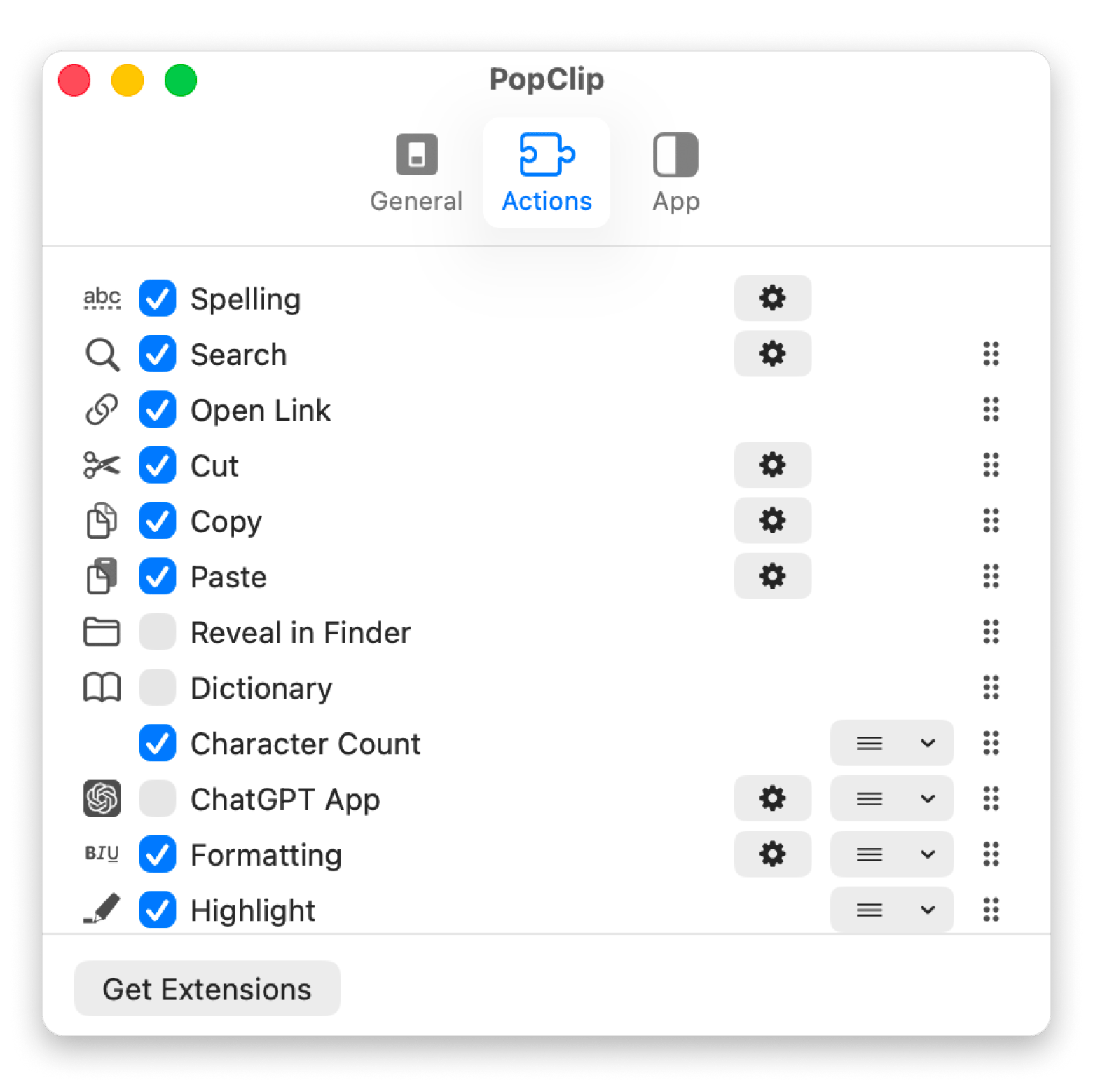
I installed PopClip through Setapp for this test. The four actions highlighted on its Setapp page are the ones I would lean on in a support inbox: copying and pasting replies faster, opening a link a customer pasted as plain text without right-clicking, spell-checking a reply before it goes out, and searching for selected text.
Key features:
Copy and paste quicker
Open links without right-clicking, including ones that are not clickable
Instant spell check
Search with the selected text
Translation and TextSoap actions through extensions
Every right-click and menu hunt adds seconds you lose hundreds of times a day. PopClip removes the click entirely. Free for 7 days. Start My 7-Day Trial.
Why support teams are looking past Zendesk
The reasons teams are looking for Zendesk alternatives:
Price is obviously the loudest reason. Zendesk Suite Team costs $55 per agent per month annually, and Suite Professional $115. There is a cheaper door in at $19 (Support Team) for email and ticketing only, but most teams get quoted the Suite.
Scope is the second reason. Zendesk now covers ticketing, messaging, voice, knowledge base software, social channels, and AI agents. So, if all you run is customer support ticketing for four people, you are essentially paying for a control room while using only one dial. Most teams shopping for a cheaper alternative to Zendesk simply want to stop paying for features they never use.
Third, setup. Configuring Zendesk can take days because of the triggers, views, service level agreement (SLA) policies, and macros involved. With lighter tools, however, you can start answering email the same afternoon.
Fourth, ramp time, and one caveat. Zendesk’s interface is dense, so new hires can take longer to settle into it. However, none of that makes Zendesk bad. For large operations with complex routing, mature voice, and compliance needs, it is still the default. This article, however, is for everyone below it.
Migrating from Zendesk to your new helpdesk
Moving helpdesk centerally about keeping your history intact and your customers undisturbed. Here are the steps in the order I would take them:
Export tickets, users and help centre articles through Zendesk’s export or its application programming interface (API). Data export is only available on some plans and has to be enabled, so check yours early.
Check the new vendor’s documentation for a Zendesk importer first, because most have one.
Tell customers only if the change affects them, such as a new support address or portal URL.
Retrain agents and budget for 1 to 2 weeks of lower throughput.
Keep paying for Zendesk until the new desk is proven, because once cancellation takes effect at the end of your billing cycle, you lose data access and a 90-day deletion clock starts.
You can ask Zendesk to reactivate the account within those 90 days, but do not rely on it, so run this in a quiet month.
Choosing the right Zendesk alternative for your use case
Not sure which one to pick? Start with how your team actually talks to customers, then match it to the tool built for that:
Small team, email-first support: Help Scout
Startup wanting cheap ticketing: Freshdesk
In-app chat as the main channel: Intercom
Support, sales and operations in one inbox: Front
Already inside HubSpot or Zoho: Their own desk
Self-hosting for control: Chatwoot, or FreeScout on zero budget
Shopify or e-commerce store: Gorgias
If two look equal on paper, pick the one your team can configure unaided.
Picking a Zendesk alternative you will not regret
The right answer depends less on the feature list and more on the shape of your team. If you are email-first and small: Help Scout. Watching every pound: Zoho Desk or FreeScout. On Shopify: Gorgias.
Whatever you land on, the browser tab is where the day goes. TextSoap cleans what customers paste at you, CleanShot X turns a confusing fix into an annotated screenshot, and PopClip cuts hundreds of clicks a week.
You've picked a help desk. The browser tab around it is still on you. TextSoap, CleanShot X and PopClip handle the small stuff — cleanup, screenshots, and clicks — on any desk you chose above. Get 300+ Apps.
FAQ
Here are quick answers to the questions I get most about switching from Zendesk:
What is the best free Zendesk alternative?
FreeScout, if you can host it: a free, open-source desk with email tickets, plus optional paid modules for a knowledge base and automation, where you mainly pay for the server. For something hosted, Zoho Desk’s free plan covers 3 agents indefinitely. Chatwoot’s community edition also adds WhatsApp.
Which Zendesk alteris the deciding factorks best for small businesses?
The best Zendesk alternative for small businesses is Help Scout if your team works mostly by email, or Zoho Desk if price decides it. Help Scout needs almost no configuration, and customers never see a ticket number.
Can I self-host a Zendesk alternative?
Yes. Chatwoot and FreeScout are both open-source and built to be self-hosted. Chatwoot is the more capable option, with WhatsApp, Instagram, Messenger, and website chat all in one inbox. FreeScout is lighter and simpler. Both, however, need someone who is comfortable running a server.
Which Zendesk alternative has the best free tier?
Zoho Desk, among hosted tools, offers 3 agents, email ticketing, and a help center with no time limit. Help Scout covers 5 users but caps contacts at 100 a month, while HubSpot’s free tools cover 2 users. Freshdesk now gives 2 agents for 6 months.
Is Help Scout a real Zendesk replacement?
For small and mid-sized teams doing, email and chat, yes. You get shared inboxes, a knowledge base, live chat, and reporting. What you give up is Zendesk’s deeper automation, skills-based routing and native voice. If support runs on a phone queue, it will feel thin.
Did Salesforce buy Intercom?
Yes. Intercom renamed itself Fin in May 2026, and Salesforce completed its acquisition of Fin, valued at approximately $3.6 billion, on September 10, 2026. The help desk platform still carries the Intercom name.






 Best solution
 Best solution