
Deckname
AI help, minus the oversharing


Mac
Version 1.0.0
macOS 13.0 or later
17 MB
2 languages
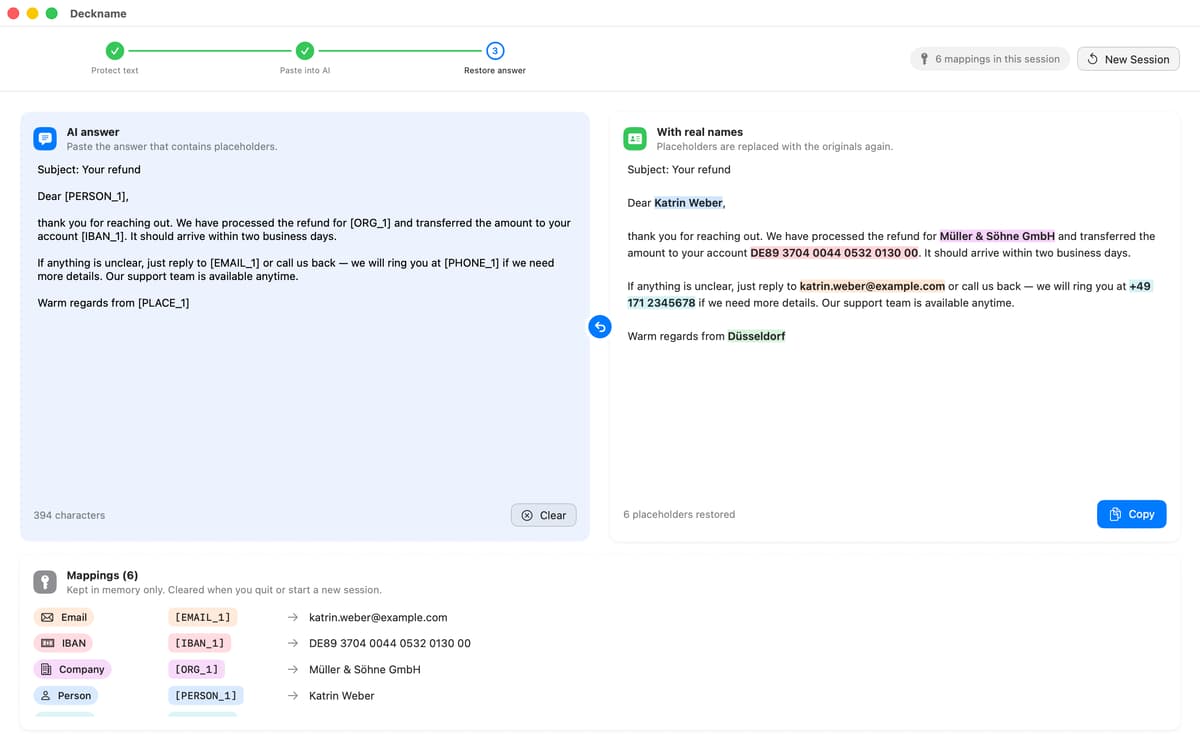
Deckname — Data anonymizer for Mac. It swaps names, companies, emails, and other personal details for placeholders like [PERSON_1] before you paste text into an AI chat. Get your answer, paste it back, and every placeholder turns into the original. Everything runs offline, so your data stays on your Mac.
Ask AI about a contract safely
Summarize meeting notes privately
Rewrite emails without sharing names
Hide client details in AI prompts
Deckname features
Protect, paste, restore
Three steps, no learning curve. Protect your text, send it to any AI assistant, then paste the answer back into Deckname to bring the real details home.
Catches the personal stuff
Deckname finds names, companies, places, email addresses, phone numbers, IBANs, card numbers, and IP addresses. Then it swaps them for neat placeholders.
You make the final call
Review every match before anything leaves your Mac. If something can stay visible, just uncheck it.
Favorites and custom terms
Give your boss or key clients their own placeholder, like [BOSS], so it stays the same every time. Add project code names, product names, or internal words too.
Quick access from the menu bar
Open the panel in a click, or use the shortcuts: ⌃⌥⌘D to protect and ⌃⌥⌘R to restore.
Private by design
Deckname works fully offline. The placeholder list lives in memory only, so nothing is stored once you’re done.
Get hundreds of apps with Membership
Become Setapp member and use hundreds of stellar apps with one subscription.
Try 7 days free, then pay one simple fee.
Install Setapp on Mac
Explore apps for Mac, iOS, and web. Find easy ways to solve daily tasks.

Get the app you came for
That one shiny app is waiting inside Setapp. Install with a click.

Deckname
Choose your subscription
One app or more with a Setapp membership. Get apps the way you want.

Get hundreds of apps with Membership
Become Setapp member and use hundreds of stellar apps with one subscription.
Try 7 days free, then pay one simple fee.
1
Install Setapp on Mac
Explore apps for Mac, iOS, and web. Find easy ways to solve daily tasks.
2
Get the app you came for
That one shiny app is waiting inside Setapp. Install with a click.
Deckname
3
Choose your subscription
One app or more with a Setapp membership. Get apps the way you want.
Home to the top apps
From planning and routine tasks to creative pursuits and coding, tackle tasks with apps on Setapp.


Deckname
AI help, minus the oversharing