
Sidekick
Just ask. Your Mac does it



Mac
Version 1.5.46
macOS 15.0 or later
9.6 MB
1 languages
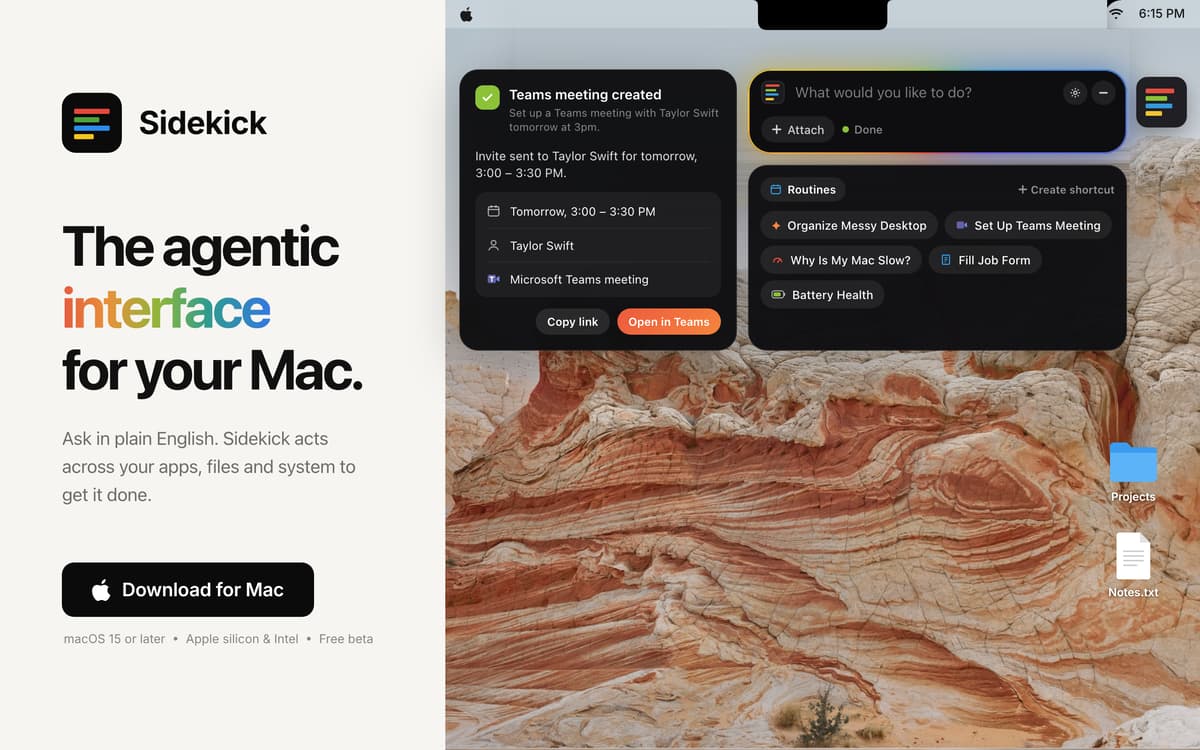
Sidekick is an AI agent for your Mac. Ask in plain English and it gets the job done. Fill in forms, tidy your desktop, and set up meetings without lifting a finger.
Fill in web forms in Safari in one go
Turn 200 desktop files into neat folders your way
Set up a Teams meeting in two clicks
Close every social media tab in one go
Sidekick features
Advanced form filling in Safari
Sidekick reads the whole form, fills in your details, and flags anything it needs from you.
Tidy your desktop
Say "sort my desktop" and your files are organised into folders in seconds.
Set up Teams meetings
Say the date and time, and the invite is ready in two clicks.
Find any file
Describe it roughly and Sidekick finds and opens it. A word from the name is enough.
You stay in charge
Sidekick only acts when you ask, asks before deleting anything, and lets you undo changes.
Ratings and reviews
Sidekick
•
15 ratings
Simon Thompson
Nov 5, 2026
App version: 1.5.42
Like the app but there is NO way to change the Ai provider, sort this and you have a winner amigo!
Response from Developer
Nov 5, 2026
I appreciate the appreciation Simon! That's a good point about the AI. I've added a drop down which now lets you pick the model. It'll be available in the next update, around tomorrow. Currently it's only AI models by Claude as Sidekick works best with it. Will be adding other providers once we get them to give the best possible results for users.
RoMaN
Nov 4, 2026
App version: 1.5.41
Honestly, looks like an app with so much potential, easy to use and with a great design. Unfortunately, it spent my entire monthly quota of AI Credits in 4-5 things I asked it for while testing and trying it out. It wasn’t anything overly long or complicated. Check battery health, ran once the “Clean Mac” shortcut and so on. And it seems to be almost useless without the AI Credits, there’s no option to use my own models, so, sadly, after only a couple of hours I’m uninstalling it…
Response from Developer
Nov 4, 2026
Thank you for giving Sidekick a proper try. We're sorry about this. Until now, every task ran on Setapp's most capable AI model, even the quick ones. The latest update adds an AI Mode menu, right next to where you type. Choose Balanced and Sidekick uses a lighter model for simple jobs like battery health, saving the stronger one for harder tasks. Choose Fast and it always uses the light model with a super low credit usage. Do come back and try out our latest "Control your Mac via Telegram" feature. Message Sidekick from your phone, wherever you are, and it does the job on your Mac. Connecting takes about ten seconds. I'd love for you to give it another go. Tell me how it works for you. You can always email me at [email protected].
Tortoise
Nov 4, 2026
App version: 1.5.41
I downloaded the app because it looked good but the privacy policy is too opaque. For an AI app to say content may be sent to AI third parties but not give any further information is reckless.
Response from Developer
Nov 4, 2026
Thanks for raising this. The privacy section on our home page is only a short summary. The full policy is here: https://sidekick-os.online/privacy.html It names exactly who handles your data. Requests go through Setapp AI (run by MacPaw) to Anthropic's Claude models. Anthropic doesn't train on them and deletes them within 30 days. It also lists what each kind of task sends, what never leaves your Mac, and what we keep and for how long. Your requests aren't stored on our servers, and Sidekick never reads password fields. Any questions, email me at [email protected].
Get hundreds of apps with Membership
Become Setapp member and use hundreds of stellar apps with one subscription.
Try 7 days free, then pay one simple fee.
Install Setapp on Mac
Explore apps for Mac, iOS, and web. Find easy ways to solve daily tasks.

Get the app you came for
That one shiny app is waiting inside Setapp. Install with a click.

Sidekick
Choose your subscription
One app or more with a Setapp membership. Get apps the way you want.

Get hundreds of apps with Membership
Become Setapp member and use hundreds of stellar apps with one subscription.
Try 7 days free, then pay one simple fee.
1
Install Setapp on Mac
Explore apps for Mac, iOS, and web. Find easy ways to solve daily tasks.
2
Get the app you came for
That one shiny app is waiting inside Setapp. Install with a click.
Sidekick
3
Choose your subscription
One app or more with a Setapp membership. Get apps the way you want.
Home to the top apps
From planning and routine tasks to creative pursuits and coding, tackle tasks with apps on Setapp.


Sidekick
Just ask. Your Mac does it